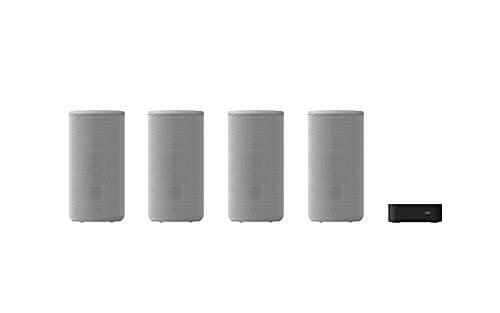
Platin Monaco 5.1 Wireless Home Theater System for Smart TVs - with WiSA SoundSend Transmitter Included - WiSA Certified - Tuned by THX.


Key features
- •STUNNING SURROUND SOUND. Monaco speakers are individually and collectively Tuned by THX, the uncontested leader in cinematic surround sound. The SoundSend audio transmitter decodes cinematic audio formats, such as Dolby Atmos.?
- •WiSA CERTIFIED. Monaco components are WiSA Certified - they meet the highest globally-recognized standards for wireless speaker systems, ensuring superior performance, reliability, and interoperability.?
- •SUPERIOR QUALITY. Featuring 5.1 channels of uncompressed 24-bit 48-96 kHz sound, Monaco delivers rich, robust audio with crystal-clear dialog that's superior to Bluetooth, MP3, and CD formats. Want to expand your system? No problem. Monaco supports up to eight channels of cinema-quality sound - simply add WiSA-certified speakers.
- •SIMPLE TO SET UP. Plug the speakers and SoundSend into power outlets and connect SoundSend to your Smart TV. That's it. SoundSend does the rest. It connects to your Monaco speakers automatically, creating a robust wireless network for your sound system.?
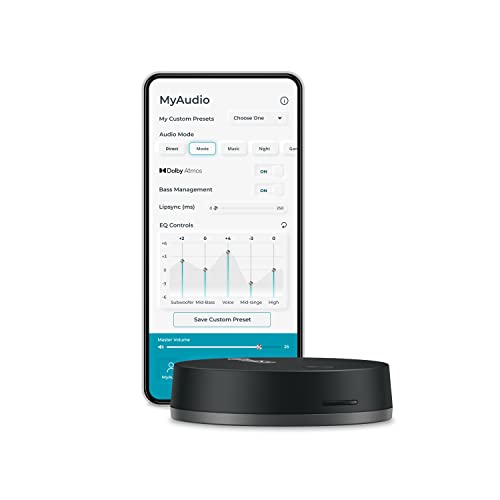
- •SIMPLE TO OPERATE. Adjust volume with your TV remote or with the SoundSend app (iOS and Android) . Want to fine tune your system? The app makes it simple. For example, easily calibrate your sound around a designated sweet spot in the room, using the exclusive My Zone feature.
Platin Monaco 5.1 Wireless Home Theater System for Smart TVs - with WiSA SoundSend Transmitter Included - WiSA Certified - Tuned by THX.
List Price: $1599.05$1439.15DEALYou Save: $159.90 (10%)
Free shippingFree Returns – 30 daysFree Order CancellationSecure Payment2–3 Days DeliveryGet It October 26, 2026In Stock (1)No marketing spamNo account requiredFulfilment by FedEx / Amazon / UPS / ShipwirePayPal / Card Buyer Protection
Customer Reviews
Reviews sourced from verified Amazon purchasers4.0
out of 5
Based on 10 reviews
5★
80%
4★
20%
3★
0%
2★
0%
1★
0%
Excellent System
Ernie W.✓ Verified Purchase•August 23, 2023
Simple installation and setup. The audio is very good and 5.1 recordings offet impressive results. Wish it converted lower level recordings to simulated 5.1, but that's not really a fair critism.
Ernie
Ernie
I am losing the sound whenever I turn my TV off and then back on.
Blake Fisher✓ Verified Purchase•August 14, 2023
The speakers sound great, but almost every time I turn my Samsung TV off and then back on, I lose the sound. It also happened when I finished watching a movie on Amazon, then went to DirecTV, and then went back to Amazon to play a different movie. No sound. I have to keep going into Settings on my TV. I have to go to Settings>General>External Device Manager>Anynet+ (HDMI-CEC) and turn if off. After 5 seconds I get sound back. Then I turn it back on and after 12 seconds I get better sound. Then I have to go to Settings>Sound>Expert Settings>HDMI-eARC Mode and set it back to auto. (Turning off and on the HDMI-CEC setting causes the HDMI-eARC to shut off.) After all that, I get the nice sound back. The Wisa app is nice but I've found that the setting for Music is the only one that sounds good even if I am watching a movie.
Outstanding!
DCR✓ Verified Purchase•August 12, 2023
Our 15-year old traditional stereo system (receiver, 2 front satellite speakers, sub-woofer) quit, so I began looking for a replacement. We mainly watch movies and listen to music via Apple TV 4k, and broadcast tv on the Tablo (another great device) app on the Apple TV. Going with a new amp and decent speakers seemed expensive, and if I went with wired speakers I'd have to engineer that.
This package, with each speaker being wireless and amplified, doesn't need the amplifier or wires. It took more time to unpack (my wife was really impressed with the all-recyclable pkg) than to get going. We first set up on a tv using its optical output - sounded fantastic, but we could control volume only through the SoundSend app. I swapped out to a tv with an arc hdmi port, and we could also use the remote to control volume. It will fill a room with sound, excellent bass, and even simulates an excellent "surround sound" experience on old NYPD Blues shows.
The sound is great to us, but of course it probably wouldn't be perfect for a high-end audiophile.
One tip for setup that it took us a few minutes to figure out. The instructions say to make sure Bluetooth is on the smartphone or pad running SoundSend. I had Bluetooth on, but I needed to go into Settings (iOS), scroll down to SoundSend, and then toggle on the app's access to Bluetooth. Boom!
We love it, great value!
This package, with each speaker being wireless and amplified, doesn't need the amplifier or wires. It took more time to unpack (my wife was really impressed with the all-recyclable pkg) than to get going. We first set up on a tv using its optical output - sounded fantastic, but we could control volume only through the SoundSend app. I swapped out to a tv with an arc hdmi port, and we could also use the remote to control volume. It will fill a room with sound, excellent bass, and even simulates an excellent "surround sound" experience on old NYPD Blues shows.
The sound is great to us, but of course it probably wouldn't be perfect for a high-end audiophile.
One tip for setup that it took us a few minutes to figure out. The instructions say to make sure Bluetooth is on the smartphone or pad running SoundSend. I had Bluetooth on, but I needed to go into Settings (iOS), scroll down to SoundSend, and then toggle on the app's access to Bluetooth. Boom!
We love it, great value!
Great system - same quality sound as wired systems
P✓ Verified Purchase•August 7, 2023
The sound is great for the money even though it does not support DTS (which the product clearly states) nor does it upscale 2-channel to 5.1 (which they do not state). The only problem is that the sound cuts in and out for a second every now and then during a movie. I think it is an issue with the SoundSend unit. I have an LG OLED77CXPUA set it to bitrate, HDMI out, Dolby Atmos, and eArch in advanced settings. Also rebooted the SoundSend unit. Sound though still cuts in and out on occasion during a movie which is very annoying. I read another reviewer had this issue and that the company sent a new Soundsend unit which fixed the problem. Wish they would contact me too for this and try to fix the issue "“ possibly with a new unit. Other than that, it really is an awesome piece of tech and I wish success to this company!
Update April 2, 2021:
I played with TV settings at the suggestion of WiSA Product Manager Jeff Noah that mentioned sometimes the right settings may actually not work. I have an LG TV model year 2020 (LG OLED77CXPUA) and after making the change for #3 below the system worked perfectly with AMAZING sound. The problem is that this is new technology and TV manufacturers are not yet including detailed instructions in their manuals regarding proper settings for WISA SoundSend tech"”also it would be nice if WISA could start compiling instructions/settings for TV models, which is a labor intensive task. So, my 4 star rating is being changed to 5. Hope this helps other customers. Enjoy!
Also note: this is a real in-the-box surround system because you do not need an AV receiver which although has more options/is more versatile costs a lot of extra money --- and you need to wire the speakers to the receiver unlike this Wisa SoundSend.
LG OLED TV settings are:
1) TV WiFi can be on 2.4 or 5 GHZ there is no interference with the speakers (which use 5 GHZ).
2) Sound out: set to HDMI ARC (the only setting option that allows the use of HDMI connection)
3) All settings → Sound → Additional settings→ Digital Sound Out: three options "auto" "PCM" and "Pass Through". I had it at "auto" then changed it to "Pass Through" and that fixed the problem!
4) All settings → Sound → Additional settings→ eARC: turned on (must be set to on to use eARC)
Update April 2, 2021:
I played with TV settings at the suggestion of WiSA Product Manager Jeff Noah that mentioned sometimes the right settings may actually not work. I have an LG TV model year 2020 (LG OLED77CXPUA) and after making the change for #3 below the system worked perfectly with AMAZING sound. The problem is that this is new technology and TV manufacturers are not yet including detailed instructions in their manuals regarding proper settings for WISA SoundSend tech"”also it would be nice if WISA could start compiling instructions/settings for TV models, which is a labor intensive task. So, my 4 star rating is being changed to 5. Hope this helps other customers. Enjoy!
Also note: this is a real in-the-box surround system because you do not need an AV receiver which although has more options/is more versatile costs a lot of extra money --- and you need to wire the speakers to the receiver unlike this Wisa SoundSend.
LG OLED TV settings are:
1) TV WiFi can be on 2.4 or 5 GHZ there is no interference with the speakers (which use 5 GHZ).
2) Sound out: set to HDMI ARC (the only setting option that allows the use of HDMI connection)
3) All settings → Sound → Additional settings→ Digital Sound Out: three options "auto" "PCM" and "Pass Through". I had it at "auto" then changed it to "Pass Through" and that fixed the problem!
4) All settings → Sound → Additional settings→ eARC: turned on (must be set to on to use eARC)
Things I wish I knew Before I purchased:
ccastro✓ Verified Purchase•May 26, 2023
So I gave it 5 stars because the sound system is low and it still sounds amazing. Still too soon to decide if it was worth the prize but I got it during prime with a $200 discount so kind of already feel like I got a great deal but I do want to keep this as accurate for others as possible.
Set up was not hard but there are things to keep in mind when trouble shooting the audio system:
1. Make sure your TV supports 5.1 Audio before you purchase. Luckily my TV does but otherwise you just bought a 2.1 Audio because that's all your TV will be able to support naturally. So before you even add this to your cart, make sure your TV can support 5.1 Audio Output in HDMI ARC or Optical. If it does, you're set! If it doesn't, I would not recommend getting anything 5.1 Audio Output.
2. There are 2 apps in the apple store for this system (not sure about android) but you definitely will need both. One is "Soundsend" and the other is "WiSABluetooth" and both are a must to properly run this system. The bluetooth one will give you the updates your system needs. The soundsend will not only allow you to control the system through your phone but also modify speaker, reset to factory settings, etc. Using the speaker check function will allow you to see if your speaker was connected or not. I saw 2 speakers greyed out in the app and assumed the problem was the speakers didn't connect, but all are actually connected and those are just 2 additional spots to change your speaker location as needed.
3. Your TV settings will need to be updated. Only 2 of my speakers had sound coming out of them. After a long and extensive internet search, I discovered the problem was my TV sound settings. My TV was automatically in "PCM" for my Digital Audio Out; I changed it to Auto and that seemed to fix the problem. Depending on your TV you might have to change it to "Pass Through" or to "PCM" to fix your audio problem.
4. The sound in the rear speakers is faint but it could be because I just tested them, I didn't finish setting them up properly and I don't know yet what the sound will be like when I fully finish installing them. But I can confirm, all speakers have sound and work properly.
All in all, so far so good!
Set up was not hard but there are things to keep in mind when trouble shooting the audio system:
1. Make sure your TV supports 5.1 Audio before you purchase. Luckily my TV does but otherwise you just bought a 2.1 Audio because that's all your TV will be able to support naturally. So before you even add this to your cart, make sure your TV can support 5.1 Audio Output in HDMI ARC or Optical. If it does, you're set! If it doesn't, I would not recommend getting anything 5.1 Audio Output.
2. There are 2 apps in the apple store for this system (not sure about android) but you definitely will need both. One is "Soundsend" and the other is "WiSABluetooth" and both are a must to properly run this system. The bluetooth one will give you the updates your system needs. The soundsend will not only allow you to control the system through your phone but also modify speaker, reset to factory settings, etc. Using the speaker check function will allow you to see if your speaker was connected or not. I saw 2 speakers greyed out in the app and assumed the problem was the speakers didn't connect, but all are actually connected and those are just 2 additional spots to change your speaker location as needed.
3. Your TV settings will need to be updated. Only 2 of my speakers had sound coming out of them. After a long and extensive internet search, I discovered the problem was my TV sound settings. My TV was automatically in "PCM" for my Digital Audio Out; I changed it to Auto and that seemed to fix the problem. Depending on your TV you might have to change it to "Pass Through" or to "PCM" to fix your audio problem.
4. The sound in the rear speakers is faint but it could be because I just tested them, I didn't finish setting them up properly and I don't know yet what the sound will be like when I fully finish installing them. But I can confirm, all speakers have sound and work properly.
All in all, so far so good!
Page 1 of 2