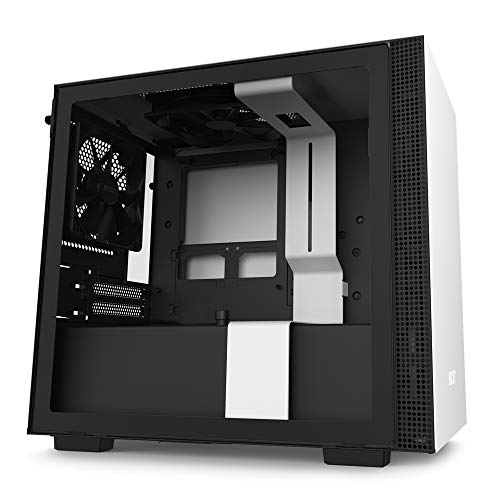
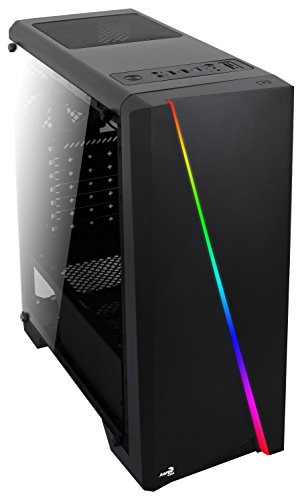
NZXT H6 Flow RGB Mid-Tower Airflow Case with 3 RGB Fans, Panoramic Glass Panels, Cable Management - Black


Key features
- •Wraparound glass panels with a seamless edge provides an unobstructed view of the inside to highlight key components.
- •Compact dual-chamber design improves overall thermal performance and creates a clean, uncrowded aesthetic.
- •Includes three pre-installed 120mm RGB fans positioned at an ideal angle for optimal out-of-the-box cooling and vibrant RGB lighting.
- •The top and side panels feature an airflow-optimized perforation pattern to enhance overall performance and filter dust.
- •An intuitive cable management system simplifies the build process by using wide channels and straps.
BrandNZXT
CategoryComputer Cases
SizeH6 Flow RGB
ColorBlack
Warranty2 year manufacturer  Warranty Description 
NZXT H6 Flow RGB Mid-Tower Airflow Case with 3 RGB Fans, Panoramic Glass Panels, Cable Management - Black
List Price: $145.49$130.94DEALYou Save: $14.55 (10%)
Free shippingFree Returns – 30 daysFree Order CancellationSecure Payment2–3 Days DeliveryGet It October 25, 2026In Stock (5)No marketing spamNo account requiredFulfilment by FedEx / Amazon / UPS / ShipwirePayPal / Card Buyer Protection
Customer Reviews
Reviews sourced from verified Amazon purchasers4.7
out of 5
Based on 10 reviews
5★
90%
4★
10%
3★
0%
2★
0%
1★
0%
Great Cooling, Easy to Build in, Super Quiet
Vu L.✓ Verified Purchase•May 18, 2024
Gosh, where do I start with this case?
I came from a Corsair 5000D and purchased a new air-cooler for my CPU, new fans all around, and Cablemod extensions. It was enjoyable to build in and quite relaxing. It is my gaming/editing rig and while noise wasn't a huge concern, I was pleasantly surprised!
My system:
Ryzen 9 7900X
Asus ROG Strix B650E-F
G.Skill Flare X5 6000/CL30
nVidia RTX 3090 FE
ASRock Intel Arc A310
WD SN770 2tb NVMe
Samsung 990 Pro 1tb NVMe
EVGA GQ850w PSU
DeepCool Assassin IV CPU cooler
Corsair AR120 fans rear, top, and front
Corsair AF140 bottom fans
CableMod 24pin, CPU 2x8pin, and GPU 2x8pin extensions
To start, the ease of disassembly and reassembly speaks volumes to me. There is an ample amount of space in the back of the motherboard tray to route wiring. Although if I did it again I'd plan for custom length power cables as there is a ton of wiring in this thing!
Nonetheless wiring was easy and the way all the wiring locations are planned shows how much they care about the builders experience. The bottom dual 140mm fan area is a nice touch, it helps keep my graphics card nice and cool even when pushing 400w all game!
I have tuned my fan curves and that allows me to run all of them around 300rpm-500rpm at idle and it is utterly quiet. If I had a decently noise isolated room I'd record it. Even my old setup with an Arctic Liquid Freezer 360mm AIO was much noisier, not sure why but it also ran hotter when it was idling at a higher RPM.
The bottom mounted fans were a huge game changer and adds such a nice piece of color with the fans.
But, since I'm an editor it's important for me to have smooth timeline performance and due to the fact I run Ryzen, I went and bought a Intel Arc A310 and that helped decode the HEVC footage from my Sony FX30. The only issue was my motherboard layout was less than spectacular with the 2 x16 slots being as far away as possible from eachother which caused me to remove the cooler and lay it on the side of the GPU. But with this case the bottom rear fan keeps it icy at 40c~ vs 60c before the fans kicked on. Besides that it is well worth the investment of some $120 or so if you edit in DaVinci Resolve and use HEVC footage!
If there was anything I'd change, it would be the slots above the motherboard should be moved up more, otherwise the wiring from the fans is much more noticeable. As well as adding some sort of filtration system, not just vented metal sheets. Other than that, great work NZXT, you've got a forever customer now!
I came from a Corsair 5000D and purchased a new air-cooler for my CPU, new fans all around, and Cablemod extensions. It was enjoyable to build in and quite relaxing. It is my gaming/editing rig and while noise wasn't a huge concern, I was pleasantly surprised!
My system:
Ryzen 9 7900X
Asus ROG Strix B650E-F
G.Skill Flare X5 6000/CL30
nVidia RTX 3090 FE
ASRock Intel Arc A310
WD SN770 2tb NVMe
Samsung 990 Pro 1tb NVMe
EVGA GQ850w PSU
DeepCool Assassin IV CPU cooler
Corsair AR120 fans rear, top, and front
Corsair AF140 bottom fans
CableMod 24pin, CPU 2x8pin, and GPU 2x8pin extensions
To start, the ease of disassembly and reassembly speaks volumes to me. There is an ample amount of space in the back of the motherboard tray to route wiring. Although if I did it again I'd plan for custom length power cables as there is a ton of wiring in this thing!
Nonetheless wiring was easy and the way all the wiring locations are planned shows how much they care about the builders experience. The bottom dual 140mm fan area is a nice touch, it helps keep my graphics card nice and cool even when pushing 400w all game!
I have tuned my fan curves and that allows me to run all of them around 300rpm-500rpm at idle and it is utterly quiet. If I had a decently noise isolated room I'd record it. Even my old setup with an Arctic Liquid Freezer 360mm AIO was much noisier, not sure why but it also ran hotter when it was idling at a higher RPM.
The bottom mounted fans were a huge game changer and adds such a nice piece of color with the fans.
But, since I'm an editor it's important for me to have smooth timeline performance and due to the fact I run Ryzen, I went and bought a Intel Arc A310 and that helped decode the HEVC footage from my Sony FX30. The only issue was my motherboard layout was less than spectacular with the 2 x16 slots being as far away as possible from eachother which caused me to remove the cooler and lay it on the side of the GPU. But with this case the bottom rear fan keeps it icy at 40c~ vs 60c before the fans kicked on. Besides that it is well worth the investment of some $120 or so if you edit in DaVinci Resolve and use HEVC footage!
If there was anything I'd change, it would be the slots above the motherboard should be moved up more, otherwise the wiring from the fans is much more noticeable. As well as adding some sort of filtration system, not just vented metal sheets. Other than that, great work NZXT, you've got a forever customer now!
Awesome cooling performance and easy build experience
Amanda York✓ Verified Purchase•May 12, 2024
Summary: H6 is a perfect middle ground case between the historically cramped square cases and the newly emerging massive fish tank cases. Cooling performance is great and the price makes it a perfect balance of aesthetics, awesome performance, and lower price. Build quality is the standard amazing quality expected from NZXT cases.
Pros
- Super easy to build in! Tons of space for cable routing and management, especially in the back and at the top of the mobo where it's usually a pain. Plenty of space for extra PSU cable length from cable kits or non-modular PSUs.
- All panels pop off and on very easily. Incredibly easy to work with.
- Case looks even better in person! The full glass gives a beautiful view of components.
- Going from a glass front H510, I thought the full mesh would make my system much louder, but it's just as quiet. That's largely dependent on fans and their RPMs, but my same build in this case is quieter, perhaps from the angled fans being pointed away from where I'm sitting.
- The recessed fan slots in the bottom of the case both look interesting and also seem to work exceptionally well. I'm seeing 7 degree (C) GPU temp reduction under load compared to my prior H510, but there are also multiple more fan slots on this case. Whether it's the lower 140 slots or the front, I'm stoked to see that much of a GPU temp reduction given how intense games push GPU these days.
- My favorite little detail is a small hook between the back exhaust fan and the top of the case. This allows you to route that cable safely so wire interference is not a concern.
- I thought this case was going to be a lot wider of a footprint than it actually is. It is wider than my prior H510 due to the PSU being behind the mobo instead of beneath it, but it's totally worth the extra space given the cooling performance and it doesn't feel or look too big like some of the larger fish tanks cases are.
Cons
- Honestly, I haven't found a true con yet. Biggest con I can think of is that the included fans come with a pre installed splitter. That splitter is too short to run to a mobo header, but it's plenty of length if you have a Kraken or other NZXT RGB or Fan controller.
Pros
- Super easy to build in! Tons of space for cable routing and management, especially in the back and at the top of the mobo where it's usually a pain. Plenty of space for extra PSU cable length from cable kits or non-modular PSUs.
- All panels pop off and on very easily. Incredibly easy to work with.
- Case looks even better in person! The full glass gives a beautiful view of components.
- Going from a glass front H510, I thought the full mesh would make my system much louder, but it's just as quiet. That's largely dependent on fans and their RPMs, but my same build in this case is quieter, perhaps from the angled fans being pointed away from where I'm sitting.
- The recessed fan slots in the bottom of the case both look interesting and also seem to work exceptionally well. I'm seeing 7 degree (C) GPU temp reduction under load compared to my prior H510, but there are also multiple more fan slots on this case. Whether it's the lower 140 slots or the front, I'm stoked to see that much of a GPU temp reduction given how intense games push GPU these days.
- My favorite little detail is a small hook between the back exhaust fan and the top of the case. This allows you to route that cable safely so wire interference is not a concern.
- I thought this case was going to be a lot wider of a footprint than it actually is. It is wider than my prior H510 due to the PSU being behind the mobo instead of beneath it, but it's totally worth the extra space given the cooling performance and it doesn't feel or look too big like some of the larger fish tanks cases are.
Cons
- Honestly, I haven't found a true con yet. Biggest con I can think of is that the included fans come with a pre installed splitter. That splitter is too short to run to a mobo header, but it's plenty of length if you have a Kraken or other NZXT RGB or Fan controller.
The Ultimate Blend of Performance and Style!
Loki N.✓ Verified Purchase•April 30, 2024
The media could not be loaded. In the ever-evolving world of PC building, finding the perfect balance between performance, aesthetics, and functionality is crucial. As an avid enthusiast, I recently had the pleasure of upgrading my PC build with the NZXT H6 Flow case, and I must say, it has exceeded my expectations in every aspect. In this comprehensive review, I'll delve into the features, performance, and overall experience of using this remarkable case.
Design and Aesthetics:
The NZXT H6 Flow boasts a sleek and modern design that immediately catches the eye. Its minimalist exterior with clean lines and subtle accents exudes sophistication, making it a stunning addition to any gaming setup or workstation. The tinted tempered glass side panel provides a clear view of the internal components while adding a touch of elegance to the overall aesthetic. Additionally, the integrated cable management system ensures a clean and clutter-free interior, enhancing the visual appeal of the build.
Airflow and Cooling Performance:
One of the standout features of the NZXT H6 Flow is its innovative airflow design. The case features optimized airflow channels and ample room for multiple fans and radiators, ensuring efficient cooling for even the most demanding components. During extensive gaming sessions and CPU-intensive tasks, I noticed a significant improvement in temperature management compared to my previous case. The H6 Flow kept my components cool and stable, allowing for uninterrupted performance without any thermal throttling issues.
Functionality and Build Quality:
The NZXT H6 Flow excels in terms of functionality and build quality. The spacious interior provides ample room for large components, making installation a breeze. The tool-less design simplifies the building and upgrading process, saving time and frustration. I particularly appreciated the attention to detail in the design, such as the easily removable dust filters and the strategically placed cable routing options. Every aspect of the case feels well-engineered and thoughtfully designed, contributing to a seamless building experience.
Customization and Expansion Options:
One of the key advantages of the NZXT H6 Flow is its flexibility for customization and expansion. The case offers plenty of room for additional fans, RGB lighting, and custom water-cooling loops, allowing users to personalize their builds according to their preferences. Whether you're a hardcore gamer looking to add extra cooling power or a content creator aiming for a visually striking setup, the H6 Flow provides the versatility to accommodate various customization options.
Conclusion:
In conclusion, the NZXT H6 Flow is a standout choice for PC builders and enthusiasts seeking the perfect blend of performance, aesthetics, and functionality. Its innovative airflow design, sleek aesthetics, user-friendly features, and flexibility for customization make it a top contender in the competitive market of PC cases. Whether you're building a gaming rig or a workstation, the H6 Flow offers everything you need to elevate your PC build to the next level. With its exceptional performance and stunning design, the NZXT H6 Flow has earned its place as a premium choice for discerning enthusiasts.
Design and Aesthetics:
The NZXT H6 Flow boasts a sleek and modern design that immediately catches the eye. Its minimalist exterior with clean lines and subtle accents exudes sophistication, making it a stunning addition to any gaming setup or workstation. The tinted tempered glass side panel provides a clear view of the internal components while adding a touch of elegance to the overall aesthetic. Additionally, the integrated cable management system ensures a clean and clutter-free interior, enhancing the visual appeal of the build.
Airflow and Cooling Performance:
One of the standout features of the NZXT H6 Flow is its innovative airflow design. The case features optimized airflow channels and ample room for multiple fans and radiators, ensuring efficient cooling for even the most demanding components. During extensive gaming sessions and CPU-intensive tasks, I noticed a significant improvement in temperature management compared to my previous case. The H6 Flow kept my components cool and stable, allowing for uninterrupted performance without any thermal throttling issues.
Functionality and Build Quality:
The NZXT H6 Flow excels in terms of functionality and build quality. The spacious interior provides ample room for large components, making installation a breeze. The tool-less design simplifies the building and upgrading process, saving time and frustration. I particularly appreciated the attention to detail in the design, such as the easily removable dust filters and the strategically placed cable routing options. Every aspect of the case feels well-engineered and thoughtfully designed, contributing to a seamless building experience.
Customization and Expansion Options:
One of the key advantages of the NZXT H6 Flow is its flexibility for customization and expansion. The case offers plenty of room for additional fans, RGB lighting, and custom water-cooling loops, allowing users to personalize their builds according to their preferences. Whether you're a hardcore gamer looking to add extra cooling power or a content creator aiming for a visually striking setup, the H6 Flow provides the versatility to accommodate various customization options.
Conclusion:
In conclusion, the NZXT H6 Flow is a standout choice for PC builders and enthusiasts seeking the perfect blend of performance, aesthetics, and functionality. Its innovative airflow design, sleek aesthetics, user-friendly features, and flexibility for customization make it a top contender in the competitive market of PC cases. Whether you're building a gaming rig or a workstation, the H6 Flow offers everything you need to elevate your PC build to the next level. With its exceptional performance and stunning design, the NZXT H6 Flow has earned its place as a premium choice for discerning enthusiasts.
Close to perfect.
T. A. Clark✓ Verified Purchase•April 24, 2024
What I look for in a AAA case are: aesthetics, accessibility, and airflow.
Aesthetically, this is a nice fish tank to put your components into so that you can admire your handiwork. I didn't get the RGB version because I don't throw a lot of disco parties, so this is just a good, no-nonsense build that still looks pleasingly modern. I just looks good, as good as anything out there, and it would be a good home for those fancy RGB setups if you're into that.
Accessibility of this case is also great. It comes apart with a simple thumbscrew for the front glass and back panel, making it very easy to get into and work in, and the top pops off easily if you need to get in from there. The dual chamber design makes it very easy to manage cables, even for someone like me who's generally pretty terrible at it; it has included velcro straps in the back chamber to help keep things in control, too. It's a very easy case to work in without scraping off your knuckles or struggling with finding enough room to do anything.
The only downside I'd mention is the drive mount chassis in the rear chamber. It has a thumbscrew and just pops off easily to put it in and out of the case, but it seems designed for a single 3.5" mechanical drive and/or two 2.5" SSD's with typical screws. It's kind of old-school, no toolless design there or anything fancy, and almost seems out of place on this case. It wasn't hard to work with, and it works fine for what it is, but with all that room back there it feels like a more modern tool-free SSD-centric design would be more fitting to the systems most people will build in this thing. If you're only using M.2 drives, just remove it entirely.
Airflow would be last, and it's kind of amazing. I did add two 140mm fans to the bottom of the case, and a 120mm exhaust fan to the back, with a 280mm AIO on the top of the case. It's relatively quiet and moves so much air that I can feel the difference at my desk when my system is turned on. You shouldn't have any trouble keeping your system cool in this case, but I definitely would recommend at least the two 140mm fans on the bottom at the very least and I'd probably use another two on the top if you're not attaching a radiator up there. I think you could get by without the 120mm rear exhaust, but the case seems designed to funnel air through that way and installing one is cheap and extra cooling never hurts.
Overall, it's one the best cases I've ever owned. It looks great, the price isn't bad, it's really easy to work in and isn't ungodly heavy, and cable management is about as easy as you could hope for.
Aesthetically, this is a nice fish tank to put your components into so that you can admire your handiwork. I didn't get the RGB version because I don't throw a lot of disco parties, so this is just a good, no-nonsense build that still looks pleasingly modern. I just looks good, as good as anything out there, and it would be a good home for those fancy RGB setups if you're into that.
Accessibility of this case is also great. It comes apart with a simple thumbscrew for the front glass and back panel, making it very easy to get into and work in, and the top pops off easily if you need to get in from there. The dual chamber design makes it very easy to manage cables, even for someone like me who's generally pretty terrible at it; it has included velcro straps in the back chamber to help keep things in control, too. It's a very easy case to work in without scraping off your knuckles or struggling with finding enough room to do anything.
The only downside I'd mention is the drive mount chassis in the rear chamber. It has a thumbscrew and just pops off easily to put it in and out of the case, but it seems designed for a single 3.5" mechanical drive and/or two 2.5" SSD's with typical screws. It's kind of old-school, no toolless design there or anything fancy, and almost seems out of place on this case. It wasn't hard to work with, and it works fine for what it is, but with all that room back there it feels like a more modern tool-free SSD-centric design would be more fitting to the systems most people will build in this thing. If you're only using M.2 drives, just remove it entirely.
Airflow would be last, and it's kind of amazing. I did add two 140mm fans to the bottom of the case, and a 120mm exhaust fan to the back, with a 280mm AIO on the top of the case. It's relatively quiet and moves so much air that I can feel the difference at my desk when my system is turned on. You shouldn't have any trouble keeping your system cool in this case, but I definitely would recommend at least the two 140mm fans on the bottom at the very least and I'd probably use another two on the top if you're not attaching a radiator up there. I think you could get by without the 120mm rear exhaust, but the case seems designed to funnel air through that way and installing one is cheap and extra cooling never hurts.
Overall, it's one the best cases I've ever owned. It looks great, the price isn't bad, it's really easy to work in and isn't ungodly heavy, and cable management is about as easy as you could hope for.
Good Buy, Little Pricey
TLC✓ Verified Purchase•April 9, 2024
The NZXT H5 Elite is a really nice case with little to dislike. It provides good airflow for a solid front panel and the two included RGB fans look and function great with the help of a single case fan angled towards the GPU. The included cable management in the case is really helpful and organized well. Almost the entire case is metal. Building in it was a breeze considering it's on the smaller side for an ATX case. Only dislike is the price. It's not very competitive and other options are cheaper for similar features, but this case has its appeal because of its clean design and clever features. Would recommend to anyone looking for a solid case that still looks cool.
Page 1 of 2