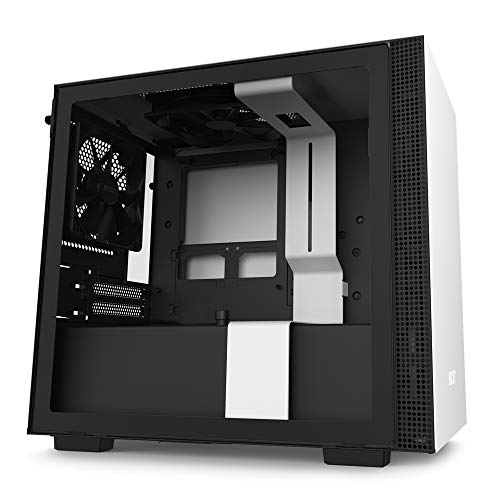
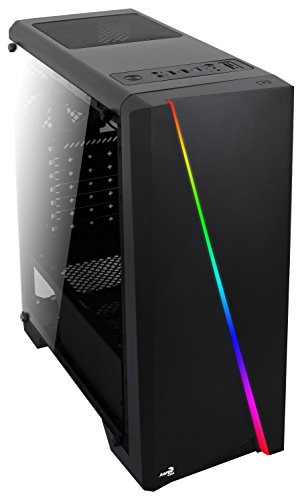
NZXT H6 Flow RGB Mid-Tower Airflow Case with 3 RGB Fans, Panoramic Glass Panels, and Cable Management - White


Key features
- •Wraparound glass panels with a seamless edge provides an unobstructed view of the inside to highlight key components.
- •Compact dual-chamber design improves overall thermal performance and creates a clean, uncrowded aesthetic.
- •Includes three pre-installed 120mm RGB fans positioned at an ideal angle for optimal out-of-the-box cooling and vibrant RGB lighting.
- •The top and side panels feature an airflow-optimized perforation pattern to enhance overall performance and filter dust.
- •An intuitive cable management system simplifies the build process by using wide channels and straps.
NZXT H6 Flow RGB Mid-Tower Airflow Case with 3 RGB Fans, Panoramic Glass Panels, and Cable Management - White
List Price: $160.04$144.04DEALYou Save: $16.00 (10%)
Free shippingFree Returns – 30 daysFree Order CancellationSecure Payment2–3 Days DeliveryGet It October 24, 2026In Stock (5)No marketing spamNo account requiredFulfilment by FedEx / Amazon / UPS / ShipwirePayPal / Card Buyer Protection
Customer Reviews
Reviews sourced from verified Amazon purchasers4.7
out of 5
Based on 10 reviews
5★
80%
4★
20%
3★
0%
2★
0%
1★
0%
Great Case
Chris✓ Verified Purchase•March 1, 2024
The media could not be loaded. Update: July 2022
I have upgraded the CPU to a Ryzen 9 5900x (OC'd to 4500 mhz) and the GPU to an MSI 2080 Ventura (OC'd to 1825 mhz). I also added a Noctua CPU cooler. Hard gaming my thermals are 51 C on the CPU and 38 C on the GPU. I have absolutely no complaints with this thing. I absolutely love the case. I did upgrade the fans to Noctua for thier quality and silent running, however, I have tried out the NZXT fans that came with it and they are just fine as well.
First off, let's talk about the pros and cons of this case. Lastly, I have a few things to say about some other reviews of this case.
Pros:
Great looking case
Sturdy
Great cable management
Lots of storage bays
Cons:
Hard drive tray is a bit old fashioned.
My build.
AMD Ryzen 5 3600
Gigabyte Aeorus Wi-fi X570
GSkill 32 gb (2x16) DDR 4 3200 ram
500 GB Silicon Power m.2 drive
Western Digital red 4 TB hard drive
Asus STRIX Nvidia GTX 980
2x 90 mm and 2 x 140mm nactua case fans.
This case is great! Excellent! Stupendous! I did have a slight worry when the case first came because the tempered glass was a little tight and I didnt want to break it. I took my time and was able to get it to come out just fine. This did concern me for a little bit since maybe it would be this awkward Everytime I tried to open the case. Well here are some pointers: if you are really worried. Take off the back metal panel. From there you can access the two tabs that are held in by plastic pressure connectors. If you just apply pressure on the far one, the glass door will pop out easily. However, once I removed the protective plastic film, I found the door opens easily now. I'm thinking that just that little bit of extra thickness makes it a tight fit at first. So let's be honest, this thing has tight tolerances, usually a sign of a well thought design.
The capstand screws for a normal ATX motherboard come pre-installed. It even has a self centering screw that keeps the motherboard in place while you tighten everything down. (Just some advice, the case requires you to be precise. Fidget with the motherboard until the back panel sits into its slot tightly, this will allow the capstands and the screw holes to line up.) Once I had all the hardware installed I then began to attach all the fan and power cables using the supplied channels and tabs. It is pretty easy to figure out. They supply some twist ties (you can clip these and use black zip ties if that is your thing.) and some Velcro straps for the main MB power cable and the graphics card power. (One review mentioned that this management system was weak and lacked anyway of holding the cables down beyond the Velcro. This is not true. There are little tabs that you can slip the supplied little black zip ties through in order to secure the cables into the channels.) Everything routed pretty easily and connected just the way it should.
I will agree, coming from a 10 year old cooler master case with plastic pop out trays, that the hard drive cage seems a little old fashioned. You have to unscrew it from the bottom(4 screws) then install your hard drive into one of the bays, then screw the cage back into the case. (Let's be honest though, this is not that big of a deal) on the backside of the motherboard there are two plastic trays for what looks like to be ssd management. So those seem to be a little easier to use than any spinning drive. Most modern motherboards come with m.2 sata ports anyway, usually at least two, and with m.2 ssd's becoming cheaper and cheaper. I'm not sure this really matters much.
Anyway, there are no slots for DVD writers, blueray drives, etc. This is a modern design case with clean lines. So if you want spinning media, look elsewhere. The entire build was very slick. I took my time and thought things through whenever something seemed to stick or not move as I thought it should at first. I did switch the upper fan. When the case came, both fans were set to exhaust. I think the idea was so that the case would pull more fresh air into the system from the front. Since I added two large fans to the front, I wanted to make sure I had positive pressure inside the case, as that does best for keeping things cool. So I switched the upper fan to blow in, the rear fan and the graphics card being the only exhaust. Everything seems to run very cool.
No, the instructions are very paltry. If you don't have any experience system building, don't be intimidated, just look at what you are trying to do. Look at the piece you are installing, and look at the case. You will see how it is intended to work and just remember, seldom are you supposed to just force something no matter the cost.
So I'm going to be a harsh critic of some other reviewers, namely some of the 1 star reviews. The reason is, I almost didn't buy this case because of some of the complaints. They made it sound like the case was cheap flimsy garbage and that the built in cable management was just a gimmick. As you can see from my system specs, I wasn't going top of the line, just building a decent system for some Photoshop, light gaming, and mostly Buisness. I decided that the case looked good, and had some positives, so I would take the plunge and get it. If the negative reviews were right, I would just send it back. Well, let me get this off my chest. Those negative reviews are bull crap. I am sure that the guy with broken feet or the one with the broken glass panel are legit. (Although I could fix the feet looking at the supplied photo) Why would you need to fix the feet, one might ask. It should come pristine. That is true. I agree, in those cases, I would chock it up to crap happens. Sometimes you get a raw deal. (I am currently working to RMA a motherboard for another build.) I have been building systems since the late 80's. Bad ram, faulty drives, etc. etc. That's kind of just par for the course.
Now let's focus on one particular review. This person claimed the case was supper cheap with thin metal that would easily dent. Another review also claimed that the fan frame at the front of the case was supper weak and would bend and distort if you tried to remove it. I would say both reviewers could be considered partially correct. If you dance on this case it would probably bend, it's not as heavy duty as a Frankenstein Dell from the early 2000's I play around with. That case is a sturdy brick. But let's just say to us normal people, the case is not exactly like a soda can. It is lighter than some and the steal is thinner, but it is still plenty robust. As to the fan frame. Don't be a moron. Yes if you try and yank it out, it will bend and distort. It is not meant to be pulled and bent. If you open the other side of the case you can see where there are three contact points. Unscrew the two thumb screws holding the frame in, then with the back of a screwdriver, press these contact points and it will slip out, no problem. This or another reviewer claimed that the fan frame was soooo cheap that it rattled when he connected fans to it. This I take issue with. If it is so hard to get out, why would it rattle? Well let me assure you, it does not rattle. As to the supplied fans. Because some reviewers complained that why were loud, I went ahead and purchased noctua fans as replacements. I will not be able to speak to the noise level of the NZXT fans as the first thing I did was remove them and replace them. I have been impressed with noctua fans for a long time. Yes the uggle two tone brown is annoying. Although as you can see, they do have some gray ones now. The noctua fans are excellent. They are almost completely silent. No rattling of the case at all. If the supplied fans create excessive noise, I suggest the reviewer look at getting better fans.
Wait, why should someone get better fans when they obviously bought a case that came with fans supplied? I don't know, why did you buy a budget case that looks cool thinking you were going to get top of the line fans? And to be honest, those NZXT fans might be completely fine and the reviewer might be just neurotic.
Don't force the glass door, it will probably break. Take your time and ask, why isn't the door coming out? I am sure the answer will come to you. If there is sticky goo from the 'warning this is glass' sticker. Take some good gone or even fingernail polish remover on a rag and wipe it off. It's glass, it's not going to melt. (Don't get it on the paint though.)
I think this case is fantastic. Everything looks clean and slick. If this is what you're looking for and you don't want to break the bank getting there, do it.
Ok. Why am I being this harsh on other reviewers? Well because I almost didn't buy this excellent case. In the back of my mind I almost think some of these negative reviews come from people who work for competitive company's. (I am not affiliated with NZXT or any other computer hardware manufacturer. I have no dog in this fight.) I just am a bit frustrated by the fact that I could have gone with a humdrum case, never realizing how great this thing is.
I have upgraded the CPU to a Ryzen 9 5900x (OC'd to 4500 mhz) and the GPU to an MSI 2080 Ventura (OC'd to 1825 mhz). I also added a Noctua CPU cooler. Hard gaming my thermals are 51 C on the CPU and 38 C on the GPU. I have absolutely no complaints with this thing. I absolutely love the case. I did upgrade the fans to Noctua for thier quality and silent running, however, I have tried out the NZXT fans that came with it and they are just fine as well.
First off, let's talk about the pros and cons of this case. Lastly, I have a few things to say about some other reviews of this case.
Pros:
Great looking case
Sturdy
Great cable management
Lots of storage bays
Cons:
Hard drive tray is a bit old fashioned.
My build.
AMD Ryzen 5 3600
Gigabyte Aeorus Wi-fi X570
GSkill 32 gb (2x16) DDR 4 3200 ram
500 GB Silicon Power m.2 drive
Western Digital red 4 TB hard drive
Asus STRIX Nvidia GTX 980
2x 90 mm and 2 x 140mm nactua case fans.
This case is great! Excellent! Stupendous! I did have a slight worry when the case first came because the tempered glass was a little tight and I didnt want to break it. I took my time and was able to get it to come out just fine. This did concern me for a little bit since maybe it would be this awkward Everytime I tried to open the case. Well here are some pointers: if you are really worried. Take off the back metal panel. From there you can access the two tabs that are held in by plastic pressure connectors. If you just apply pressure on the far one, the glass door will pop out easily. However, once I removed the protective plastic film, I found the door opens easily now. I'm thinking that just that little bit of extra thickness makes it a tight fit at first. So let's be honest, this thing has tight tolerances, usually a sign of a well thought design.
The capstand screws for a normal ATX motherboard come pre-installed. It even has a self centering screw that keeps the motherboard in place while you tighten everything down. (Just some advice, the case requires you to be precise. Fidget with the motherboard until the back panel sits into its slot tightly, this will allow the capstands and the screw holes to line up.) Once I had all the hardware installed I then began to attach all the fan and power cables using the supplied channels and tabs. It is pretty easy to figure out. They supply some twist ties (you can clip these and use black zip ties if that is your thing.) and some Velcro straps for the main MB power cable and the graphics card power. (One review mentioned that this management system was weak and lacked anyway of holding the cables down beyond the Velcro. This is not true. There are little tabs that you can slip the supplied little black zip ties through in order to secure the cables into the channels.) Everything routed pretty easily and connected just the way it should.
I will agree, coming from a 10 year old cooler master case with plastic pop out trays, that the hard drive cage seems a little old fashioned. You have to unscrew it from the bottom(4 screws) then install your hard drive into one of the bays, then screw the cage back into the case. (Let's be honest though, this is not that big of a deal) on the backside of the motherboard there are two plastic trays for what looks like to be ssd management. So those seem to be a little easier to use than any spinning drive. Most modern motherboards come with m.2 sata ports anyway, usually at least two, and with m.2 ssd's becoming cheaper and cheaper. I'm not sure this really matters much.
Anyway, there are no slots for DVD writers, blueray drives, etc. This is a modern design case with clean lines. So if you want spinning media, look elsewhere. The entire build was very slick. I took my time and thought things through whenever something seemed to stick or not move as I thought it should at first. I did switch the upper fan. When the case came, both fans were set to exhaust. I think the idea was so that the case would pull more fresh air into the system from the front. Since I added two large fans to the front, I wanted to make sure I had positive pressure inside the case, as that does best for keeping things cool. So I switched the upper fan to blow in, the rear fan and the graphics card being the only exhaust. Everything seems to run very cool.
No, the instructions are very paltry. If you don't have any experience system building, don't be intimidated, just look at what you are trying to do. Look at the piece you are installing, and look at the case. You will see how it is intended to work and just remember, seldom are you supposed to just force something no matter the cost.
So I'm going to be a harsh critic of some other reviewers, namely some of the 1 star reviews. The reason is, I almost didn't buy this case because of some of the complaints. They made it sound like the case was cheap flimsy garbage and that the built in cable management was just a gimmick. As you can see from my system specs, I wasn't going top of the line, just building a decent system for some Photoshop, light gaming, and mostly Buisness. I decided that the case looked good, and had some positives, so I would take the plunge and get it. If the negative reviews were right, I would just send it back. Well, let me get this off my chest. Those negative reviews are bull crap. I am sure that the guy with broken feet or the one with the broken glass panel are legit. (Although I could fix the feet looking at the supplied photo) Why would you need to fix the feet, one might ask. It should come pristine. That is true. I agree, in those cases, I would chock it up to crap happens. Sometimes you get a raw deal. (I am currently working to RMA a motherboard for another build.) I have been building systems since the late 80's. Bad ram, faulty drives, etc. etc. That's kind of just par for the course.
Now let's focus on one particular review. This person claimed the case was supper cheap with thin metal that would easily dent. Another review also claimed that the fan frame at the front of the case was supper weak and would bend and distort if you tried to remove it. I would say both reviewers could be considered partially correct. If you dance on this case it would probably bend, it's not as heavy duty as a Frankenstein Dell from the early 2000's I play around with. That case is a sturdy brick. But let's just say to us normal people, the case is not exactly like a soda can. It is lighter than some and the steal is thinner, but it is still plenty robust. As to the fan frame. Don't be a moron. Yes if you try and yank it out, it will bend and distort. It is not meant to be pulled and bent. If you open the other side of the case you can see where there are three contact points. Unscrew the two thumb screws holding the frame in, then with the back of a screwdriver, press these contact points and it will slip out, no problem. This or another reviewer claimed that the fan frame was soooo cheap that it rattled when he connected fans to it. This I take issue with. If it is so hard to get out, why would it rattle? Well let me assure you, it does not rattle. As to the supplied fans. Because some reviewers complained that why were loud, I went ahead and purchased noctua fans as replacements. I will not be able to speak to the noise level of the NZXT fans as the first thing I did was remove them and replace them. I have been impressed with noctua fans for a long time. Yes the uggle two tone brown is annoying. Although as you can see, they do have some gray ones now. The noctua fans are excellent. They are almost completely silent. No rattling of the case at all. If the supplied fans create excessive noise, I suggest the reviewer look at getting better fans.
Wait, why should someone get better fans when they obviously bought a case that came with fans supplied? I don't know, why did you buy a budget case that looks cool thinking you were going to get top of the line fans? And to be honest, those NZXT fans might be completely fine and the reviewer might be just neurotic.
Don't force the glass door, it will probably break. Take your time and ask, why isn't the door coming out? I am sure the answer will come to you. If there is sticky goo from the 'warning this is glass' sticker. Take some good gone or even fingernail polish remover on a rag and wipe it off. It's glass, it's not going to melt. (Don't get it on the paint though.)
I think this case is fantastic. Everything looks clean and slick. If this is what you're looking for and you don't want to break the bank getting there, do it.
Ok. Why am I being this harsh on other reviewers? Well because I almost didn't buy this excellent case. In the back of my mind I almost think some of these negative reviews come from people who work for competitive company's. (I am not affiliated with NZXT or any other computer hardware manufacturer. I have no dog in this fight.) I just am a bit frustrated by the fact that I could have gone with a humdrum case, never realizing how great this thing is.
Ideal airflow with a clean design.
Michael D.✓ Verified Purchase•February 29, 2024
Had a gargantuan NZXT Phantom for several years, and had been seeing this style of case explode in popularity over the last several months. The H6 Flow kinda came out of nowhere (to me, at least), just as I was about to start ordering upgrades so I could actually run some of the most recent pc releases. This case is a far more manageable size, and as a long time fan of NZXT cases, this new offering does not disappoint.
Obvious comparisons to other dual chamber/aquarium style cases aside, the H6 boasts a functional clipped front corner that comes stock with 3x120mm intake fans. At this angle, the fans blow air directly towards your GPU, as well as your CPU's air cooler tower, if you're using one.
The biggest objective con in this case is that the bottom fan mounts, which are recessed to allow for a clean and streamlined installation, are restricted to 140mm fans. As seen in my attached picture, 120mm fans will just kinda... float there, but since the RGB is so extensive on mine, I almost consider it a feature. But for the sake of maximum airflow and making sure the case is a positive air pressure environment, it is something I'll address at a later date.
One other important thing to bear in mind is the available depth for tower coolers. I'm not sure if it's obvious from the picture, but the leading fan is actually contacting the glass side panel. It literally could not fit any tighter. That being said, I'd either recommend opting for water cooling on the CPU, or having low profile RAM sticks for air cooling, but that's mostly dependent on how your MOBO is laid out. :P
Overall, the H6 Flow was fun to build in and looks spectacular once everything's up and running. Build quality is sturdy, along with good options for cable management tucked behind the motherboard tray, and all at a very competitive, budget-friendly price.
Obvious comparisons to other dual chamber/aquarium style cases aside, the H6 boasts a functional clipped front corner that comes stock with 3x120mm intake fans. At this angle, the fans blow air directly towards your GPU, as well as your CPU's air cooler tower, if you're using one.
The biggest objective con in this case is that the bottom fan mounts, which are recessed to allow for a clean and streamlined installation, are restricted to 140mm fans. As seen in my attached picture, 120mm fans will just kinda... float there, but since the RGB is so extensive on mine, I almost consider it a feature. But for the sake of maximum airflow and making sure the case is a positive air pressure environment, it is something I'll address at a later date.
One other important thing to bear in mind is the available depth for tower coolers. I'm not sure if it's obvious from the picture, but the leading fan is actually contacting the glass side panel. It literally could not fit any tighter. That being said, I'd either recommend opting for water cooling on the CPU, or having low profile RAM sticks for air cooling, but that's mostly dependent on how your MOBO is laid out. :P
Overall, the H6 Flow was fun to build in and looks spectacular once everything's up and running. Build quality is sturdy, along with good options for cable management tucked behind the motherboard tray, and all at a very competitive, budget-friendly price.
Excellent case for smaller or older PC builds
JM Fisk✓ Verified Purchase•February 19, 2024
For the TL;DR Attention Deficit folks:
This is an excellent case for older or smaller component build outs. Cable management is great and air flow is more than adequate for modest builds.
Longer Review:
I'm becoming more and more of a fanboy of NZXT cases. Overall, they are well designed, good looking, well made, with clean cable management and adequate cooling. This particular case is the smaller sibling of the H710i case, which I recently used for a high-end photo/video editing rig. Both cases are wonderful.
Pros:
- Tool-less case access
- No sharp corners ;-)
- Excellent cable routing
- Roomy enough for an ATX MB with all the trimmings, including modern, reasonably large GPU's
- Reasonably quiet
- Reasonably adequate cooling
Cons:
- Not a huge fan of the "buttons and ports on top of the case" design
- Limited room for radiators / AIO coolers - these can only be installed in the front
- Limited support for fans (120/140 mm on the top, 120 mm on the rear, and dual 140/120's or an AIO radiator in the front)
I used this case to rebuild a 4-year old setup that I had (crazily...) first installed in one of those gargantuan tower cases thinking I'd be using it for hot-swapping drives. Turns out, I didn't. That case was like having a great Dane in an efficiency apartment. It seemed like a good idea at the time...
Anyway, I tore that system down, cleaned things up and gave everything a good dusting, and rebuilt it in this case. I'm using an old NVidia Quadro K2200 GPU and an AMD FX-8300 3.3 GHz 8-core CPU, which is air-cooled. CPU temps are running consistently in the low 20's C under light loads and the GPU driving a 2K 24" monitor runs in the upper 30's C. Notably, the GPU is the old style single-height, so it doesn't inhibit air flow through the case to any great extent. I'm mostly using this to scan old slides into Adobe LR.
The build was easy, installation was mostly painless, and the case is not ugly. I wouldn't consider it eye candy, but it's not hard to look at and, with proper fans, it's quiet enough to set up in the living room and not irritate the rest of the family.
So, I can recommend this without hesitation as long as you're not trying to stuff too much stuff into it. Keep the components small and you should have a happy build. If you're planning on the really big build stuff: large GPU's, water cooling, half a dozen 140 mm case fans or more, etc. - you'll want to go with something larger and more roomy.
Hope this helps!
Good luck,
J
This is an excellent case for older or smaller component build outs. Cable management is great and air flow is more than adequate for modest builds.
Longer Review:
I'm becoming more and more of a fanboy of NZXT cases. Overall, they are well designed, good looking, well made, with clean cable management and adequate cooling. This particular case is the smaller sibling of the H710i case, which I recently used for a high-end photo/video editing rig. Both cases are wonderful.
Pros:
- Tool-less case access
- No sharp corners ;-)
- Excellent cable routing
- Roomy enough for an ATX MB with all the trimmings, including modern, reasonably large GPU's
- Reasonably quiet
- Reasonably adequate cooling
Cons:
- Not a huge fan of the "buttons and ports on top of the case" design
- Limited room for radiators / AIO coolers - these can only be installed in the front
- Limited support for fans (120/140 mm on the top, 120 mm on the rear, and dual 140/120's or an AIO radiator in the front)
I used this case to rebuild a 4-year old setup that I had (crazily...) first installed in one of those gargantuan tower cases thinking I'd be using it for hot-swapping drives. Turns out, I didn't. That case was like having a great Dane in an efficiency apartment. It seemed like a good idea at the time...
Anyway, I tore that system down, cleaned things up and gave everything a good dusting, and rebuilt it in this case. I'm using an old NVidia Quadro K2200 GPU and an AMD FX-8300 3.3 GHz 8-core CPU, which is air-cooled. CPU temps are running consistently in the low 20's C under light loads and the GPU driving a 2K 24" monitor runs in the upper 30's C. Notably, the GPU is the old style single-height, so it doesn't inhibit air flow through the case to any great extent. I'm mostly using this to scan old slides into Adobe LR.
The build was easy, installation was mostly painless, and the case is not ugly. I wouldn't consider it eye candy, but it's not hard to look at and, with proper fans, it's quiet enough to set up in the living room and not irritate the rest of the family.
So, I can recommend this without hesitation as long as you're not trying to stuff too much stuff into it. Keep the components small and you should have a happy build. If you're planning on the really big build stuff: large GPU's, water cooling, half a dozen 140 mm case fans or more, etc. - you'll want to go with something larger and more roomy.
Hope this helps!
Good luck,
J
Really nice, but some issues.
Michael✓ Verified Purchase•February 12, 2024
Pros: There is so much space for cable management, which I love. There is much interior space to load up fans and easy cutouts to wire everything up easily. The airflow is great, and I've seen a temperature drop since replacing my Jonsbo D41.
Cons: Incompatibility with specialized fans. I'm a big fan of the Lian Li UNI fans, but the front-angled 360mm fan space is constrained to 120mmx120mm, which is an extremely tight fight for these larger fan casings. Also, the same can be said about the 280mm space for the bottom fan compartment. A couple of more millimeters would have made all the difference. I was able to get everything in, but it was far more difficult than it needed to be in both areas. The same can be said with the 360mm space up top. I had a 360mm aio and struggled to get the top screws lined up correctly (although my motherboard I/O shield was probably the culprit). Either way, it is a large to compact case with fit issues.
Bottom Line: I'd purchase it again with a different set of fans, like the Phanteks D30 or Thermaltake SWAFAN.
Cons: Incompatibility with specialized fans. I'm a big fan of the Lian Li UNI fans, but the front-angled 360mm fan space is constrained to 120mmx120mm, which is an extremely tight fight for these larger fan casings. Also, the same can be said about the 280mm space for the bottom fan compartment. A couple of more millimeters would have made all the difference. I was able to get everything in, but it was far more difficult than it needed to be in both areas. The same can be said with the 360mm space up top. I had a 360mm aio and struggled to get the top screws lined up correctly (although my motherboard I/O shield was probably the culprit). Either way, it is a large to compact case with fit issues.
Bottom Line: I'd purchase it again with a different set of fans, like the Phanteks D30 or Thermaltake SWAFAN.
Awesome cooling performance and easy build experience
Amanda York✓ Verified Purchase•January 22, 2024
Summary: H6 is a perfect middle ground case between the historically cramped square cases and the newly emerging massive fish tank cases. Cooling performance is great and the price makes it a perfect balance of aesthetics, awesome performance, and lower price. Build quality is the standard amazing quality expected from NZXT cases.
Pros
- Super easy to build in! Tons of space for cable routing and management, especially in the back and at the top of the mobo where it's usually a pain. Plenty of space for extra PSU cable length from cable kits or non-modular PSUs.
- All panels pop off and on very easily. Incredibly easy to work with.
- Case looks even better in person! The full glass gives a beautiful view of components.
- Going from a glass front H510, I thought the full mesh would make my system much louder, but it's just as quiet. That's largely dependent on fans and their RPMs, but my same build in this case is quieter, perhaps from the angled fans being pointed away from where I'm sitting.
- The recessed fan slots in the bottom of the case both look interesting and also seem to work exceptionally well. I'm seeing 7 degree (C) GPU temp reduction under load compared to my prior H510, but there are also multiple more fan slots on this case. Whether it's the lower 140 slots or the front, I'm stoked to see that much of a GPU temp reduction given how intense games push GPU these days.
- My favorite little detail is a small hook between the back exhaust fan and the top of the case. This allows you to route that cable safely so wire interference is not a concern.
- I thought this case was going to be a lot wider of a footprint than it actually is. It is wider than my prior H510 due to the PSU being behind the mobo instead of beneath it, but it's totally worth the extra space given the cooling performance and it doesn't feel or look too big like some of the larger fish tanks cases are.
Cons
- Honestly, I haven't found a true con yet. Biggest con I can think of is that the included fans come with a pre installed splitter. That splitter is too short to run to a mobo header, but it's plenty of length if you have a Kraken or other NZXT RGB or Fan controller.
Pros
- Super easy to build in! Tons of space for cable routing and management, especially in the back and at the top of the mobo where it's usually a pain. Plenty of space for extra PSU cable length from cable kits or non-modular PSUs.
- All panels pop off and on very easily. Incredibly easy to work with.
- Case looks even better in person! The full glass gives a beautiful view of components.
- Going from a glass front H510, I thought the full mesh would make my system much louder, but it's just as quiet. That's largely dependent on fans and their RPMs, but my same build in this case is quieter, perhaps from the angled fans being pointed away from where I'm sitting.
- The recessed fan slots in the bottom of the case both look interesting and also seem to work exceptionally well. I'm seeing 7 degree (C) GPU temp reduction under load compared to my prior H510, but there are also multiple more fan slots on this case. Whether it's the lower 140 slots or the front, I'm stoked to see that much of a GPU temp reduction given how intense games push GPU these days.
- My favorite little detail is a small hook between the back exhaust fan and the top of the case. This allows you to route that cable safely so wire interference is not a concern.
- I thought this case was going to be a lot wider of a footprint than it actually is. It is wider than my prior H510 due to the PSU being behind the mobo instead of beneath it, but it's totally worth the extra space given the cooling performance and it doesn't feel or look too big like some of the larger fish tanks cases are.
Cons
- Honestly, I haven't found a true con yet. Biggest con I can think of is that the included fans come with a pre installed splitter. That splitter is too short to run to a mobo header, but it's plenty of length if you have a Kraken or other NZXT RGB or Fan controller.
Page 1 of 2