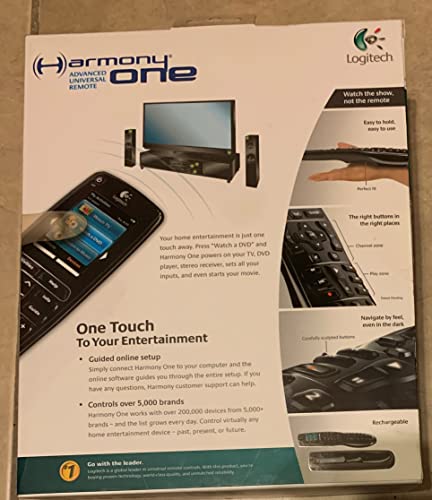
Logitech Harmony One Universal Remote with Color Touch Screen - OLD MODEL (Discontinued by Manufacturer)



Key features
- •One-touch, activity-based controls
- •Easy to use
- •An excellent choice for Xbox 360 owners
Logitech Harmony One Universal Remote with Color Touch Screen - OLD MODEL (Discontinued by Manufacturer)
List Price: $130.94$117.85DEALYou Save: $13.09 (10%)
Free shippingFree Returns – 30 daysFree Order CancellationSecure Payment2–3 Days DeliveryGet It October 25, 2026In Stock (5)No marketing spamNo account requiredFulfilment by FedEx / Amazon / UPS / ShipwirePayPal / Card Buyer Protection
Customer Reviews
Reviews sourced from verified Amazon purchasers4.1
out of 5
Based on 10 reviews
5★
60%
4★
40%
3★
0%
2★
0%
1★
0%
Great Remote!
Dock Ellis✓ Verified Purchase•August 6, 2023
I purchased the Harmony One about three weeks ago and have been using it for the past two weeks. I love this remote. I have a Samsung HDTV, Pioneer VSX 1120-k a/v receiver, Cox cable box (Scientific Atlanta) and a Sony PS3 that is also used as my BluRay player (yes I bought the Logitec PS3 adapter).
I found the software and setup procedure very easy to use. It took me about one hour to get it setup. I did this the in the following order:
1) Hooked up my Logitech PS3 adapter
2) Wrote down the Name and Model of the components listed above
3) Wrote down the "input" for each device (HDMI 1, Component input, etc)
4) Loaded the software that came with the Harmony onto my PC
5) Followed the directions as prompted by the software
a) set up the devices
b) choose the activities
c) set up the "favorites screen"
d) connected up my Harmony via the USB cable and updated with settings
6) Once I finished on the PC, I took the remote into the family room and tried all the Activites and they all worked!
Even though everything worked flawlessly, I wanted to "refine" the settings. I went back to the PC and did the following:
1) When I set up the Activities, the first one was "Game Controller" followed by DVD and then TV. I was able to change the order so TV is on top, followed by DVD and then Game Controller. This is the order of most used first.
2) I wanted to change my Favorites screen from showing the station names (i.e. HBO, CBS, FOX, etc) to their actual logo. These logos can be downloaded from IconHarmony website: [...] - this was a strictly cosmetic desire but it really looks cool.
I couldn't believe how well the Harmony handled my most complex device: the Pioneer a/v receiver. This is a new model released eight months ago. There are dozens of settings/commands on this device and the Harmony has them all: at least as far as I can tell. I just choose Devices, Receiver on my Harmony and it lists 14 sub menus which include all the commands that were on the receiver remote and it is a lot easier to read and understand.
In summary, the things I liked about the Harmony One:
A) Easy to use setup: walks you through each step in an easy to understand method
B) Button and screen backlight that comes on automatically when you pick up the remote
C) Customizable buttons and names
D) Help screen: not that you will need it
E) Your remote settings are saved on your PC so you don't need to re-enter.
F) Easy to change order of listings such as which networks show on which screens
G) Works great with my PS3 (you will need to buy the Logitech PS3 adapter).
H) Charging cradle is convenient. Just place the remote on it and it keeps it charged
I) The software gives you the option to leave your cable box on all the time or power it on and off when watching TV. I chose to leave it on since there is a delay when the box is turned on. This way I can switch from watching a DVD to cable instantly. Nice feature.
J) Looks: The shiny black finish is nice looking and I don't have any real problem with fingerprints like others mention. I wipe it down with the microfiber cloth that came with the remote once every couple of days and it looks great!
K) Last but certainly not least, my wife can now watch TV or a DVD on my PS3 with the touch of a single button (actually the touch screen). A happy wife trumps all the other pluses!
Things I don't like: Have to come back later when I find something!
Finally I bought this on Amazon for approx $150. That is a great price for a great remote! Anyone wanting to be able to watch TV with a single button or switch to watching a DVD etc, by touching just one button, this is the remote for you. By buying on Amazon, I knew if I did not like it I could return it within 30 days with no hassle. Unless something goes wrong, there is no way this remote is going back to Amazon. Sorry Jeff Bezos (Amazon CEO), it's mine! Oops, no it's my wife's!
I found the software and setup procedure very easy to use. It took me about one hour to get it setup. I did this the in the following order:
1) Hooked up my Logitech PS3 adapter
2) Wrote down the Name and Model of the components listed above
3) Wrote down the "input" for each device (HDMI 1, Component input, etc)
4) Loaded the software that came with the Harmony onto my PC
5) Followed the directions as prompted by the software
a) set up the devices
b) choose the activities
c) set up the "favorites screen"
d) connected up my Harmony via the USB cable and updated with settings
6) Once I finished on the PC, I took the remote into the family room and tried all the Activites and they all worked!
Even though everything worked flawlessly, I wanted to "refine" the settings. I went back to the PC and did the following:
1) When I set up the Activities, the first one was "Game Controller" followed by DVD and then TV. I was able to change the order so TV is on top, followed by DVD and then Game Controller. This is the order of most used first.
2) I wanted to change my Favorites screen from showing the station names (i.e. HBO, CBS, FOX, etc) to their actual logo. These logos can be downloaded from IconHarmony website: [...] - this was a strictly cosmetic desire but it really looks cool.
I couldn't believe how well the Harmony handled my most complex device: the Pioneer a/v receiver. This is a new model released eight months ago. There are dozens of settings/commands on this device and the Harmony has them all: at least as far as I can tell. I just choose Devices, Receiver on my Harmony and it lists 14 sub menus which include all the commands that were on the receiver remote and it is a lot easier to read and understand.
In summary, the things I liked about the Harmony One:
A) Easy to use setup: walks you through each step in an easy to understand method
B) Button and screen backlight that comes on automatically when you pick up the remote
C) Customizable buttons and names
D) Help screen: not that you will need it
E) Your remote settings are saved on your PC so you don't need to re-enter.
F) Easy to change order of listings such as which networks show on which screens
G) Works great with my PS3 (you will need to buy the Logitech PS3 adapter).
H) Charging cradle is convenient. Just place the remote on it and it keeps it charged
I) The software gives you the option to leave your cable box on all the time or power it on and off when watching TV. I chose to leave it on since there is a delay when the box is turned on. This way I can switch from watching a DVD to cable instantly. Nice feature.
J) Looks: The shiny black finish is nice looking and I don't have any real problem with fingerprints like others mention. I wipe it down with the microfiber cloth that came with the remote once every couple of days and it looks great!
K) Last but certainly not least, my wife can now watch TV or a DVD on my PS3 with the touch of a single button (actually the touch screen). A happy wife trumps all the other pluses!
Things I don't like: Have to come back later when I find something!
Finally I bought this on Amazon for approx $150. That is a great price for a great remote! Anyone wanting to be able to watch TV with a single button or switch to watching a DVD etc, by touching just one button, this is the remote for you. By buying on Amazon, I knew if I did not like it I could return it within 30 days with no hassle. Unless something goes wrong, there is no way this remote is going back to Amazon. Sorry Jeff Bezos (Amazon CEO), it's mine! Oops, no it's my wife's!
Finally, a truly "Universal" remote
BeccaM✓ Verified Purchase•August 1, 2023
I already love this remote, despite the sticker-shock.
It's often not that hard to get a remote where you can enter a code number and it'll control a number of devices. Some can learn from existing remotes. We had a One-for-All Kameleon for some years, but it was kludgey, couldn't really be customized, I was never able to get downloaded remote programs to work on it, and it ate batteries like candy.
Meanwhile the remotes on our coffee table proliferated like a warren of rabbits. One for the TV, another for the AV Receiver, still others for the cable box, Roku, CinemaTube media player, Playstation 3, Yamaha region-free DVD changer... Aaaaaaaaaaaaaah! TOO. MANY. REMOTES!
I received the Harmony One and its PS3 bluetooth-to-infrared adapter accessory as an early holiday gift. (Actually, my spouse told me to go buy it.) Now it's still early for a real review, but my first impressions are very positive, with a few small criticisms.
Cons:
- Initial programming can be intimidating to the non-technical. But if you follow the program wizards, you should be able to get the remote up and running with reasonably complete functionality within a couple hours.
- The in-box printed documentation, while slick, is in my opinion extremely inadequate. There are some important details, information, and instructions which just can't really be figured out from the multi-lingual pictograms and declarative sentences. I'll cover a few of these below in Helpful Hints.
- The in-cradle charging display is totally misleading, and a bad design mistake (also covered below), made worse by misleading documentation.
- Should be more flexibility in creating 'Activities', other than just the single generic 'Utility' choice. Should be given options for custom Activity icons, too.
- Wish there were more custom icon options for the touchscreen buttons; at present, you can only do TV channels.
- I also wish there was some way to mix Activities and Devices. Sometimes you just want to control the one device, and it takes a few steps to make this happen. Also, as people have noted, Devices are sorted alphabetically; be nice to be able to sort them as one likes.
- Not inexpensive. Especially if you add the PS3 adapter. Not a remote you want young children or clumsy drunken party-attending adults to be fooling with.
Pros:
- Sleek, well-designed physically, comfortable to hold in the hand. Buttons are well-placed and easy to reach, and all of them are of a good size. Haven't had a remote this comfortable since we retired our old Tivo.
- Backlighting and touchscreen lighting are very nice. The touchscreen itself seems responsive, but not overly so (sensitivity is also configurable).
- I like the tilt sensor for turning it on when you pick up the remote, unlike our old Kameleon which flares like a blue nova if you even breathe at it.
- Between Logitech's fairly comprehensive online database, plus a few missing buttons I had Harmony learn, this is the first remote I've owned which has been able to learn every single remote we currently have.
- I very much like the customization possibilities, in setting or reprogramming buttons to do whatever you want, and it's wonderful being able to program every single button on the remote for multiple functions. I haven't even begun to explore multi-function sequences. However, I wish there was a more advanced interface available, and not forcing nearly everything to go through the wizard.
- No problems having the Harmony learn new commands from our other remotes (I needed to add some buttons from the Sony Bravia remote -- most notably the number pad 'period' and 'enter' keys.)
Helpful Hints:
- The battery goes in with the blank, white side up (they really should print 'this side up' and an insertion arrow on it). Push it in until the back edge drops into place; there's a little spring in the back of the battery enclosure, providing resistance for the last quarter inch. To remove the battery, lift the edge slightly and the spring should pop it out.
- When you put the Harmony One in the cradle, if it's charging, the touchscreen shows what looks like a 1/4 filled battery with a lightning bolt through it. The ONLY thing this indicates is that the Harmony is in fact receiving power. Otherwise ignore this static icon display, as it in no way shows actual battery charge amount. If you pick up the remote, on the touchscreen in the upper right corner, above the date/time, there's a tiny cell-phone style battery bar. Pretty small -- but that's where you can find the actual battery level. Normal charging time to full from out-of-the-box seems to be about 4 hours. Supposedly there's enough charge straight off to do the basic programming set-up...but I decided to wait a while, just in case.
- For learning from other remotes: The Harmony needs to be connected to your computer and the Logitech program running. Follow the prompts to add a button (there's online help if you're not sure how to do this). Note that the receiver for learning new codes is at the BOTTOM of the Harmony, not the top as is usual for other learning remotes. Also, the guide wizard says it may take up to 30 seconds to learn the function, but this doesn't mean mash the button and hold it. Press and release the button to learn from as you normally would use it. If the program doesn't pick it up, wait a couple seconds and press it again. The program itself usually will tell you if it's getting a good signal or not. Once learned, you can assign the new function to any button on the remote.
Would I get this remote again? Yes. "One remote to rule them all", as I've heard many times. Would I recommend it to a friend? Also yes.
Would I recommend it for the technologically challenged? Sort of... this might work out best if you or someone you know who is tech-savvy did the set-up and programming for them. However, for example, my spouse has been so intimidated by all our remotes and the complicated steps necessary to do almost anything with our set-up here, essentially I always run the equipment when we watch anything. I do think she'd be a little put off by the programming of the Harmony, since it can get complicated fast. She nevertheless likes the Harmony because now she can just point and shoot. "Watch TV" -- boom, done. "Watch Media Player" -- done. Play a movie, ditto.
It's often not that hard to get a remote where you can enter a code number and it'll control a number of devices. Some can learn from existing remotes. We had a One-for-All Kameleon for some years, but it was kludgey, couldn't really be customized, I was never able to get downloaded remote programs to work on it, and it ate batteries like candy.
Meanwhile the remotes on our coffee table proliferated like a warren of rabbits. One for the TV, another for the AV Receiver, still others for the cable box, Roku, CinemaTube media player, Playstation 3, Yamaha region-free DVD changer... Aaaaaaaaaaaaaah! TOO. MANY. REMOTES!
I received the Harmony One and its PS3 bluetooth-to-infrared adapter accessory as an early holiday gift. (Actually, my spouse told me to go buy it.) Now it's still early for a real review, but my first impressions are very positive, with a few small criticisms.
Cons:
- Initial programming can be intimidating to the non-technical. But if you follow the program wizards, you should be able to get the remote up and running with reasonably complete functionality within a couple hours.
- The in-box printed documentation, while slick, is in my opinion extremely inadequate. There are some important details, information, and instructions which just can't really be figured out from the multi-lingual pictograms and declarative sentences. I'll cover a few of these below in Helpful Hints.
- The in-cradle charging display is totally misleading, and a bad design mistake (also covered below), made worse by misleading documentation.
- Should be more flexibility in creating 'Activities', other than just the single generic 'Utility' choice. Should be given options for custom Activity icons, too.
- Wish there were more custom icon options for the touchscreen buttons; at present, you can only do TV channels.
- I also wish there was some way to mix Activities and Devices. Sometimes you just want to control the one device, and it takes a few steps to make this happen. Also, as people have noted, Devices are sorted alphabetically; be nice to be able to sort them as one likes.
- Not inexpensive. Especially if you add the PS3 adapter. Not a remote you want young children or clumsy drunken party-attending adults to be fooling with.
Pros:
- Sleek, well-designed physically, comfortable to hold in the hand. Buttons are well-placed and easy to reach, and all of them are of a good size. Haven't had a remote this comfortable since we retired our old Tivo.
- Backlighting and touchscreen lighting are very nice. The touchscreen itself seems responsive, but not overly so (sensitivity is also configurable).
- I like the tilt sensor for turning it on when you pick up the remote, unlike our old Kameleon which flares like a blue nova if you even breathe at it.
- Between Logitech's fairly comprehensive online database, plus a few missing buttons I had Harmony learn, this is the first remote I've owned which has been able to learn every single remote we currently have.
- I very much like the customization possibilities, in setting or reprogramming buttons to do whatever you want, and it's wonderful being able to program every single button on the remote for multiple functions. I haven't even begun to explore multi-function sequences. However, I wish there was a more advanced interface available, and not forcing nearly everything to go through the wizard.
- No problems having the Harmony learn new commands from our other remotes (I needed to add some buttons from the Sony Bravia remote -- most notably the number pad 'period' and 'enter' keys.)
Helpful Hints:
- The battery goes in with the blank, white side up (they really should print 'this side up' and an insertion arrow on it). Push it in until the back edge drops into place; there's a little spring in the back of the battery enclosure, providing resistance for the last quarter inch. To remove the battery, lift the edge slightly and the spring should pop it out.
- When you put the Harmony One in the cradle, if it's charging, the touchscreen shows what looks like a 1/4 filled battery with a lightning bolt through it. The ONLY thing this indicates is that the Harmony is in fact receiving power. Otherwise ignore this static icon display, as it in no way shows actual battery charge amount. If you pick up the remote, on the touchscreen in the upper right corner, above the date/time, there's a tiny cell-phone style battery bar. Pretty small -- but that's where you can find the actual battery level. Normal charging time to full from out-of-the-box seems to be about 4 hours. Supposedly there's enough charge straight off to do the basic programming set-up...but I decided to wait a while, just in case.
- For learning from other remotes: The Harmony needs to be connected to your computer and the Logitech program running. Follow the prompts to add a button (there's online help if you're not sure how to do this). Note that the receiver for learning new codes is at the BOTTOM of the Harmony, not the top as is usual for other learning remotes. Also, the guide wizard says it may take up to 30 seconds to learn the function, but this doesn't mean mash the button and hold it. Press and release the button to learn from as you normally would use it. If the program doesn't pick it up, wait a couple seconds and press it again. The program itself usually will tell you if it's getting a good signal or not. Once learned, you can assign the new function to any button on the remote.
Would I get this remote again? Yes. "One remote to rule them all", as I've heard many times. Would I recommend it to a friend? Also yes.
Would I recommend it for the technologically challenged? Sort of... this might work out best if you or someone you know who is tech-savvy did the set-up and programming for them. However, for example, my spouse has been so intimidated by all our remotes and the complicated steps necessary to do almost anything with our set-up here, essentially I always run the equipment when we watch anything. I do think she'd be a little put off by the programming of the Harmony, since it can get complicated fast. She nevertheless likes the Harmony because now she can just point and shoot. "Watch TV" -- boom, done. "Watch Media Player" -- done. Play a movie, ditto.
Logitech's Best Harmony Yet...But Could Still Be Better
M. Pickering✓ Verified Purchase•July 30, 2023
The introduction of the new Logitech Harmony One Advanced Universal Remote has really raised some eyebrows and produced a lot of chatter in the electronics gadget market. Once you see this remote and try it for yourself you will understand what all the buzz is about!
The Harmony line of universal remotes has become the most popular among average consumer grade remotes here in the U.S. Although not cheap, the Logitech Harmony series offers great functionality, easy computer-based programmability, and stylish looks at a somewhat affordable price. I already owned two other Harmony remotes, including the Logitech Harmony 550 Universal Remote and the Logitech Harmony 880 Advanced Universal Remote Control , before deciding to buy the new Harmony One. The 880 model has proven to be a wonderful but somewhat frustrating remote to own. It has very small buttons, a smallish color LCD display, and I had problems with the charging feature working properly when sitting the remote in its charging cradle. The Harmony one improves on all of these aspects. This new remote has much larger buttons, which have unique shapes that make it easy to determine function of most buttons by feel (so you don't have to look at them before pressing). The LCD screen is bigger, brighter, and has a much higher resolution; not to mention the fact that it is a touch screen. The newly designed charging cradle is formed precisely to hold the new Harmony One snug, so it cannot wobble and lose connection with the charging contacts. The Harmony One is a slight bit larger than the Harmony 880 and 890 series remotes, but feels more balanced in the hand; likely due to the remote's wonderful contoured body. Setting up the new Harmony One could not be much easier, using the same USB interface and Harmony Remote software that all of the other Harmony remotes utilize. If you already have a previous Harmony remote, you can copy over all of the activities and devices onto the new Harmony One. However, doing this will cause you to lose any custom button settings. As could be expected, the Harmony One also has an IR learning capability, so you can teach it IR commands from other device remotes that you have.
Although some of the features of this new model are not unique from other Harmony models, here are a few of the perks you get with the newly designed Harmony One:
- Beautiful 2.2" LCD Touch Screen Display (220 by 176 pixels)
- 40 Essential Backlit Function Buttons, With Unique Shapes That Make Them Easy To Identify By Touch
- USB Interface Allows Easy Setup via Computer With Included Harmony Remote Software
- Harmony Remote Software Currently Includes Database Of More Than 5,000 Manufacturers and 175,000 Devices.
- Activities Can Be Programmed For One Touch Control Of Your Entire Home Entertainment and/or Home Automation System (i.e., Watch DVD, Listen to CD, etc.)
- Up To 15 Devices Can Be Programmed, Meaning You Can Essentially Replace 15 Remotes With The Harmony One
- Logos Can Be Added For Favorite Channels Or Device Functions (although setting this up can be rather tedious!)
- Rechargeable Litium Ion Battery Powers Remote For Several Days Between Charges
- Up To 8 Photos Can Be Uploaded For Slideshow On LCD Display (resolution and file size limitations apply!)
- Ergonomic Body Fits Well In Hand And Feels Light And Well Balanced
- Included Charging Cradle Holds Remote Snug And Keeps Remote Charged And Ready For Use
- IR Learning Feature Allows Custom Teaching Of Specialized Device Remote Commands
- Built-In Motion Sensor Automatically Tuns On Backlighting When Remote Is Picked Up Or Tilted
With the good you always have to expect some bad, and the Harmony One does indeed have a few flaws that nick my overall score of this otherwise awesome device:
- Glossy Surface Of Remote Promotes Ugly Finger Print Smudges And Accentuates The Appearance Of Dust Particles
- Only 3 Activities Are Displayed On LCD At One Time (you can flip pages to display other activities in sets of 3)
- No RF or Bluetooth (IR only!)
- No WiFi for Remote Setup (must be plugged directly into PC via included USB cable)
- Photos and Custom Button Icons Can Be Painful To Setup and Configure
- Remote Wobbles A Bit When Sitting On Hard Surface (counter top, night stand, etc.)
- Cannot Customize Order Of Device List
- No Tactile Response/Feedback for Touchscreen Buttons
Overall I am extremely pleased with my new Logitech Harmony One Advanced Universal Remote. It is definately a step up from my Harmony 880 model. However, with a $250.00 price tag this may not be a practical choice for everyone. Many of the cheaper Logitech Harmony universal remotes offer most of the same capabilities; just not with all of the bells, whistles and high-tech style as you get with the Harmony One. I definately wish Logitech had designed this remote with a matte finish, rather than the finger print attracting gloss finish. I also wish they included the ability to customize the order in which it displays the device list. I have 15 devices programmed into my Harmony One, and I find myself flipping through page after page in order to find the device I want (since the LCD only displays 3 per page). These design oversights, and those listed in my cons list above, as well as the hefty price tag prevent me from giving this wonderful remote a 5-star rating. Still, the Harmony One is one of the best, affordable, full-featured universal remote controls you will find on the market today (IMO). Since this remote has firmware that can be upgraded via the Harmony Remote Software, I am hoping that Logitech tweaks this device a little over the coming months. Still, there is no way for them to add features like RF, Bluetooth or WiFi without introducing an upgraded model in the future. This means that buying the Harmony One today may leave you wanting a newer (improved) model, which is sure to be released by Logitech in the near future (as they did when they introduced the Harmony 890 after many of us had already purchased the Harmony 880!). If you are looking for a sleek, one remote solution for your home entertainment and/or home automation needs, and you can live without RF and Bluetooth for the foreseeable future, then I highly recommend the Logitech Harmony One. It really is one amazing remote control device!
The Harmony line of universal remotes has become the most popular among average consumer grade remotes here in the U.S. Although not cheap, the Logitech Harmony series offers great functionality, easy computer-based programmability, and stylish looks at a somewhat affordable price. I already owned two other Harmony remotes, including the Logitech Harmony 550 Universal Remote and the Logitech Harmony 880 Advanced Universal Remote Control , before deciding to buy the new Harmony One. The 880 model has proven to be a wonderful but somewhat frustrating remote to own. It has very small buttons, a smallish color LCD display, and I had problems with the charging feature working properly when sitting the remote in its charging cradle. The Harmony one improves on all of these aspects. This new remote has much larger buttons, which have unique shapes that make it easy to determine function of most buttons by feel (so you don't have to look at them before pressing). The LCD screen is bigger, brighter, and has a much higher resolution; not to mention the fact that it is a touch screen. The newly designed charging cradle is formed precisely to hold the new Harmony One snug, so it cannot wobble and lose connection with the charging contacts. The Harmony One is a slight bit larger than the Harmony 880 and 890 series remotes, but feels more balanced in the hand; likely due to the remote's wonderful contoured body. Setting up the new Harmony One could not be much easier, using the same USB interface and Harmony Remote software that all of the other Harmony remotes utilize. If you already have a previous Harmony remote, you can copy over all of the activities and devices onto the new Harmony One. However, doing this will cause you to lose any custom button settings. As could be expected, the Harmony One also has an IR learning capability, so you can teach it IR commands from other device remotes that you have.
Although some of the features of this new model are not unique from other Harmony models, here are a few of the perks you get with the newly designed Harmony One:
- Beautiful 2.2" LCD Touch Screen Display (220 by 176 pixels)
- 40 Essential Backlit Function Buttons, With Unique Shapes That Make Them Easy To Identify By Touch
- USB Interface Allows Easy Setup via Computer With Included Harmony Remote Software
- Harmony Remote Software Currently Includes Database Of More Than 5,000 Manufacturers and 175,000 Devices.
- Activities Can Be Programmed For One Touch Control Of Your Entire Home Entertainment and/or Home Automation System (i.e., Watch DVD, Listen to CD, etc.)
- Up To 15 Devices Can Be Programmed, Meaning You Can Essentially Replace 15 Remotes With The Harmony One
- Logos Can Be Added For Favorite Channels Or Device Functions (although setting this up can be rather tedious!)
- Rechargeable Litium Ion Battery Powers Remote For Several Days Between Charges
- Up To 8 Photos Can Be Uploaded For Slideshow On LCD Display (resolution and file size limitations apply!)
- Ergonomic Body Fits Well In Hand And Feels Light And Well Balanced
- Included Charging Cradle Holds Remote Snug And Keeps Remote Charged And Ready For Use
- IR Learning Feature Allows Custom Teaching Of Specialized Device Remote Commands
- Built-In Motion Sensor Automatically Tuns On Backlighting When Remote Is Picked Up Or Tilted
With the good you always have to expect some bad, and the Harmony One does indeed have a few flaws that nick my overall score of this otherwise awesome device:
- Glossy Surface Of Remote Promotes Ugly Finger Print Smudges And Accentuates The Appearance Of Dust Particles
- Only 3 Activities Are Displayed On LCD At One Time (you can flip pages to display other activities in sets of 3)
- No RF or Bluetooth (IR only!)
- No WiFi for Remote Setup (must be plugged directly into PC via included USB cable)
- Photos and Custom Button Icons Can Be Painful To Setup and Configure
- Remote Wobbles A Bit When Sitting On Hard Surface (counter top, night stand, etc.)
- Cannot Customize Order Of Device List
- No Tactile Response/Feedback for Touchscreen Buttons
Overall I am extremely pleased with my new Logitech Harmony One Advanced Universal Remote. It is definately a step up from my Harmony 880 model. However, with a $250.00 price tag this may not be a practical choice for everyone. Many of the cheaper Logitech Harmony universal remotes offer most of the same capabilities; just not with all of the bells, whistles and high-tech style as you get with the Harmony One. I definately wish Logitech had designed this remote with a matte finish, rather than the finger print attracting gloss finish. I also wish they included the ability to customize the order in which it displays the device list. I have 15 devices programmed into my Harmony One, and I find myself flipping through page after page in order to find the device I want (since the LCD only displays 3 per page). These design oversights, and those listed in my cons list above, as well as the hefty price tag prevent me from giving this wonderful remote a 5-star rating. Still, the Harmony One is one of the best, affordable, full-featured universal remote controls you will find on the market today (IMO). Since this remote has firmware that can be upgraded via the Harmony Remote Software, I am hoping that Logitech tweaks this device a little over the coming months. Still, there is no way for them to add features like RF, Bluetooth or WiFi without introducing an upgraded model in the future. This means that buying the Harmony One today may leave you wanting a newer (improved) model, which is sure to be released by Logitech in the near future (as they did when they introduced the Harmony 890 after many of us had already purchased the Harmony 880!). If you are looking for a sleek, one remote solution for your home entertainment and/or home automation needs, and you can live without RF and Bluetooth for the foreseeable future, then I highly recommend the Logitech Harmony One. It really is one amazing remote control device!
A worthy replacement for any universal remote new or old!
Lars Milano✓ Verified Purchase•July 19, 2023
Just received this new gadget and although I have not had it for a long time, my initial impressions are overflowing with praise. Logitech upon acquiring Harmony has somehow found the list I made a few years ago about everything I thought was wrong and would do differently with the Harmony line of remotes and have found a solution to them all in this magnificent new version. At least that's what it seems like.
This remote will be replacing my trusty old Harmony 880, which will be relegated to the bedroom after I had inadvertently sat on and crushed the lcd screen on my relatively new Harmony 550 (may it rest in peace). Apparently, the Harmony 880 is a bit more durable than the slimmer 550 because I've been known to sit on that by accident on several occasions without inflicting any damage to the unit. I'm hoping this new beautifully designed Harmony One will be have also have durability to match its looks. Only time will tell, and I will update this review in the near future after I've spent some more quality time with the device.
The quick and dirty:
Form factor and Ergonomics: Brilliant! Fits nicely in my medium sized hand, comfortable to hold, and nicely weighted. Logitech has answered one of my few complaints about the 880 by having raised buttons on the new Harmony One to offer the user some tactile sense of which button to press without having to look down. Also, the rearrangement of buttons makes everything more accessible and the new touch screen looks sharp and works very well - the icing on the cake.
Ease of Use / Programmability: Harmony remotes have always excelled in this regard. The web-based software is intuitive and very easy to setup. It is always updated and has improved greatly over its many versions though the years. Works with both PC's and Macs with a USB port in terms of programming. The activity-based setup with the help functions makes this easy for anyone to use, including the most technology-phobic or electronically-challenged individuals, like my grandmother. My only wish is that perhaps a future software update will allow the user to further customize the icons and graphics on the touchscreen to suit personal tastes.
Functionality: It does everything you need a remote to do. It would've been nice if it had RF and bluetooth functionality (to control the PS3 and other specialized devices) but there are very viable workarounds to that (Nyko bluwave IR for the PS3) and in reality, I have no need for RF functionality. Harmony offers the 890 and Universal offers a few models that do RF but none of them can match the Harmony One's user-friendliness. Perhaps Logitech will release an RF version of this remote in the future, but there is likely a small market for it. Lastly, the charger base is a significant improvement over the 880. For you 880 owners out there, I'm sure you've found its charger base to be unreliable and often unwilling to actually charge your remote unless you position it just right. Logitech has fixed this on the Harmony One. Yet another problem solved. We'll how see it holds up over time but so far, this remote is approaching perfection.
Value: Is this remote worth $250? Depends who you are. Are you a techno-geek gadget-freak or a more practical and sensible person? A Harmony 550 can do just about everything the Harmony One can at a fraction of the cost but then it doesn't look, feel, and work as nice. The Harmony 550 is your Toyota corolla of remotes: dependable, practical, reliable, economical, until you bang it up by accident and it doesn't hold up very well (in my case, inadvertently sit on it). The Harmony One is your Lexus of remotes (or BMW or Mercedes, pick one). It does everything the toyota can but just better and more upscale, and it appears more durable and just feels much nicer... you know, in case you're wondering where the $250 went.
Conclusion: Highly recommended! If you don't have a decent universal-type remote yet, you can't go wrong with this one. It's the best out there but comes at a price. If you already have an 880 or 890, it's a tougher proposition unless you really have $250 burning a hole in your pocket. If you have a 550 or similar and wished it was nicer or just jealous of the Harmony One's fancy touch screen, perhaps you might accidently sit on it and justify an upgrade? It's ok, I won't tell.
This remote will be replacing my trusty old Harmony 880, which will be relegated to the bedroom after I had inadvertently sat on and crushed the lcd screen on my relatively new Harmony 550 (may it rest in peace). Apparently, the Harmony 880 is a bit more durable than the slimmer 550 because I've been known to sit on that by accident on several occasions without inflicting any damage to the unit. I'm hoping this new beautifully designed Harmony One will be have also have durability to match its looks. Only time will tell, and I will update this review in the near future after I've spent some more quality time with the device.
The quick and dirty:
Form factor and Ergonomics: Brilliant! Fits nicely in my medium sized hand, comfortable to hold, and nicely weighted. Logitech has answered one of my few complaints about the 880 by having raised buttons on the new Harmony One to offer the user some tactile sense of which button to press without having to look down. Also, the rearrangement of buttons makes everything more accessible and the new touch screen looks sharp and works very well - the icing on the cake.
Ease of Use / Programmability: Harmony remotes have always excelled in this regard. The web-based software is intuitive and very easy to setup. It is always updated and has improved greatly over its many versions though the years. Works with both PC's and Macs with a USB port in terms of programming. The activity-based setup with the help functions makes this easy for anyone to use, including the most technology-phobic or electronically-challenged individuals, like my grandmother. My only wish is that perhaps a future software update will allow the user to further customize the icons and graphics on the touchscreen to suit personal tastes.
Functionality: It does everything you need a remote to do. It would've been nice if it had RF and bluetooth functionality (to control the PS3 and other specialized devices) but there are very viable workarounds to that (Nyko bluwave IR for the PS3) and in reality, I have no need for RF functionality. Harmony offers the 890 and Universal offers a few models that do RF but none of them can match the Harmony One's user-friendliness. Perhaps Logitech will release an RF version of this remote in the future, but there is likely a small market for it. Lastly, the charger base is a significant improvement over the 880. For you 880 owners out there, I'm sure you've found its charger base to be unreliable and often unwilling to actually charge your remote unless you position it just right. Logitech has fixed this on the Harmony One. Yet another problem solved. We'll how see it holds up over time but so far, this remote is approaching perfection.
Value: Is this remote worth $250? Depends who you are. Are you a techno-geek gadget-freak or a more practical and sensible person? A Harmony 550 can do just about everything the Harmony One can at a fraction of the cost but then it doesn't look, feel, and work as nice. The Harmony 550 is your Toyota corolla of remotes: dependable, practical, reliable, economical, until you bang it up by accident and it doesn't hold up very well (in my case, inadvertently sit on it). The Harmony One is your Lexus of remotes (or BMW or Mercedes, pick one). It does everything the toyota can but just better and more upscale, and it appears more durable and just feels much nicer... you know, in case you're wondering where the $250 went.
Conclusion: Highly recommended! If you don't have a decent universal-type remote yet, you can't go wrong with this one. It's the best out there but comes at a price. If you already have an 880 or 890, it's a tougher proposition unless you really have $250 burning a hole in your pocket. If you have a 550 or similar and wished it was nicer or just jealous of the Harmony One's fancy touch screen, perhaps you might accidently sit on it and justify an upgrade? It's ok, I won't tell.
Nice remote with a few quirks
Rolidnot✓ Verified Purchase•July 15, 2023
Previously, I owned a Universal Remote Control (URC)MX 700. URC makes a nice product but they went from direct to consumer to direct to installer in 2006 and pulled all the on line updates for the IRC codes for equipment and reserved them for approved dealers only. Bottom line is that URC screwed over prior and prospective customers. I was not about to pay $200+ for a URC remote and then an installer programming fee of $125 (base price)and then another $50+ every time I needed an update on the URC so I tried the Harmony One when I changed to FiOS TV.
The Harmony One is slick in terms of usability and programming which is good but also slick in that it's like a greased banana. It's so smooth and slippery that it's ten times easier to drop or mishandle than the URC remotes which are non-slip. Mishandling means sending all sorts of weird commands to equipment and dropping means potential damage to the remote. I had hoped the Zagg folks who make protective non-slip coverings for cell phones and related devices would make a full body covering for the Harmony One but they don't - only a screen protector.
On the plus side, the on line IRC codes for the Harmony One are extensive and accurate. It is fairly inutive to program and it has a ton of capability. The color touch screen is bright and adjustable and the onboard accelerometer that turns it on when moved is a nice touch. My local URC dealer basically lied to me when he told me that the Harmony wasn't as capable of complex macro sequences as are the URC remotes - it is, you just have to figure out how to make those work. The reason URC dealers don't like the Harmony One is that they can't bilk you for the programming fee. The Harmony is a lot more user friendly for people not familiar with your system and once you get the cable favorites progammed, the on board station artwork and logos are cool. The USB cable hook up is nice and works well. Many of the older and even some current URC remotes are still using antique serial cables not that it matters anymore because URC won't let anyone but dealers program the units on line.
On the negative side, programming the cable favorites on the Harmony One was a real chore but once it's done, the art work for the stations will make any tech junkie happy. The more complicated your system is, the more complex it is to program the Harmony One. Stuff like 12 volt triggers on interconnected audio equipment can give you fits until you figure out how to deal with these quirks. Other reviewers report that the screen is a fingerprint magnet and that is dead accurate. I will try the Zagg screen protector to eliminate this issue. [...] To reiterate, my bigggest complaint about the Harmony One is that it's like trying to hold a fresh trout with WD 40 on your fingers - it justs want to flop out of your hand.
In summary, the Harmony One is an impressive unit, it will run just about any equipment and the learning curve for programming is a function of how complex the system you are trying to control. There are a LOT of sub functions that require some skill and a potentially high learning curve so don't think you will be able to set this unit up for a 6 piece system in 30 minutes. It took me 3 to 4 hours to really get the programming accurate and I'm still tweaking it from time to time. The rechargeable cradle is nice and works well. The color touch screen is bright and all the keys light up which is really nice at night but it's easy to hit the wrong button when you fumble with the unit which is inevitable. $200 is a lot of dough for a remote but compared to the URC remotes which cost at least $200 plus the dealer programming fee of $125+, it's a bargain. If you are truly a tech junkie and have some computer ability, the Harmony One is a good choice.
Update - I've had this remote about one month and my opinion of this unit is not as favorable as it was initially. The commands work sporadically and I've reprogrammed it a few times to get it to behave. Simply stated, it's not the remote I reach for regularly because it's so slippery, it's very touchy and it's not as intuitive as the URC MX 700 I have had for a few years.
The Harmony One is slick in terms of usability and programming which is good but also slick in that it's like a greased banana. It's so smooth and slippery that it's ten times easier to drop or mishandle than the URC remotes which are non-slip. Mishandling means sending all sorts of weird commands to equipment and dropping means potential damage to the remote. I had hoped the Zagg folks who make protective non-slip coverings for cell phones and related devices would make a full body covering for the Harmony One but they don't - only a screen protector.
On the plus side, the on line IRC codes for the Harmony One are extensive and accurate. It is fairly inutive to program and it has a ton of capability. The color touch screen is bright and adjustable and the onboard accelerometer that turns it on when moved is a nice touch. My local URC dealer basically lied to me when he told me that the Harmony wasn't as capable of complex macro sequences as are the URC remotes - it is, you just have to figure out how to make those work. The reason URC dealers don't like the Harmony One is that they can't bilk you for the programming fee. The Harmony is a lot more user friendly for people not familiar with your system and once you get the cable favorites progammed, the on board station artwork and logos are cool. The USB cable hook up is nice and works well. Many of the older and even some current URC remotes are still using antique serial cables not that it matters anymore because URC won't let anyone but dealers program the units on line.
On the negative side, programming the cable favorites on the Harmony One was a real chore but once it's done, the art work for the stations will make any tech junkie happy. The more complicated your system is, the more complex it is to program the Harmony One. Stuff like 12 volt triggers on interconnected audio equipment can give you fits until you figure out how to deal with these quirks. Other reviewers report that the screen is a fingerprint magnet and that is dead accurate. I will try the Zagg screen protector to eliminate this issue. [...] To reiterate, my bigggest complaint about the Harmony One is that it's like trying to hold a fresh trout with WD 40 on your fingers - it justs want to flop out of your hand.
In summary, the Harmony One is an impressive unit, it will run just about any equipment and the learning curve for programming is a function of how complex the system you are trying to control. There are a LOT of sub functions that require some skill and a potentially high learning curve so don't think you will be able to set this unit up for a 6 piece system in 30 minutes. It took me 3 to 4 hours to really get the programming accurate and I'm still tweaking it from time to time. The rechargeable cradle is nice and works well. The color touch screen is bright and all the keys light up which is really nice at night but it's easy to hit the wrong button when you fumble with the unit which is inevitable. $200 is a lot of dough for a remote but compared to the URC remotes which cost at least $200 plus the dealer programming fee of $125+, it's a bargain. If you are truly a tech junkie and have some computer ability, the Harmony One is a good choice.
Update - I've had this remote about one month and my opinion of this unit is not as favorable as it was initially. The commands work sporadically and I've reprogrammed it a few times to get it to behave. Simply stated, it's not the remote I reach for regularly because it's so slippery, it's very touchy and it's not as intuitive as the URC MX 700 I have had for a few years.
Page 1 of 2