Logitech Harmony 700 Rechargeable Remote with Color Screen (Discontinued by Manufacturer)



Key features
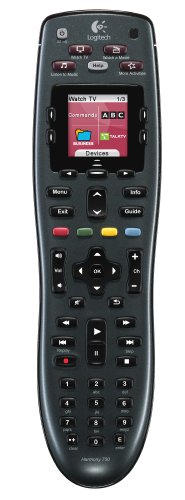
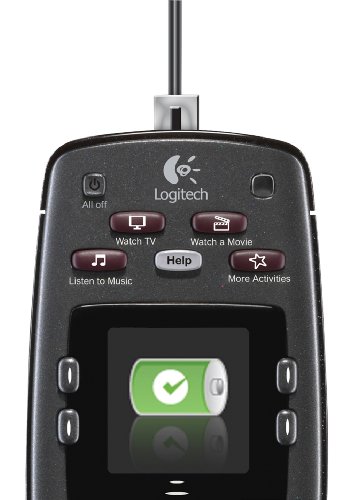
- •Rechargeable design keeps your remote charged and ready for up to a week, no batteries to buy or replace
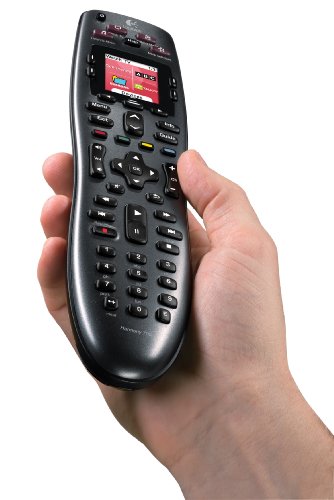
- •Brilliant color screen displays favorite-channel icons and commands for easy selection
- •One-touch activity buttons automatically turn on all the right devices for instant access to TV, DVDs, music and more
- •Replaces multiple remotes with universal control of up to 6 different components
- •Supports virtually any home-entertainment component, including over 225,000 devices from over 5,000 brands
Logitech Harmony 700 Rechargeable Remote with Color Screen (Discontinued by Manufacturer)
List Price: $113.70$102.33DEALYou Save: $11.37 (10%)
Free shippingFree Returns – 30 daysFree Order CancellationSecure Payment2–3 Days DeliveryGet It October 24, 2026In Stock (2)No marketing spamNo account requiredFulfilment by FedEx / Amazon / UPS / ShipwirePayPal / Card Buyer Protection
Customer Reviews
Reviews sourced from verified Amazon purchasers4.1
out of 5
Based on 10 reviews
5★
60%
4★
40%
3★
0%
2★
0%
1★
0%
Simplifies my life! Solves many problems well. Great service.
LJ S✓ Verified Purchase•July 10, 2023
We have been living with an A/V setup in my family room with mostly new equipment--large LED TV, Samsung Blu-ray DVD with built-in Netflix streaming, Apple TV, and an A/V receiver to power all the sound. This remote has made everything easier to live with. Not only has it eliminated our remote clutter, it has actually solved quite a few niggling problems for us. It is also simple to use and even the kids and my husband are comfortable with it.
I don't have a cable set-top box or Tivo. I DO get a ton of digital stations on sub-channels via basic cable with the tuner on the TV. Due to the foibles of digital tv, every tv tuner tunes a bit differently, so my two digital tv's have different channels for the same stations. I was tired of remembering them all. Plus, it takes a bit longer to tune a channel with digital. If you make a mistake or need to hunt for a channel, it takes much longer than in the "old days" of analog. I went ahead a set up favorite channels to program in almost all the channels we watch regularly. I downloaded logos from a 3rd party site to use on the remote. Now we have cute logos on a screen to select from and they can be reordered and changed easily any time. No sub-channels to remember any more.
My blu-ray device works fine. Even Netflix streaming works. The buttons were not set up completely by default. I think I was missing the "red" button that would bring me to Netflix in one click. I bought this remote partially because it has the red, blue, yellow, green buttons that were familiar to us and we really need that red one for our Samsung. I called customer support to get walked through adding in that functionality. The agent surprised me with wonderful service. She started by asking what my user name in their system is. Then she asked me what I needed. Then she told me, "Okay--update your remote." I did and it worked! We get this service for 90 days with this product. I have no doubt that I could have called before I set anything up and had them do it for me, but I like to learn things and be somewhat self-reliant, so I did most of it by myself.
The Apple TV works better with this product. I did have to follow a faq that they link to in the setup program to "unpair" the device to make it be able to control the Apple TV. After I did this, the Harmony works BETTER than the remote that comes with the Apple TV. In our family room, our seating is fairly far from the Apple TV and the little remote that came with the Apple TV sometimes only worked if we moved closer. What a pain. The Harmony works very well.
I really like this product. The setup takes a bit longer than I expected so it lost a star for that. Also, the mac program doesn't look and work "mac-ish" and sometimes had glitches (I just quit and restart to make it work properly) so it lost a star for that. It is pretty easy to use the program after getting used to it, so I only took off the one star.
I don't have a cable set-top box or Tivo. I DO get a ton of digital stations on sub-channels via basic cable with the tuner on the TV. Due to the foibles of digital tv, every tv tuner tunes a bit differently, so my two digital tv's have different channels for the same stations. I was tired of remembering them all. Plus, it takes a bit longer to tune a channel with digital. If you make a mistake or need to hunt for a channel, it takes much longer than in the "old days" of analog. I went ahead a set up favorite channels to program in almost all the channels we watch regularly. I downloaded logos from a 3rd party site to use on the remote. Now we have cute logos on a screen to select from and they can be reordered and changed easily any time. No sub-channels to remember any more.
My blu-ray device works fine. Even Netflix streaming works. The buttons were not set up completely by default. I think I was missing the "red" button that would bring me to Netflix in one click. I bought this remote partially because it has the red, blue, yellow, green buttons that were familiar to us and we really need that red one for our Samsung. I called customer support to get walked through adding in that functionality. The agent surprised me with wonderful service. She started by asking what my user name in their system is. Then she asked me what I needed. Then she told me, "Okay--update your remote." I did and it worked! We get this service for 90 days with this product. I have no doubt that I could have called before I set anything up and had them do it for me, but I like to learn things and be somewhat self-reliant, so I did most of it by myself.
The Apple TV works better with this product. I did have to follow a faq that they link to in the setup program to "unpair" the device to make it be able to control the Apple TV. After I did this, the Harmony works BETTER than the remote that comes with the Apple TV. In our family room, our seating is fairly far from the Apple TV and the little remote that came with the Apple TV sometimes only worked if we moved closer. What a pain. The Harmony works very well.
I really like this product. The setup takes a bit longer than I expected so it lost a star for that. Also, the mac program doesn't look and work "mac-ish" and sometimes had glitches (I just quit and restart to make it work properly) so it lost a star for that. It is pretty easy to use the program after getting used to it, so I only took off the one star.
bomb.com!
Christina T. Bjune✓ Verified Purchase•July 5, 2023
a buddy had it, and spoke highly of it, so i thought, why not! I'm a geek, and a geek needs a "omni-remote", so i dropped the bones to get it
Charging: kinda lame (on face value) that you have to charge it, but it's actually kinda nice (in the long run) becuase you need never worry if junior stole a AA out of it, and honestly i've easily gotten 2-3wks of fairly heavy use out of it before i decided i should charge it, and it charges pretty fast. I just do it before going to sleep, when i wont need it anyway, and then pull it off next day and bam i'm charged and ready to rock and roll!
Programing: WOW!!! i was so sure it was going to be a hair-lose fight to program my Apple TV, my Roku, my Visio TV, my Panasonic Amp, my Sony Blue Ray.... I was WRONG!!! it was **SOOO EASY*** that i thought i was doing it wrong, lol, LOVE IT! i just went online, followed the instructions (you need to know the model/make of your devices), find them on the Logitech Setup Website, plug you remote into your laptop and BAM its done! easy peasy!
Use: this is why i only gave a 4, not a 5 star. Its very easy to use, girlfriend and guests have all been able to figure it out with about a 30-sec tutorial. BUT the one complaint is if it is set to "Apple TV" and i want to raise the volume, I have to go back on the remote from Apple TV -> Panasonic Amp, raise the volume, and then go back on the remote from Panasonic Amp -> Apple TV to pause/play. Ya ya i know, 1st world problem, but it just seems silly that if i group "TV, Apple TV, and Sound System" togather (which you can do, pretty cool) that when i push -/+ volume it'd be smart enough to know i want the Sound System to -/+ the volume, not have to manually go into each device. Otherwise easy and fun to use. And the remote lights up (great for in the dark) when ever you pick it up, no looking for the cheesy lil "light" button you can never find
Lots of fun, easy to use, and removed the need to keep track of 5 remotes, living room looks cleaner, just wish it was a lil more inegrated on the lil things
Charging: kinda lame (on face value) that you have to charge it, but it's actually kinda nice (in the long run) becuase you need never worry if junior stole a AA out of it, and honestly i've easily gotten 2-3wks of fairly heavy use out of it before i decided i should charge it, and it charges pretty fast. I just do it before going to sleep, when i wont need it anyway, and then pull it off next day and bam i'm charged and ready to rock and roll!
Programing: WOW!!! i was so sure it was going to be a hair-lose fight to program my Apple TV, my Roku, my Visio TV, my Panasonic Amp, my Sony Blue Ray.... I was WRONG!!! it was **SOOO EASY*** that i thought i was doing it wrong, lol, LOVE IT! i just went online, followed the instructions (you need to know the model/make of your devices), find them on the Logitech Setup Website, plug you remote into your laptop and BAM its done! easy peasy!
Use: this is why i only gave a 4, not a 5 star. Its very easy to use, girlfriend and guests have all been able to figure it out with about a 30-sec tutorial. BUT the one complaint is if it is set to "Apple TV" and i want to raise the volume, I have to go back on the remote from Apple TV -> Panasonic Amp, raise the volume, and then go back on the remote from Panasonic Amp -> Apple TV to pause/play. Ya ya i know, 1st world problem, but it just seems silly that if i group "TV, Apple TV, and Sound System" togather (which you can do, pretty cool) that when i push -/+ volume it'd be smart enough to know i want the Sound System to -/+ the volume, not have to manually go into each device. Otherwise easy and fun to use. And the remote lights up (great for in the dark) when ever you pick it up, no looking for the cheesy lil "light" button you can never find
Lots of fun, easy to use, and removed the need to keep track of 5 remotes, living room looks cleaner, just wish it was a lil more inegrated on the lil things
Works as advertised
Duffyjr✓ Verified Purchase•June 28, 2023
I have the 510 and really like it but I think the 700 is has a better layout, I like having more room between the buttons, the 510 is a little to compact for my fat fingers. The 700 was easy to setup, I wanted to be able to use the update remote part of the software but still keep the 510 settings, you have to call customer service and have them clone your account with a new user name and then go into the new account and do the update. The only part of the software that was difficult was ordering the functions that display in the window when a device is selected. The little arrows to move up & down the functions can be hard to hit with the mouse and can be come tedious. The back lite could be a little better, if its not completely dark in the room the can be hard to read, but after you learn the remote its not an issue. Some people have mentioned that they don't like the fact that the Activity buttons are not back lit but I don't see the big deal, once you learn the remote it doesn't matter and besides when you pick up the remote (or tilt it) the the back lite comes on and you can choose your activity from the lit screen. One of the big reasons I purchased the 510 and 700 are the four colored buttons, if you have a HD dish and Blue ray player these are a must have. I also like the icons you can have for your favorite channels, even though I don't use them much it's just cool. Also like the Eneloop batteries, I have had this remote for a month and only had to recharge the batteries once so far.
All in all this is a nice remote and I wish I would have purchased one a long time ago. I have had other universal remotes but they never could handle all the functions of the original remote so you always had to have them in reach, not true with these Harmony's you can put you other remotes in a box and for get about them.
The only thing now is to see how long the Harmony's will last, I have seen a lot of threads out there saying they only last around a year, will see.
UPDATE: I love this remote for few reasons, the batteries, I only have to charge this remote every couple of weeks, it fits great in the hand and after learning the keys by feel I don't hardly look at it, which brings up my only complaint. Some of the keys are wearing to the point the back light is coming through, not what I would expect from a $100+ remote. The good news is they replaced it with what appears to be a brand new remote. They even let me keep my old one, just can't program it any more with the software. I figured I would have to send it in to get repaired. They had me a new remote in about a week from the time I contacted them, still giving it 5 stars for the quick service.
All in all this is a nice remote and I wish I would have purchased one a long time ago. I have had other universal remotes but they never could handle all the functions of the original remote so you always had to have them in reach, not true with these Harmony's you can put you other remotes in a box and for get about them.
The only thing now is to see how long the Harmony's will last, I have seen a lot of threads out there saying they only last around a year, will see.
UPDATE: I love this remote for few reasons, the batteries, I only have to charge this remote every couple of weeks, it fits great in the hand and after learning the keys by feel I don't hardly look at it, which brings up my only complaint. Some of the keys are wearing to the point the back light is coming through, not what I would expect from a $100+ remote. The good news is they replaced it with what appears to be a brand new remote. They even let me keep my old one, just can't program it any more with the software. I figured I would have to send it in to get repaired. They had me a new remote in about a week from the time I contacted them, still giving it 5 stars for the quick service.
An unbelievable 6-in-1 remote (even controls the PS3)!
P. Kremer✓ Verified Purchase•June 17, 2023
I held off for years in buying one of these all-in-one remotes because they didn't control my Playstation 3. I felt if I'm going to buy an all-in-one remote, it should do it all. I recently found out about the Logitech Harmony remotes and the PS3 Adapter! Now truly it could control all my devices!
I opted for the 700 because I only have 5 components in my system right now (TV, A/V receiver, PS3, DVD, and satellite DVR), but the Harmony 700 allows for 6, so I'm prepared for the future if I add a new component! And I will always be prepared for the future, because even if I replace a piece of equipment, Logitech is always updating their database with the newest A/V equipment! Makes spending $100 on a remote a lot easier knowing it is future-proof. I ran into 1 difficulty with my satellite receiver, but the online instructions on how to reset the remote channel number were very good and worked right away.
I'll be honest and say that you can't describe setting up the remote as "simple." It requires a software download, knowing the exact model numbers of all your equipment, and at least a basic knowledge of the inputs on all of your components (for instance, which inputs your DVD player runs into on your A/V receiver, and what input your A/V receiver runs into your TV). If you find technical things difficult, you may need to call the support line for help (thankfully, a few months of free support are included) or get a tech savvy friend to help you. If you would describe yourself as "tech savvy," you shouldn't have too much trouble setting this remote up. The software is pretty well designed and pretty easy to figure out.
Once the remote was set up, I absolutely LOVE it! It does exactly what it says it does, controls all your devices simultaneously. You can push one button, "Watch TV," and it will turn on your TV to the right input, your AV receiver, and your satellite/cable DVR device. Watch a DVD? It will turn off your DVR and turn the DVD player on. And very important: It controls the PS3 beautifully! Every PS3 command is available to you! (NOTE: You do need the Harmony PS3 adapter, which is sold separately).
It actually does even more than I expected, allowing you to customize every single button to do what you want it to do! The 4 colored PS3 buttons? I set them up to control my DVR when watching TV. I love the flexibility it has. I found using the controls after a while came second nature, as the remote is set up very intuitively. No review on battery life yet, as I have yet to need to recharge, but the rechargeable batteries are included and you can just plug it in when you aren't using it.
So the bottom line? It does exactly what it says it does, controls 6 devices, and will turn on (or off) every device you need to do what you want. It's just that easy. The actual setup of the remote can be challenging, but very worth it. If you're looking to control 6 or less devices, this is absolutely the right remote. If you want touchscreen capability, or the ability to control more than 6, I'd definitely recommend looking at the Harmony One.
I opted for the 700 because I only have 5 components in my system right now (TV, A/V receiver, PS3, DVD, and satellite DVR), but the Harmony 700 allows for 6, so I'm prepared for the future if I add a new component! And I will always be prepared for the future, because even if I replace a piece of equipment, Logitech is always updating their database with the newest A/V equipment! Makes spending $100 on a remote a lot easier knowing it is future-proof. I ran into 1 difficulty with my satellite receiver, but the online instructions on how to reset the remote channel number were very good and worked right away.
I'll be honest and say that you can't describe setting up the remote as "simple." It requires a software download, knowing the exact model numbers of all your equipment, and at least a basic knowledge of the inputs on all of your components (for instance, which inputs your DVD player runs into on your A/V receiver, and what input your A/V receiver runs into your TV). If you find technical things difficult, you may need to call the support line for help (thankfully, a few months of free support are included) or get a tech savvy friend to help you. If you would describe yourself as "tech savvy," you shouldn't have too much trouble setting this remote up. The software is pretty well designed and pretty easy to figure out.
Once the remote was set up, I absolutely LOVE it! It does exactly what it says it does, controls all your devices simultaneously. You can push one button, "Watch TV," and it will turn on your TV to the right input, your AV receiver, and your satellite/cable DVR device. Watch a DVD? It will turn off your DVR and turn the DVD player on. And very important: It controls the PS3 beautifully! Every PS3 command is available to you! (NOTE: You do need the Harmony PS3 adapter, which is sold separately).
It actually does even more than I expected, allowing you to customize every single button to do what you want it to do! The 4 colored PS3 buttons? I set them up to control my DVR when watching TV. I love the flexibility it has. I found using the controls after a while came second nature, as the remote is set up very intuitively. No review on battery life yet, as I have yet to need to recharge, but the rechargeable batteries are included and you can just plug it in when you aren't using it.
So the bottom line? It does exactly what it says it does, controls 6 devices, and will turn on (or off) every device you need to do what you want. It's just that easy. The actual setup of the remote can be challenging, but very worth it. If you're looking to control 6 or less devices, this is absolutely the right remote. If you want touchscreen capability, or the ability to control more than 6, I'd definitely recommend looking at the Harmony One.
Great Remote, Four Systems...Five Stars!
Ms_Ladi✓ Verified Purchase•June 4, 2023
I'll just go down various attributes of this remote...hope it helps.
Price: This remote is half the price of the next step up, the Harmony One. I went back and forth a few days (okay, weeks) and looked at Amazon and another popular electronics website for their reviews before making my decision. My conclusion was, although the Harmony One had a couple of more features, it wasn't worth double the price. The Harmony 700 looks "bland" compared to the Harmony One--especially seeing reviews and seeing photos on Amazon, however look at reviews--including video reviews elsewhere and you will see this is a pretty sturdy remote for the price. Try and find a Gold Box discount to get ultimate savings. Bottom line, a price of about 10 dollars cheaper might make this remote a classic deal, but it's still a good price as is.
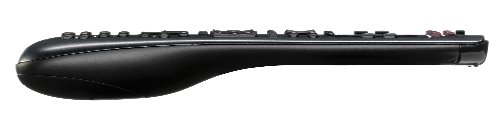
Looks/Build: As I stated, the remote looks bland on the Amazon website compared to the Harmony One, however this is a slick remote. It has a smooth matte finish, so no fingerprint smudges! The buttons are rubbery, but does not attract lint like I assumed it would. It feels nice and solid. The shape of it may be ergonomically pleasing, but I'm not an expert. I'll just say this remote looks better in person that the photos.
Set-Up: I had another Harmony remote, however it was broken during a move, so I do not remember the model...but the faces were interchangeable. My experience with the Harmony allowed me to easily transfer the same programs to the new remote using the software on my computer that I already had. A couple of tweaks to accommodate my new television and cable box and I was pretty much good to go. The software set-up changed from my previous remote four years ago to the new remote. I had a lot more set-up to do whereas this software just recognized what every component does and how the remote should handle basic commands. Channel changing, volume changing, menu access, and even second button features on my DVD player were already programmed into the remote which made things super easy. This works with my MacBook Pro no problem.
Overall Performance: Okay, set-up aside, this remote pretty much works as advertised, however I marked the star down for "functionality". At least 2-3 times a week I have to "fix" the remote using the Help because it won't turn on the television or "forgets" and my power on powers the systems off. The fix takes about 15 seconds, but it's annoying I have to keep doing this. Battery life lasts pretty long...a few weeks of normal use before the battery sign pops up. I usually just plug it in before I go to bed or leave for work, and it's charged. I wish the included cord would allow charging via my computer and I'm not sure why it doesn't. It's not worth it to purchase another cord...I have plenty of outlets, but they are usually not where I'm sitting on my couch! :-)
Again, overall the few negatives I've mentioned is nothing compared to the positives. This is a great remote, good looking, good feel, and simple to setup and use.
Five stars!
Price: This remote is half the price of the next step up, the Harmony One. I went back and forth a few days (okay, weeks) and looked at Amazon and another popular electronics website for their reviews before making my decision. My conclusion was, although the Harmony One had a couple of more features, it wasn't worth double the price. The Harmony 700 looks "bland" compared to the Harmony One--especially seeing reviews and seeing photos on Amazon, however look at reviews--including video reviews elsewhere and you will see this is a pretty sturdy remote for the price. Try and find a Gold Box discount to get ultimate savings. Bottom line, a price of about 10 dollars cheaper might make this remote a classic deal, but it's still a good price as is.
Looks/Build: As I stated, the remote looks bland on the Amazon website compared to the Harmony One, however this is a slick remote. It has a smooth matte finish, so no fingerprint smudges! The buttons are rubbery, but does not attract lint like I assumed it would. It feels nice and solid. The shape of it may be ergonomically pleasing, but I'm not an expert. I'll just say this remote looks better in person that the photos.
Set-Up: I had another Harmony remote, however it was broken during a move, so I do not remember the model...but the faces were interchangeable. My experience with the Harmony allowed me to easily transfer the same programs to the new remote using the software on my computer that I already had. A couple of tweaks to accommodate my new television and cable box and I was pretty much good to go. The software set-up changed from my previous remote four years ago to the new remote. I had a lot more set-up to do whereas this software just recognized what every component does and how the remote should handle basic commands. Channel changing, volume changing, menu access, and even second button features on my DVD player were already programmed into the remote which made things super easy. This works with my MacBook Pro no problem.
Overall Performance: Okay, set-up aside, this remote pretty much works as advertised, however I marked the star down for "functionality". At least 2-3 times a week I have to "fix" the remote using the Help because it won't turn on the television or "forgets" and my power on powers the systems off. The fix takes about 15 seconds, but it's annoying I have to keep doing this. Battery life lasts pretty long...a few weeks of normal use before the battery sign pops up. I usually just plug it in before I go to bed or leave for work, and it's charged. I wish the included cord would allow charging via my computer and I'm not sure why it doesn't. It's not worth it to purchase another cord...I have plenty of outlets, but they are usually not where I'm sitting on my couch! :-)
Again, overall the few negatives I've mentioned is nothing compared to the positives. This is a great remote, good looking, good feel, and simple to setup and use.
Five stars!
Page 1 of 2