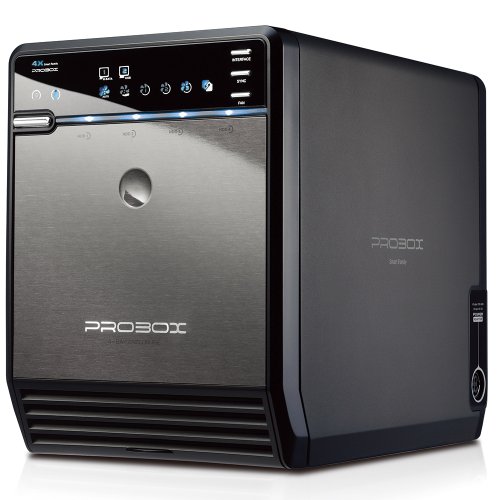
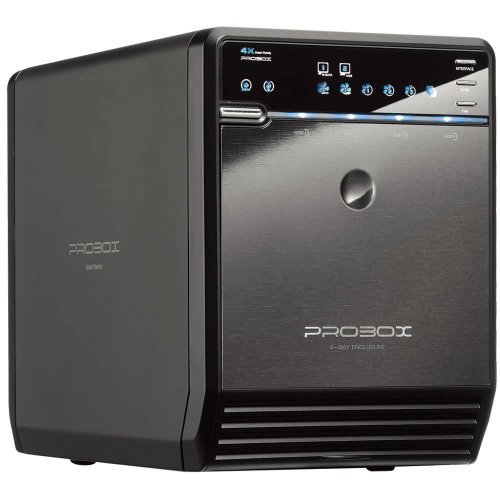
Mediasonic ProBox HF2-SU3S2 4 Bay 3.5” SATA HDD Enclosure – USB 3.0 & eSATA Support SATA 3 6.0Gbps HDD transfer speed


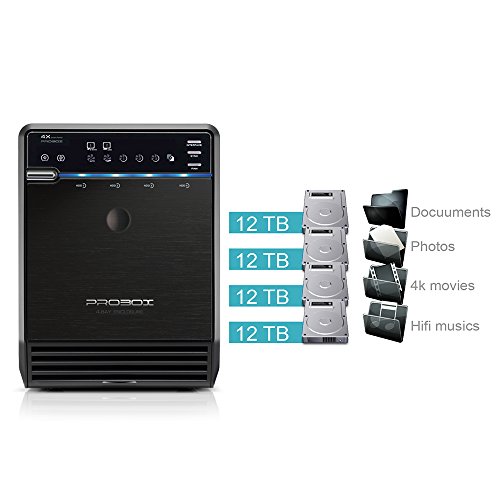
Key features
- •Support all brand of 3.5" SATA I / II / III hard disk drive up to 16TB per drive, and up to 4 x 16TB
- •Support SATA 3 6.0Gbps hard drive transfer rate.
- •Transfer rate up to 5.0Gbps via USB 3.0, Transfer rate up to 6.0Gbps via eSATA
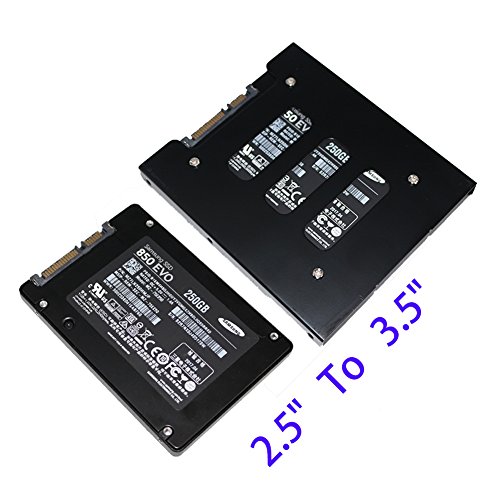
- •Support 2.5" SATA SSD / HDD (Bracket Adapter required, not included in the package)
- •Thermal Sensor built-in, Auto and Manual Mode and One Button Interface selection to switch USB 3.0 or eSATA Interface
Mediasonic ProBox HF2-SU3S2 4 Bay 3.5” SATA HDD Enclosure – USB 3.0 & eSATA Support SATA 3 6.0Gbps HDD transfer speed
List Price: $199.32$179.39DEALYou Save: $19.93 (10%)
Free shippingFree Returns – 30 daysFree Order CancellationSecure Payment2–3 Days DeliveryGet It October 25, 2026In Stock (3)No marketing spamNo account requiredFulfilment by FedEx / Amazon / UPS / ShipwirePayPal / Card Buyer Protection
Customer Reviews
Reviews sourced from verified Amazon purchasers3.9
out of 5
Based on 20 reviews
5★
45%
4★
10%
3★
15%
2★
15%
1★
15%
Great 12 VDC Design, easy to load, fast USB3 to SATA controller. Love 'em!
Richard Dis Assembler✓ Verified Purchase•March 28, 2018
We have been using these units for almost 10 years and we have 30 of them installed. They just keep getting faster and better. And, they are 12 Volt units and we have one of the servers with 6 of them on Battery power 24/7/365 and we LOVE IT! We think it helps the drives last longer since there are NO JOLTS when we lose power. We RARELY have to replace drives in those units, PLUS, I don't think one of these chassis has ever failed on us! We upgraded a couple of them, but put them to use elsewhere. Great design.
I used to dislike the front door design until I realized how easy they were to clean. You can pop it out and take it to the sink and use a bit of warm soapy water, dry it, pop it back in, and it looks like new. I'm sold on them!
I used to dislike the front door design until I realized how easy they were to clean. You can pop it out and take it to the sink and use a bit of warm soapy water, dry it, pop it back in, and it looks like new. I'm sold on them!
A year after purchase, suddenly stopped working. Not hot-swappable. Couldn't get ESATA to work.
Royal✓ Verified Purchase•December 4, 2017
A year after purchase, suddenly stopped working. I had 4 2tb barracudas in this and it just powered off and now won't boot up. Lights come on then go off, no fan startup. The fan was running before it powered itself off. I'm guessing it overheated--since it runs hot as hell. I could never find a ESATA controller that would make multiple drives work using a high speed ESATA connection. I had no choice but to stick with USB3. I've found USB to be significantly slower than ESATA connections in the past due to overhead in the protocols. The more small files you are working with the more inefficient it seemed to be. In addition the product IS NOT HOT SWAPPABLE. Total marketing LIE. When you insert a new drive the whole thing basically re-boots. All your drives vanish, then they all setup again one at a time. There are no ways to get this to power back on after a power outage. You have to manually intervene. It runs very hot in there. The whole circuit board blocks the ENTIRE fan except for a 1/2 inch whole they cut in the circuit board. Seriously---the ENTIRE FAN is blocked off from the drives. Crap design through and through. I'm looking for a replacement, but so many of these buy-and-toss products flood the market each year, it is hard to find good products that aren't very expensive.
A year after purchase, suddenly stopped working. Not hot-swappable. Couldn't get ESATA to work.
Royal✓ Verified Purchase•December 4, 2017
A year after purchase, suddenly stopped working. I had 4 2tb barracudas in this and it just powered off and now won't boot up. Lights come on then go off, no fan startup. The fan was running before it powered itself off. I'm guessing it overheated--since it runs hot as hell. I could never find a ESATA controller that would make multiple drives work using a high speed ESATA connection. I had no choice but to stick with USB3. I've found USB to be significantly slower than ESATA connections in the past due to overhead in the protocols. The more small files you are working with the more inefficient it seemed to be. In addition the product IS NOT HOT SWAPPABLE. Total marketing LIE. When you insert a new drive the whole thing basically re-boots. All your drives vanish, then they all setup again one at a time. There are no ways to get this to power back on after a power outage. You have to manually intervene. It runs very hot in there. The whole circuit board blocks the ENTIRE fan except for a 1/2 inch whole they cut in the circuit board. Seriously---the ENTIRE FAN is blocked off from the drives. Crap design through and through. I'm looking for a replacement, but so many of these buy-and-toss products flood the market each year, it is hard to find good products that aren't very expensive.
Good for the Price
Peter NYC✓ Verified Purchase•October 13, 2017
It's only OK. For the price, you're definitely getting your money's worth.
It interfaces both eSATA and USB 3.0. It holds 4 drives. For 99 bucks, that's pretty good.
Now for the bad. The fan isn't exactly quiet. I would've paid $10 more for a product that had a higher quality fan. It's not loud in the scheme of things, but chances are you'll hear it when you're watching a movie at your computer. If that sort of thing doesn't normally bother you, no worries. If you're a bit anal about noise, it'll bug you.
The front enclosure panel (what you need to remove to get at the drive bays) has a "glass jaw". It will break sooner or later, I guarantee you. It's really not that big of a deal. At this point I just leave mine off. It looks like garbage, but my drives are probably getting better circulation, so no big worries. I keep it under my desk anyhow.
There are too many lights. Jeez. What's with all the lights? Annoying A.F. but again, I keep my drive bay under my desk, so I don't really see it. If I kept this thing at eye-level, I'd probably find it annoying, especially with the lights off while gaming or watching a movie.
A user named Josh (Xaminmo) Davis wrote a pretty awesome quick start summary, MUCH better than what came with the drive enclosure, so I'll repost it (Mediasonic should pay him for doing such a good job and enclose *this* instead of what came with the enclosure):
* Top bay is bay 1. That must have a drive in it. The others are optional.
* No sleds, just a handle for each drive. Install it cupped UP, not down.
* Once your drives are in, reinstall the metal plate to keep the drives from vibrating out of the socket.
* Power supply plug goes on the right side, near the back.
* Power on with the silver button on the left front.
* Leave the fan mode in auto unless you need it. Other modes are 1 - 3, with 1 being fastest.
* Set the sync mode to ORANGE by holding the sync button for several seconds. Orange means "Stay powered on, stay on the chosen interface."
Blue mode toggles between eSATA and USB a couple of times, and if you're not booted, doing USB, and auto-detecting just right then, the box will power itself off.
* Use the interface button to set your mode: 1 (eSATA) and 2 (USB). You cannot use both at the same time.
* Power on your computer and do whatever you need to do
It interfaces both eSATA and USB 3.0. It holds 4 drives. For 99 bucks, that's pretty good.
Now for the bad. The fan isn't exactly quiet. I would've paid $10 more for a product that had a higher quality fan. It's not loud in the scheme of things, but chances are you'll hear it when you're watching a movie at your computer. If that sort of thing doesn't normally bother you, no worries. If you're a bit anal about noise, it'll bug you.
The front enclosure panel (what you need to remove to get at the drive bays) has a "glass jaw". It will break sooner or later, I guarantee you. It's really not that big of a deal. At this point I just leave mine off. It looks like garbage, but my drives are probably getting better circulation, so no big worries. I keep it under my desk anyhow.
There are too many lights. Jeez. What's with all the lights? Annoying A.F. but again, I keep my drive bay under my desk, so I don't really see it. If I kept this thing at eye-level, I'd probably find it annoying, especially with the lights off while gaming or watching a movie.
A user named Josh (Xaminmo) Davis wrote a pretty awesome quick start summary, MUCH better than what came with the drive enclosure, so I'll repost it (Mediasonic should pay him for doing such a good job and enclose *this* instead of what came with the enclosure):
* Top bay is bay 1. That must have a drive in it. The others are optional.
* No sleds, just a handle for each drive. Install it cupped UP, not down.
* Once your drives are in, reinstall the metal plate to keep the drives from vibrating out of the socket.
* Power supply plug goes on the right side, near the back.
* Power on with the silver button on the left front.
* Leave the fan mode in auto unless you need it. Other modes are 1 - 3, with 1 being fastest.
* Set the sync mode to ORANGE by holding the sync button for several seconds. Orange means "Stay powered on, stay on the chosen interface."
Blue mode toggles between eSATA and USB a couple of times, and if you're not booted, doing USB, and auto-detecting just right then, the box will power itself off.
* Use the interface button to set your mode: 1 (eSATA) and 2 (USB). You cannot use both at the same time.
* Power on your computer and do whatever you need to do
Good for the Price
Peter NYC✓ Verified Purchase•October 13, 2017
It's only OK. For the price, you're definitely getting your money's worth.
It interfaces both eSATA and USB 3.0. It holds 4 drives. For 99 bucks, that's pretty good.
Now for the bad. The fan isn't exactly quiet. I would've paid $10 more for a product that had a higher quality fan. It's not loud in the scheme of things, but chances are you'll hear it when you're watching a movie at your computer. If that sort of thing doesn't normally bother you, no worries. If you're a bit anal about noise, it'll bug you.
The front enclosure panel (what you need to remove to get at the drive bays) has a "glass jaw". It will break sooner or later, I guarantee you. It's really not that big of a deal. At this point I just leave mine off. It looks like garbage, but my drives are probably getting better circulation, so no big worries. I keep it under my desk anyhow.
There are too many lights. Jeez. What's with all the lights? Annoying A.F. but again, I keep my drive bay under my desk, so I don't really see it. If I kept this thing at eye-level, I'd probably find it annoying, especially with the lights off while gaming or watching a movie.
A user named Josh (Xaminmo) Davis wrote a pretty awesome quick start summary, MUCH better than what came with the drive enclosure, so I'll repost it (Mediasonic should pay him for doing such a good job and enclose *this* instead of what came with the enclosure):
* Top bay is bay 1. That must have a drive in it. The others are optional.
* No sleds, just a handle for each drive. Install it cupped UP, not down.
* Once your drives are in, reinstall the metal plate to keep the drives from vibrating out of the socket.
* Power supply plug goes on the right side, near the back.
* Power on with the silver button on the left front.
* Leave the fan mode in auto unless you need it. Other modes are 1 - 3, with 1 being fastest.
* Set the sync mode to ORANGE by holding the sync button for several seconds. Orange means "Stay powered on, stay on the chosen interface."
Blue mode toggles between eSATA and USB a couple of times, and if you're not booted, doing USB, and auto-detecting just right then, the box will power itself off.
* Use the interface button to set your mode: 1 (eSATA) and 2 (USB). You cannot use both at the same time.
* Power on your computer and do whatever you need to do
It interfaces both eSATA and USB 3.0. It holds 4 drives. For 99 bucks, that's pretty good.
Now for the bad. The fan isn't exactly quiet. I would've paid $10 more for a product that had a higher quality fan. It's not loud in the scheme of things, but chances are you'll hear it when you're watching a movie at your computer. If that sort of thing doesn't normally bother you, no worries. If you're a bit anal about noise, it'll bug you.
The front enclosure panel (what you need to remove to get at the drive bays) has a "glass jaw". It will break sooner or later, I guarantee you. It's really not that big of a deal. At this point I just leave mine off. It looks like garbage, but my drives are probably getting better circulation, so no big worries. I keep it under my desk anyhow.
There are too many lights. Jeez. What's with all the lights? Annoying A.F. but again, I keep my drive bay under my desk, so I don't really see it. If I kept this thing at eye-level, I'd probably find it annoying, especially with the lights off while gaming or watching a movie.
A user named Josh (Xaminmo) Davis wrote a pretty awesome quick start summary, MUCH better than what came with the drive enclosure, so I'll repost it (Mediasonic should pay him for doing such a good job and enclose *this* instead of what came with the enclosure):
* Top bay is bay 1. That must have a drive in it. The others are optional.
* No sleds, just a handle for each drive. Install it cupped UP, not down.
* Once your drives are in, reinstall the metal plate to keep the drives from vibrating out of the socket.
* Power supply plug goes on the right side, near the back.
* Power on with the silver button on the left front.
* Leave the fan mode in auto unless you need it. Other modes are 1 - 3, with 1 being fastest.
* Set the sync mode to ORANGE by holding the sync button for several seconds. Orange means "Stay powered on, stay on the chosen interface."
Blue mode toggles between eSATA and USB a couple of times, and if you're not booted, doing USB, and auto-detecting just right then, the box will power itself off.
* Use the interface button to set your mode: 1 (eSATA) and 2 (USB). You cannot use both at the same time.
* Power on your computer and do whatever you need to do
Page 1 of 4


![Sabrent USB 3.0 to SATA/IDE 2.5/3.5/5.25-INCH Hard Drive Converter with Power Supply & LED Activity Lights [4TB Support] (USB-DSC9)](https://images-na.ssl-images-amazon.com/images/I/51H7CJMhCzL.jpg)