OBDLink SX USB: Professional Grade OBD-II Automotive Scan Tool for Windows – DIY Car and Truck Data and Diagnostics


Key features
- •PROFESSIONAL GRADE SCAN TOOL: Transform your Windows PC, laptop, or tablet into an accurate automotive diagnostic device (not compatible with Apple iOS devices)
- •DIY VEHICLE DIAGNOSTICS: Save time and money by reading and clearing 'check engine' and trouble codes yourself and determine problems before consulting a mechanic
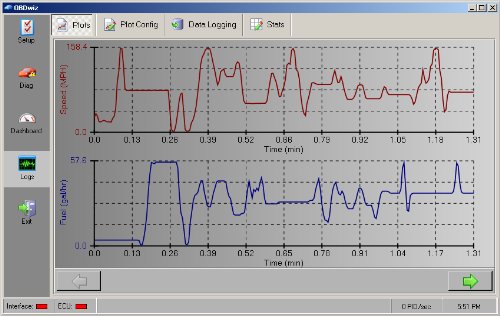
- •FREE FIRMWARE AND SOFTWARE UPGRADES: System includes OBDwiz diagnostics software for easy to access graphs, logs and real-time engine data exports
- •MAXIMUM VEHICLE COVERAGE: Works on more vehicles than any scan tool on the market including all 1996+ cars and light trucks sold in the USA (except hybrid or electric vehicles)
- •SATISFACTION GUARANTEED: Your ScanTool is supplied with a 90-day money back guarantee if you are unsatisfied for any reason, along with a 3-year repair or replace manufacturer warranty
- •Turn off check engine light and erase stored diagnostic information.
- •Read and erase trouble codes (both generic and manufacturer-specific, over 7000 codes in database).
- •Provide useful links to online database that provides trouble code descriptions and causes.
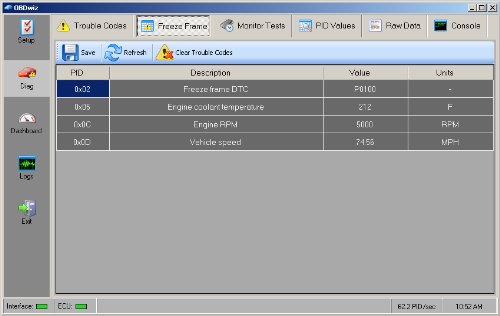
- •Freeze frame takes a snapshot of your system the moment a trouble code is triggered.
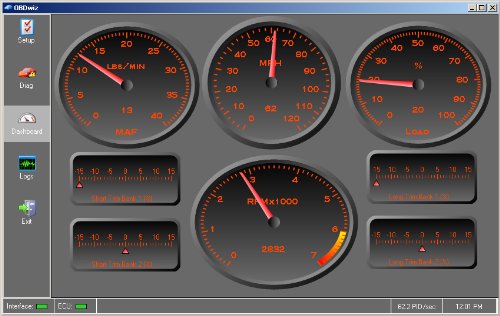
- •Display, graph, and log 90+ real-time parameters - life-like onscreen gauges to see more than what the manufacturer provides.
- •Create your own gauge layout custom screens, measure and display fuel economy - instant feedback teaches drivers fuel economy skills.
BrandOBDLink
CategoryCode Readers & Scan Tools
SizeSmall
ColorRed
Warranty3 Year Full Manufacturer's Warranty. Warranty does not apply for damages caused by owner abuse or alteration of the device.
OBDLink SX USB: Professional Grade OBD-II Automotive Scan Tool for Windows – DIY Car and Truck Data and Diagnostics
List Price: $80.43$72.39DEALYou Save: $8.04 (10%)
Free shippingFree Returns – 30 daysFree Order CancellationSecure Payment2–3 Days DeliveryGet It October 25, 2026In Stock (1)No marketing spamNo account requiredFulfilment by FedEx / Amazon / UPS / ShipwirePayPal / Card Buyer Protection
Customer Reviews
Reviews sourced from verified Amazon purchasers4.2
out of 5
Based on 10 reviews
5★
70%
4★
0%
3★
30%
2★
0%
1★
0%
NO SERIAL KEY FOR SOFTWARE
shawn cooke•April 23, 2017
I like the tool itself, but it didn't come with a serial key for the software. Ive seen others with the same complaints. Not sure what to do or who to contact
Super tool and must have for anyone that works on newer cars.
Ryan L.•March 28, 2017
This cable and software are a great value and easy to use. I have a scan tool and it couldn't do half what this does and it cost 3 time what this does. There is options for addition functions and I am thinking I might get them so I can do even more. This product was able to read VW codes which my other tool wouldn't. So worth the money
Freakin Awesome!
Demetre•March 1, 2017
I'm using this cable and Palmers OBD2 software, was around $80 for my 1999 LS1 Camaro SS. Cable works 100% of the time and have plugged it and unplug it around 20 times. It lights green when working correctly.I'm amazed on data shown and you can erase and read detailed engine codes. The software takes some time to get use to it but when recording it shows timing, o2 sensors, emissions stuff, intake temp, air fuel ratio, coolant temps etc. Used it on my brothers 2008 Chevy truck within seconds as well. Best money ever spent for the car.
Works, basic free software bundle will record logs of PID's
Ennenga•February 17, 2016
I am glad to report that I finally got this thing working. I feel that the documentation provided wasn't really enough to get it working and I had to spend a fair amount of time searching for a solution.
I installed this under Win7(64) and went through the quick setup guide. The OBDWiz software would not connect to the device or my car, despite the lights being the proper color. I poked around on the forums and found that this appears to be a common issue perhaps having to do with an FTDI driver issue. I upgraded the driver and still no connection, so I gave up on this thing for a while, thinking I might try it on another vehicle soon. I upgraded to Win10. After that upgrade I tried it and the software wouldn't run. I uninstalled and reinstalled and still the software wouldn't run. I ended up searching and deleting an OBDWiz folder under C:\ProgramData and reinstalling the driver and the OBDWiz program.
I drove around and noticed (while stopped) that the RPM and Speed gauges along with some other info (coolant temperature, engine load) would update, but none of the (prominent) fuel consumption related gauges ever update. Poked around in the settings and couldn't figure out if there is a way to make it work. I am left not knowing what info is supported for (provided by) my vehicle (Saturn SC2) using this tool.
Overall, three stars for basic functionality and a customer friendly warranty.
I'd give it one star for documentation and the annoying FTDI driver issues
Five stars for data logging in CSV format for later graphing and analysis.
It does update PID's faster than the (very short-lived) ~$12 bluetooth dongle I bought, and promises more functionality if I pay extra for "premium software".
I installed this under Win7(64) and went through the quick setup guide. The OBDWiz software would not connect to the device or my car, despite the lights being the proper color. I poked around on the forums and found that this appears to be a common issue perhaps having to do with an FTDI driver issue. I upgraded the driver and still no connection, so I gave up on this thing for a while, thinking I might try it on another vehicle soon. I upgraded to Win10. After that upgrade I tried it and the software wouldn't run. I uninstalled and reinstalled and still the software wouldn't run. I ended up searching and deleting an OBDWiz folder under C:\ProgramData and reinstalling the driver and the OBDWiz program.
I drove around and noticed (while stopped) that the RPM and Speed gauges along with some other info (coolant temperature, engine load) would update, but none of the (prominent) fuel consumption related gauges ever update. Poked around in the settings and couldn't figure out if there is a way to make it work. I am left not knowing what info is supported for (provided by) my vehicle (Saturn SC2) using this tool.
Overall, three stars for basic functionality and a customer friendly warranty.
I'd give it one star for documentation and the annoying FTDI driver issues
Five stars for data logging in CSV format for later graphing and analysis.
It does update PID's faster than the (very short-lived) ~$12 bluetooth dongle I bought, and promises more functionality if I pay extra for "premium software".
This product works great with my windows 10 HP laptop
Chris Newman•January 4, 2016
This product works great with my windows 10 HP laptop. With the included downloadable software and drivers this product will read not only active fault codes but stored fault codes as well. This product gives you the ability to delete active codes from your cars computer system as well as monitor and record your vehicle performance while driving. This ability allows you to diagnose the mystery problems that only occur under certain driving conditions. once a code is displayed on screen it is a simple point and click for the description of the fault along with links for manufacturer specifics as to what causes the code. for example instead of just telling you the cade is for a bad oxygen sensor in bank one it will tell you what the problems are with the censor (reading out of voltage range during these conditions) The virtual dash board is very informative giving you information such as exact water temperature, gallons per hour current being used (great for recognizing excessive gas consumption at idle). Speedometer and rpm gauge If you have a laptop that you don't care to use in the garage and are an at home mechanic that does not have hundreds or thousands to spend on a good scan computer I would recommend this product. It has a fair price with good features (Many I have yet to explore). The cord is long enough to set your laptop in your passenger seat and still be routed out of the way.
Pros: Great features, sturdy construction, Fair price, cord length is sufficient for use.
Cons: Would benefit greatly from a link to video instructions for use of the software (There may be a YouTube video out there but I have not had time to search for one)
Pros: Great features, sturdy construction, Fair price, cord length is sufficient for use.
Cons: Would benefit greatly from a link to video instructions for use of the software (There may be a YouTube video out there but I have not had time to search for one)
Page 1 of 2


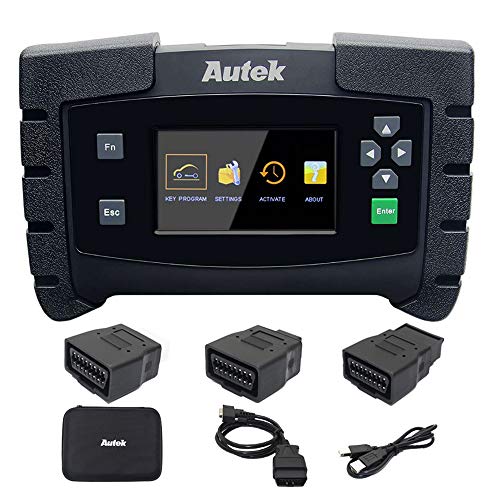
![Autel MaxiDAS DS808 KIT Scanner [$200-Valued 11PCS Adapters], 2023 Full System Bidirectional & Functional Tests Scan Tool, ECU Coding as MaxiSYS MS906, Up of DS808 DS708 MP808, 31+ Reset, FCA AutoAuth](https://m.media-amazon.com/images/I/61YzbYNw+sL._SL500_.jpg)


