Awolf HDD Docking Station, Multi-Function External Hard Drive Docking Station for 2.5" 3.5" IDE SATA 8 TB Hard Disk with One Touch Backup(OTB),Support XD/MS/TF/CF/SD Card



Key features
- •Built-in over current, over voltage, electric leakage, short circuit, noise and other multiple protection mechanism, to ensure more secure data transmission. 3A power supply, passed CE certificate.
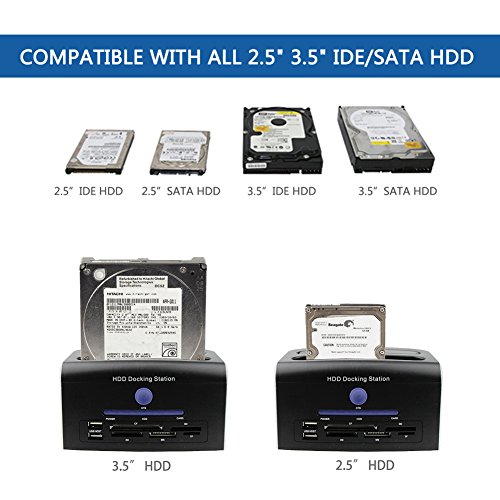
- •Supports most 2.5"/3.5" SATA & 2.5"/3.5" IDE hard disk within 4TB.
- •One touch backup function (via usb port only), safe and convenient.
- •Plug and play, supports 2 hard disk, 2 usb disk and 1 memory card at the same time.
- •No driver required, compatible with Windows/Mac, etc.
Awolf HDD Docking Station, Multi-Function External Hard Drive Docking Station for 2.5" 3.5" IDE SATA 8 TB Hard Disk with One Touch Backup(OTB),Support XD/MS/TF/CF/SD Card
List Price: $69.82$62.84DEALYou Save: $6.98 (10%)
Free shippingFree Returns – 30 daysFree Order CancellationSecure Payment2–3 Days DeliveryGet It October 25, 2026In Stock (1)No marketing spamNo account requiredFulfilment by FedEx / Amazon / UPS / ShipwirePayPal / Card Buyer Protection
Customer Reviews
Reviews sourced from verified Amazon purchasers4.1
out of 5
Based on 10 reviews
5★
70%
4★
30%
3★
0%
2★
0%
1★
0%
WYSIWYG on this product! Does exactly what it says and solved my need perfectly. Inexpensive too?!? What's not to like? :-)
Ken Trough✓ Verified Purchase•July 29, 2017
So many bad reviewers on this item. This is not a consumer item. This is a technician item.
I had a crashed server (bad motherboard) with media trapped across a half dozen old legacy drives. This dock was perfect for hoovering the old IDE and SATA drives into a new external USB3 8TB Seagate drive. Worked like a charm.
If you broke the little plastic bits inside, you are either careless or you just bought an item that presumed you knew more than you did. Gaps in your experience are not the fault of this product. It does what it says it does. You shouldn't leave a negative review for user error. All products are not required to be idiot-proof.
I had a crashed server (bad motherboard) with media trapped across a half dozen old legacy drives. This dock was perfect for hoovering the old IDE and SATA drives into a new external USB3 8TB Seagate drive. Worked like a charm.
If you broke the little plastic bits inside, you are either careless or you just bought an item that presumed you knew more than you did. Gaps in your experience are not the fault of this product. It does what it says it does. You shouldn't leave a negative review for user error. All products are not required to be idiot-proof.
"I like this product" (Thanks for the assist on the scale ...
Satisfied Man✓ Verified Purchase•July 28, 2017
IDE Port came broken or broke while I tried to insert a drive. The SATA portion worked well, as well as all of the various media readers in the front. This product won't BLOW YOU AWAY, but it is very handy. Still frustrated by the IDE port though, not gonna let that go. Look it eventually worked, but it bent some pins.I bumped this review up to four stars because MAYBE I was being a bit harsh about the IDE thing, I really only had one very old drive that I needed to pull stuff off of before I trashed it. Bumped up to 4-stars, "I like this product" (Thanks for the assist on the scale Amazon).
nice little dock
customer-x✓ Verified Purchase•February 9, 2017
It took 2 tries to get drivers installed for the USB interface, e-sata mounted first try.
Everything works well, does exactly what I wanted, nice little dock.
Lets me use hard drives & ssd's as removable media, with the speed of e-sata, even when my USB-3 ports are tied up with other devices.
Would definitely recommend it, especially for someone that has old IDE drives that they want to get data from.
Everything works well, does exactly what I wanted, nice little dock.
Lets me use hard drives & ssd's as removable media, with the speed of e-sata, even when my USB-3 ports are tied up with other devices.
Would definitely recommend it, especially for someone that has old IDE drives that they want to get data from.
Pretty good. I've already gotten my money's worth in rescued and reformated HDDs
bubbuh✓ Verified Purchase•September 8, 2016
It's not perfect but it enabled me to "rescue" and reformat 4 of 7 HDDs, including one ancient WD IDE. Of the three, it could do nothing with, one was DOA, one was a 12 year old Hitachi with a completely non-standard Sata connector (I wish I had noticed before junking the PC it came from. I might have saved its connector ribbon and tried my luck.), and the last was a 13 year old WD IDE which seated properly, but did not show up at the user level. (It was only after I junked it that I thought I should have tried looking for the disk with AOMEI Partition Assistant.)
Speaking of Partition Assistant it did enable me to easily rescue an 10 year old WD Sata I which Win 10's format command could not reformat properly. Keep that in mind when you begin your adventure.
Speaking of Partition Assistant it did enable me to easily rescue an 10 year old WD Sata I which Win 10's format command could not reformat properly. Keep that in mind when you begin your adventure.
Far exceeds my expectations
Donald H. Moore✓ Verified Purchase•August 2, 2016
After years of computer upgrades, I have a lot of hard disk drives just sitting in a box that I no longer used.
So I started looking for ways I could still access them,but not have to install them in my computer.
Stumbled across this in my search, and for $38 I figured why not.
And it has worked great.
Setup was a snap, I just plugged it into the computer (Windows 7), turned it on and Windows found the driver for it automatically.
Then it was just a matter of dropping in my IDE and SATA disks, and they were immediately available for use as an external drive.
Now I have an easy way to clean off those old drives and re-use them as backup drives for my media files and documents.
Very happy I purchased this.
So I started looking for ways I could still access them,but not have to install them in my computer.
Stumbled across this in my search, and for $38 I figured why not.
And it has worked great.
Setup was a snap, I just plugged it into the computer (Windows 7), turned it on and Windows found the driver for it automatically.
Then it was just a matter of dropping in my IDE and SATA disks, and they were immediately available for use as an external drive.
Now I have an easy way to clean off those old drives and re-use them as backup drives for my media files and documents.
Very happy I purchased this.
Page 1 of 2


![Sabrent USB 3.0 to SATA/IDE 2.5/3.5/5.25-INCH Hard Drive Converter with Power Supply & LED Activity Lights [4TB Support] (USB-DSC9)](https://images-na.ssl-images-amazon.com/images/I/51H7CJMhCzL.jpg)