LAUNCH CRP123 V2.0 Elite OBD2 Scanner, 2025 New Engine/ABS/SRS/Transmission Car Diagnostic Tool With Oil Reset/Throttle Adaption/SAS Relearn , Check Engine Code Reader, Lifetime Free Update Scan Tool




Key features
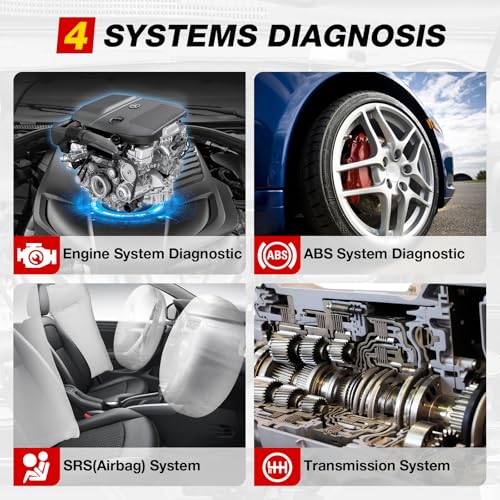
- •BASED ON THE INDUSTRY STANDARD LAUNCH X431, the CRP123 features a 3. 5" TFT color display and fully supports all 10 modes of OBDII standard to ensure complete, accurate, system diagnosis. CRP123 is the perfect balance of power and affordability, providing the ability to view preset, or user defined, live data streams for ENGINE, AT, ABS and SRS data; the ability to graph, record, replay and print data; an OBDII Code lookup tool and acronym database to assist and speed diagnosis and repair time.
- •EXTENSIVE VEHICLE COVERAGE; The LAUNCH CRP123 reads data from ENGINE, TRANSMISSION, ABS and SRS systems from Asian, US and European manufacturers. Coverage includes Suzuki, Honda, Mitsubishi, Nissan, Toyota, Mazda, Hyundai, Kia, Subaru, Infiniti, Lexus, Acura, Isuzu, Ford, GM, Chrysler, Benz, BMW, VW, Opel, Volvo, Fiat, Land Rover, Seat, Skoda, Audi, Porsche, Saab, Jaguar and many others.
- •MAIN FUNCTIONS: The LAUNCH CRP123 reads and clears codes for ENGINE, TRANSMISSION, ABS and SRS systems; Support for Generic OBDII Codes (P0, P2, P3 and U0); manufacturer specific codes (P1, P3 and U1); pending codes; freeze frame data; monitor and I/M readiness; live PCM stream data; graphing functionality for up to four (4) live data streams; O2 sensor test data; clears DTC codes and turns off the MIL; resets monitors; provides Data Link Connector (DLC) location hints.
- •SPECIAL FUNCTIONS: The LAUNCH CRP123 performs the modules present test; provides support for OBD II Mode 6; retrieves vehicle information (VIN, CIN and CVN). Diagnostic Trouble Code (DTC) help and definitions; all designed to aid the user in diagnosing and remediating issues.
- •: 100% money back ; lifetime, online, free updates; no questions asked 1-year replacement ; industry leading customer service.
BrandLAUNCH
CategoryCode Readers & Scan Tools
Sizecrp123
ColorRed
WarrantyFree exchange whithin one month
LAUNCH CRP123 V2.0 Elite OBD2 Scanner, 2025 New Engine/ABS/SRS/Transmission Car Diagnostic Tool With Oil Reset/Throttle Adaption/SAS Relearn , Check Engine Code Reader, Lifetime Free Update Scan Tool
List Price: $194.97$175.47DEALYou Save: $19.50 (10%)
Free shippingFree Returns – 30 daysFree Order CancellationSecure Payment2–3 Days DeliveryGet It October 25, 2026In Stock (1)No marketing spamNo account requiredFulfilment by FedEx / Amazon / UPS / ShipwirePayPal / Card Buyer Protection
Customer Reviews
Reviews sourced from verified Amazon purchasers4.3
out of 5
Based on 10 reviews
5★
70%
4★
30%
3★
0%
2★
0%
1★
0%
Nice specific scanner, works great!
Public Name•April 14, 2018
I was having some trouble understanding a service engine light my car was giving me. I decided to buy this unit as I had tried other cheaper scanners with little help and too broad. This scanner did the job I needed it for, It read the codes that I needed to get from my BMW and detailed the specific problem for me, cleared the codes ABS/SRS. I like that it can work with european, asian, and american cars. I also own a couple honda cars which this will come in handy. It seems very easy to use and understand, self explanatory, but if you don't understand, it does come with a manual. Also comes with a year of replacement warranty which is awesome.
Just love it
Andrey•April 11, 2018
If you wanna take a good care of your car this thing is just must have like for me, it has so many functions and can show you any possible car test that you can do with an OBD2 scanner and it so easy to use just choose test you wanna do your car model and all set.
The only minus about it is when you get it make sure the SD card that comes with it is inserted all the way! what happened when i was trying to test it first time it wouldn't work and i was about to return it but than i checked the SD card and made sure its all the way in
The only minus about it is when you get it make sure the SD card that comes with it is inserted all the way! what happened when i was trying to test it first time it wouldn't work and i was about to return it but than i checked the SD card and made sure its all the way in
Works on Subarus, Writing this to add PC update help.
TTP3317•April 1, 2018
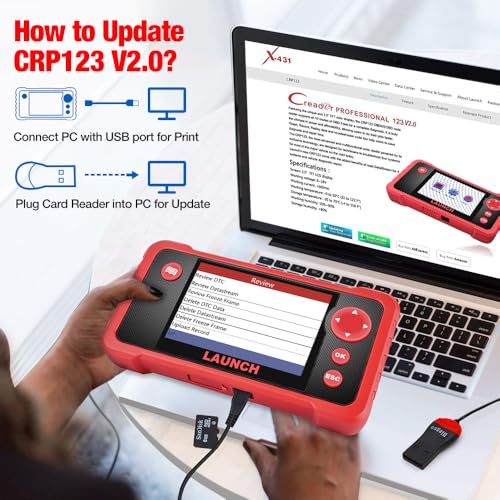
I would give this 5 stars if the registration/update worked nicely...but it didn't. I chose this unit because I drive a Subaru Outback and I didn't want to be limited to generic codes. I like this CR. Its intuitive to use, and will do much more than I currently understand. The cord for the car connection is not long enough to reach out to the engine compartment, if that's important. It connected easily and read things specific to Subaru, so I made the right choice there. It relies on external power, no batteries. It comes with a USB cable to connect to a PC and a micro SD/USB card reader for updates. Out of the box, you are instructed to remove the installed micro SD memory card. You plug that into the USB card reader and connect to your PC for registration and update. You have to manually enter the URL to download a program for your PC or Android. The website has changed and does not match instructions. The option for PC Update Tool delivers the app named CRP229UpdatedSetup.exe It downloaded OK but would not install on my Windows 10 system. That's frustrating. There is another place on the web page to click, but it is mostly covered by a promotional banner (see my snapshot). All I could see was the top 2/3 of the words "Tool Download" . I clicked on that and it worked. It delivers a zip folder called LaunchDIY_Update_Setup.zip that contains DIY_Update_Setup.exe. It successfully installed an app called LaunchDIY_Update. Once the micro SD is updated, you reinstall it and then use the USB cable to connect the CR to your PC. It powers on and gets the updated data for dozens of car makers from the micro SD card. Then it is ready to use.
Does as advertised. Great product!
Amazon Customer•March 17, 2018
The Launch crp 123 is a great scanner for the money, the cost vs all it can do is a bargain, especially when it's a upgrade for me. I love it. I really do think scanners are getting more reasonable with the price and how much you get with the scanner now a days. You really can't go wrong with this product.
I had a hard time registering my scanner though, 2 reasons. One is it works on Windows 7,8, 10 XP. The second reason is, the registration paper the product comes with just didn't work for me and made it more difficult than it needed to be. I would say for anyone looking to buy this scanner is don't follow the registration process on the paper.. go to LaunchtechUSA.com, products, creaderseries, crp123 then click update download, keep going until registered.
Overall, I love the scanner and am very happy with what I got. Customer service was very good too! Thank you!
I had a hard time registering my scanner though, 2 reasons. One is it works on Windows 7,8, 10 XP. The second reason is, the registration paper the product comes with just didn't work for me and made it more difficult than it needed to be. I would say for anyone looking to buy this scanner is don't follow the registration process on the paper.. go to LaunchtechUSA.com, products, creaderseries, crp123 then click update download, keep going until registered.
Overall, I love the scanner and am very happy with what I got. Customer service was very good too! Thank you!
Software update capability assures ability to diagnose new cars.
Arlene•March 16, 2018
Since I had a good experience with the Launch X431 I decided to get this CRP123 to take on the road. I can say it's definitely the X431s little brother. Even if it doesnt have bi-directional capability it shares the real-time systems monitoring of the X431, this is important for higher level systems diagnosing. What sets this apart from cheap $25 generic OBD2 scanners is the ability to update the software so it can access the ECUs of new cars. The scanner is light, and the casing is rugged. This was a good buy from a great seller!
I noticed the few negative reviews have something to do with the software upgrade. I uploaded a video on how I did it. This is my write-up:
1. Look at the back of the scanner and write down the serial number under the bar code.
2. Power the scanner with the cable and wall-plug adapter. After it initializes the home screen will appear with 3 options, use the Right arrow key to select HELP which is the right most option represented by the question mark '?'.
3. Press the down arrowkey and pick the 4th option 'Tool Information'. Look at the last line in the menu which reads 'Register Code', write that down on the same paper you wrote the serial number in #1, then set it aside for a moment.
4. Using a computer with Windows 10 or XP go to-
http://mycar.x431.com/pad/landingPageIndexProductCRP.action
Its one webpage with 2 alternating screens, 1st screen is for the Professional 229, the 2nd is for the CRP123. The webpage keeps switching between screens showing the Professional 229 and after the CRP123. If for some reason it sticks to the 1st screen just click the 2nd of 2 small pink dots below the picture of the Profesional 229 to show the update screen of the CRP123.
5. Pick the blue icon 'UPDATING TOOL DOWNLOAD' just above the picture of the CRP123 Scanner. Windows will ask you save the file so click on SAVE and wait for the download to complete.
6. While waiting, remove the micro memory card (some call this a TF card or a Mini SD card) from the bottom of the scanner. It is under a protective tab right beside where you would insert the power cable. Lightly pull the tab to gain access. The micro sim is spring locked so you will have to lightly press on it for it to pop out. As you pull it out remember the parallel metal contacts are facing UP. But once out, flip it so the face of the card with writting is facing up, and insert it (with the parallel metal contacts facing DOWN) into the USB adapter provided with the scanner.
7. Insert the adaptor into any USB slot of your computer. Take note which USB slot the adapter was inserted to. Usually Windows will tell you which drive slot the new 'Mass Storage Device' has been inserted to, write this down too then you can go directly to step 8. But if your computer doesn't report this, click on 'File Explorer' which is the mini folder on the mid-bottom portion of Windows main screen. The left most column will show all active drives in your computer. Look for 'USB Drive (__:) where __ is a letter representing the drive. In the video mine was drive E:
8. Now go back to your computer as the download must be finished, then click on OPEN. The new window will show the downloaded file "DIY_Update_Setup", double click that and wait a bit for the software to load.
9. The next window will ask you to pick a language and type in your serial number (the 1st set of numbers you wrote down earlier). Accomplish this then click DEVICE UPGRADE.
10. Don't fret the upgrade process is near completion, the next window will require your email and the PRODUCT ID (the 2nd number written down earlier). Type those in and click SUBMIT.
11. Now the final window called CRP SERIES DOWNLOAD CENTER will come out and show all the car brands the scanner can access. They are all pre-selected and there is no need to de-select any as the micro sim card provided has enough memory to save all of them. Click DOWNLOAD.
12. Now a small window will pop up and ask the drive location where you inserted the micro memory card (the last info you wrote down earlier), pick the correct letter representing the drive then click OK. Then wait for the download to complete.
13. Once done the final window (in your computer at least) will thank you for your patience, click OK. Then click on QUIT to close the DOWNLOAD CENTER window. Now its always a good practice to dismount any USB device before pulling it out of the slot. Click the caret symbol (looks like an inverted V) on the lower Right of the main screen and pick 'Eject Mass Storage Device' with the same letter of the USB drive where all the updates were saved to. After your computer will report that its safe to remove.
14. Remove the adapter from the computer. Then remove the mini memory card from the adapter. Then re-insert the mini memory card into the scanner FACE DOWN (with the metal contacts facing UP) and lightly press so it will spring-lock in place. Then press in the red protective tab to cover its access. Now keep the adapter in a safe place for future updates. Small equipment like these always get lost when not kept well.
15. Power up the scanner with the cable and wall plug adaptor. A window will ask if you are 'sure to upgrade', press the OK button (which is in the middle of the 4 arrows on the Right side of the scanners screen).
16. Wait for the download to complete then press OK again. Now the scanner is armed with all the latest, updated OBD2 fault codes of almost every make and model. Time to scan your vehicle and save the money what the dealership would have charged you per code read!
I noticed the few negative reviews have something to do with the software upgrade. I uploaded a video on how I did it. This is my write-up:
1. Look at the back of the scanner and write down the serial number under the bar code.
2. Power the scanner with the cable and wall-plug adapter. After it initializes the home screen will appear with 3 options, use the Right arrow key to select HELP which is the right most option represented by the question mark '?'.
3. Press the down arrowkey and pick the 4th option 'Tool Information'. Look at the last line in the menu which reads 'Register Code', write that down on the same paper you wrote the serial number in #1, then set it aside for a moment.
4. Using a computer with Windows 10 or XP go to-
http://mycar.x431.com/pad/landingPageIndexProductCRP.action
Its one webpage with 2 alternating screens, 1st screen is for the Professional 229, the 2nd is for the CRP123. The webpage keeps switching between screens showing the Professional 229 and after the CRP123. If for some reason it sticks to the 1st screen just click the 2nd of 2 small pink dots below the picture of the Profesional 229 to show the update screen of the CRP123.
5. Pick the blue icon 'UPDATING TOOL DOWNLOAD' just above the picture of the CRP123 Scanner. Windows will ask you save the file so click on SAVE and wait for the download to complete.
6. While waiting, remove the micro memory card (some call this a TF card or a Mini SD card) from the bottom of the scanner. It is under a protective tab right beside where you would insert the power cable. Lightly pull the tab to gain access. The micro sim is spring locked so you will have to lightly press on it for it to pop out. As you pull it out remember the parallel metal contacts are facing UP. But once out, flip it so the face of the card with writting is facing up, and insert it (with the parallel metal contacts facing DOWN) into the USB adapter provided with the scanner.
7. Insert the adaptor into any USB slot of your computer. Take note which USB slot the adapter was inserted to. Usually Windows will tell you which drive slot the new 'Mass Storage Device' has been inserted to, write this down too then you can go directly to step 8. But if your computer doesn't report this, click on 'File Explorer' which is the mini folder on the mid-bottom portion of Windows main screen. The left most column will show all active drives in your computer. Look for 'USB Drive (__:) where __ is a letter representing the drive. In the video mine was drive E:
8. Now go back to your computer as the download must be finished, then click on OPEN. The new window will show the downloaded file "DIY_Update_Setup", double click that and wait a bit for the software to load.
9. The next window will ask you to pick a language and type in your serial number (the 1st set of numbers you wrote down earlier). Accomplish this then click DEVICE UPGRADE.
10. Don't fret the upgrade process is near completion, the next window will require your email and the PRODUCT ID (the 2nd number written down earlier). Type those in and click SUBMIT.
11. Now the final window called CRP SERIES DOWNLOAD CENTER will come out and show all the car brands the scanner can access. They are all pre-selected and there is no need to de-select any as the micro sim card provided has enough memory to save all of them. Click DOWNLOAD.
12. Now a small window will pop up and ask the drive location where you inserted the micro memory card (the last info you wrote down earlier), pick the correct letter representing the drive then click OK. Then wait for the download to complete.
13. Once done the final window (in your computer at least) will thank you for your patience, click OK. Then click on QUIT to close the DOWNLOAD CENTER window. Now its always a good practice to dismount any USB device before pulling it out of the slot. Click the caret symbol (looks like an inverted V) on the lower Right of the main screen and pick 'Eject Mass Storage Device' with the same letter of the USB drive where all the updates were saved to. After your computer will report that its safe to remove.
14. Remove the adapter from the computer. Then remove the mini memory card from the adapter. Then re-insert the mini memory card into the scanner FACE DOWN (with the metal contacts facing UP) and lightly press so it will spring-lock in place. Then press in the red protective tab to cover its access. Now keep the adapter in a safe place for future updates. Small equipment like these always get lost when not kept well.
15. Power up the scanner with the cable and wall plug adaptor. A window will ask if you are 'sure to upgrade', press the OK button (which is in the middle of the 4 arrows on the Right side of the scanners screen).
16. Wait for the download to complete then press OK again. Now the scanner is armed with all the latest, updated OBD2 fault codes of almost every make and model. Time to scan your vehicle and save the money what the dealership would have charged you per code read!
Page 1 of 2


![Autel MaxiDAS DS808 KIT Scanner [$200-Valued 11PCS Adapters], 2023 Full System Bidirectional & Functional Tests Scan Tool, ECU Coding as MaxiSYS MS906, Up of DS808 DS708 MP808, 31+ Reset, FCA AutoAuth](https://m.media-amazon.com/images/I/61YzbYNw+sL._SL500_.jpg)


