Kingwin Powered USB Hub 3.0 w/ 1 USB-C Port, SD Card Reader & Micro SD Card Reader - Sata Power Port w/Lightning Speed Data Transfer Up to 5Gbps - 5.25" Computer Case Front Bay, black (KW525-3U3CR)



Key features
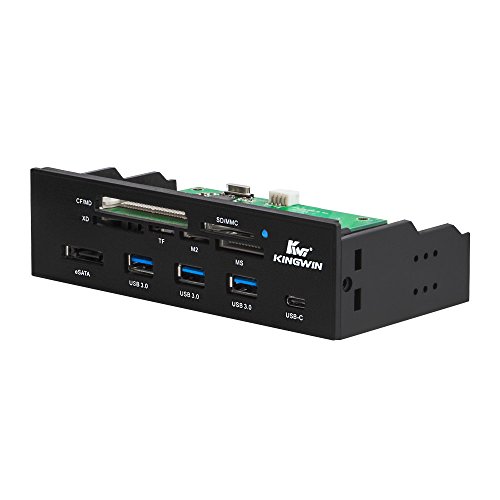
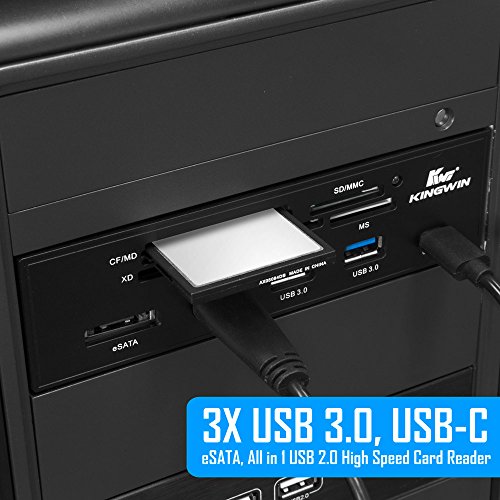
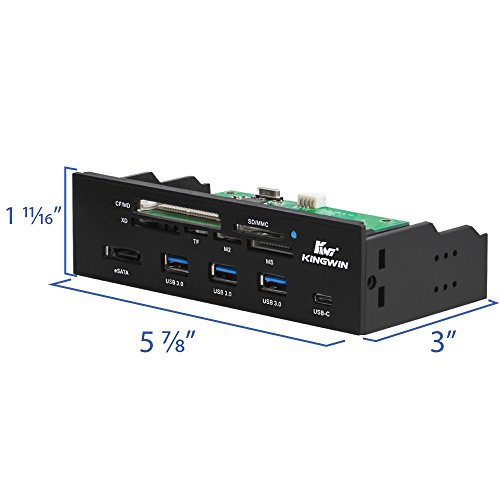
- •Super speed USB 3.0 supports up to 5 Gbps of bandwidth
- •Three front accessible USB 3.0 Type-A Ports
- •One front accessible USB 3.1 Type-C port
- •Support SD/MMC/SDHC, CF/CF II/hs CF/Mid, MS/MS Duo/MS Pro, xd, tf/T-Flash, M2
- •All in 1 high speed card reader
Kingwin Powered USB Hub 3.0 w/ 1 USB-C Port, SD Card Reader & Micro SD Card Reader - Sata Power Port w/Lightning Speed Data Transfer Up to 5Gbps - 5.25" Computer Case Front Bay, black (KW525-3U3CR)
List Price: $66.33$59.70DEALYou Save: $6.63 (10%)
Free shippingFree Returns – 30 daysFree Order CancellationSecure Payment2–3 Days DeliveryGet It October 24, 2026In Stock (1)No marketing spamNo account requiredFulfilment by FedEx / Amazon / UPS / ShipwirePayPal / Card Buyer Protection
Customer Reviews
Reviews sourced from verified Amazon purchasers3.8
out of 5
Based on 10 reviews
5★
50%
4★
20%
3★
10%
2★
0%
1★
20%
Difficulty Mounting in Today's Case Designs; Will Not Allow More Than 2 HDDs Without Expansion Card
Ryan K.✓ Verified Purchase•October 18, 2017
It's worth $30, but I'm not singing the praises of the Kingwin HDD power switch. First, this switch case is not a standard HDD / optical size in depth, so mounting is difficult in today's tool-less case design. My HP does not allow access to the left side of the 5-1/4" bay bracket. (This was the first time I wanted to remove the "other side" of the computer case, only to find out that it is riveted to the frame, as is the drive bay bracket itself.) So there is no way to support the switch housing on the left side. The case does come with extra thick-head screws that act as supports for the tool-less feature. You would need 2 screws on each side of the switch for this to work. I could use only one such screw on the left side. The right side could be screwed into the drive bay bracket. What I'm left with is a well-mounted right side, but almost no support on the left. Pressing button #1 causes the switch to go into the case 1/4". Looks awful. No way around this. BEFORE ORDERING MAKE SURE YOUR COMPUTER CASE HAS ACCESS TO BOTH SIDES OF THE 5-1/4" BAY BRACKET!
The other thing is that this only controls the power cables, not the SATA cables. Most motherboards only come with 2 SATA jacks, so if you want to use all this switch with 6 drives, you would need another SATA controller card plugged into a PCI or PCI-E slot (make sure you order the right thing). Even with only 2 jacks, make sure you have a 2nd cable for your 2nd HDD or this switch will be useless!
The other thing is that this only controls the power cables, not the SATA cables. Most motherboards only come with 2 SATA jacks, so if you want to use all this switch with 6 drives, you would need another SATA controller card plugged into a PCI or PCI-E slot (make sure you order the right thing). Even with only 2 jacks, make sure you have a 2nd cable for your 2nd HDD or this switch will be useless!
Permanent installation - an unexpected feature
Patrick M McDonald✓ Verified Purchase•October 16, 2017
Ordered the seven port USB hub because I was tired of limited number of USB ports on my cases.
I went to go install it and it barely fit in my 5.25" bay. I had to really shove it in there.
But the most unexpected thing for me happened when I plugged the USB cable in to the motherboard header. I heard a click and thought it was weird so I tried pulling the cable loose. It wouldn't come out. I pulled a little harder. Nothing. Pulled a little bit harder and finally the plug came out.
Then I looked at it. It had somehow fused itself with the plastic connector on the motherboard and pulled the whole thing out with it leaving only bare pins on the motherboard.
While I had it out I tried to separate the plug from the plastic again but could not do so. I could probably have cut the plastic shroud but that seemed useless.
I ended up being able to push the connector with the shroud back on to the pins very carefully. This hub's cable and this motherboard are now mated together for life. I hope they live happily ever after.
1/5 stars would not order again.
I went to go install it and it barely fit in my 5.25" bay. I had to really shove it in there.
But the most unexpected thing for me happened when I plugged the USB cable in to the motherboard header. I heard a click and thought it was weird so I tried pulling the cable loose. It wouldn't come out. I pulled a little harder. Nothing. Pulled a little bit harder and finally the plug came out.
Then I looked at it. It had somehow fused itself with the plastic connector on the motherboard and pulled the whole thing out with it leaving only bare pins on the motherboard.
While I had it out I tried to separate the plug from the plastic again but could not do so. I could probably have cut the plastic shroud but that seemed useless.
I ended up being able to push the connector with the shroud back on to the pins very carefully. This hub's cable and this motherboard are now mated together for life. I hope they live happily ever after.
1/5 stars would not order again.
Easily Controls Your Fan Speeds
Logan B.✓ Verified Purchase•July 28, 2017
This fan controller has been a real life saver for me! I have a very basic motherboard/computer case, neither of which allow me to be able to control the speeds of the fans I have installed on for my gaming rig. However, my fiancé does not like how loud the setup gets (I have a liquid cooler in my setup that has fans on its radiator that run up to 2500 rpm). So, I installed this into my setup. Now, when I'm using the computer, all I have to do is tell each fan how fast I want it to run! When I'm done, I just set them all to the lowest setting possible, which seems to be about half of the full-running speed of each fan. The touch screen works very nice as well, which was a main concern of mine. You have to press the keys a little bit harder than you would a phone's screen.
The reason why I am giving this product four stars rather than a perfect five is because of the thermometer. The thermometer doesn't plug into the port on the motherboard that relays a cpu's core temperatures; rather, it is just a free-floating thermometer. The instructions suggest that you put the thermometer in a heatsink for optimal use, but since I have a water-cooled system, I just have it free-floating as close to the seal of the cooler and the cpu as I have possible, essentially measuring the temperature of the inside of the case itself. I would like for it to be able to read the temperature of the cpu as that is much more important.
The reason why I am giving this product four stars rather than a perfect five is because of the thermometer. The thermometer doesn't plug into the port on the motherboard that relays a cpu's core temperatures; rather, it is just a free-floating thermometer. The instructions suggest that you put the thermometer in a heatsink for optimal use, but since I have a water-cooled system, I just have it free-floating as close to the seal of the cooler and the cpu as I have possible, essentially measuring the temperature of the inside of the case itself. I would like for it to be able to read the temperature of the cpu as that is much more important.
Turn Hard Drives off and on individually - But Be Careful!
Max Grodty✓ Verified Purchase•January 12, 2017
The KIngwin HDD Power Switch Module is a well designed, solidly built product. This device, mounted in an extra DVD drive bay, allows you to have multiple separate computers operating in one single case. This offers the benefits of saving power on unused drives, prevents applications on one HDD from interfering with other applications on other drives, and prevents accidental erasure of a drive while adding a new operating system. The cables are pre-attached and long enough to reach the farthest places in a large case.
In my instance, I operate a ProTools recording system that uses its own mixing board, sound card, etc.on a high powered computer. Due to the complexity of the software and all its plug-ins it is recommended to operate ProTools on a single computer all by itself. By using the Kingwin HDD Power Switch Module I can run a Windows XP computer for all my legacy software on one solid state drive, my Windows7 recording computer on another SSD, and another Win7 SSD drive for all of my other stuff - one at a time without interfering with each other. All 3 SSD's share a single large HDD data drive which is left on all the time. It's very convenient (and space saving).
I have the pushbuttons on the front clearly labeled so that I know which drive is which. I turn on the one drive that I want to use and turn off the others, then boot up the computer. When I'm finished, I allow the drive to shut down completely during reboot, then turn it off and switch the other one on while the computer is re-booting. Works perfectly.
Be CAREFUL and DO NOT push these buttons while the computer is running. I fried my motherboard by carelessly pushing on off buttons for the hard drives. To be sure this never happens to you, ALWAYS POWER DOWN first before switching hard drive configurations.
I have been trying to solve this problem for years and the Kingwin HDD Power Switch Module does it for me. It will simplify things greatly. If you operate a complex computer, try one and be careful with it.
In my instance, I operate a ProTools recording system that uses its own mixing board, sound card, etc.on a high powered computer. Due to the complexity of the software and all its plug-ins it is recommended to operate ProTools on a single computer all by itself. By using the Kingwin HDD Power Switch Module I can run a Windows XP computer for all my legacy software on one solid state drive, my Windows7 recording computer on another SSD, and another Win7 SSD drive for all of my other stuff - one at a time without interfering with each other. All 3 SSD's share a single large HDD data drive which is left on all the time. It's very convenient (and space saving).
I have the pushbuttons on the front clearly labeled so that I know which drive is which. I turn on the one drive that I want to use and turn off the others, then boot up the computer. When I'm finished, I allow the drive to shut down completely during reboot, then turn it off and switch the other one on while the computer is re-booting. Works perfectly.
Be CAREFUL and DO NOT push these buttons while the computer is running. I fried my motherboard by carelessly pushing on off buttons for the hard drives. To be sure this never happens to you, ALWAYS POWER DOWN first before switching hard drive configurations.
I have been trying to solve this problem for years and the Kingwin HDD Power Switch Module does it for me. It will simplify things greatly. If you operate a complex computer, try one and be careful with it.
Works Great!
JohnDennis✓ Verified Purchase•December 31, 2016
Product works as advertised. Easy install. Power connects to a 4-pin molex connector from the power supply (this is a tap connector so you can plug another molex connector behind it, and not use up your power supply connectors). Very easy install. Sockets will take up to a 4-pin fan plug. I wanted to slow down a noisy fan and this did the job nicely. Also adjusted the speed of a second fan. Very quiet computer now.
Page 1 of 2