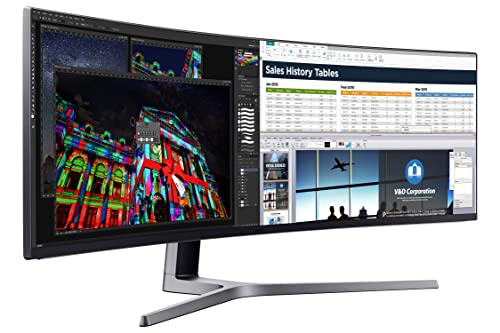
SAMSUNG 49-Inch CHG90 144Hz Curved Gaming Monitor (LC49HG90DMNXZA) – Super Ultrawide Screen QLED Computer Monitor, 3840 x 1080p Resolution, 1ms Response, FreeSync 2 with HDR,Black


Key features
- •49 INCH SUPER ULTRAWIDE 32:9 CURVED GAMING MONITOR with dual 27 inch screen side by side
- •QUANTUM DOT (QLED) TECHNOLOGY, HDR support and factory calibration provides stunningly realistic and accurate color and contrast
- •144HZ HIGH REFRESH RATE and 1ms ultra fast response time work to eliminate motion blur, ghosting, and reduce input lag
- •ENHANCED ERGONOMICS with an adjustable stand and VESA compatibility
- •PRODUCT DIMENSIONS (with stand): 47.36 inches x 20.69 inches x 15.02 inches (WxHxD). Dimensions Without Stand-47.3 x 14.5 x 7.6 inches
SAMSUNG 49-Inch CHG90 144Hz Curved Gaming Monitor (LC49HG90DMNXZA) – Super Ultrawide Screen QLED Computer Monitor, 3840 x 1080p Resolution, 1ms Response, FreeSync 2 with HDR,Black
List Price: $1801.86$1621.67DEALYou Save: $180.19 (10%)
Free shippingFree Returns – 30 daysFree Order CancellationSecure Payment2–3 Days DeliveryGet It August 10, 2026In Stock (1)No marketing spamNo account requiredFulfilment by FedEx / Amazon / UPS / ShipwirePayPal / Card Buyer Protection
Customer Reviews
Reviews sourced from verified Amazon purchasers4.4
out of 5
Based on 10 reviews
5★
60%
4★
40%
3★
0%
2★
0%
1★
0%
Very nice
Great Read!✓ Verified Purchase•September 30, 2023
Love the screen size and quality of picture. I work from home and can rub 3 different programs at once on one screen thanks to this. Perfect for finance
Great!! Once I Replaced it.
Jeffrey Bunn✓ Verified Purchase•September 17, 2023
This is a great monitor. I would be very cautious, or maybe just as cautious as one should when buying a monitor. When I first got it, there were strange horizontal lines in the picture. They were an issue with some pixels it seems.
The issue was most clearly seen on a light blue or white background. I am not showing any of these photos here because it is not a great indication of how the monitor looks in actuality. I am simply going to say that it looks great, and having a 144Hz monitor will change your life for gaming.
My worst experience was with getting it exchanged for a working model. Here's a timeline of what happened and some advice. Only took a couple of days to get it sorted but it was a pain for sure.
Day 1 - I received it and unboxed it. It took some time to setup as it is so large. I was also being very particular on hiding wires and such. That evening when I turned it on I saw the issue, at first i was wondering since it was a 1080p if I was just seeing the pixels (I wasn't).
Day2 - Called Samsung first. At first call (the number listed in manual) I was sent through a very bad phone tree to finally get a person on the phone (this only took about 20 minutes ). Once I told them my monitor model they said it was a "commercial model" and they had to forward me to their business line. This was actually quite fast. I was connected quickly (another phone tree) to a Samsung rep who was very helpful, and informed me that the other line could have easily answered my question. The rep asked me to send them some photos - I took some on my phone and them replied to an email they sent me. They said this was a known defect, and it could be repaired (no cost), but why should I get it repaired and not replaced. They informed me to contact amazon.
Next I called amazon, well actually I used the website to try and start a return/replace. The website said I could not simply do a return and that I had to either chat or have amazon call me/ I elected for amazon to call me. They did and then I waited on hold. Then the amazon rep stated that a return could not be processed unless we called Samsung to ensure it was not a user error or something. I informed them I had already called, they stated they could hear me well then proceeded to call Samsung. I was then told the Samsung rep couldn't hear me that well, from the amazon rep - but anyhow after about 3 minutes of the person trying to get me to troubleshoot the problem, and then requesting more photos they (Samsung) actually decided to look up my number and found the previous call. Immediately the Samsung rep said they could fix it and went through how they would. The amazon rep was quick to point out that Samsung could fix it and wanted to just drop off the call and let that happen - had to fight to make sure that didn't happen. Then another 30 minutes of them trying to arrange a pickup of the monitor for my house later they asked if I still had the box and had the ability to disassemble (duhh - I put it together). So that's what I did and the return processed the way I expected it to a full 2 hours before this call.
My advice: quickly test the monitor, see if it works, Keep the box (obviously), and call Samsung first like I did if you have an issue. Then ask them for some sort of a tracking number for your issue before returning to amazon. Also make sure to stand strong to make sure amazon will take your return. For such an expensive item they seem to want to pawn it off on the manufacturers.
The issue was most clearly seen on a light blue or white background. I am not showing any of these photos here because it is not a great indication of how the monitor looks in actuality. I am simply going to say that it looks great, and having a 144Hz monitor will change your life for gaming.
My worst experience was with getting it exchanged for a working model. Here's a timeline of what happened and some advice. Only took a couple of days to get it sorted but it was a pain for sure.
Day 1 - I received it and unboxed it. It took some time to setup as it is so large. I was also being very particular on hiding wires and such. That evening when I turned it on I saw the issue, at first i was wondering since it was a 1080p if I was just seeing the pixels (I wasn't).
Day2 - Called Samsung first. At first call (the number listed in manual) I was sent through a very bad phone tree to finally get a person on the phone (this only took about 20 minutes ). Once I told them my monitor model they said it was a "commercial model" and they had to forward me to their business line. This was actually quite fast. I was connected quickly (another phone tree) to a Samsung rep who was very helpful, and informed me that the other line could have easily answered my question. The rep asked me to send them some photos - I took some on my phone and them replied to an email they sent me. They said this was a known defect, and it could be repaired (no cost), but why should I get it repaired and not replaced. They informed me to contact amazon.
Next I called amazon, well actually I used the website to try and start a return/replace. The website said I could not simply do a return and that I had to either chat or have amazon call me/ I elected for amazon to call me. They did and then I waited on hold. Then the amazon rep stated that a return could not be processed unless we called Samsung to ensure it was not a user error or something. I informed them I had already called, they stated they could hear me well then proceeded to call Samsung. I was then told the Samsung rep couldn't hear me that well, from the amazon rep - but anyhow after about 3 minutes of the person trying to get me to troubleshoot the problem, and then requesting more photos they (Samsung) actually decided to look up my number and found the previous call. Immediately the Samsung rep said they could fix it and went through how they would. The amazon rep was quick to point out that Samsung could fix it and wanted to just drop off the call and let that happen - had to fight to make sure that didn't happen. Then another 30 minutes of them trying to arrange a pickup of the monitor for my house later they asked if I still had the box and had the ability to disassemble (duhh - I put it together). So that's what I did and the return processed the way I expected it to a full 2 hours before this call.
My advice: quickly test the monitor, see if it works, Keep the box (obviously), and call Samsung first like I did if you have an issue. Then ask them for some sort of a tracking number for your issue before returning to amazon. Also make sure to stand strong to make sure amazon will take your return. For such an expensive item they seem to want to pawn it off on the manufacturers.
Transformative
Robert✓ Verified Purchase•September 9, 2023
I've now had several days with this monitor. Setup was relatively easy. Most of the time spent was preparing my desk. At first, I have to admit I was more than a little disappointed with the quality of the video. QLED black levels, while marginally better than my previous Samsung 2333 monitors, are not all that impressive, especially once you've seen the true blacks that OLED delivers. Text looked quite poor on Windows 10 - markedly worse than my old monitors - heavily aliased, just yuck. I fiddled forever with clear type and monitor settings combinations, but nothing looked good.
But over the past few days, I swear it's gotten better. I think I may simply be rationalizing because I could find no information regarding "QLED burn-in" times. Maybe I've just adjusted to poorer quality text?
But something else has happened that I did not expect. Despite the less-than-ideal image performance, I've fallen head over heels in love with this amazing piece of technology. Almost overnight, it has transformed the way I work and the way I play.
I've been running a dual 23" 1920x1080 monitor setup for the past 10 years. This screen is simply those 2 screens merged together. But what a difference the merger makes!
I was excited to use the Easy Setting Box software to make the transition to a single screen smoother. But now I realize I have absolutely no need for it whatsoever. With so much operating space, working with multiple windows has become almost a joyous activity. The sense of freedom afforded by a giant contiguous workspace cannot be overstated. As a software developer, I find myself sizing most of my windows to slightly LARGER than 24" - not full screen, just extra wide - where I can keep lots of subpanels and tools comfortably on screen at all times.
Desktop backgrounds look incredible.
Games: I don't really play video games. Scratch that. Now I do. You HAVE to play video games on this beast. Until VR reaches its inevitable critical mass, the CHG90 is here to let you feel the future without donning a faskmask. A surprising number of video games support the near-comedic 3840 x 1080 resolution and they look friggin' incredible. All that real estate adds up to better field of view and massively intensified immersion. I feel like dragging people off the street into my office just so I can show them this thing. I feel almost guilty possessing something so unabashedly "future".
I was worried that my little GTX960 video card wasn't gonna cut it - but it works fine on games like Call of Duty, where, with some lowering of settings, I can still get 60FPS.
The productivity and gaming enhancements afforded by this mystical device are truly transformative. Yes, I wish the pixel density was higher, but I'm simply too impressed with the overall impact to complain. The more time you spend in front of your computer screen, the more highly I recommend this product.
But over the past few days, I swear it's gotten better. I think I may simply be rationalizing because I could find no information regarding "QLED burn-in" times. Maybe I've just adjusted to poorer quality text?
But something else has happened that I did not expect. Despite the less-than-ideal image performance, I've fallen head over heels in love with this amazing piece of technology. Almost overnight, it has transformed the way I work and the way I play.
I've been running a dual 23" 1920x1080 monitor setup for the past 10 years. This screen is simply those 2 screens merged together. But what a difference the merger makes!
I was excited to use the Easy Setting Box software to make the transition to a single screen smoother. But now I realize I have absolutely no need for it whatsoever. With so much operating space, working with multiple windows has become almost a joyous activity. The sense of freedom afforded by a giant contiguous workspace cannot be overstated. As a software developer, I find myself sizing most of my windows to slightly LARGER than 24" - not full screen, just extra wide - where I can keep lots of subpanels and tools comfortably on screen at all times.
Desktop backgrounds look incredible.
Games: I don't really play video games. Scratch that. Now I do. You HAVE to play video games on this beast. Until VR reaches its inevitable critical mass, the CHG90 is here to let you feel the future without donning a faskmask. A surprising number of video games support the near-comedic 3840 x 1080 resolution and they look friggin' incredible. All that real estate adds up to better field of view and massively intensified immersion. I feel like dragging people off the street into my office just so I can show them this thing. I feel almost guilty possessing something so unabashedly "future".
I was worried that my little GTX960 video card wasn't gonna cut it - but it works fine on games like Call of Duty, where, with some lowering of settings, I can still get 60FPS.
The productivity and gaming enhancements afforded by this mystical device are truly transformative. Yes, I wish the pixel density was higher, but I'm simply too impressed with the overall impact to complain. The more time you spend in front of your computer screen, the more highly I recommend this product.
Does what it sets out to do beautifully. Question is, does it meet your needs?
Matt Greer✓ Verified Purchase•September 5, 2023
I've now had this monitor for four days. I will update this review periodically as I own it longer.
I've had no sleeping/resuming issues at all as others have reported. I am using Windows 10 and Ubuntu 16.04 and the monitor 100% works flawlessly with both.
I give this monitor 5 stars because it accomplishes what it set out to do perfectly. But buyer beware, you need to know what you're getting with this beast. The 1080 vertical resolution doesn't bother me at all. I can now comfortably put three windows side by side to do my work and that alone is worth the price of admission.
Gaming wise this thing is fantastic. I have paired it with a Radeon Vega 64 and since it only has half the number of pixels a 4k monitor has, all games run beautifully. Freesync works from 48hz up to 144hz. I am finding most games can handle 3840x1080 rather well, and really recent games handle it perfectly. The view is so immersive, it's just fantastic.
This monitor has a DPI of about 80. If you're like me and have been using high DPI monitors for the past few years, this is a pretty, er, striking regression. Yes, you can really see pixels easily on this thing. No, fonts don't look that great (fonts look a little better in Ubuntu than Windows, but regardless nowhere near the beauty a high DPI monitor would provide). To me this is the only real compromise you need to make with this monitor. The gaming and productivity gains I get far outweigh this setback for me.
This monitor has no speakers at all.
I have it mounted on my monitor arm with no problems. The monitor weighs 33lbs which is the upper limit on my arm. Getting it mounted was quite the chore and nearly led to my wife divorcing me, but we did it.
UPDATE 1:
I've now been using this monitor for work quite a bit and I have to say I love it. I can fit everything I need comfortably onto the screen. No more switching desktops. It's been a great productivity and "staying in the zone" boost.
UPDATE 2:
I've now had this monitor for 2 months and you will have to claw it out of my cold dead hands. I. Love. This. Thing. My only complaint is how it changes sources, it's a bit tedious. My productivity, focus and happiness while working has increased so much with this monitor, and gaming is fantastic. I use Linux with a tiling window manager. To be honest when I'm in Windows or OSX then this monitor isn't quite as godly. The automatic tiling really helps squeeze out the full worth of this giant beast.
I've had zero issues with it. No matter what machine, OS or whatever, it has worked 100% perfectly.
I've added an up close photo of text in OSX. Windows looks very similar. This monitor does not render text well due to its low DPI.
UPDATE 3:
This will be my last update I think, I'm at about 9 months of owning it.
The arm I am using is the Loctek D7L.
Through some sheer luck I managed to get this monitor at work too. Now my life is pretty much complete.
I now use Windows 10 quite a bit at home and at work, and to manage the massive space I have found Divvy works pretty well.
Absolutely zero regrets buying this, it's simply stellar.
I've had no sleeping/resuming issues at all as others have reported. I am using Windows 10 and Ubuntu 16.04 and the monitor 100% works flawlessly with both.
I give this monitor 5 stars because it accomplishes what it set out to do perfectly. But buyer beware, you need to know what you're getting with this beast. The 1080 vertical resolution doesn't bother me at all. I can now comfortably put three windows side by side to do my work and that alone is worth the price of admission.
Gaming wise this thing is fantastic. I have paired it with a Radeon Vega 64 and since it only has half the number of pixels a 4k monitor has, all games run beautifully. Freesync works from 48hz up to 144hz. I am finding most games can handle 3840x1080 rather well, and really recent games handle it perfectly. The view is so immersive, it's just fantastic.
This monitor has a DPI of about 80. If you're like me and have been using high DPI monitors for the past few years, this is a pretty, er, striking regression. Yes, you can really see pixels easily on this thing. No, fonts don't look that great (fonts look a little better in Ubuntu than Windows, but regardless nowhere near the beauty a high DPI monitor would provide). To me this is the only real compromise you need to make with this monitor. The gaming and productivity gains I get far outweigh this setback for me.
This monitor has no speakers at all.
I have it mounted on my monitor arm with no problems. The monitor weighs 33lbs which is the upper limit on my arm. Getting it mounted was quite the chore and nearly led to my wife divorcing me, but we did it.
UPDATE 1:
I've now been using this monitor for work quite a bit and I have to say I love it. I can fit everything I need comfortably onto the screen. No more switching desktops. It's been a great productivity and "staying in the zone" boost.
UPDATE 2:
I've now had this monitor for 2 months and you will have to claw it out of my cold dead hands. I. Love. This. Thing. My only complaint is how it changes sources, it's a bit tedious. My productivity, focus and happiness while working has increased so much with this monitor, and gaming is fantastic. I use Linux with a tiling window manager. To be honest when I'm in Windows or OSX then this monitor isn't quite as godly. The automatic tiling really helps squeeze out the full worth of this giant beast.
I've had zero issues with it. No matter what machine, OS or whatever, it has worked 100% perfectly.
I've added an up close photo of text in OSX. Windows looks very similar. This monitor does not render text well due to its low DPI.
UPDATE 3:
This will be my last update I think, I'm at about 9 months of owning it.
The arm I am using is the Loctek D7L.
Through some sheer luck I managed to get this monitor at work too. Now my life is pretty much complete.
I now use Windows 10 quite a bit at home and at work, and to manage the massive space I have found Divvy works pretty well.
Absolutely zero regrets buying this, it's simply stellar.
AWESOME Gaming Monitor BUT...
Thrillseeker!✓ Verified Purchase•August 31, 2023
Greetings - I have had this monitor now for about a month and wanted to submit my own review and feedback on some things that I have learned during this time. I won't go into the specs, pro's, cons, etc. since there are other reviews now that do that. FIRST - I would suggest that if you DON'T plan to do any gaming on this monitor don't buy it - this IS a monitor designed for gaming. If you are thinking about purchasing it JUST for productivity I doubt you will like the vertical resolution - 1080 vertical lines - 80DPI/PPI just doesn't cut it for a lot of productivity.
GAMING: For gaming this monitor is AWESOME! By far the most immersive gaming experience I have ever had. I had triple monitors before this and I cannot believe how much more enjoyable gaming is without the side bezels. The colors are rich and vibrant, 120/144hz refresh rate results in very smooth game play, I have fewer monitor cables, and I don't have to configure my NVIDIA GTX 1070 8GB video card into surround mode every time I want to play a game. And I can run every game I have tried (all of the COD's from 2007 on, F1 2017, Project Cars 2) in 32:9 with full high/ultra settings at 60+ FPS. I'd give it a 5 star rating for gaming without question!
PRODUCTIVITY: I use this monitor 75% for gaming and 25% for productivity. No question it falls a little short when it comes to productivity. My system uses Windows 10 professional and the default Windows font (and more importantly size) just doesn't look that great. The fonts are too big and choppy/aliased. I have tried everything I can think of to improve it - only the following has made a difference for me:
1 - Use a DP connection, not an HDMI connection. The fonts with DP look crisper and sharper for me.
2 - In the monitor settings choose the DP Version 1.1 or 1.2 setting. Don't use the Version 1.2+ setting.
3 - In the monitor settings turn your sharpness down to about 55-60 (just before it starts to blur the text). This smooths out the fonts some for me.
(if you have found any other tweaks to improve the fonts or reduce the windows default font size below 100% please comment)
These 3 tweaks result in a resolution that I can live with given the amount of productivity that I do daily. And I really like the Easy Box software that allows you to organize your screen real estate into lots of different configurations with drag/drop. It makes it very easy to have a lot of stuff on screen at one time and keep it all organized.
ISSUES: Based on the other reviews there DOES seem to be an issue with the monitor turning off in Windows 10 and not waking back up. It happens to me too. Unplugging it doesn't work. You have to turn your PC completely off and back on to wake it up again. But I got around this by leaving the monitor on all the time and using the W10 screen saver to just blank it out. Besides I want to run the monitor all the time now anyway to fully break it in and check for any issues before my Amazon return time expires. Hopefully Samsung will address this issue quickly. The cost of this monitor is fluctuating daily on Amazon from $1500 down to $999. I picked it up for $999. I personally don't think it's worth much more than that due to the 1080p vertical resolution shortcoming. Every owner has to be in their OS some of the time at least.
QUESTION: To the other owners out there - I have purposely not updated the monitor BIOS because the monitor is working perfectly right now and I don't want to cause any issues. Does a BIOS update address this W10 wake up issue, or any other significant issues that might make the upgrade worth doing? Samsung has NO documentation to go with their firmware updates at all so I won't do the update without a good reason for it. If it isn't broke, don't fix it right? CHEERS!
GAMING: For gaming this monitor is AWESOME! By far the most immersive gaming experience I have ever had. I had triple monitors before this and I cannot believe how much more enjoyable gaming is without the side bezels. The colors are rich and vibrant, 120/144hz refresh rate results in very smooth game play, I have fewer monitor cables, and I don't have to configure my NVIDIA GTX 1070 8GB video card into surround mode every time I want to play a game. And I can run every game I have tried (all of the COD's from 2007 on, F1 2017, Project Cars 2) in 32:9 with full high/ultra settings at 60+ FPS. I'd give it a 5 star rating for gaming without question!
PRODUCTIVITY: I use this monitor 75% for gaming and 25% for productivity. No question it falls a little short when it comes to productivity. My system uses Windows 10 professional and the default Windows font (and more importantly size) just doesn't look that great. The fonts are too big and choppy/aliased. I have tried everything I can think of to improve it - only the following has made a difference for me:
1 - Use a DP connection, not an HDMI connection. The fonts with DP look crisper and sharper for me.
2 - In the monitor settings choose the DP Version 1.1 or 1.2 setting. Don't use the Version 1.2+ setting.
3 - In the monitor settings turn your sharpness down to about 55-60 (just before it starts to blur the text). This smooths out the fonts some for me.
(if you have found any other tweaks to improve the fonts or reduce the windows default font size below 100% please comment)
These 3 tweaks result in a resolution that I can live with given the amount of productivity that I do daily. And I really like the Easy Box software that allows you to organize your screen real estate into lots of different configurations with drag/drop. It makes it very easy to have a lot of stuff on screen at one time and keep it all organized.
ISSUES: Based on the other reviews there DOES seem to be an issue with the monitor turning off in Windows 10 and not waking back up. It happens to me too. Unplugging it doesn't work. You have to turn your PC completely off and back on to wake it up again. But I got around this by leaving the monitor on all the time and using the W10 screen saver to just blank it out. Besides I want to run the monitor all the time now anyway to fully break it in and check for any issues before my Amazon return time expires. Hopefully Samsung will address this issue quickly. The cost of this monitor is fluctuating daily on Amazon from $1500 down to $999. I picked it up for $999. I personally don't think it's worth much more than that due to the 1080p vertical resolution shortcoming. Every owner has to be in their OS some of the time at least.
QUESTION: To the other owners out there - I have purposely not updated the monitor BIOS because the monitor is working perfectly right now and I don't want to cause any issues. Does a BIOS update address this W10 wake up issue, or any other significant issues that might make the upgrade worth doing? Samsung has NO documentation to go with their firmware updates at all so I won't do the update without a good reason for it. If it isn't broke, don't fix it right? CHEERS!
Page 1 of 2