HUO JI E-Yooso Z-88 RGB Mechanical Gaming Keyboard, Metal Panel, Brown Switches, Compact 81 Keys Hot Swappable for Mac, PC, Black
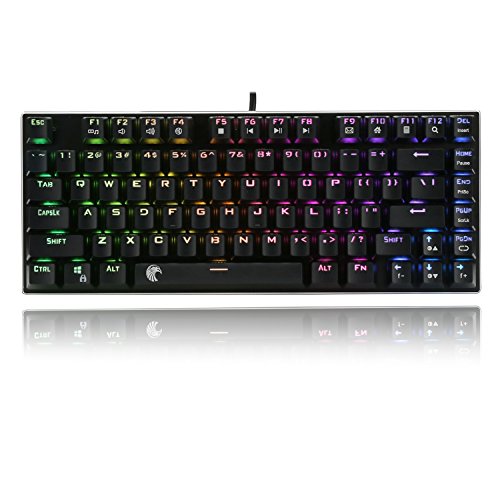


Key features
- •❤️ Brown Switches, Tactile and lightly clikcy ▶ Custom mechanical switches designed for longevity, responsiveness, and durability. Offer the best tactile typing experience. As well being ever so slightly QUIETER than blue switch, but louder than red switches
- •❤️ Anti-ghosting 81 Keys, N-key rollover ▶ Allowing multi-keys to work simultaneously with high speed. Each key is controlled by independent switch, let you enjoy high-grade games with fast response.
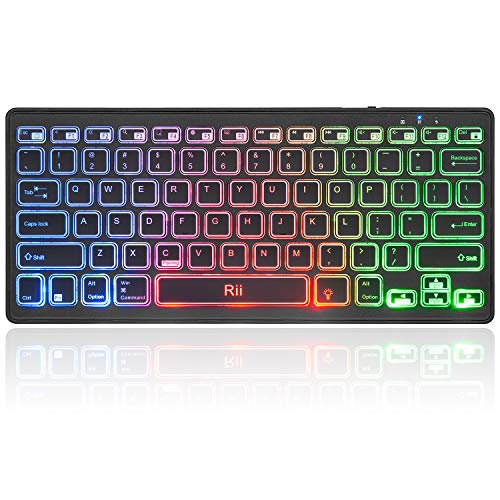
- •❤️ Preset 10-mode RGB Backlighting and Color- Flashing Speed ▶ Double-shot injection molded keycaps for crystal clear backlighting and extreme durability. There is a solid color backlit mode
- •❤️ Durability and Wide Compatibility ▶ Made of Over-engineered ABS and metal material, with matte-finish texture and gold plated USB connector, it is sturdy and robust. Compatible with Windows 10, Windows 8, Windows 7, Mac OS X, Windows XP, Windows VISTA.
- •❤️ Key Shortcuts and Ergonomical design ▶Easy to access to calculator, email, web browser, volume, media etc with FN+F1-F12. Ergonomic design: the stepped keycap makes it sleek and thearc and slope fit your hands easily to prevent fatigue. Provides Windows Key lock for gaming. video review: youtu.be/yl1CGt8K_jo
HUO JI E-Yooso Z-88 RGB Mechanical Gaming Keyboard, Metal Panel, Brown Switches, Compact 81 Keys Hot Swappable for Mac, PC, Black
List Price: $69.82$62.84DEALYou Save: $6.98 (10%)
Free shippingFree Returns – 30 daysFree Order CancellationSecure Payment2–3 Days DeliveryGet It October 26, 2026In Stock (3)No marketing spamNo account requiredFulfilment by FedEx / Amazon / UPS / ShipwirePayPal / Card Buyer Protection
Customer Reviews
Reviews sourced from verified Amazon purchasers4.4
out of 5
Based on 10 reviews
5★
50%
4★
50%
3★
0%
2★
0%
1★
0%
'Hello' from West Virginia! Freaky Fast Delivery! Puts Jimmy Johns to shame!
FireSnake✓ Verified Purchase•September 22, 2023
The media could not be loaded. I ordered this thing on WEDNESDAY, and it was scheduled by Amazon to come in 9 days later on FRIDAY. Instead it arrived in only 2 days, the fastest Amazon delivery I have ever experienced!
So I wanted a 60% keyboard because I have two desktop PCs side by side. One is a gaming rig and the other is purpose built media computer. Having two full size keyboards on a desk just takes up too much room and doesnt work so well. So I wanted one Full Size for the gaming PC and a smaller 60% keyboard underneath the first as not to clutter up my whole desk.
I looked thru all the 60%s on the market. Before this one I got a Logitech 60% keyboard but it didnt work out because it was bluetooth only and did not work until the computer was all the way up to desktop.
I dual boot Fedora KDE Linux and Windows using GRUB Boot loader. When I used the bluetooth keyboard it didnt stay connected when I rebooted. So I could not use it in Grub, nor could I use it to type in my password and login. I had to use another keyboard to get to desktop, then sync the bluetooth up and then the logitech worked. That wasnt going to cut it.
I also wanted Arrow keys on my 60% For the Grub menu.
This keyboard was perfect!
I got to say using it, and previously, I was a huge Logitech fan, this keyboard feels good! I can type on it easily and fits my fingers well. Its comfortable and its not loud or anything. I got the Cherry MX and the keys are soft and smooth and quiet. They are the average travel length for mechanical keys. They feel like my Logitech mechanical keyboard that also has cherry keys.
I think I also appreciate the consideration that the company sent me a KEY PULLER and EXTRA KEYS incase i have a bad key or some issue. It would be easy for me to just fix it myself and not need to RMA the entire keyboard for a simple problem. Thats pretty cool!
It comes with a bag of extra buttons and some different colored button tops if you want to custom layout some sort of gaming setup...... Programming the keys wasnt to bad at all, it didnt even require software like the razors or others require. I was able to simply press the {FUNCTION} Key and hold down {ESC} for 3 seconds, once it starts blinking, you can switch between types waves and functions with PAGE UP and PAGE DOWN.
Once you have your type of effect selected, you can change the specific colors using PLUS and MINUS until you get to one you like.
Check mine out, I customized mine! It flashes when I press a key! Love it!
So I wanted a 60% keyboard because I have two desktop PCs side by side. One is a gaming rig and the other is purpose built media computer. Having two full size keyboards on a desk just takes up too much room and doesnt work so well. So I wanted one Full Size for the gaming PC and a smaller 60% keyboard underneath the first as not to clutter up my whole desk.
I looked thru all the 60%s on the market. Before this one I got a Logitech 60% keyboard but it didnt work out because it was bluetooth only and did not work until the computer was all the way up to desktop.
I dual boot Fedora KDE Linux and Windows using GRUB Boot loader. When I used the bluetooth keyboard it didnt stay connected when I rebooted. So I could not use it in Grub, nor could I use it to type in my password and login. I had to use another keyboard to get to desktop, then sync the bluetooth up and then the logitech worked. That wasnt going to cut it.
I also wanted Arrow keys on my 60% For the Grub menu.
This keyboard was perfect!
I got to say using it, and previously, I was a huge Logitech fan, this keyboard feels good! I can type on it easily and fits my fingers well. Its comfortable and its not loud or anything. I got the Cherry MX and the keys are soft and smooth and quiet. They are the average travel length for mechanical keys. They feel like my Logitech mechanical keyboard that also has cherry keys.
I think I also appreciate the consideration that the company sent me a KEY PULLER and EXTRA KEYS incase i have a bad key or some issue. It would be easy for me to just fix it myself and not need to RMA the entire keyboard for a simple problem. Thats pretty cool!
It comes with a bag of extra buttons and some different colored button tops if you want to custom layout some sort of gaming setup...... Programming the keys wasnt to bad at all, it didnt even require software like the razors or others require. I was able to simply press the {FUNCTION} Key and hold down {ESC} for 3 seconds, once it starts blinking, you can switch between types waves and functions with PAGE UP and PAGE DOWN.
Once you have your type of effect selected, you can change the specific colors using PLUS and MINUS until you get to one you like.
Check mine out, I customized mine! It flashes when I press a key! Love it!
Great keyboard and great switches!
Hirudin✓ Verified Purchase•September 19, 2023
I'm not a mechanical keyboard expert, but maybe a few of my observations will help make the decision of whether to buy this keyboard or not easier...
I bought the black RGB keyboard with Outemu brown switches. My switches have partial boxes around the stems.
First, I really like the layout of this keyboard. The 75% size gives you almost everything that a ten-key-less keyboard would give you, but in a more compact formfactor. I like that this one has the "Home" and "End" keys next to each other (some keyboards have them separated by the PgUp and PgDn buttons). A VERY minor gripe is that the spacing of the arrow keys is slightly wider than standard.
These switches seem to be very good. In fact, in the artificial "test" of holding the switch in your hand and clicking it, I like these Outemu (box?) brown switches better than Cherry brown, Kailh brown, Kailh box brown, or Gateron browns. That is testing individual loose switches - not keyboards with those switches installed - so perhaps I would have a different opinion if I was able to try them all side-by-side.
S welcome feature of this keyboard is that the cable is removable and plugs into the bottom of the board. There are channels molded into the plastic to route the cable straight out the back, to the left, or to the right. This is a good feature because, without the channels, inevitable movement of the cable will put strain on the micro USB port and may cause it to fail.
The lighting on the keyboard is adequate. It's not very bright and only has four brightness levels (five if you include "off" as a level). Also, the instructions aren't great and if it weren't for other Amazon reviews, I wouldn't have known that pressing Fn+'+' and Fn+'-' let you change from rainbow to single-color mode. Without using the software, it appears that the colors are limited to rainbow, white, red, green, blue, yellow, cyan, and magenta. Perhaps there's a way to change the color with more granularity, but I'm not aware of it and I'm not inclined to install the customization software. Also, the animated modes seem to be limited to five speeds, which seems like enough to me.
My keyboard came with a few extra switches and a switch puller. I have pulled and replaced several of the Outemu switches without damage, but both a Kailh switch and a Gateron switch that I tried to install into this keyboard got damaged. It seems that one of the tines on all of these switches is smaller/thinner than the other. The thinner tine on the Outemu switch is curved though, and I suspect this curve gives that tine extra rigidity. When I plugged the Kailh and Gateron switches into this keyboard's PCB, both the switches functioned, but when I pulled the switch back out I found that the thinner tine of each of these non-Outemu switches bent (bucked) so were not making a reliable connection with the PCB.
I bought the black RGB keyboard with Outemu brown switches. My switches have partial boxes around the stems.
First, I really like the layout of this keyboard. The 75% size gives you almost everything that a ten-key-less keyboard would give you, but in a more compact formfactor. I like that this one has the "Home" and "End" keys next to each other (some keyboards have them separated by the PgUp and PgDn buttons). A VERY minor gripe is that the spacing of the arrow keys is slightly wider than standard.
These switches seem to be very good. In fact, in the artificial "test" of holding the switch in your hand and clicking it, I like these Outemu (box?) brown switches better than Cherry brown, Kailh brown, Kailh box brown, or Gateron browns. That is testing individual loose switches - not keyboards with those switches installed - so perhaps I would have a different opinion if I was able to try them all side-by-side.
S welcome feature of this keyboard is that the cable is removable and plugs into the bottom of the board. There are channels molded into the plastic to route the cable straight out the back, to the left, or to the right. This is a good feature because, without the channels, inevitable movement of the cable will put strain on the micro USB port and may cause it to fail.
The lighting on the keyboard is adequate. It's not very bright and only has four brightness levels (five if you include "off" as a level). Also, the instructions aren't great and if it weren't for other Amazon reviews, I wouldn't have known that pressing Fn+'+' and Fn+'-' let you change from rainbow to single-color mode. Without using the software, it appears that the colors are limited to rainbow, white, red, green, blue, yellow, cyan, and magenta. Perhaps there's a way to change the color with more granularity, but I'm not aware of it and I'm not inclined to install the customization software. Also, the animated modes seem to be limited to five speeds, which seems like enough to me.
My keyboard came with a few extra switches and a switch puller. I have pulled and replaced several of the Outemu switches without damage, but both a Kailh switch and a Gateron switch that I tried to install into this keyboard got damaged. It seems that one of the tines on all of these switches is smaller/thinner than the other. The thinner tine on the Outemu switch is curved though, and I suspect this curve gives that tine extra rigidity. When I plugged the Kailh and Gateron switches into this keyboard's PCB, both the switches functioned, but when I pulled the switch back out I found that the thinner tine of each of these non-Outemu switches bent (bucked) so were not making a reliable connection with the PCB.
Great for first timers with mechanical keyboards
Jaylen Gamilla✓ Verified Purchase•September 10, 2023
First got this keyboard about a month ago and worked well, but after about 30-ish days of use, some keys started to go faulty even when I replaced them with the spare switches it comes with. I was able to reach out to the seller and they sent me a new one and it works as intended!
It's a good cheap mechanical keyboard to start out with that has a compact design while keeping the arrow keys and some keys that are necessary for some people (like me needing the PgUp, PgDn, End, Home, Del and the F-keys row). It comes with Outemu switches which are basically Cherry MX clones and much cheaper. It's also hot-swappable (however limited to Outemu switches) and has a nice and sturdy frame. It also comes with spare switches in case some start going bad. This keyboard is also nice to give more flare or brighten the RGB with pudding key caps (mine are the HK Doubleshot PBT puddings, refer to photos). To my surprise when I was swapping the key caps out, I noticed the stablizers were already lubed which was present on both keyboards I've received!
Pros:
- Easy on the wallet
- Customizable
- Comes with spare switches
- Great RGB effects and patterns
- PCB is very well made
- Hot-swappable
- Factory lubed stablizers
- Detachable USB-C
- Excellent customer service
Cons:
- Outemu switches vary from one another in durability. Some may be fine, some might start not working out of the box
- Limited to Outemu switches and will have to put in more work to fit in Cherry MX's or Gaterons
- Metal ringing in the frame when typing
- Hot-swapping switches are a bit of a pain since some are really stuck on there
- LED are not very bright especially with the key caps it comes with
- Interactive RGB can cause the keyboard to have some input lag/latency
- The design of the USB-C holder will restrict it to the USB-C it comes with, or any that are that size
Likes:
Once again, I'm rather surprised the stablizers came factory lubed whether it's noticeable or not, but it's still nice knowing that there was some factory lubing involved when making this. One of my other favorite things is how much the RGB pops on this keyboard especially with the white pudding key caps I have on. Having these cool and unique patterns is not common to see in the bigger named brand keyboards. I also really like the convenient layout of this 81-key keyboard that has these functions on the side along with keeping the arrow keys. You can also make it sound really nice and quiet with the right modifications like putting in foam dampening material and o-rings. Customer service is also great and do care about their customers so reach out to them if you ever have a problem with your keyboard!
Dislikes/Gripes:
I didn't take this into consideration when first buying this keyboard but being stuck with Outemu switches is kind of a bummer. Especially since I tried out Gateron switches on another keyboard, I definitely like Gaterons over Outemus. I would love it if this manufacturer would come out with a version that comes with Gateron switches and I would be willing to pay more for those! The metal ringing in the keyboard is more of a gripe, not really a dislike since I only really notice it when I'm listening out for it. It can also be mitigated by wearing headphones. Unfortunately using foam dampeners doesn't help with the ringing since it comes from the top part where the switches and PCB connects to.
Recommend?
To people looking for their first mechanical keyboard, yes! I would definitely rate it a 5-star for people looking to dive into mechanical keyboards and possibly turn into a keyboard enthusiast (like me lol).
To people who already know their keyboards and know what they want? No, not really unless this keyboard comes with options to sell with Gateron switches or actual Cherry MX switches, would love to see that happen. I would especially not recommend this to rhythm gamers since this keyboard has low polling rate. 3-stars out of 5.
Final rating: 4 out of 5 stars
It's a good cheap mechanical keyboard to start out with that has a compact design while keeping the arrow keys and some keys that are necessary for some people (like me needing the PgUp, PgDn, End, Home, Del and the F-keys row). It comes with Outemu switches which are basically Cherry MX clones and much cheaper. It's also hot-swappable (however limited to Outemu switches) and has a nice and sturdy frame. It also comes with spare switches in case some start going bad. This keyboard is also nice to give more flare or brighten the RGB with pudding key caps (mine are the HK Doubleshot PBT puddings, refer to photos). To my surprise when I was swapping the key caps out, I noticed the stablizers were already lubed which was present on both keyboards I've received!
Pros:
- Easy on the wallet
- Customizable
- Comes with spare switches
- Great RGB effects and patterns
- PCB is very well made
- Hot-swappable
- Factory lubed stablizers
- Detachable USB-C
- Excellent customer service
Cons:
- Outemu switches vary from one another in durability. Some may be fine, some might start not working out of the box
- Limited to Outemu switches and will have to put in more work to fit in Cherry MX's or Gaterons
- Metal ringing in the frame when typing
- Hot-swapping switches are a bit of a pain since some are really stuck on there
- LED are not very bright especially with the key caps it comes with
- Interactive RGB can cause the keyboard to have some input lag/latency
- The design of the USB-C holder will restrict it to the USB-C it comes with, or any that are that size
Likes:
Once again, I'm rather surprised the stablizers came factory lubed whether it's noticeable or not, but it's still nice knowing that there was some factory lubing involved when making this. One of my other favorite things is how much the RGB pops on this keyboard especially with the white pudding key caps I have on. Having these cool and unique patterns is not common to see in the bigger named brand keyboards. I also really like the convenient layout of this 81-key keyboard that has these functions on the side along with keeping the arrow keys. You can also make it sound really nice and quiet with the right modifications like putting in foam dampening material and o-rings. Customer service is also great and do care about their customers so reach out to them if you ever have a problem with your keyboard!
Dislikes/Gripes:
I didn't take this into consideration when first buying this keyboard but being stuck with Outemu switches is kind of a bummer. Especially since I tried out Gateron switches on another keyboard, I definitely like Gaterons over Outemus. I would love it if this manufacturer would come out with a version that comes with Gateron switches and I would be willing to pay more for those! The metal ringing in the keyboard is more of a gripe, not really a dislike since I only really notice it when I'm listening out for it. It can also be mitigated by wearing headphones. Unfortunately using foam dampeners doesn't help with the ringing since it comes from the top part where the switches and PCB connects to.
Recommend?
To people looking for their first mechanical keyboard, yes! I would definitely rate it a 5-star for people looking to dive into mechanical keyboards and possibly turn into a keyboard enthusiast (like me lol).
To people who already know their keyboards and know what they want? No, not really unless this keyboard comes with options to sell with Gateron switches or actual Cherry MX switches, would love to see that happen. I would especially not recommend this to rhythm gamers since this keyboard has low polling rate. 3-stars out of 5.
Final rating: 4 out of 5 stars
and I have learned only recently they make good solid keyboards that I love
Matt [Eight-Six] ✓ Verified Purchase•August 31, 2023
The media could not be loaded. E-Element has been around for a while now, and I have learned only recently they make good solid keyboards that I love. I purchased this keyboard to use in conjunction with another setup I was doing a review on. The idea was it would just be a 'prop' of sorts for a hybrid, low area desk setup (like a dorm room or hotel desk).
After I received the keyboard and fiddled with it a bit, and I got to thinking 'this really is pretty quality driven.' I decided to do a separate review video for it as well. The keyboard packs a lot for the low price. There is no GUI to contend with, all of the effect controls are built in to it (the quick start guide or even the icons on the keyboard make using this pretty simple).
A quick gripe is that this isn't a very 'color spectrum' covering keyboard. Calling it RGB is not a lie as it encompasses a hand full of colors that technically include red, green and blue, but it doesn't cover more than about 7 colors in total. So the rainbow effect for example may look a little less 'flowy' then you would expect from something that covers the 16.8 million color range.
I like that they are listed as 'DIY' blue switches, it made me smile. But really, the switches used are the steadily more popular growing alternative to other competitors. They are Outemu blue switches. I have used these many times before and prefer them to TTC (another budget/affordable switch alternative), and like them a lot as far as feel, and responsiveness. We use an Outemu blue switch Motospeed CK104 at one of the stations and its a favorite for us. I mention that because now, having this nice portable space saving on the go mech keyboard is like having a smaller version of one of our favorites in the office.
It is a solid build quality and feels heavily re-enforced, a metal bezel surrounds the frame. Key caps are comfortable and easy to read. If you are used to the 10-key this may not be for you, but absolutely finds a a great spot for minimalists, or someone who wants an affordable on the go mechanical keyboard that has a little flash and style to match.
There is something I like about this one. It has an interchangeable USB cable. Yep, thats right, if you need something shorter because it has too much, you can get something shorter. Likewise if you need something longer that can reach a greater distance, you can pickup a longer one for that distance stretch. If you are particular, keep in mind MS latency times as you do this. Still, really cool that you can do this with this keyboard.
I hope this brief overview was insightful and helpful!
After I received the keyboard and fiddled with it a bit, and I got to thinking 'this really is pretty quality driven.' I decided to do a separate review video for it as well. The keyboard packs a lot for the low price. There is no GUI to contend with, all of the effect controls are built in to it (the quick start guide or even the icons on the keyboard make using this pretty simple).
A quick gripe is that this isn't a very 'color spectrum' covering keyboard. Calling it RGB is not a lie as it encompasses a hand full of colors that technically include red, green and blue, but it doesn't cover more than about 7 colors in total. So the rainbow effect for example may look a little less 'flowy' then you would expect from something that covers the 16.8 million color range.
I like that they are listed as 'DIY' blue switches, it made me smile. But really, the switches used are the steadily more popular growing alternative to other competitors. They are Outemu blue switches. I have used these many times before and prefer them to TTC (another budget/affordable switch alternative), and like them a lot as far as feel, and responsiveness. We use an Outemu blue switch Motospeed CK104 at one of the stations and its a favorite for us. I mention that because now, having this nice portable space saving on the go mech keyboard is like having a smaller version of one of our favorites in the office.
It is a solid build quality and feels heavily re-enforced, a metal bezel surrounds the frame. Key caps are comfortable and easy to read. If you are used to the 10-key this may not be for you, but absolutely finds a a great spot for minimalists, or someone who wants an affordable on the go mechanical keyboard that has a little flash and style to match.
There is something I like about this one. It has an interchangeable USB cable. Yep, thats right, if you need something shorter because it has too much, you can get something shorter. Likewise if you need something longer that can reach a greater distance, you can pickup a longer one for that distance stretch. If you are particular, keep in mind MS latency times as you do this. Still, really cool that you can do this with this keyboard.
I hope this brief overview was insightful and helpful!
Awesome entry mech keyboard with some great features
Tommy C✓ Verified Purchase•August 21, 2023
I've owned this keyboard for about a month now. In fact, I'm typing this review on it right now. I went with the black, 81 key version with Otemu blue switches, so this review may not reflect the experiences of the same keyboard with a different layout or different switches.
I chose the blue switches because I love the loud click and the tactile feedback, and it definitely is LOUD. I have used Cherry blues and Razer greens briefly and this are definitely most similar to the Cherry blues. They certainly aren't the same, but somebody who isn't particularly familiar with mechanical keyboards probably won't notice a significant difference other than the noise. The click of the Otemu switch is definitely louder, but I like that. I wanted my keyboard to be good and loud and I got that. It is to the extent at which I have to keep my office door closed as to not bother my SO with the noise.
The switches do feel nice, not scratchy or crunchy like some cheaper switches can feel. There is definitely some side-to-side play, but in normal typing, I don't even notice. They are very responsive and feel great under my fingers. They've definitely increased my speed and accuracy.
On to the backlights: You get a pretty great bang for your buck here. They aren't particularly bright, but they do have a lot of settings and color to choose from. You don't get to set custom colors per key, but I do believe you do have that option on the larger, full-sized model. Nevertheless, it is easy to cycle through colors, settings, effect speeds, etc. to find something you like.
The rubber padding on the bottom keeps it in place really well, and I love that they added it to the adjustable legs as well. The removable cable and 3 routing options are great. The top plate is aluminum, and while the bottom is plastic, it feels of very good quality and I do not doubt that it will last.
Okay, I think I've gone through most of the important positives with this, I'll move on to the negative aspects, because they do exist.
First, I think the worst part of this keyboard is the keycaps. They look nice enough out of the box, but the typeface is very gamer-y, and there is quite a bit of molding flash around the bottom edges. Not only that, but I've only owned this for around a month and some of my more commonly utilized keys (I'll let you guess which ones) are already becoming slick and glossy. This is a pretty poor longevity for keycaps, so I will be replacing them in the near future. This brings me to my final point about the keycaps: The right shift key. They spaced out arrow key cluster at the bottom right to make it more distinct from the other keys. This may be helpful if you use the arrow keys a lot, but it does come with the downside that they had to utilize a non-standard shift key size for the right shift key to accommodate this. This isn't a big deal if you don't plan to replace the stock keycaps, but if you do, it makes finding a full set with an appropriately sized shift key that much more difficult.
Next, the LEDs. They are not particularly bright. Next to my mouse, laptop's keyboard, and even my headset on brighter settings, they look a bit dull. With that said, I don't particularly like my peripherals' LEDs to be super bright all the time, but it would still be nice to have the option for those who do. I do understand though, that they had to cut costs somewhere to make this keyboard as affordable as it is, so I can't expect every high-end feature to be present.
Last is the cable. It is a minor gripe, but the cable is thick and rubbery. This isn't nececssarily a bad thing, but I would much prefer a thinner, braided cable. Of course it is removeable, so you can replace it with any cable that you would like.
Now I've just got a few little things that I didn't want to put in the positive or negative column for this review, because they are subjective. I did say previously that I liked how loud these switches are, and I do. That said, they are louder than most 'clicky' switches. If you don't want really loud switches, you may want to go for something else. Next, the keyboard uses on-board firmware instead of software for your machine. This means that you won't have a convenient, GUI-based software to customize things like keybindings and lighting. I personally love this, because it means that it will always work with pretty much any OS and you won't have to perform any updates. There are free, third-party keybinding and macro softwares available if you want to set those types of things up, though they may introduce some extra input latency by their nature, so I can understand if people would rather have dedicated software for this keyboard.
One last thing to be aware of is that other standard switches apparently do not fit this board. The leads on these switches are thinner than most, so if you want to replace the switches with different onces, you may have to make some modifications to the switches themselves to make them fit.
In closing, I gave this a 4/5, because despite the not-so-great keycaps and the not-so-bright LEDs, I think this is an awesome entry-level mechanical keyboard for the price you pay. You get really nice feeling switches, a removeable cable, (limited) customizeable backlighting, and an overall high quality feel. I don't think you can really beat it for the price. If it was damaged/lost/stolen, I would probably replace it almost immediately.
I chose the blue switches because I love the loud click and the tactile feedback, and it definitely is LOUD. I have used Cherry blues and Razer greens briefly and this are definitely most similar to the Cherry blues. They certainly aren't the same, but somebody who isn't particularly familiar with mechanical keyboards probably won't notice a significant difference other than the noise. The click of the Otemu switch is definitely louder, but I like that. I wanted my keyboard to be good and loud and I got that. It is to the extent at which I have to keep my office door closed as to not bother my SO with the noise.
The switches do feel nice, not scratchy or crunchy like some cheaper switches can feel. There is definitely some side-to-side play, but in normal typing, I don't even notice. They are very responsive and feel great under my fingers. They've definitely increased my speed and accuracy.
On to the backlights: You get a pretty great bang for your buck here. They aren't particularly bright, but they do have a lot of settings and color to choose from. You don't get to set custom colors per key, but I do believe you do have that option on the larger, full-sized model. Nevertheless, it is easy to cycle through colors, settings, effect speeds, etc. to find something you like.
The rubber padding on the bottom keeps it in place really well, and I love that they added it to the adjustable legs as well. The removable cable and 3 routing options are great. The top plate is aluminum, and while the bottom is plastic, it feels of very good quality and I do not doubt that it will last.
Okay, I think I've gone through most of the important positives with this, I'll move on to the negative aspects, because they do exist.
First, I think the worst part of this keyboard is the keycaps. They look nice enough out of the box, but the typeface is very gamer-y, and there is quite a bit of molding flash around the bottom edges. Not only that, but I've only owned this for around a month and some of my more commonly utilized keys (I'll let you guess which ones) are already becoming slick and glossy. This is a pretty poor longevity for keycaps, so I will be replacing them in the near future. This brings me to my final point about the keycaps: The right shift key. They spaced out arrow key cluster at the bottom right to make it more distinct from the other keys. This may be helpful if you use the arrow keys a lot, but it does come with the downside that they had to utilize a non-standard shift key size for the right shift key to accommodate this. This isn't a big deal if you don't plan to replace the stock keycaps, but if you do, it makes finding a full set with an appropriately sized shift key that much more difficult.
Next, the LEDs. They are not particularly bright. Next to my mouse, laptop's keyboard, and even my headset on brighter settings, they look a bit dull. With that said, I don't particularly like my peripherals' LEDs to be super bright all the time, but it would still be nice to have the option for those who do. I do understand though, that they had to cut costs somewhere to make this keyboard as affordable as it is, so I can't expect every high-end feature to be present.
Last is the cable. It is a minor gripe, but the cable is thick and rubbery. This isn't nececssarily a bad thing, but I would much prefer a thinner, braided cable. Of course it is removeable, so you can replace it with any cable that you would like.
Now I've just got a few little things that I didn't want to put in the positive or negative column for this review, because they are subjective. I did say previously that I liked how loud these switches are, and I do. That said, they are louder than most 'clicky' switches. If you don't want really loud switches, you may want to go for something else. Next, the keyboard uses on-board firmware instead of software for your machine. This means that you won't have a convenient, GUI-based software to customize things like keybindings and lighting. I personally love this, because it means that it will always work with pretty much any OS and you won't have to perform any updates. There are free, third-party keybinding and macro softwares available if you want to set those types of things up, though they may introduce some extra input latency by their nature, so I can understand if people would rather have dedicated software for this keyboard.
One last thing to be aware of is that other standard switches apparently do not fit this board. The leads on these switches are thinner than most, so if you want to replace the switches with different onces, you may have to make some modifications to the switches themselves to make them fit.
In closing, I gave this a 4/5, because despite the not-so-great keycaps and the not-so-bright LEDs, I think this is an awesome entry-level mechanical keyboard for the price you pay. You get really nice feeling switches, a removeable cable, (limited) customizeable backlighting, and an overall high quality feel. I don't think you can really beat it for the price. If it was damaged/lost/stolen, I would probably replace it almost immediately.
Page 1 of 2