Elgato Stream Deck Mini – Control Zoom, Teams, PowerPoint, MS Office and Boost Productivity with Seamless Integration for Daily Apps, Set Up Shortcuts Easily, USB, Compatible with Mac and PC

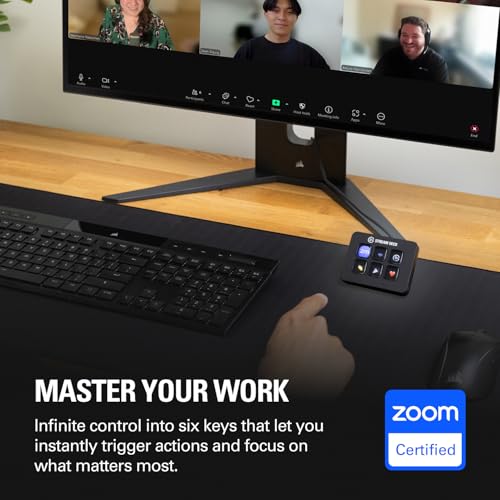


Key features
- •6 LCD keys: tap to switch scenes, launch media, adjust audio, and much more; Unlimited control: turn keys into folders to access unlimited actions
- •Multi Actions: launch multiple actions simultaneously or sequentially - with one tap
- •Fully customizable: personalize keys with custom icons and animated gifs or choose from hundreds of pre-selected
- •Direct integration: control Game Capture, OBS, XSplit, Streamlabs, Twitch, YouTube, Mixer, and more
- •Easy setup: simply drag and drop actions onto keys in the app
- •With nested folders there are an unlimited number of options
Elgato Stream Deck Mini – Control Zoom, Teams, PowerPoint, MS Office and Boost Productivity with Seamless Integration for Daily Apps, Set Up Shortcuts Easily, USB, Compatible with Mac and PC
List Price: $88.54$79.69DEALYou Save: $8.85 (10%)
Free shippingFree Returns – 30 daysFree Order CancellationSecure Payment2–3 Days DeliveryGet It October 24, 2026In Stock (10)No marketing spamNo account requiredFulfilment by FedEx / Amazon / UPS / ShipwirePayPal / Card Buyer Protection
Customer Reviews
Reviews sourced from verified Amazon purchasers4.8
out of 5
Based on 10 reviews
5★
80%
4★
20%
3★
0%
2★
0%
1★
0%
VERY versatile
Lou✓ Verified Purchase•August 18, 2023
This thing is awesome. You may want one of the bigger ones depending on your application but this works just fine for me. I use it primarily to navigate and transition through OBS while streaming and it works flawlessly. You can use this for SO many other things though. I have certain windows functions assigned so i can use it for certain PC functions. For example, one button is responsible for launching a web browser, spotify as well as a gaming launcher. All in one key press. I have functions for turning the PC off so i don't have to navigate through any menus when i want to shut down(wise to close running programs first). More importantly.. while you only have 6 buttons.. each one can be assigned to be a folder that holds 5 more actions inside. you could theoretically just keep making endless amounts of folders with no need for the bigger versions that have more buttons(preference i suppose). I've even used this to set up hot keys for games like flight sim so that functions like engine on/off ... landing gear, can all be done off the keyboard or flight sticks. awesome product.
Can't Believe I Haven't Gotten This Sooner
Steve✓ Verified Purchase•August 6, 2023
The big takeaway that you won't see in other reviews... this is some complex tech! In most other software/hardware solutions you have to be in the active app to use them... but not with this. That is GOLD.
Wonderful little gizmo
WildFyr✓ Verified Purchase•August 4, 2023
I really like the ability to control anything with my computer without having to have random keyboard combinations memorized. I can mute Discord, roll my windows up and down in FiveM, and ever switch my streaming scenes all from the buttons on my desk. My only complaint is the fact that after the computer comes out of sleep or hibernation, it will try to link to Discord Canary. This is annoying because most of the time I am not in voice chats on Canary, but I use it for my alt account. Appart from that it is a must have device!
Useful for More Than Just Gaming - Useful in the Studio, as Well
Deborah Anderson ✓ Verified Purchase•July 17, 2023
Even though this unit has several options, I have found myself starting out with the most basic, the simple website button, and even though you could do that with a simple browser bookmark, it is very convenient to use the Stream Deck to access a website (link) anytime, from any place.
For example, I have a cute button that allows me to access an emoji page so that I can add an emoji to a text, tweet (X post), or whatever with the click of Elgato Stream Deck button.
The next set of buttons will be for the OBS, LiveStreaming, Twitch, etc., as I continue to use them in my professional studio.
And, the mini allows me to travel with it, even with my laptop, programming the lower buttons to advance to the next screen with more programmable buttons, with a virtual unlimited allowable level of buttons! So, the sky is the limit.
I export my settings to my second Stream Deck so that I always have the same setup wherever I go, whether, in my office or on-the-go, I am never without my push-button options with this little unit. I don't know how I lived without it (them)!
For example, I have a cute button that allows me to access an emoji page so that I can add an emoji to a text, tweet (X post), or whatever with the click of Elgato Stream Deck button.
The next set of buttons will be for the OBS, LiveStreaming, Twitch, etc., as I continue to use them in my professional studio.
And, the mini allows me to travel with it, even with my laptop, programming the lower buttons to advance to the next screen with more programmable buttons, with a virtual unlimited allowable level of buttons! So, the sky is the limit.
I export my settings to my second Stream Deck so that I always have the same setup wherever I go, whether, in my office or on-the-go, I am never without my push-button options with this little unit. I don't know how I lived without it (them)!
WONDERFUL
Rick✓ Verified Purchase•July 16, 2023
I have to wonder how I lived with out a Stream Deck for so long, this is a game changer for the computer. Video production, Photoshop, and even average things like Word and Excel have all been streamlined. No more going to the menu/finder to start a program, press a button and word opens, press another button and excel is running. Streamlined many common formatting tasks for office programs and with video and Photoshop common tasks are only a button away saving tons of time. I'm not a big gamer but switching weapons etc is now even faster than before making game play much more enjoyable. If you don't have a Stream Deck you are missing out.
Page 1 of 2