iClever BK10 Bluetooth Keyboard, Universal Bluetooth 5.1 Wireless Keyboard with Number Pad, Ergonomic Design, Multi-Device Compatibility, Stable Connection for Mac, iPad, iPhone, Android, Windows




Key features
- •ERGONOMIC DESIGN & EXQUISITE APPEARANCE -- The iClever Bluetooth keyboard is constructed of the best-in-class stainless steel and ABS, includes feet that keep it at an optimum slope, which will prevent your wrist from hurting while long sessions of typing. A stylish black colorway gives out sophisticated and attractive appearance to it. The key-set and fabric are matte finished and spill-resistant, helping protect your Bluetooth keyboard against greasy feeling and those sudden coffee accidents.
- •STABLE BLUETOOTH 5.1 & MULTI-DEVICE CONNECTION -- Pairing with up to 3 devices and switch among them seamlessly with the inbuilt Bluetooth 5.1 technology, the Bluetooth keyboard will keep your desktop clutter-free. Automatically recognizes the system of your device and maps keys, and automatically connects your previously connected devices on your next session of typing, making it a perfect choice for iPad, iPhone, iMac, MacBook, Laptop, PC, Tablets, Smartphone, Windows, IOS, Mac OS, Android.
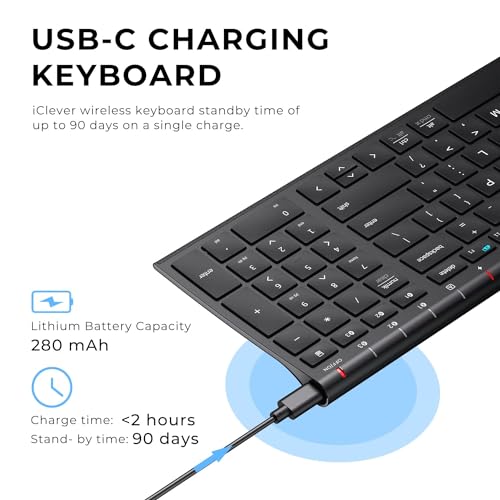
- •RECHARGEABLE BATTERY & ENVIRONMENT FRIENDLY TECHNOLOGY -- An incredibly long-lasting rechargeable battery is housed in the Bluetooth keyboard, which delivers up to 90 hours of continuous typing on a single charge. It features environmental protection power saving function to cut back on unnecessary energy usage, which takes the keyboard to sleep after 30 minutes of inactivity.
- •SENSITIVELY RESPONSIVE & LOW PROFILE KEYSTROKES -- Take a break from typos. The Wireless keyboard features a sleek design and satisfyingly responsive scissor switches for fast and efficient typing, which ensures you won't miss a key when typing e-mails or blogs for hours. The low-profile keys are remarkably tactile and have enough key travel, bringing a whole new level of comfort to your fingertips. The rear is equipped with shock and skid proof pads, offering you the best typing experience ever
- •FULL SIZE & ULTRA-SLIM KEYBOARD -- The iClever wireless keyboard is full-size design and includes numeric keypad which makes typing easier and more comfortable than other keyboards. Its layout is industry standard which features hot keys like Copy, Cut, Paste, Play, Pause, Volume up/down, helping you to increase your workflow and productivity. The wireless keyboard's slim design (14x4.9x0.15 in) ensures that it can be tucked easily into a backpack or the secondary pocket of your laptop's bag.
iClever BK10 Bluetooth Keyboard, Universal Bluetooth 5.1 Wireless Keyboard with Number Pad, Ergonomic Design, Multi-Device Compatibility, Stable Connection for Mac, iPad, iPhone, Android, Windows
List Price: $31.04$27.94DEALYou Save: $3.10 (10%)
Free shippingFree Returns – 30 daysFree Order CancellationSecure Payment2–3 Days DeliveryGet It October 25, 2026In Stock (1)No marketing spamNo account requiredFulfilment by FedEx / Amazon / UPS / ShipwirePayPal / Card Buyer Protection
Customer Reviews
Reviews sourced from verified Amazon purchasers4.3
out of 5
Based on 10 reviews
5★
40%
4★
60%
3★
0%
2★
0%
1★
0%
Bluetooth Setup Was Glitchy, Keyboard Action Lacking. iClever Support is Awesome
College Dad✓ Verified Purchase•August 23, 2023
Update: Nov. 17th, 2020
I've had this keyboard for more than 30 days and struggled with it quite a bit. The lack of tactile feedback was difficult to get used to. To "correct" that I installed a keyboard clicking app for my Ubuntu Linux 20.04 workstation that this keyboard is connected to. Hearing the "clicking" feedback from my speakers helped more than I thought it would and I actually began enjoying using this keyboard. My fingers "stopped tripping over themselves" and all in all, I'd say it's been a pleasant experience with this keyboard.
And then ... the battery stopped charging. No matter what I did, the battery refused to charge. I'd plug it in for a few hours, the battery meter would read 100% and then drop to 10% when I unplugged the keyboard. I was three days past the return date of the keyboard when it happened, so I contacted iClever support. They responded in less than 12 hours and successfully remediated the issue to make me happy. I have to say, their response and support in my case was world-class. I'm disappointed that the keyboard failed as I was finally beginning to enjoy using it and with that said --- I'm going to give it another try and purchase another. I very much appreciate their Customer Service and am happy to give their product another chance as a result. I like to support companies with excellent customer service and iClever's support is awesome. Nice job!!
Original Review:
I bought this keyboard to replace an Apple Magic Keyboard (Aluminum, bluetooth model) because a few keys broke on it due to wear and tear and finding replacement keys was very problematic. Placed multiple orders with multiple vendors only to be told after the fact parts were backordered because of the tarrif's and such with China.
So I opted to buy this keyboard instead and hey why not, it was actually cheaper than replacing the keys on my Apple Bluetooth keyboard.
Aesthetically, this is a very pleasing keyboard. It matches my blacked out workstation and I like the fact it's laid out like a 101k keyboard with the number pad off to the right. It's a sturdy keyboard, there is no "flex" when I type on it and it appears to be very well thought through and constructed. 10/10 for that.
Getting it to connect to my Bluetooth 4.x on my Ubuntu Linux workstation presented a few issues to overcome.
First was that it wasn't visible to my bluetooth. It seemed to take a very long time to be discoverable. Minutes and minutes long. Once found, I connected they keyboard via the first channel. Nothing happened until after another lengthy delay it started repeating the "d" character despite my not touching the keyboard. I had to turn the keyboard off to make it stop repeating "d" and then removed the keyboard from the list of bluetooth devices in Ubuntu.
I repeated the setup instructions documented and the same thing happened. Examining the keyboard the "d" key appeared fine and didn't appear stuck, so I tried pairing the keyboard with my Ubuntu workstation again, this time on the second channel. It worked. No repeating "d" character, the keyboard functioned as normal.
For giggles I removed the keyboard from my bluetooth devices and again followed the instructions to connect on the first channel, only to see the "d" key repeating itself again. Dropped the bluetooth connection to the keyboard, re-setup on channel 2 and it's working like a champ. Not sure what's wrong with the first channel, it's definitely kaput. That doesn't matter to me, I'm only connecting this keyboard to one device so that's a non-issue for me and not something I'd return the keyboard for.
My last comments are specific to the action in the keys and the feedback they provide while typing. I typically clock anywhere from 95 - 110 wpm on every keyboard I own, whether it's an old IBM CLICKY keyboard (my favorite) an old Logitech K570 and my beloved Apple Wireless bluetooth keyboard. I'm used to the response action on all these keyboards and can switch pretty seamlessly.
On this keyboard the action is lacking. The response from the time I press a key to it reverting back to it's resting state seems lacking to me. I expected the action to be similar to that of my Apple wireless bluetooth keyboard. It's not. If that's what you're expecting with this keyboard, do not buy it.
The last thing I want to say is that the lack of keyboard "action" for me inhibits how quickly I can type on it. I've found my fingers "tripping over themselves" trying to type on it. That means more mistakes and backing up to correct. As I typed this review, I switched back and forth between my Apple bluetooth keyboard and this one. The difference in the keyboard action and my ability to type so much faster on my Apple keyboard vs. this one is absolutely noticeable. I'm going to give myself a little more time to get used to this keyboard and if that doesn't do the trick then I'll be sending it back. The "dealbreaker" for me isn't the bad bluetooth channel it has, it's the keyboard action and not being able to go as fast as I can on my Apple bluetooth keyboard which has a similar layout and key spacing (I measured the gaps between the keys on both keyboards, they're identical.)
About me: I've been in the Information Technology field for 35 years. Yep, I'm an old fart. I write reviews for products I buy because I like to share what I find, both good and bad. I also read others reviews before I purchase a product and rely on the truthfulness of those reviews. If you found my review helpful, please indicate such. Thanks for reading.
I've had this keyboard for more than 30 days and struggled with it quite a bit. The lack of tactile feedback was difficult to get used to. To "correct" that I installed a keyboard clicking app for my Ubuntu Linux 20.04 workstation that this keyboard is connected to. Hearing the "clicking" feedback from my speakers helped more than I thought it would and I actually began enjoying using this keyboard. My fingers "stopped tripping over themselves" and all in all, I'd say it's been a pleasant experience with this keyboard.
And then ... the battery stopped charging. No matter what I did, the battery refused to charge. I'd plug it in for a few hours, the battery meter would read 100% and then drop to 10% when I unplugged the keyboard. I was three days past the return date of the keyboard when it happened, so I contacted iClever support. They responded in less than 12 hours and successfully remediated the issue to make me happy. I have to say, their response and support in my case was world-class. I'm disappointed that the keyboard failed as I was finally beginning to enjoy using it and with that said --- I'm going to give it another try and purchase another. I very much appreciate their Customer Service and am happy to give their product another chance as a result. I like to support companies with excellent customer service and iClever's support is awesome. Nice job!!
Original Review:
I bought this keyboard to replace an Apple Magic Keyboard (Aluminum, bluetooth model) because a few keys broke on it due to wear and tear and finding replacement keys was very problematic. Placed multiple orders with multiple vendors only to be told after the fact parts were backordered because of the tarrif's and such with China.
So I opted to buy this keyboard instead and hey why not, it was actually cheaper than replacing the keys on my Apple Bluetooth keyboard.
Aesthetically, this is a very pleasing keyboard. It matches my blacked out workstation and I like the fact it's laid out like a 101k keyboard with the number pad off to the right. It's a sturdy keyboard, there is no "flex" when I type on it and it appears to be very well thought through and constructed. 10/10 for that.
Getting it to connect to my Bluetooth 4.x on my Ubuntu Linux workstation presented a few issues to overcome.
First was that it wasn't visible to my bluetooth. It seemed to take a very long time to be discoverable. Minutes and minutes long. Once found, I connected they keyboard via the first channel. Nothing happened until after another lengthy delay it started repeating the "d" character despite my not touching the keyboard. I had to turn the keyboard off to make it stop repeating "d" and then removed the keyboard from the list of bluetooth devices in Ubuntu.
I repeated the setup instructions documented and the same thing happened. Examining the keyboard the "d" key appeared fine and didn't appear stuck, so I tried pairing the keyboard with my Ubuntu workstation again, this time on the second channel. It worked. No repeating "d" character, the keyboard functioned as normal.
For giggles I removed the keyboard from my bluetooth devices and again followed the instructions to connect on the first channel, only to see the "d" key repeating itself again. Dropped the bluetooth connection to the keyboard, re-setup on channel 2 and it's working like a champ. Not sure what's wrong with the first channel, it's definitely kaput. That doesn't matter to me, I'm only connecting this keyboard to one device so that's a non-issue for me and not something I'd return the keyboard for.
My last comments are specific to the action in the keys and the feedback they provide while typing. I typically clock anywhere from 95 - 110 wpm on every keyboard I own, whether it's an old IBM CLICKY keyboard (my favorite) an old Logitech K570 and my beloved Apple Wireless bluetooth keyboard. I'm used to the response action on all these keyboards and can switch pretty seamlessly.
On this keyboard the action is lacking. The response from the time I press a key to it reverting back to it's resting state seems lacking to me. I expected the action to be similar to that of my Apple wireless bluetooth keyboard. It's not. If that's what you're expecting with this keyboard, do not buy it.
The last thing I want to say is that the lack of keyboard "action" for me inhibits how quickly I can type on it. I've found my fingers "tripping over themselves" trying to type on it. That means more mistakes and backing up to correct. As I typed this review, I switched back and forth between my Apple bluetooth keyboard and this one. The difference in the keyboard action and my ability to type so much faster on my Apple keyboard vs. this one is absolutely noticeable. I'm going to give myself a little more time to get used to this keyboard and if that doesn't do the trick then I'll be sending it back. The "dealbreaker" for me isn't the bad bluetooth channel it has, it's the keyboard action and not being able to go as fast as I can on my Apple bluetooth keyboard which has a similar layout and key spacing (I measured the gaps between the keys on both keyboards, they're identical.)
About me: I've been in the Information Technology field for 35 years. Yep, I'm an old fart. I write reviews for products I buy because I like to share what I find, both good and bad. I also read others reviews before I purchase a product and rely on the truthfulness of those reviews. If you found my review helpful, please indicate such. Thanks for reading.
Perfect!!
Amazon Customer✓ Verified Purchase•August 18, 2023
Works great with my MacBook Pro! Very responsive and lightweight.
Pretty nice, durable, GOOD COMPANY. A couple design flaws.
CaptainHappy✓ Verified Purchase•August 11, 2023
tldr: It's pretty great, with a couple of design quirks. Above all, the company stands behind their product, quickly fixing the problems and making things right by the customers. If you have a faulty board, tell them, they'll make it right!
I had purchased a 2019 version. As older reviews reflect, it was terribly unreliable. The 2020 version solved the reliability issues and even improves a couple things. I'm now updating my one star to 4. If 4.5 was available, I'd choose that.
Pros:
-Great support! As soon as they learned of my problems, they sent an upgraded replacement. It's good hardware, so I'm happy that the company has updated the flaws and ensures customers are satisfied.
-Good hardware. The keyboard is well designed and built. For a slim sheet of metal and plastic, it's pretty sturdy, I have no worries throwing it in the backpack. The numpad is appreciated! The keys are full width, so touch-typists won't have to adjust. The board is about as wide as a tenkeyless, very portable and good for space savers. The switches are slightly more tactile than my laptop keyboard. iClever updated some imperfections: The font is now larger, centered, more pleasant and more mac-friendly. The legends are still decals, but their quality has significantly improved; much flatter, they almost look like part of the plastic. The board's curve might look slight, but combined with the seated angle, it significantly improves the typing experience. I'm not saying its like scupted keys, but it's surprisingly better than purely flat boards in laptops.
-iClever now includes a translucent silicone keycover that perfectly fits over the keys and stays put while typing. I'm using it now, and it's pretty great! The tactility is interesting, and I don't feel bad about snacking while typing. When I use my expensive mechanical keyboard, I can't bring myself to have food or drink anywhere near it. The keycover sits on the keyboard with gravity but stays in place, just like the silicone keycovers I put on my old Macbook. It would be awsome if there was a way to affix it for travel. Still, it was unexpected and is very appreciated.
-Good battery life.
Cons:
-Weird Bluetooth key chioce. This drives me crazy: The four keys above the numpad aren't what you'd expect. Instead, they're device connection buttons and a calculator button. The Home, End, PgUp, PgDn keys are only available as shift keys on the numpad. When you look at the competition for these thin boards, several have moved to this design, which I think is a mistake. I'd definitely give 5 stars to a version with those four keys assigned to typing. Bluetooth and calculator should always be function keys.
-No numlock light. Although there is a numlock key, there is only a caps lock light. Out of five led lights, there's only one lock light! One is for battery, and the other three indicate which of your three devices are connected. I can forgive the missing scroll lock, but no numlock light??
Still, it's a pretty nice choice for the money, especially considering the exceptionaly good support. I'm typing on it right now with silicone cover, and it's pretty enjoyable. If you want a full-size keyboard function for your iPad, this is excellent. It fits nicely alonside a 12.9" iPad pro in a backpack, so I can leave my laptop at home more often.
As long as you're comfortable with four keys wasted, I highly recommend this.
I had purchased a 2019 version. As older reviews reflect, it was terribly unreliable. The 2020 version solved the reliability issues and even improves a couple things. I'm now updating my one star to 4. If 4.5 was available, I'd choose that.
Pros:
-Great support! As soon as they learned of my problems, they sent an upgraded replacement. It's good hardware, so I'm happy that the company has updated the flaws and ensures customers are satisfied.
-Good hardware. The keyboard is well designed and built. For a slim sheet of metal and plastic, it's pretty sturdy, I have no worries throwing it in the backpack. The numpad is appreciated! The keys are full width, so touch-typists won't have to adjust. The board is about as wide as a tenkeyless, very portable and good for space savers. The switches are slightly more tactile than my laptop keyboard. iClever updated some imperfections: The font is now larger, centered, more pleasant and more mac-friendly. The legends are still decals, but their quality has significantly improved; much flatter, they almost look like part of the plastic. The board's curve might look slight, but combined with the seated angle, it significantly improves the typing experience. I'm not saying its like scupted keys, but it's surprisingly better than purely flat boards in laptops.
-iClever now includes a translucent silicone keycover that perfectly fits over the keys and stays put while typing. I'm using it now, and it's pretty great! The tactility is interesting, and I don't feel bad about snacking while typing. When I use my expensive mechanical keyboard, I can't bring myself to have food or drink anywhere near it. The keycover sits on the keyboard with gravity but stays in place, just like the silicone keycovers I put on my old Macbook. It would be awsome if there was a way to affix it for travel. Still, it was unexpected and is very appreciated.
-Good battery life.
Cons:
-Weird Bluetooth key chioce. This drives me crazy: The four keys above the numpad aren't what you'd expect. Instead, they're device connection buttons and a calculator button. The Home, End, PgUp, PgDn keys are only available as shift keys on the numpad. When you look at the competition for these thin boards, several have moved to this design, which I think is a mistake. I'd definitely give 5 stars to a version with those four keys assigned to typing. Bluetooth and calculator should always be function keys.
-No numlock light. Although there is a numlock key, there is only a caps lock light. Out of five led lights, there's only one lock light! One is for battery, and the other three indicate which of your three devices are connected. I can forgive the missing scroll lock, but no numlock light??
Still, it's a pretty nice choice for the money, especially considering the exceptionaly good support. I'm typing on it right now with silicone cover, and it's pretty enjoyable. If you want a full-size keyboard function for your iPad, this is excellent. It fits nicely alonside a 12.9" iPad pro in a backpack, so I can leave my laptop at home more often.
As long as you're comfortable with four keys wasted, I highly recommend this.
Fantastic Keyboard
Luis H. Velasquez✓ Verified Purchase•July 25, 2023
The iClever BK10 is the best BT keyboard out there: Ergonomic, rechargeable, connectivity for up to three different devices, light weight. If it was a little smaller I would take it on my travels, at $26 it is a steal. Also Iclever 'customer support is outstanding: I lost the X letter and Rachel from customer service sent me the replacement for free. You don't see that level of CS often these days.
Pretty close to great
Jason H✓ Verified Purchase•July 22, 2023
The biggest issue I have is that the "Function" key isn't on the very left of the bottom row. This makes key combinations I'm used to using on the mac with the 'Control' key don't work as they would on my laptop.
Additionally, the arrow keys are pretty small but that's less of an issue.
Keyboard feel is pretty good for a shallow key and the bluetooth pairing is very reliable so far (only 1 device used so far).
Additionally, the arrow keys are pretty small but that's less of an issue.
Keyboard feel is pretty good for a shallow key and the bluetooth pairing is very reliable so far (only 1 device used so far).
Page 1 of 2