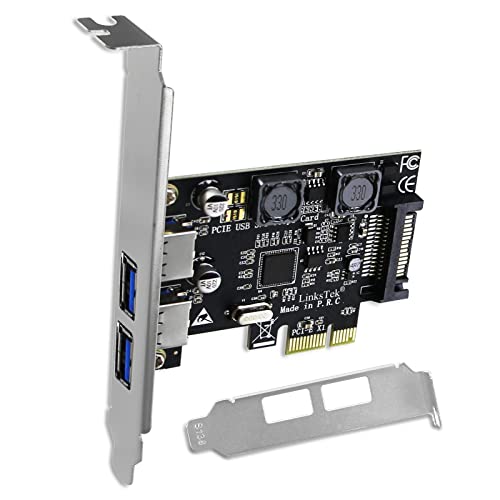
LinksTek 2-Ports PCIE USB 3.0 (USB 3.1 GEN1) 5Gbps Expansion Card for Desktop PCs, 2X 5Gbps USB-A Ports, Built in Smart Power Distribution Technology, No Need Extra Power Supply (PCIE-U302A)


Key features
- •1. PCIE-U302A allow users add 2X USB 3.1 GEN 1 type A 5Gbps max ports on desktop PCs and working stations for USB device connection. Enjoy super easy installation, plug and play on most main stream Windows PCs.
- •2. Based on ASMedia ASM1042 PCIE 2.0 to USB 3.1 GEN 1 5Gbps host controller. Provide 5Gbps total bandwidth on 2X USB-A ports for USB 3.1 GEN 1 device data transmission which include USB HDD/SSD enclosure, USB universal docking station, USB Hub, USB KVM switch, VR-System, USB graphic adapters and more.
- •3. Built in LinksTek Smart Power Distribution Technology, will pick up power supply from mother board. Users do not need to plug extra power supply cables but get enough power, each USB-A ports will get 5V/2A 10W max for connected high power consumption USB device such as USB NVME SSD enclosure.
- •4. Compatible system: Plug and Play on Windows 11, 10, 8.1, 8 (32/64bit) and Windows Server 2012, 2012R2, 2016, 2019, 2022. Need to install driver on Windows XP, Vista, 7 (32/64bit) and Windows Server 2003, 2003R2, 2008, 2008R2 (32/64bit).
- •5. Dual Mode Power Supply: 1. Users can enjoy plug and play on new mother-board that can provide enough power with LinksTek Smart Power Distribution Technology, no need installs any power cables. 2. For some old type mother-board cannot provide enough power, users can add power supply from PSU by the SATA power interface.
- •6. PCIE X1 design will works on PCIE X1, X2, X4, X8, X16 slot. Packed with low profile bracket and full height bracket, will works on both slim PCs and standard PCs.
LinksTek 2-Ports PCIE USB 3.0 (USB 3.1 GEN1) 5Gbps Expansion Card for Desktop PCs, 2X 5Gbps USB-A Ports, Built in Smart Power Distribution Technology, No Need Extra Power Supply (PCIE-U302A)
List Price: $21.32$19.19DEALYou Save: $2.13 (10%)
Free shippingFree Returns – 30 daysFree Order CancellationSecure Payment2–3 Days DeliveryGet It October 26, 2026In Stock (1)No marketing spamNo account requiredFulfilment by FedEx / Amazon / UPS / ShipwirePayPal / Card Buyer Protection
Customer Reviews
Reviews sourced from verified Amazon purchasers4.0
out of 5
Based on 10 reviews
5★
60%
4★
40%
3★
0%
2★
0%
1★
0%
Fixed my USB audio issues (mostly)
John✓ Verified Purchase•January 20, 2024
I have an ASUS B550 motherboard and have been having USB issues for a while. BIOS updates fixed devices dropping in and out, but my USB audio interface and USB microphone continued to have issues (audio crackling, input being too quiet). After some googling, I found reports from other users saying that the issues were caused by power delivery and a USB expansion card fixed their issues.
I went with this card hoping that the optional SATA power would help me in case the motherboard power alone didn't fix the issues, but I didn't end up needing it. I had some issues initially with my audio interface stopping when it was plugged into a USB hub plugged into the expansion card, but after moving the USB hub to my motherboard and my audio devices to the expansion card directly, I haven't had any more problems.
EDIT: My audio interface is freezing occasionally shortly after my computer starts. I'm also getting brief crackling from the output on rare occasions. The freezing stops after a while and the crackling is infrequent enough that it doesn't bother me, so I still consider this good enough. I might try attaching the SATA power cable later.
I went with this card hoping that the optional SATA power would help me in case the motherboard power alone didn't fix the issues, but I didn't end up needing it. I had some issues initially with my audio interface stopping when it was plugged into a USB hub plugged into the expansion card, but after moving the USB hub to my motherboard and my audio devices to the expansion card directly, I haven't had any more problems.
EDIT: My audio interface is freezing occasionally shortly after my computer starts. I'm also getting brief crackling from the output on rare occasions. The freezing stops after a while and the crackling is infrequent enough that it doesn't bother me, so I still consider this good enough. I might try attaching the SATA power cable later.
Cheap And Easy Way To Add USB-C Ports To Your PC
Jasper Coffetty✓ Verified Purchase•January 16, 2024
Very easy install. Just popped it into an open PCI slot and it just worked on my Windows 11 PC. It was instantly recognized and when I plugged in a USB-C thumbdrive to test, it was recognized and functioned perfectly.
Good value. Easy plug-and-play in Windows 11.
Good value. Easy plug-and-play in Windows 11.
It works
John✓ Verified Purchase•January 6, 2024
I tried 2 other brands of the cheaper boards. The first didn't work at all. The second worked but my computer would not start up if I had anything plugged into it. This one worked great and I have no problem starting my computer with multiple usb external drives attached. Has good speed for transferring files. It costs a little more but it works.
not bad, though PCIe bus limits the potential of even 1 USB port
Dave✓ Verified Purchase•November 30, 2023
I know when it comes to tech there is the marketing jargon and then there is real life data. Going off of the jargon and the description in this listed... a Single USB 3.0 port can push data at 5gbps (625MB/s) however a PCIe 2.0 x1 slot has a max limit of 500MB/s. So as you can see, have a single USB 3.0 device is going to function slower let alone if you have 2 devices utilizing this card at the same time.
Luckily for me, I only wanted to add a single USB 3.0 device, Elgato Cam Link 4k for my streaming, video conferencing needs and this supplies enough bandwidth to achieve this.
To prove my point regarding the PCIe 2.0 x1 slot dampening this card's potential, I did a speed test with a CFExpress A reader. I ran the tests plugged into a native USB 3.0 port on the back of my board then I plugged the reader into this card with NO other device plugged in. Here are those results;
Native Port = Write @ 418MB/s | Read @ 428 MB/s
LinksTek Card = Write @ 210MB/s | Read @ 220 MB/s
Remember, both of these are USB 3.0 5gbps connections. (mind you that my CF-a reader is normally plugged into a usb 10Gbps port and those numbers are W @ 666MB/s & R @ 710MB/s)
I am in no way saying NOT to buy this card, just know what you are buying.
Luckily for me, I only wanted to add a single USB 3.0 device, Elgato Cam Link 4k for my streaming, video conferencing needs and this supplies enough bandwidth to achieve this.
To prove my point regarding the PCIe 2.0 x1 slot dampening this card's potential, I did a speed test with a CFExpress A reader. I ran the tests plugged into a native USB 3.0 port on the back of my board then I plugged the reader into this card with NO other device plugged in. Here are those results;
Native Port = Write @ 418MB/s | Read @ 428 MB/s
LinksTek Card = Write @ 210MB/s | Read @ 220 MB/s
Remember, both of these are USB 3.0 5gbps connections. (mind you that my CF-a reader is normally plugged into a usb 10Gbps port and those numbers are W @ 666MB/s & R @ 710MB/s)
I am in no way saying NOT to buy this card, just know what you are buying.
This is exactly what it claims to be, a USB-C PCI Adapter
Alan✓ Verified Purchase•November 19, 2023
The best thing is that there is nothing special about this card. Just plug it into your PCI bus and you have USB-C ports.
Page 1 of 2