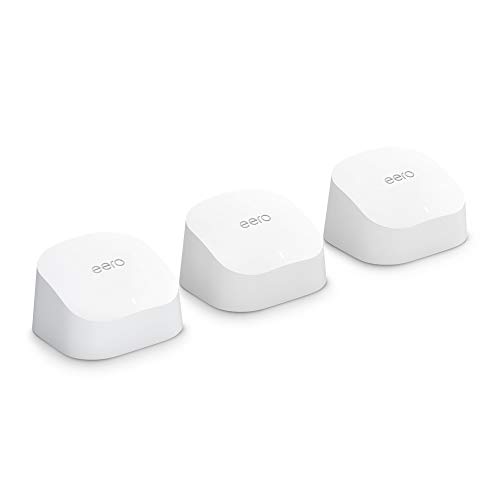
Amazon eero 6 mesh wifi system - Supports internet plans up to 500 Mbps, Coverage up to 4,500 sq. ft., Connect 75+ devices, 3-pack (1 router + 2 extenders)


Key features
- •Whole-home Wi-Fi 6 coverage - an eero 6 system covers up to 5,000 sq. ft. with wifi speeds up to 500 Mbps.
- •Say goodbye to dead spots and buffering - eero's mesh wifi technology adapts to your space—so you can confidently stream 4K video, game, and video conference across your home.
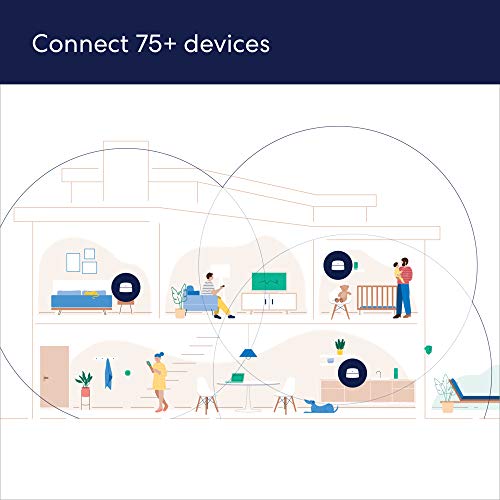
- •Supports 75+ devices - eero 6 uses the power of Wi-Fi 6 to increase the capacity—and efficiency—of your network.
- •Set up in minutes - The eero app walks you through setup and allows you to manage your network from anywhere. Plus, free customer support is available 7 days a week.
- •Connect to Alexa - eero 6 doubles as a Zigbee smart home hub, making it easy to connect and control compatible devices on your network with Alexa.
- •Gets better over time - Automatic updates bring the latest and greatest in wifi while also keeping your network safe and secure.
Brandeero
CategoryWhole Home & Mesh Wi-Fi Systems
Size1 router + 2 extenders
ColorWHITE
WarrantyWarranty
Amazon eero 6 mesh wifi system - Supports internet plans up to 500 Mbps, Coverage up to 4,500 sq. ft., Connect 75+ devices, 3-pack (1 router + 2 extenders)
List Price: $290.99$261.89DEALYou Save: $29.10 (10%)
Free shippingFree Returns – 30 daysFree Order CancellationSecure Payment2–3 Days DeliveryGet It October 24, 2026In Stock (1)No marketing spamNo account requiredFulfilment by FedEx / Amazon / UPS / ShipwirePayPal / Card Buyer Protection
Customer Reviews
Reviews sourced from verified Amazon purchasers4.4
out of 5
Based on 10 reviews
5★
70%
4★
30%
3★
0%
2★
0%
1★
0%
Easy to use
Mystery Lover✓ Verified Purchase•October 1, 2023
We live in an old home that has plaster and sheetrock for walls. The wi-fi signal does not do well on the 2nd floor or in the master bedroom which is a bit distant from the router. To have a technician come out and run wires upstairs and into the master would have cost us several hundred dollars. Using a mesh wi-fi system made more sense.
The Eero brand had good ratings from several different sources and it was on sale during Amazon Prime Day so I thought I'd give it a try. The instructions for set up are online so my son came over to help and it took us about 30 minutes to get the system up and running.
The Eero mesh system is doing a great job! No dropped signals, excellent coverage, great speed! I highly recommend it!
The Eero brand had good ratings from several different sources and it was on sale during Amazon Prime Day so I thought I'd give it a try. The instructions for set up are online so my son came over to help and it took us about 30 minutes to get the system up and running.
The Eero mesh system is doing a great job! No dropped signals, excellent coverage, great speed! I highly recommend it!
Works great in shop
RD Oregon✓ Verified Purchase•September 26, 2023
Have two of these, main one is in the house. Second one is in the shop about 200 feet away from the main. The shop is connected by ethernet cable and it works fantastic. The unit broadcasts wifi out the top, so it is mounted high in the shop ceiling, upside down. Now there is wifi available all over the shop and a very large radius all around the outside of the shop especially when the big doors are open. It does require a modern smartphone with updated operating system to download the app to first time connect the new device to your network. Must have the cell phone app, no way to access the app from a computer. Best part is moving from the house to the shop is seamless, your devices automatically connect to which ever eero has the best signal no input required from the user, wifi calling works great too.
Improved Signal strength and Speed
Nina✓ Verified Purchase•September 23, 2023
Migrated from a Linksys EA 7300.
Been using for about a month and a half. Signal strength and Speed improved. eero can handle simultaneous requests therefore making it faster and mesh network improves signal strength..
Really like eero app. Can easily profile each device that connects to network and see what eero extender is connected to, in addition can easily share QR code for guest network access and prevets guest users from accessing network shares.
Observation: If you direct DNS traffic to OpenDNS, make sure to disable ipv6 and add OpenDNS ip addresses under DNS custom..
If you have PlayStation 4 make sure you connect to 2.4GHZ network only. For some reason PlayStation 4 doesn't like 5Ghz eero network.
Overall very happy with eero,
Been using for about a month and a half. Signal strength and Speed improved. eero can handle simultaneous requests therefore making it faster and mesh network improves signal strength..
Really like eero app. Can easily profile each device that connects to network and see what eero extender is connected to, in addition can easily share QR code for guest network access and prevets guest users from accessing network shares.
Observation: If you direct DNS traffic to OpenDNS, make sure to disable ipv6 and add OpenDNS ip addresses under DNS custom..
If you have PlayStation 4 make sure you connect to 2.4GHZ network only. For some reason PlayStation 4 doesn't like 5Ghz eero network.
Overall very happy with eero,
Coverage over speed
Michael J. Descy✓ Verified Purchase•September 9, 2023
I have an approximately 2,000 square foot house. My main router has to be on one end of the house on the top floor. Before the Eero, this always meant I had to live with some dead zones within my living area, mainly at the opposite end of my house and on the deck behind our house. The Eero's wireless mesh network is able to deliver WiFi to a much larger area of my house than a single router could, and did not require me to drill holes in my wall to hard-wire something. It does so at the expense of network speed for the devices that connect to the satellite Eeros, rather than to the main one. That seems like a fair trade-off to me, however, because network speeds are fast enough for me, and because most of the areas where speed is lower are the areas that I either had spotty WiFi connections, or no WiFi connections, before I had a mesh wireless system.
#### Comparison with my old router
My old router was a tri-band 802.11ac router that cost about as much as the Eero 6 3-pack. In many respects, it was an excellent router. It was fast and offered very good coverage throughout the house, but its reach did not cover my entire living area. (Note: The Eero 6 is a WiFi 6-capable device, but I am currently running all devices on 802.11ac or older WiFi specifications. I expect to get WiFi 6-enabled devices next year, and I know my network will be ready for them.)
The regular (non-"Pro") Eero 6 system is designed for homes with internet speeds of up to 500Mbps. I currently have a 400Mbps connection. Before and after upgrading my router, I ran a bunch of speed tests throughout my house. With my old router, I maxed out my internet connection in about half the house, but had much lower speed further out, and the connection dropped to nothing or almost nothing at the side of the house opposite my router, and outside on my deck. With the Eero, speed tests are up to 400Mbps for devices connected to the main Eero unit, and up to 200Mbps (and down to 40Mbps) for devices that connect to one of the two satellite units. The coverage area is much larger, however.
The Eero is just as fast as my old router in the same room that the main Eero base unit is in. In other rooms of the house, where the Eero is obstructed by multiple walls, or is wirelessly hopping from on Eero to another, my average speeds are half that (200 Mbit) or one tenth that (40 Mbit). The thing is, even when the speed is compromised (due, I suppose, to the connection hopping between the Eero devices) the WiFi is still fast enough for what I use it for: video and audio streaming and the web. I can actually use my iPhone and my computer in the backyard, with Internet speeds that are fast enough for streaming video and music, so, in a sense, that is a 100% improvement over what I had before.
In my household, we have at least twenty wireless devices connected to the Eero at any time, in addition to five hardwired computers, including a home media server/NAS. We stream video, audio, and do video conferencing much of the day. There are a lot of packets going through my network, and the Eero has routed and transmitted them without a hitch.
#### The hardware
All three Eero units are identical in appearance, though only the base unit has Ethernet jacks. They are much smaller than any home router I have had before, and look completely unobtrusive. They are designed with a slanted and sloped top, to discourage you from putting anything on top of them. They cannot be wall mounted without some kind of bracket, which is not included. I found the design to be a little more limiting than I had expected, because I had to found tabletops to place each unit on; I couldn't place them in hallway outlets like the Eero Beacon.
The "main" Eero unit is a router, but, unlike most home routers, it does not contain a built-in switch. That means that you can connect one, and only one, device to it via Ethernet. If you connect several devices to your current router via Ethernet, you have two options with Eero: either (1) run the Eero in bridge mode, using your old router to route packets, or (2) buy a relatively inexpensive unmanaged switch to sit beside the Eero base unit, and connect your hardwired devices to that. I chose the second approach because I already had a switch.
In the past, many of my WiFi routers have "flaked out" after a while, probably because they get too hot for too long. I noticed that the main Eero unit gets warm, but not hot, to the touch, but only toward the bottom, where the circuit board is. I don't think it gets warm enough to "fry" the electronics eventually; I certainly hope not.
#### The iOS App
I knew, from heading ads for Eero on podcasts, that Eero has an smartphone app for administrating and monitoring the network. I did not know that using such an app was the _only_ way to administer the network. I am a home networking nerd, very familiar with the web-based admin tools of numerous brands of home routers, including open source firmwares such as DD-WRT and Tomato"”so this actually tripped me up when I was trying to re-create the static IP addresses of my NAS and app server. I assumed I could log into the admin page of the router, find out what IP address those devices ended up at, and then log into them over the network. I have found that wired devices do not always show up in the connected devices list in the iOS app. This can make it hard to find what IP address they are connected to.
I use the iOS app, which is attractive and pretty easy to use. You should know that you tap the top section of the "Home" tab of the Eero app to see all your Eero devices and manage them"”it isn't immediately obvious. Setting up the Eero system from the app was simple, and the app lets you monitor your network, and turn off the light on top of each Eero if you want.
Unlike almost every router I have ever used, the Eero's default IP range (at least in my case) is 192.168.4.0/24. The ".4" part surprised me, and required me to update some devices that had fixed IP addresses in the 192.168.1.0/24 range.
#### Eero Secure
The Eero comes with a free, 30-day trial for Eero Secure. It is an optional service that may be useful to you. I don't plan to subscribe because I already have a similar service that I am happy with. I could see it being useful, however, especially due to the tight integration with the Eero app and Eero hardware.
#### Comparison with my old router
My old router was a tri-band 802.11ac router that cost about as much as the Eero 6 3-pack. In many respects, it was an excellent router. It was fast and offered very good coverage throughout the house, but its reach did not cover my entire living area. (Note: The Eero 6 is a WiFi 6-capable device, but I am currently running all devices on 802.11ac or older WiFi specifications. I expect to get WiFi 6-enabled devices next year, and I know my network will be ready for them.)
The regular (non-"Pro") Eero 6 system is designed for homes with internet speeds of up to 500Mbps. I currently have a 400Mbps connection. Before and after upgrading my router, I ran a bunch of speed tests throughout my house. With my old router, I maxed out my internet connection in about half the house, but had much lower speed further out, and the connection dropped to nothing or almost nothing at the side of the house opposite my router, and outside on my deck. With the Eero, speed tests are up to 400Mbps for devices connected to the main Eero unit, and up to 200Mbps (and down to 40Mbps) for devices that connect to one of the two satellite units. The coverage area is much larger, however.
The Eero is just as fast as my old router in the same room that the main Eero base unit is in. In other rooms of the house, where the Eero is obstructed by multiple walls, or is wirelessly hopping from on Eero to another, my average speeds are half that (200 Mbit) or one tenth that (40 Mbit). The thing is, even when the speed is compromised (due, I suppose, to the connection hopping between the Eero devices) the WiFi is still fast enough for what I use it for: video and audio streaming and the web. I can actually use my iPhone and my computer in the backyard, with Internet speeds that are fast enough for streaming video and music, so, in a sense, that is a 100% improvement over what I had before.
In my household, we have at least twenty wireless devices connected to the Eero at any time, in addition to five hardwired computers, including a home media server/NAS. We stream video, audio, and do video conferencing much of the day. There are a lot of packets going through my network, and the Eero has routed and transmitted them without a hitch.
#### The hardware
All three Eero units are identical in appearance, though only the base unit has Ethernet jacks. They are much smaller than any home router I have had before, and look completely unobtrusive. They are designed with a slanted and sloped top, to discourage you from putting anything on top of them. They cannot be wall mounted without some kind of bracket, which is not included. I found the design to be a little more limiting than I had expected, because I had to found tabletops to place each unit on; I couldn't place them in hallway outlets like the Eero Beacon.
The "main" Eero unit is a router, but, unlike most home routers, it does not contain a built-in switch. That means that you can connect one, and only one, device to it via Ethernet. If you connect several devices to your current router via Ethernet, you have two options with Eero: either (1) run the Eero in bridge mode, using your old router to route packets, or (2) buy a relatively inexpensive unmanaged switch to sit beside the Eero base unit, and connect your hardwired devices to that. I chose the second approach because I already had a switch.
In the past, many of my WiFi routers have "flaked out" after a while, probably because they get too hot for too long. I noticed that the main Eero unit gets warm, but not hot, to the touch, but only toward the bottom, where the circuit board is. I don't think it gets warm enough to "fry" the electronics eventually; I certainly hope not.
#### The iOS App
I knew, from heading ads for Eero on podcasts, that Eero has an smartphone app for administrating and monitoring the network. I did not know that using such an app was the _only_ way to administer the network. I am a home networking nerd, very familiar with the web-based admin tools of numerous brands of home routers, including open source firmwares such as DD-WRT and Tomato"”so this actually tripped me up when I was trying to re-create the static IP addresses of my NAS and app server. I assumed I could log into the admin page of the router, find out what IP address those devices ended up at, and then log into them over the network. I have found that wired devices do not always show up in the connected devices list in the iOS app. This can make it hard to find what IP address they are connected to.
I use the iOS app, which is attractive and pretty easy to use. You should know that you tap the top section of the "Home" tab of the Eero app to see all your Eero devices and manage them"”it isn't immediately obvious. Setting up the Eero system from the app was simple, and the app lets you monitor your network, and turn off the light on top of each Eero if you want.
Unlike almost every router I have ever used, the Eero's default IP range (at least in my case) is 192.168.4.0/24. The ".4" part surprised me, and required me to update some devices that had fixed IP addresses in the 192.168.1.0/24 range.
#### Eero Secure
The Eero comes with a free, 30-day trial for Eero Secure. It is an optional service that may be useful to you. I don't plan to subscribe because I already have a similar service that I am happy with. I could see it being useful, however, especially due to the tight integration with the Eero app and Eero hardware.
Great mesh network but no web interface available
Charley L.✓ Verified Purchase•August 24, 2023
This is a great mesh network when it works as intended. Occasionally the phone app software and the eero hubs get confused and will not setup properly. In those cases you need to hard reboot the hubs and start over. Another issue is that there is no web interface for the network, meaning you have to administer your network thru your phone. Otherwise, I've never had a network as resilient and not need babysitting to this degree. Once it's up and running, it's flawless. I experience very fast wifi speeds as well. On my home internet I can get over 400Mbps download speeds. For this reason I recommend this product.
Page 1 of 2