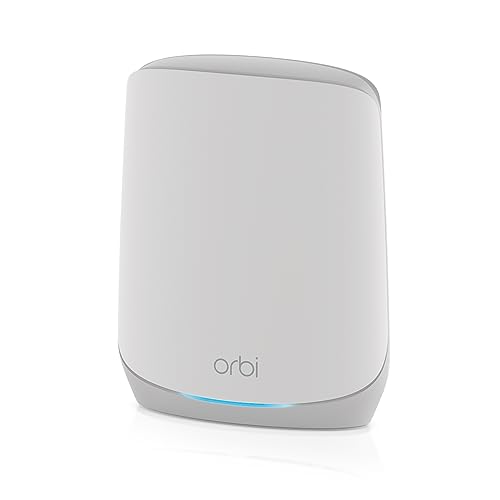
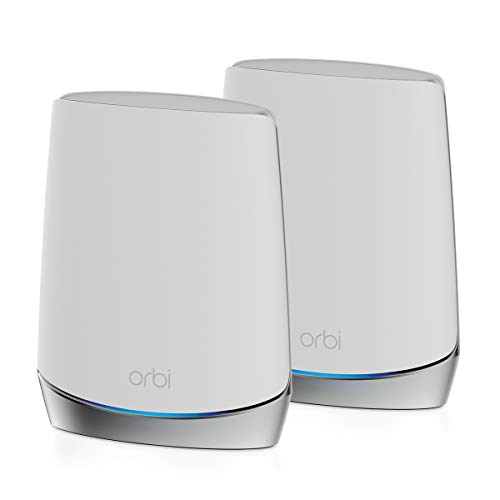
NETGEAR Orbi Whole Home Tri-Band Mesh WiFi 6 System (RBK752) – Router with 1 Satellite Extender | Coverage up to 5,000 sq. ft., 40 Devices | AX4200 (Up to 4.2Gbps)


Key features
- •NO MORE DEAD ZONES: Whole home mesh WiFi coverage up to 5, 000 square feet and 40+ devices. Mesh technology helps you stay connected as you roam around your home using a single network name. Extend coverage up to 2, 500 sq. ft. with additional satellites (sold separately).
- •ULTRA FAST GIGABIT SPEED: AX4200 WiFi 6 powers up to 4. 2Gbps of streaming HD video, gaming or Internet surfing and downloads. Works with existing WiFi devices and new WiFi 6 devices like iPhone 11, Galaxy Note 10 and Galaxy S10.
- •WORKS WITH ALL INTERNET PROVIDERS: Replace your existing WiFi Router (separate modem or gateway required). Compatible with any Internet Service Provider up to 2Gbps including cable, satellite, fiber, DSL and more.
- •TRI-BAND BACKHAUL: A dedicated band between your Orbi router and satellite frees up the other two bands for maximum speed to your devices.
- •EASY TO SET-UP AND MANAGE: Connects to your existing cable modem and sets up and customizes in minutes with the Orbi app – easily manage your WiFi settings at the device and network level, test your Internet speed, view speed history and monitor data usage.
- •WIRED ETHERNET PORTS: Plug in computers, game consoles, streaming players and other nearby wired devices with 4 Gigabit Ethernet ports in the router and 2 Gigabit Ethernet ports in the satellite.
NETGEAR Orbi Whole Home Tri-Band Mesh WiFi 6 System (RBK752) – Router with 1 Satellite Extender | Coverage up to 5,000 sq. ft., 40 Devices | AX4200 (Up to 4.2Gbps)
List Price: $494.63$445.17DEALYou Save: $49.46 (10%)
Free shippingFree Returns – 30 daysFree Order CancellationSecure Payment2–3 Days DeliveryGet It October 24, 2026In Stock (3)No marketing spamNo account requiredFulfilment by FedEx / Amazon / UPS / ShipwirePayPal / Card Buyer Protection
Customer Reviews
Reviews sourced from verified Amazon purchasers4.4
out of 5
Based on 10 reviews
5★
60%
4★
40%
3★
0%
2★
0%
1★
0%
Good but the newer WiFi 6E system is better
Manny✓ Verified Purchase•July 11, 2023
These were the best on the market for the money before the WiFi 6E standard came out. New phones and computers are coming out with WiFi 6E. 6E is faster and has an additional band to help with load balancing the traffic. Devices using WiFi 6E can still use this generation.
As transparency, I'm an IT tech and have installed these in a lot of homes and offices. These are one of the best (if not *the* best) for the money on the market if you don't want to be drilling holes in your home or office. Easy app management but placement is key (don't just put them anywhere). WiFi only travels in straight lines not around corners. Always have the main router and these units as high off the ground as possible and in the highest, most central location in your home or office (WiFi can travel downward but not up nearly as well ... think rain on an umbrella). They don't go thru *interior* walls well (or at all) that have plaster, brick, cinder block, stone, ceramic, porcelain, and mirrors. This includes homes/offices in an L-shape where there can be 2 *exterior* walls between the units and the room/area where you need WiFi. Microwave ovens and HVAC systems also interfere a lot. Hire a professional to get the most efficient placement (special equipment is needed). Just measuring the bandwidth on your phone isn't enough. All mesh units and extenders only "repeat as good as they get", they *don't* boost a WiFi signal. So if a unit is only getting 1 bar of WiFi signal, they will only repeat 1 bar even if the repeater shows 4 bars (it's 4 bars of a 1 bar signal). Recommend.
As transparency, I'm an IT tech and have installed these in a lot of homes and offices. These are one of the best (if not *the* best) for the money on the market if you don't want to be drilling holes in your home or office. Easy app management but placement is key (don't just put them anywhere). WiFi only travels in straight lines not around corners. Always have the main router and these units as high off the ground as possible and in the highest, most central location in your home or office (WiFi can travel downward but not up nearly as well ... think rain on an umbrella). They don't go thru *interior* walls well (or at all) that have plaster, brick, cinder block, stone, ceramic, porcelain, and mirrors. This includes homes/offices in an L-shape where there can be 2 *exterior* walls between the units and the room/area where you need WiFi. Microwave ovens and HVAC systems also interfere a lot. Hire a professional to get the most efficient placement (special equipment is needed). Just measuring the bandwidth on your phone isn't enough. All mesh units and extenders only "repeat as good as they get", they *don't* boost a WiFi signal. So if a unit is only getting 1 bar of WiFi signal, they will only repeat 1 bar even if the repeater shows 4 bars (it's 4 bars of a 1 bar signal). Recommend.
Best upgrade so far
Pubi✓ Verified Purchase•July 11, 2023
I moved over to the Orbi from a Nighthawk AC1900. The Nighthawk started to look like it wanted to give up the ghost, so I figured might as upgrade. Previously, my network was a 16 port gigabit switch, the Nighthawk, and an AC750 range extender. My wireless connection was always a nuisance. As long as I stayed on one side of the house, I could get both 2.4 and 5 GHz signals perfectly. On the other end, the 5 GHz became shoddy. In the backyard, the 5 GHz was non-existent and the 2.4 GHz was intermittent. This is why I added the range extender. The major issue was that as long as even a tiny bit of signal could be had, no WiFi capable device would automatically switch to the stronger signal from the extender. This is due to the extender having its own SSID. This meant I had a total of 4 wireless networks just to cover the house and backyard. This also necessitated me to prefer one signal over the other depending on where the WiFi capable device spent the majority of its time in the house.
In comes Orbi (and out go the other two). I had no idea how this beast would be set up. I had never done a mesh network before. But first, let me get to the physical aspects:
1) Orbi is gigantic! The pictures don't really portray the size of the units. Good part, all units are the same size. Satellites aren't one size and base unit another. They are about the size of a general chemistry textbook, well at least my general chemistry textbook. And they are also quite hefty in comparison to the Nighthawk.
2) The aesthetics of the units are great. After I set them up, my aunt saw the base unit and asked if it could be moved inside from the garage! She said it's too cute to leave in the garage. I do plane on moving it after I buy a wired router; I want Orbi to be strictly an access point in my newest setup.
3) That blue light you constantly see in the images? Nowhere to be found. It's actually a white light. The magenta disconnect light is T-mobile magenta.
OK now the actual functionality:
1) I had some minor issues setting up, but that's because my modem was set to recognize on MAC address and Orbi was telling it another. The instructions also list a set way to setup the base and satellites, but I found that the satellites and base come pre-paired. All you do is power both and they already communicate!
2) At one point I messed up the sync and Orbi started advertising for T-mobile (lol). I was freaking out a bit since I don't know how to sync mesh networks properly. To my amazement, for once the sync button actually syncs things! I pressed it on both units and after two more megenta blinks, it went white again.
3) I decided to have some fun with the mesh network and walked around with my Surface Pro 3 logged into the interface. I actually saw the Surface transfer between base and satellite without a hiccup. I then noticed my aunt's phone was doing the same thing as she walked around. Pro tip: Naming your new router's WiFi the same as old and using the same key will make ever wireless capable device you own that connected to your old router automatically connect to the new one.
4) The interface is completely the same as Nighthawk. I can admit I was slightly saddened that Netgear didn't give Orbi a nicer interface. One would think that a premium product would command a more premium looking interface. The only difference was the Orbi logo in place of the Netgear one.
5) I did a speed test to compare with the old Nighthawk. I pay for 25 Mbps. With Nighthawk, I always saw about 27 Mbps. With Orbi, I was seeing 30 Mbps! I know that the equipment can't magically give me free internet, but having better quality connections does free up more bandwidth. Orbi being AC3000 vs Nighthawk's AC1900 I guess opened enough bandwidth to get me going a tad faster.
6) ONLY 1 WIRELESS NAME!!!!! Yes I'm that happy to go from 4 networks down to 1.
I do have a couple gripes:
1) Updating is/was broken. My unit came with a firmware that was about 4 versions behind. No matter how often I told it to update, it would just get stuck in loading. I ended up having to do a manual update. First manual update I have ever done for a Netgear router in all the years I've owned one. A different review stated that a mismatched firmware between satellite and base resulted in disconnects, but I never saw that happen while I tinkered with the base. The satellite unit always stayed connected until I caused the sync issue changing a setting somewhere. Updating the satellite was a bit worse. It wouldn't even register an update was available, nor would it check. Again, a manual update was done to bypass issue. I can't verify if it was just a firmware problem causing the update problems until the next update.
2) I like assigning any range extending device, such as the satellite, the second IP address (192.168.1.2) because I just have my own OCD way of doing things. It was automatically assigned the last address, 192.168.1.250. Changing this is what caused my sync issue that I mentioned a few times. I like using MAC filter and assigned IP addresses so that only that which I have explicitly authorized gets online. Until I figure out how to make the satellite accept the IP I want, this will remain an issue.
3) What I feel is incomplete information and a missing setting. Orbi uses only one WiFi name. This made me wonder how can I assign my devices to connect to the proper signal (2.4 or 5 GHz). I like keeping multimedia on 5 GHz and everything else on 2.4 GHz. I can't find a way of doing this. Using my phone though, I noticed that it has a wireless speed over 700 Mbps. This meant the 5 GHz signal was connected. On a different device, I saw speeds that reflect a 2.4 GHz signal. Orbi assigns which signal to use for you without input. I would like to see a way to force certain devices to only use one signal over the other. For example, my 65" smart TV should only be on the 5 GHz signal so it can stream at the best quality, but my phone can make due with either 2.4 or 5 GHz depending on current network traffic.
Now if you notice, only one (first) is a true problem. The other two are me being OCD. I had read reviews like crazy of Google WiFi vs Orbi, and each one edging Google WiFi as better. Here are my thoughts based on camparisons:
1) Google WiFi is AC 1200 and Orbi is AC3000. Point Orbi
2) Google WiFi needs 3 units to cover 4500 sq.ft. while Orbi needs only 2 for 4000 sq.ft. Point Orbi. A 500 square foot difference is not much when you could add one more satellite to have 3 units and cover WAY more.
3) Google WiFi will more than likely sniff your data for advertising purposes just like every other Google device. If it isn't already happening, it will eventually. You even need to accept a document stating the data mining. Orbi is just a router. That's it. Point Orbi, or maybe we should give Orbi 100 points on this one.
4) Google WiFi uses a dual band mesh network and Orbi uses a tri-band network. Orbi's third signal is strictly for inter-unit connectivity. This prevents congestion between units on the signals meant for your devices. Point Orbi.
5) Google WiFi has 2 gigabit ports per unit. Orbi's base unit has 4 gigabit, 1 being WAN, and each satellite has 4 LAN ports (haven't checked to see if also gigabit). Now I don't even see anything other than the base station actually requiring LAN ports since most home networks are either purely wireless or there are wired ports in locations that are needed already. But going just on sheer number, point Orbi. Based on gigabit availability? Most likely still point Orbi since not many devices come gigabit as standard yet. A regular LAN port is still more than enough.
6) Each Google WiFi unit is a 2 x 2 configuration, meaning 2 antennas handling in and out. Orbi has a 6 amplified antenna set up. More antennas allow both faster speeds and more range. Point Orbi.
7) The big one, price. Google WiFi is $299 for 3 units and Orbi is $399 for 2 units. Going solely on price, it's point Google WiFi. I bought Orbi on sale though for $379. But even for a $100 difference, knowing my data isn't going to be mined for advertising is justified. If you are all about pinching every last cent, you will go Google WiFi. If you actually look at how much better the Orbi system is just looking at the specs sheet between both items though, you too will see that $100 gives you quite a lot (like privacy).
In the end, I am more than happy I went with Orbi. Hopefully it continues to serve me well for many more years.
In comes Orbi (and out go the other two). I had no idea how this beast would be set up. I had never done a mesh network before. But first, let me get to the physical aspects:
1) Orbi is gigantic! The pictures don't really portray the size of the units. Good part, all units are the same size. Satellites aren't one size and base unit another. They are about the size of a general chemistry textbook, well at least my general chemistry textbook. And they are also quite hefty in comparison to the Nighthawk.
2) The aesthetics of the units are great. After I set them up, my aunt saw the base unit and asked if it could be moved inside from the garage! She said it's too cute to leave in the garage. I do plane on moving it after I buy a wired router; I want Orbi to be strictly an access point in my newest setup.
3) That blue light you constantly see in the images? Nowhere to be found. It's actually a white light. The magenta disconnect light is T-mobile magenta.
OK now the actual functionality:
1) I had some minor issues setting up, but that's because my modem was set to recognize on MAC address and Orbi was telling it another. The instructions also list a set way to setup the base and satellites, but I found that the satellites and base come pre-paired. All you do is power both and they already communicate!
2) At one point I messed up the sync and Orbi started advertising for T-mobile (lol). I was freaking out a bit since I don't know how to sync mesh networks properly. To my amazement, for once the sync button actually syncs things! I pressed it on both units and after two more megenta blinks, it went white again.
3) I decided to have some fun with the mesh network and walked around with my Surface Pro 3 logged into the interface. I actually saw the Surface transfer between base and satellite without a hiccup. I then noticed my aunt's phone was doing the same thing as she walked around. Pro tip: Naming your new router's WiFi the same as old and using the same key will make ever wireless capable device you own that connected to your old router automatically connect to the new one.
4) The interface is completely the same as Nighthawk. I can admit I was slightly saddened that Netgear didn't give Orbi a nicer interface. One would think that a premium product would command a more premium looking interface. The only difference was the Orbi logo in place of the Netgear one.
5) I did a speed test to compare with the old Nighthawk. I pay for 25 Mbps. With Nighthawk, I always saw about 27 Mbps. With Orbi, I was seeing 30 Mbps! I know that the equipment can't magically give me free internet, but having better quality connections does free up more bandwidth. Orbi being AC3000 vs Nighthawk's AC1900 I guess opened enough bandwidth to get me going a tad faster.
6) ONLY 1 WIRELESS NAME!!!!! Yes I'm that happy to go from 4 networks down to 1.
I do have a couple gripes:
1) Updating is/was broken. My unit came with a firmware that was about 4 versions behind. No matter how often I told it to update, it would just get stuck in loading. I ended up having to do a manual update. First manual update I have ever done for a Netgear router in all the years I've owned one. A different review stated that a mismatched firmware between satellite and base resulted in disconnects, but I never saw that happen while I tinkered with the base. The satellite unit always stayed connected until I caused the sync issue changing a setting somewhere. Updating the satellite was a bit worse. It wouldn't even register an update was available, nor would it check. Again, a manual update was done to bypass issue. I can't verify if it was just a firmware problem causing the update problems until the next update.
2) I like assigning any range extending device, such as the satellite, the second IP address (192.168.1.2) because I just have my own OCD way of doing things. It was automatically assigned the last address, 192.168.1.250. Changing this is what caused my sync issue that I mentioned a few times. I like using MAC filter and assigned IP addresses so that only that which I have explicitly authorized gets online. Until I figure out how to make the satellite accept the IP I want, this will remain an issue.
3) What I feel is incomplete information and a missing setting. Orbi uses only one WiFi name. This made me wonder how can I assign my devices to connect to the proper signal (2.4 or 5 GHz). I like keeping multimedia on 5 GHz and everything else on 2.4 GHz. I can't find a way of doing this. Using my phone though, I noticed that it has a wireless speed over 700 Mbps. This meant the 5 GHz signal was connected. On a different device, I saw speeds that reflect a 2.4 GHz signal. Orbi assigns which signal to use for you without input. I would like to see a way to force certain devices to only use one signal over the other. For example, my 65" smart TV should only be on the 5 GHz signal so it can stream at the best quality, but my phone can make due with either 2.4 or 5 GHz depending on current network traffic.
Now if you notice, only one (first) is a true problem. The other two are me being OCD. I had read reviews like crazy of Google WiFi vs Orbi, and each one edging Google WiFi as better. Here are my thoughts based on camparisons:
1) Google WiFi is AC 1200 and Orbi is AC3000. Point Orbi
2) Google WiFi needs 3 units to cover 4500 sq.ft. while Orbi needs only 2 for 4000 sq.ft. Point Orbi. A 500 square foot difference is not much when you could add one more satellite to have 3 units and cover WAY more.
3) Google WiFi will more than likely sniff your data for advertising purposes just like every other Google device. If it isn't already happening, it will eventually. You even need to accept a document stating the data mining. Orbi is just a router. That's it. Point Orbi, or maybe we should give Orbi 100 points on this one.
4) Google WiFi uses a dual band mesh network and Orbi uses a tri-band network. Orbi's third signal is strictly for inter-unit connectivity. This prevents congestion between units on the signals meant for your devices. Point Orbi.
5) Google WiFi has 2 gigabit ports per unit. Orbi's base unit has 4 gigabit, 1 being WAN, and each satellite has 4 LAN ports (haven't checked to see if also gigabit). Now I don't even see anything other than the base station actually requiring LAN ports since most home networks are either purely wireless or there are wired ports in locations that are needed already. But going just on sheer number, point Orbi. Based on gigabit availability? Most likely still point Orbi since not many devices come gigabit as standard yet. A regular LAN port is still more than enough.
6) Each Google WiFi unit is a 2 x 2 configuration, meaning 2 antennas handling in and out. Orbi has a 6 amplified antenna set up. More antennas allow both faster speeds and more range. Point Orbi.
7) The big one, price. Google WiFi is $299 for 3 units and Orbi is $399 for 2 units. Going solely on price, it's point Google WiFi. I bought Orbi on sale though for $379. But even for a $100 difference, knowing my data isn't going to be mined for advertising is justified. If you are all about pinching every last cent, you will go Google WiFi. If you actually look at how much better the Orbi system is just looking at the specs sheet between both items though, you too will see that $100 gives you quite a lot (like privacy).
In the end, I am more than happy I went with Orbi. Hopefully it continues to serve me well for many more years.
It really does eliminate dead spots and improve overall performance
Bill Loguidice✓ Verified Purchase•July 1, 2023
Before I get into my review of the recently released Netgear Orbi AC3000 Tri-band Wifi System (RBK50), I thought I would first give a quick history and background.
I've been using a Netgear Nighthawk X6 AC3200 Tri-band Gigabit Wifi Router (R8000) in my home for almost two years (starting late 2014). I specifically bought that relatively expensive router because of its beam forming technology and promise of greater range and coverage. While it proved a worthy upgrade over my previous router from nearly two years before that (starting late 2012), an Asus RT-AC66U Dual-band Wireless-AC1750 Gigabit Router (itself an upgrade over a previous router, and so on and so forth), it was not without its flaws.
Because of the way the Nighthawk distributed its bands, it needed two network names. While in most cases this was not an issue since both networks usually communicated with each other as if they were one, sometimes devices on one network segment wouldn't talk well with devices on the other network segment. And of course, because of the frequency, some devices would only work with one network or the other. Finally, while the 5.8 GHz band was the fastest, it was also of course the frequency that would lose range the soonest, often requiring my device (usually a smartphone) to drop one network and connect to the other.
Perhaps more frustrating though was that regardless of network or band, there were still a few dead spots in my house. We have a three story home, and my cable modem is located in our mostly finished basement, so there was little flexibility in placement of the router, which needs a hardwired connection to the Xfinity cable modem. While the added power of the Nighthawk improved overall range and speed over my previous solutions, I still had a few notable dead spots, like in the bathroom and laundry room areas on the main floor.
While I was considering range extenders, like the Keewifi kisslink Wireless Smart Router/Range Extender/Repeater (which I actually own), the downside to those is that they typically require their own network name, meaning I'd have a third network name to think about, plus there's a performance hit. While said performance hit is relatively modest, it's still there.
Enter mesh networking. Solutions like eero, Luma, Securifi Almond, and the recently announced Google WiFi, among others, all work on the idea of a centralized router and one or more satellites. These satellites communicate with the centralized router over a dedicated channel, and, with more than one satellite, each other, creating extensive coverage areas with minimal loss of speed or dramatic increase in latency, especially in comparison to traditional repeaters. While all those solutions are or seem nice, I decided to go with the company with the greatest home networking experience and the promise of only needing a single satellite for my size home. As such, I ended up choosing the Netgear Orbi AC3000 Tri-band Wifi System (RBK50).
The package is simple. In the box are the two nearly identical routers, two power supplies, quick start guide, and a flat white network cable. Perhaps the first thing you'll be struck by is that these routers are not particularly small. In fact, in comparison to the competition, they're rather large at almost 9 inches tall, 7 inches wide, and 3 inches thick. If you plan on making one of these devices part of your home decor, you may need to think twice about this particular solution and go with one of the other options. For me, though, my main concern is performance.
Following the quick start guide, I unplugged the network cable that goes from from my Nighthawk to my cable modem and plugged it into the correct port on the Orbi. I then powered on the Orbi and let it set itself up with my modem. Of note is that there are only three NIC ports available on the main router, and I had four cables plugged into the four ports on my Nighthawk. Fortunately, I was able to plug the extra network cable into a powerline router (which I may phase out at some point since only a printer makes use of it now) and plug that into the port on the Orbi. Finally, I used the USB 2.0 port on the Orbi to power my SmartThings hub, which of course also took up one of those NIC ports.
With that out of the way, it was time to place my Orbi satellite. I intended to place it below my standing desk on our main floor so my desktop computer and Surface Pro 3 dock could make use of the (four) NIC ports on the satellite. Unfortunately, its color light-based syncing wasn't working the way the quick start guide indicated, staying on the syncing process way too long.
I tried moving the satellite to another part of the main floor, but it still wouldn't sync correctly. Finally, I moved it down to the basement to see if I could get any sync at all going. Fortunately, I was able to, so everything was at least shown to be working correctly. I moved it back to under my standing desk and it repeated the several minute syncing process, and this time it worked just fine.
The Orbi comes preconfigured with a random default SSID and password, but you're prompted to change it to whatever you want after you login either via a desktop or mobile browser. I chose my Windows 10 desktop.
While again, I had a few struggles initially, setup via Chrome on my desktop eventually went smoothly. I named the network the same as the primary name of my previous Nighthawk network so most devices would automatically see it (about the only ones that were on the 5 GHz network and wouldn't know about the main network were my two Xbox Ones, which I was able to switch over without incident). There were of course firmware updates for both routers, but that too installed without issues.
My first performance tests on my desktop proved fruitful. With that out of the way, I walked around the house with my Apple iPhone 6 Plus, and, sure enough, even with a momentary drop in one bar of full signal strength as I walked about (which quickly returned to maximum), I had zero dead spots. The main floor bathroom and laundry area was perfect, and I even took a stroll in our backyard, again, with full signal strength at places the previous router could only dream of. Browsing on the mobile browser was as speedy as I ever experienced it.
Although I've only been using the Orbi for a few days, I feel confident in saying that mesh networking is the clear solution for anywhere range and performance with existing single routers are currently issues. And the Orbi works exactly as the marketing materials say it does, which is a big plus.
Naturally, if I come across any performance or other issues as more time passes, I'll post an additional review, a part 2, sooner rather than later. For now, though, the Orbi receives my enthusiastic recommendation for providing superior coverage and performance in our multi-floor home with a few dozen wifi-hungry devices.
PLUSES:
- Covers a large area (up to 4000 square feet)
- Can be expanded with more satellites to cover an even larger area (up to 2000 additional square feet per satellite)
- Excellent performance
- Easy access to settings
MINUSES:
- Relatively large routers that you may not want prominently displayed in your main living spaces
- Initial setup is not necessarily seamless
- Like other solutions of this type, it's relatively pricey
I've been using a Netgear Nighthawk X6 AC3200 Tri-band Gigabit Wifi Router (R8000) in my home for almost two years (starting late 2014). I specifically bought that relatively expensive router because of its beam forming technology and promise of greater range and coverage. While it proved a worthy upgrade over my previous router from nearly two years before that (starting late 2012), an Asus RT-AC66U Dual-band Wireless-AC1750 Gigabit Router (itself an upgrade over a previous router, and so on and so forth), it was not without its flaws.
Because of the way the Nighthawk distributed its bands, it needed two network names. While in most cases this was not an issue since both networks usually communicated with each other as if they were one, sometimes devices on one network segment wouldn't talk well with devices on the other network segment. And of course, because of the frequency, some devices would only work with one network or the other. Finally, while the 5.8 GHz band was the fastest, it was also of course the frequency that would lose range the soonest, often requiring my device (usually a smartphone) to drop one network and connect to the other.
Perhaps more frustrating though was that regardless of network or band, there were still a few dead spots in my house. We have a three story home, and my cable modem is located in our mostly finished basement, so there was little flexibility in placement of the router, which needs a hardwired connection to the Xfinity cable modem. While the added power of the Nighthawk improved overall range and speed over my previous solutions, I still had a few notable dead spots, like in the bathroom and laundry room areas on the main floor.
While I was considering range extenders, like the Keewifi kisslink Wireless Smart Router/Range Extender/Repeater (which I actually own), the downside to those is that they typically require their own network name, meaning I'd have a third network name to think about, plus there's a performance hit. While said performance hit is relatively modest, it's still there.
Enter mesh networking. Solutions like eero, Luma, Securifi Almond, and the recently announced Google WiFi, among others, all work on the idea of a centralized router and one or more satellites. These satellites communicate with the centralized router over a dedicated channel, and, with more than one satellite, each other, creating extensive coverage areas with minimal loss of speed or dramatic increase in latency, especially in comparison to traditional repeaters. While all those solutions are or seem nice, I decided to go with the company with the greatest home networking experience and the promise of only needing a single satellite for my size home. As such, I ended up choosing the Netgear Orbi AC3000 Tri-band Wifi System (RBK50).
The package is simple. In the box are the two nearly identical routers, two power supplies, quick start guide, and a flat white network cable. Perhaps the first thing you'll be struck by is that these routers are not particularly small. In fact, in comparison to the competition, they're rather large at almost 9 inches tall, 7 inches wide, and 3 inches thick. If you plan on making one of these devices part of your home decor, you may need to think twice about this particular solution and go with one of the other options. For me, though, my main concern is performance.
Following the quick start guide, I unplugged the network cable that goes from from my Nighthawk to my cable modem and plugged it into the correct port on the Orbi. I then powered on the Orbi and let it set itself up with my modem. Of note is that there are only three NIC ports available on the main router, and I had four cables plugged into the four ports on my Nighthawk. Fortunately, I was able to plug the extra network cable into a powerline router (which I may phase out at some point since only a printer makes use of it now) and plug that into the port on the Orbi. Finally, I used the USB 2.0 port on the Orbi to power my SmartThings hub, which of course also took up one of those NIC ports.
With that out of the way, it was time to place my Orbi satellite. I intended to place it below my standing desk on our main floor so my desktop computer and Surface Pro 3 dock could make use of the (four) NIC ports on the satellite. Unfortunately, its color light-based syncing wasn't working the way the quick start guide indicated, staying on the syncing process way too long.
I tried moving the satellite to another part of the main floor, but it still wouldn't sync correctly. Finally, I moved it down to the basement to see if I could get any sync at all going. Fortunately, I was able to, so everything was at least shown to be working correctly. I moved it back to under my standing desk and it repeated the several minute syncing process, and this time it worked just fine.
The Orbi comes preconfigured with a random default SSID and password, but you're prompted to change it to whatever you want after you login either via a desktop or mobile browser. I chose my Windows 10 desktop.
While again, I had a few struggles initially, setup via Chrome on my desktop eventually went smoothly. I named the network the same as the primary name of my previous Nighthawk network so most devices would automatically see it (about the only ones that were on the 5 GHz network and wouldn't know about the main network were my two Xbox Ones, which I was able to switch over without incident). There were of course firmware updates for both routers, but that too installed without issues.
My first performance tests on my desktop proved fruitful. With that out of the way, I walked around the house with my Apple iPhone 6 Plus, and, sure enough, even with a momentary drop in one bar of full signal strength as I walked about (which quickly returned to maximum), I had zero dead spots. The main floor bathroom and laundry area was perfect, and I even took a stroll in our backyard, again, with full signal strength at places the previous router could only dream of. Browsing on the mobile browser was as speedy as I ever experienced it.
Although I've only been using the Orbi for a few days, I feel confident in saying that mesh networking is the clear solution for anywhere range and performance with existing single routers are currently issues. And the Orbi works exactly as the marketing materials say it does, which is a big plus.
Naturally, if I come across any performance or other issues as more time passes, I'll post an additional review, a part 2, sooner rather than later. For now, though, the Orbi receives my enthusiastic recommendation for providing superior coverage and performance in our multi-floor home with a few dozen wifi-hungry devices.
PLUSES:
- Covers a large area (up to 4000 square feet)
- Can be expanded with more satellites to cover an even larger area (up to 2000 additional square feet per satellite)
- Excellent performance
- Easy access to settings
MINUSES:
- Relatively large routers that you may not want prominently displayed in your main living spaces
- Initial setup is not necessarily seamless
- Like other solutions of this type, it's relatively pricey
Best wifi coverage I've ever had! The review is a little long.
Michael Forde✓ Verified Purchase•June 24, 2023
I think the title says it best, but to give more perspective, I have a Mac, so early on I started using Apple wifi routers. I'd also had some experience with various Netgear routers before switching to Apple. At the time, the main reason I switched to Apple was because it was the only wifi router/switch that I could attach an external USB drive and my printer via a USB hub, essentially allowing me to have wireless backups and printing. I stayed with Apple through the iterations of routers up to the current Apple Extreme that supports wireless b/g, n, and ac. In my 1546 sq' house the coverage hit the main spots I'd be using wireless, but there were also dead spots and weak signals. My family recently moved to a 2176 sq' house and I knew I wanted to upgrade my wifi. It worked fine in certain areas, but I would get spotty coverage even on the same floor, but on the other end of the house because of walls etc. Initially I bought an Apple Express to extend the signal (being the cheapest solution), but this was a bad move as Apple Express only goes up to wireless N and it didn't really help as expected. The extension was marginal and I still have the same issue upstairs. I looked at those gigantic routers that have half a dozen antennas, as well a Eero. With Eero I liked the idea that traffic could be rerouted to a different Eeros spread throughout the house, if one was having trouble. Then I ran across Orbi. Seeing it was a Netgear product and not being terribly impressed with early model Netgear products, I was hesitant. I read a bit about it and saw that it couldn't re-route traffic like Eero and started to lean towards Eero, when I read some more reviews and found out what I think really sets Orbi apart from other products, the dedicated back channel. Various reviews noted that Eero is a good product, but as you added more Eero units (I believe beyond three) for more coverage of your house, you will eventually start to lose bandwidth. The reason being the same antennas used for your Internet access are also used to send and receive traffic from each Eero. With the Orbi, there are dedicated separate antennas used for the router and satellite to communicate, and dedicated separate antennas for your Internet access. With the RBK50 the backhaul is 4x4 TX/RX. Some of the smaller models have a 2x2, but you can read the Netgear Orbi website for details. It's also sized to cover 5000 sq' with just the router and the satellite. What made me decide to go with the Orbi is a coworker got it and said it was the best system he'd ever bought. He is outfitting his house with many wifi gadgets and his Orbi is handling everything, so I took the plunge. I went with the RBK50 because although the 5000 sq' is more than double my house, I too plan on adding some wifi devices around the house and back yard, so I essentially wanted to get more than what I thought I'd need. I also found Amazon was selling this model for a little bit more than the 3000 sq' model which I was initially intending to buy. So it was a no brainer. One thing about the setup. It's done via an app on your phone or you can go to the website. It's recommended you use the app and that's what I did. There is a quick setup guide, which is what I did first then thought it was connected to the Internet and I'd then download the app to finish. That didn't work. Download the app before you start your setup. After the app is installed, just follow the setup guide which will tell you when to use the app and complete your configuration. The pairing of the satellite and the router took a little bit longer than I was expecting, maybe 3 to 5 minutes instead of 1 or 2, but it paired just as the instructions said, without issue. I just had to be more patient. Once the system was up, I did a quick speed test with the included app and got 179Mbps down and 6Mb up. Down that's more than I'm actually paying for. Now here is where I got really impressed. Not only did a strong signal in every corner of my house, I went through into the backyard at the farthest points and all around the house and got the same strong signal and still 179 Mbps down, in my backyard. I was able to walk across the street to my neighbors house and only lost 1 bar of signal. I decided to try something my coworker did which was start a video on my laptop while in the house near the router, and let it run as I walked all around the house, out into the backyard and across the street to the neighbors house. Not once did the video drop, buffer or skip. I've been using it for almost two weeks now and I love it. And it looks great. You won't have an ugly spider looking router sitting on top of your corner table or counter top. My two cents, it's worth every penny.
Good product but parental control is not that great
SAMI✓ Verified Purchase•June 12, 2023
I recently purchased the Orbi Netgear TriBand Mesh System for my home and I must say, I am thoroughly impressed with its performance.
First and foremost, the ease of setup was a breeze. The system comes with clear and concise instructions, making it simple to get everything up and running within minutes. The sleek and modern design of the Orbi units also adds a touch of elegance to my home decor, which is a bonus.
In terms of coverage and speed, I am more than satisfied. The TriBand technology ensures that I have seamless, uninterrupted Wi-Fi throughout my entire home, eliminating any dead zones. Whether I'm streaming movies in the living room, working in my home office, or gaming in the basement, I consistently get strong and reliable Wi-Fi signal. The difference from my previous router is night and day.
Another standout feature of the Orbi system is the dedicated backhaul band. This ensures that the connection between the Orbi units is always fast and efficient, maximizing the overall performance of the network. I have multiple devices connected to the network simultaneously and have not experienced any lag or drop in speed.
I also appreciate the user-friendly Orbi mobile app, which allows me to easily manage and monitor my network. The app provides insight into connected devices, allows for customization of security settings, and even enables parental controls. It's a convenient tool for keeping my network secure and optimized.
One small drawback is the price of the Orbi Netgear TriBand Mesh System compared to other routers or Wi-Fi extenders on the market. However, considering the exceptional performance and coverage it provides, I believe it is worth the investment.
Overall, I highly recommend the Orbi Netgear TriBand Mesh System to anyone looking to upgrade their home network. With its exceptional coverage, speed, and user-friendly features, it has become an integral part of my everyday life, making streaming, gaming, and working from home a seamless and enjoyable experience.
First and foremost, the ease of setup was a breeze. The system comes with clear and concise instructions, making it simple to get everything up and running within minutes. The sleek and modern design of the Orbi units also adds a touch of elegance to my home decor, which is a bonus.
In terms of coverage and speed, I am more than satisfied. The TriBand technology ensures that I have seamless, uninterrupted Wi-Fi throughout my entire home, eliminating any dead zones. Whether I'm streaming movies in the living room, working in my home office, or gaming in the basement, I consistently get strong and reliable Wi-Fi signal. The difference from my previous router is night and day.
Another standout feature of the Orbi system is the dedicated backhaul band. This ensures that the connection between the Orbi units is always fast and efficient, maximizing the overall performance of the network. I have multiple devices connected to the network simultaneously and have not experienced any lag or drop in speed.
I also appreciate the user-friendly Orbi mobile app, which allows me to easily manage and monitor my network. The app provides insight into connected devices, allows for customization of security settings, and even enables parental controls. It's a convenient tool for keeping my network secure and optimized.
One small drawback is the price of the Orbi Netgear TriBand Mesh System compared to other routers or Wi-Fi extenders on the market. However, considering the exceptional performance and coverage it provides, I believe it is worth the investment.
Overall, I highly recommend the Orbi Netgear TriBand Mesh System to anyone looking to upgrade their home network. With its exceptional coverage, speed, and user-friendly features, it has become an integral part of my everyday life, making streaming, gaming, and working from home a seamless and enjoyable experience.
Page 1 of 2