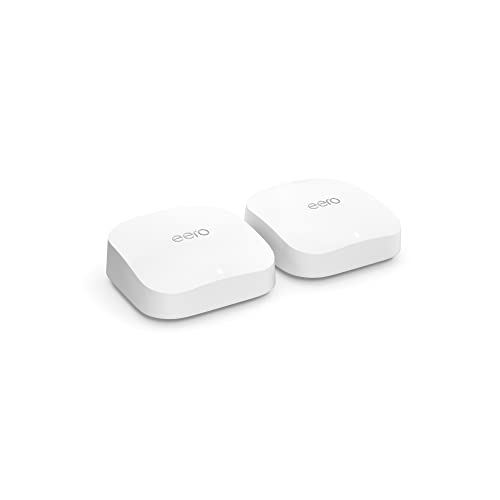
Amazon eero Pro 6E mesh Wi-Fi router | 2.5 Gbps Ethernet | Coverage up to 4,000 sq. ft. | Connect 100+ devices | Ideal for streaming, working, and gaming | 2-Pack | 2022 release


Key features
- •EERO'S FIRST Wi-Fi 6E SYSTEM - eero Pro 6E supports fast speeds and access to the new 6 GHz band when using Wi-Fi 6E devices, resulting in lower latency across your network, even for non Wi-Fi 6E devices. Backward-compatible with previous-generation eero devices.
- •EERO'S FASTEST SYSTEM YET - Supports network speeds up to 2.3 Gbps — including wired speeds of up to a gigabit and wireless speeds of up to 1.6 Gbps. Enables gigabit+ internet plans when using the 2.5 Gb Ethernet port.
- •MORE WIFI FOR MORE DEVICES - Network coverage up to 4,000 sq ft and support for 100+ connected devices.
- •EXPERIENCE THE EERO TRUEMESH DIFFERENCE - eero's patented TrueMesh technology intelligently routes traffic to reduce drop-offs and dead spots.
- •SET UP IN MINUTES - The eero app guides you through setup and allows you to manage your network from anywhere.
- •GETS BETTER OVER TIME - Receive automatic updates to help keep your network safe and secure. Online security and additional network management features available via a separate subscription.
Amazon eero Pro 6E mesh Wi-Fi router | 2.5 Gbps Ethernet | Coverage up to 4,000 sq. ft. | Connect 100+ devices | Ideal for streaming, working, and gaming | 2-Pack | 2022 release
List Price: $581.99$523.79DEALYou Save: $58.20 (10%)
Free shippingFree Returns – 30 daysFree Order CancellationSecure Payment2–3 Days DeliveryGet It October 25, 2026In Stock (1)No marketing spamNo account requiredFulfilment by FedEx / Amazon / UPS / ShipwirePayPal / Card Buyer Protection
Customer Reviews
Reviews sourced from verified Amazon purchasers4.3
out of 5
Based on 10 reviews
5★
70%
4★
30%
3★
0%
2★
0%
1★
0%
Mixed review
Raj✓ Verified Purchase•November 14, 2023
I was going to take these to replace some Asus ET12s since Asus routers are historically Not stable (owned over 5 types).
Pros:
1) these are stable like no other, no reboots needed constantly like my orbi or Asus systems.
2) for a novice this router is perfect for a plug and play approach to a router.
Cons:
1) I have spent over 20 hours with EERO support with the conclusion stability comes at a speed cap price. My EERO was capped at 975Mbps down and 200 Mbps upload. (this is know since my old asus setup proves I was getting 1.2 Gbps down and 998Mbps up)
2) you can only access this through the phone app. This is good for novice users who want something simple, but advanced networking people like me want much more desired control on our network.
3) you plug into a 2.5Gbps port but capped on lan bandwidth outbound at 1Gbps. Why would you do this?!
In the end I will be returning this and going back to firewalla and pfsense as my router and my asus nodes in ap mode. These are awesome for stability but losing speeds is not acceptable.
Pros:
1) these are stable like no other, no reboots needed constantly like my orbi or Asus systems.
2) for a novice this router is perfect for a plug and play approach to a router.
Cons:
1) I have spent over 20 hours with EERO support with the conclusion stability comes at a speed cap price. My EERO was capped at 975Mbps down and 200 Mbps upload. (this is know since my old asus setup proves I was getting 1.2 Gbps down and 998Mbps up)
2) you can only access this through the phone app. This is good for novice users who want something simple, but advanced networking people like me want much more desired control on our network.
3) you plug into a 2.5Gbps port but capped on lan bandwidth outbound at 1Gbps. Why would you do this?!
In the end I will be returning this and going back to firewalla and pfsense as my router and my asus nodes in ap mode. These are awesome for stability but losing speeds is not acceptable.
BRIDGE BRIDGE BRIDGE
RetroSamurai✓ Verified Purchase•October 29, 2023
I am not one for writing reviews as of late, but I feel that this is a must for those of you like myself just getting into mesh systems and wanting the best of the best or least wanting something worth the money. Let me start of by saying that this is my first mesh system. I returned it one week after owning it. Why you ask? Because it went on sale for $200 cheaper a week later after I purchased this past August 2022, so I returned it and immediately purchased the exact same setup for the sale price. Now that that is out of the way, lets get into the brass tax.
I have over 100 smart devices, bulbs, led strips, switches, plugs, tvs, way too many gaming systems, tablets, phones, blinds, fans, garage door, sprinkler, speakers, 10 variations of Echos, computer pcs and macs, in my 1 story attached garage 2000 sq ft home of concrete stucco hurricane code. I purchased the 3 pk this past August of 2022. Now is it overkill? Maybe. Prior to this I purchased several WIFI range extenders just so I could reach my outside landscape smart bulbs, and my driveway smart lights and my smart sprinkler Rachio. Needless to say that was a fail, the price of those extenders were fairly cheap and that was the definition of you get what you pay for. I was barely getting 15 down and 1 up with those extenders by my smart sprinkler panel that is attached to the outside of my home.
I decided to take a dive into EERO and go all out and get the PRO 6e. The first couple of days I was getting speeds of 500 down and 40 up. Then things started to get a little crazy. Mind you I set them up at the farthest corners of the house and have one in the garage as well. As the week went on devices started slowly disconnecting and wouldn't work. Lifx anything was totally useless, and so were the nanoleaf panels. Shortly room by room the wiz bulbs started to not work and then eventually the govee anything and Roombas as well as sonos speakers. Everything started to not connect to the network. I have one EERO set up next to the modem/router combo from Xfinity in the center of my 2000 sq ft home serving as the gateway and each of the other two are over 500 feet away.
At this point and you might be thinking to yourself that is one expensive failing range extending system. At least that is what I was thinking. SO I called Amazon customer support and I was transferred to an EERO tech who got me through the process of hard resetting each EERO and only having one connected. He advised me that having more than one in my 2000 sq ft home was overkill and I was clogging up the highway of bandwidth. So shortly after I got off the phone with tech support, I was thinking to myself....wait what? If that were true then why were all my devices working flawlessly in the beginning when I first set them up a week ago?
So I connected the other two and boom all my devices were lightning fast no lag no hesitation. This time almost 600 up on my phone and almost 700 on my PC. Wirelessly I might add. A week goes by and then it starts happening again, I went through the entire reset process disconnected every device reconnected everything and things are back running smoothly. At least I thought. So digging through the web and further investigating I decided to go into bridge mode. Based on EEROS software and program design, they are set up to optimize your entire home network every so often, in my case it was one week. However their optimization program in router mode is counterintuitive in my case. This is why all the clients/devices were having connectivity issues.
Now here is where the fun begins because I was going to send these back, because my 11 year old Netgear gaming router was out performing this system...until I bridged it. Wow, PC speed is almost at 900 down, and the PC is far away from the mesh systems, phone speeds at about 800. And every single device has not disconnected or dropped and works beyond my expectations. Outside of my house I live on a 10000 sq ft lot and I can go anywhere in my yard and I have signal. Not to mention these things are fighting through concrete stucco and probably more traffic then i35 and i10 combined during construction. Overall 4/5 due to the so called router optimization software they use and the fact that they would have you pay for a sub, which reminds me I need to cancel since their subscription services do not work in bridge mode.
If you are too lazy to read all that here is a short list of pros and cons.
Pros: Super fast speeds, easy to set up, app is easy, sleek futuristic clean minimal design
Cons: Price, takes quite some tinkering on user end to optimize setup, subscription based services
Special notes:
1 EERO serving as the gate in bridge mode directly connected to the router/modem from Xfinity.
My EERO serving as gateway has an outgoing powered network switch attached to it.
I have 1.2 GBps with Xfinity, just with the one EERO Pro 6e wired I an getting above 1.4GBps super fast
If you are not savvy with nerdy geeky stuff, hire a pro to optimize your network.
These are worth it and I would recommend even without the sale price.
Invest into a firewall router if going into bridge mode.
I have over 100 smart devices, bulbs, led strips, switches, plugs, tvs, way too many gaming systems, tablets, phones, blinds, fans, garage door, sprinkler, speakers, 10 variations of Echos, computer pcs and macs, in my 1 story attached garage 2000 sq ft home of concrete stucco hurricane code. I purchased the 3 pk this past August of 2022. Now is it overkill? Maybe. Prior to this I purchased several WIFI range extenders just so I could reach my outside landscape smart bulbs, and my driveway smart lights and my smart sprinkler Rachio. Needless to say that was a fail, the price of those extenders were fairly cheap and that was the definition of you get what you pay for. I was barely getting 15 down and 1 up with those extenders by my smart sprinkler panel that is attached to the outside of my home.
I decided to take a dive into EERO and go all out and get the PRO 6e. The first couple of days I was getting speeds of 500 down and 40 up. Then things started to get a little crazy. Mind you I set them up at the farthest corners of the house and have one in the garage as well. As the week went on devices started slowly disconnecting and wouldn't work. Lifx anything was totally useless, and so were the nanoleaf panels. Shortly room by room the wiz bulbs started to not work and then eventually the govee anything and Roombas as well as sonos speakers. Everything started to not connect to the network. I have one EERO set up next to the modem/router combo from Xfinity in the center of my 2000 sq ft home serving as the gateway and each of the other two are over 500 feet away.
At this point and you might be thinking to yourself that is one expensive failing range extending system. At least that is what I was thinking. SO I called Amazon customer support and I was transferred to an EERO tech who got me through the process of hard resetting each EERO and only having one connected. He advised me that having more than one in my 2000 sq ft home was overkill and I was clogging up the highway of bandwidth. So shortly after I got off the phone with tech support, I was thinking to myself....wait what? If that were true then why were all my devices working flawlessly in the beginning when I first set them up a week ago?
So I connected the other two and boom all my devices were lightning fast no lag no hesitation. This time almost 600 up on my phone and almost 700 on my PC. Wirelessly I might add. A week goes by and then it starts happening again, I went through the entire reset process disconnected every device reconnected everything and things are back running smoothly. At least I thought. So digging through the web and further investigating I decided to go into bridge mode. Based on EEROS software and program design, they are set up to optimize your entire home network every so often, in my case it was one week. However their optimization program in router mode is counterintuitive in my case. This is why all the clients/devices were having connectivity issues.
Now here is where the fun begins because I was going to send these back, because my 11 year old Netgear gaming router was out performing this system...until I bridged it. Wow, PC speed is almost at 900 down, and the PC is far away from the mesh systems, phone speeds at about 800. And every single device has not disconnected or dropped and works beyond my expectations. Outside of my house I live on a 10000 sq ft lot and I can go anywhere in my yard and I have signal. Not to mention these things are fighting through concrete stucco and probably more traffic then i35 and i10 combined during construction. Overall 4/5 due to the so called router optimization software they use and the fact that they would have you pay for a sub, which reminds me I need to cancel since their subscription services do not work in bridge mode.
If you are too lazy to read all that here is a short list of pros and cons.
Pros: Super fast speeds, easy to set up, app is easy, sleek futuristic clean minimal design
Cons: Price, takes quite some tinkering on user end to optimize setup, subscription based services
Special notes:
1 EERO serving as the gate in bridge mode directly connected to the router/modem from Xfinity.
My EERO serving as gateway has an outgoing powered network switch attached to it.
I have 1.2 GBps with Xfinity, just with the one EERO Pro 6e wired I an getting above 1.4GBps super fast
If you are not savvy with nerdy geeky stuff, hire a pro to optimize your network.
These are worth it and I would recommend even without the sale price.
Invest into a firewall router if going into bridge mode.
Stable and good coverage
orion8301✓ Verified Purchase•October 26, 2023
I'm in IT and manage wireless for Enterprise class wireless systems. My wife was very patient with the years of testing gear at the house. Unfortunately using enterprise grade wireless in a residential deployment has a downside for interoperability between all the IOT devices we have in the home. Some Ring cameras have an issue with 802.11r, Sonos would flake out from time to time, rebooting and upgrading APs was a normal operation to get wireless back online.
We finally got tired of trying to use the high end enterprise grade APs in the house. During a deal, we pulled the trigger and bought the Wifi-6e kit. Setup was a breeze and the device fingerprinting worked better than the previous system I was running. Integration with the new Echo devices, as wifi extenders, filled in a few weaker areas. Creating a dedicated IOT wireless LAN separate from my trusted devices was possible by renaming the guest WLAN.
Traffic monitoring of the profiled devices helps to keep Comcast honest on our monthly bill for any data overages. Also helps pinpoint the device consuming the most bandwidth.
I built a similar system in my mother's home. You can manage multiple homes wireless by being added as a shared admin. It's pretty nice to toggle between Mom's house and our own to monitor everything is running well or profile new devices being added.
I'd recommend the system to anyone, especially those with new Amazon Echo dots in their home. The wifi extender functionality help ensure coverage in far off rooms.
We finally got tired of trying to use the high end enterprise grade APs in the house. During a deal, we pulled the trigger and bought the Wifi-6e kit. Setup was a breeze and the device fingerprinting worked better than the previous system I was running. Integration with the new Echo devices, as wifi extenders, filled in a few weaker areas. Creating a dedicated IOT wireless LAN separate from my trusted devices was possible by renaming the guest WLAN.
Traffic monitoring of the profiled devices helps to keep Comcast honest on our monthly bill for any data overages. Also helps pinpoint the device consuming the most bandwidth.
I built a similar system in my mother's home. You can manage multiple homes wireless by being added as a shared admin. It's pretty nice to toggle between Mom's house and our own to monitor everything is running well or profile new devices being added.
I'd recommend the system to anyone, especially those with new Amazon Echo dots in their home. The wifi extender functionality help ensure coverage in far off rooms.
Whoa...
jhender85✓ Verified Purchase•October 15, 2023
So I was skeptical at first. Not skeptical enough not to pay over $300, but still wasn't expecting these to be as good as I've heard. My house has multiple tvs/streaming devices on all 3 floors, every major streaming service, and I work from home with a data heavy (constant video conference calls). We're typically at 1.5 to 2TB of data per month, using Comcast's XB7 gateway.
I never got my advertised 1.2GB download speed. ~80MB/s was more typical, on good days, 300 to 400mb/s could happen, and I good count on my hands how often speeds got above 800mb/s. This isn't to mention the many deadspots in my fairly small house that Xfi pods didn't really help with. I was at my wits end.
I'm in day 2 with Eero setup. I'm consistently getting 1.4 GB/s downstairs, and consistently 600 to 900 in previous deadspots. Still a lot of time to go sideways, but as of right now, I'm a believer!
I never got my advertised 1.2GB download speed. ~80MB/s was more typical, on good days, 300 to 400mb/s could happen, and I good count on my hands how often speeds got above 800mb/s. This isn't to mention the many deadspots in my fairly small house that Xfi pods didn't really help with. I was at my wits end.
I'm in day 2 with Eero setup. I'm consistently getting 1.4 GB/s downstairs, and consistently 600 to 900 in previous deadspots. Still a lot of time to go sideways, but as of right now, I'm a believer!
Great WiFi speeds, even if you don't have any 6E devices
Paul✓ Verified Purchase•October 14, 2023
TL;DR - This is a great WiFi Router for stable, fast WiFi signal throughout your home, even if you don't have any WiFi 6E devices. Worth investing a little extra for the 6E over the 6 Pro in my experience. -- I previously used a Google WiFi system for years and was initially pleased with the stability of the WiFi network compared to more basic routers in the past. After a year or more of use, I was not thrilled with my WiFi speeds being around 160 Mbps download, when I am paying my ISP for 800 Mbps down. After doing some research I landed on trying out the Eero 6 and 6E Pro. I initially was leaning towards the 6 Pro because I have a few WiFi 6 devices and older, but nothing that takes advantage of the new 6E bands. I ended up keeping the 6E Pro because I was consistently getting about 600 Mbps downloads throughout my home over WiFi on my phone and laptop, which is about 100 Mbps faster than the 6 Pro was able to provide. I also have a home that is small enough that I can just use one router without creating a mesh network. Worth the additional investment over the cost of the 6 Pro IMO.
Page 1 of 2