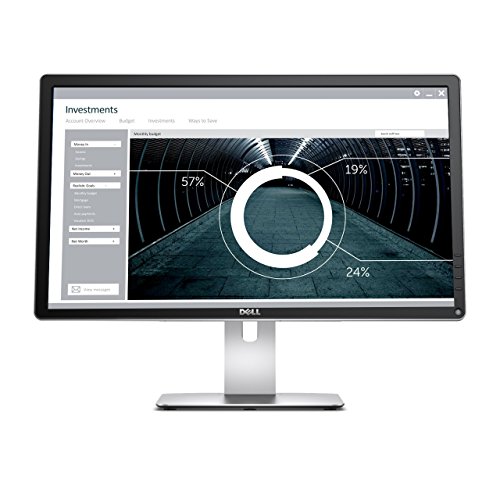
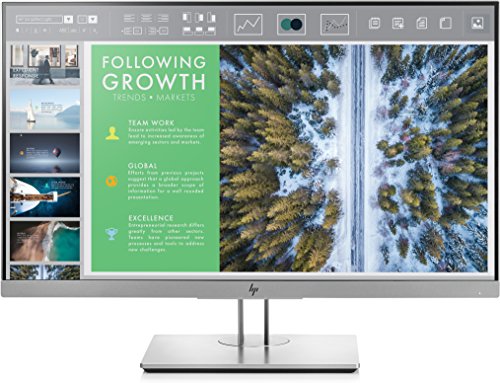
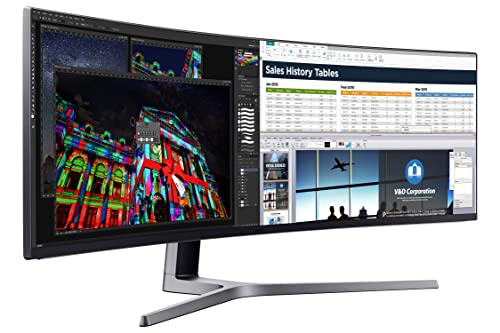
Dell Computer Ultrasharp U2415 24.0-Inch FHD 1080p Screen LED Monitor, Black
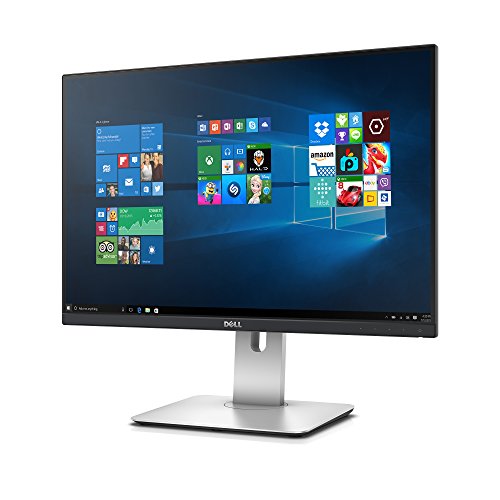


Key features
- •24-inch WUXGA Monitor (1920x1200) at 60Hz, 16:10 Aspect Ratio. Compliant Standards-Plug and Play, FCC, DDC/CI, RoHS, NFPA 99, TCO Displays
- •1000:1 Contrast Ratio, 16.78 Million Colors, 6ms Response Time. Enhanced power management with PowerNap enables the Dell Display Manager to either dim the monitor to the minimum brightness level or put it into sleep mode when it is not in use
- •Viewing Angle: 178/178, Widescreen Anti-Glare Display, Security Lock Slot; Horizontal Refresh Rate: 30 - 83 kHz
- •HDMI, Mini DP, DP, Audio line out, USB 3.0 with USB 3.0 Upstream Port. Temperature Range Operating:0? to 40?C (32? to 104?F)
- •Height-Adjustable Stand (115mm) Title, Pivot, and Swivel with Built-in Cable Management
- •Note: Please refer to the user manuals below for better use. Compatibility- All Operating System
Dell Computer Ultrasharp U2415 24.0-Inch FHD 1080p Screen LED Monitor, Black
List Price: $851.18$766.06DEALYou Save: $85.12 (10%)
Free shippingFree Returns – 30 daysFree Order CancellationSecure Payment2–3 Days DeliveryGet It October 28, 2026In Stock (1)No marketing spamNo account requiredFulfilment by FedEx / Amazon / UPS / ShipwirePayPal / Card Buyer Protection
Customer Reviews
Reviews sourced from verified Amazon purchasers4.4
out of 5
Based on 10 reviews
5★
70%
4★
20%
3★
0%
2★
0%
1★
10%
great stand, and good amount of inputs
Voltmod•May 28, 2018
It's hard to go wrong with this monitor so long as you know what you're buying. It is not 144hz, g-sync, etc. It is a business class IPS panel with a slim bezel, great stand, and good amount of inputs.
I can't comment on the Daisy chaining functionality as I am not using it. However, I did notice a good amount of posts on Dell forums about issues with that feature. This could be isolated to an earlier revision of this monitor. The revision is listed after the serial number on the product. I recommend getting the latest revision if possible (A08, I believe). I'm happy to say I received the latest and a March 2018 manufacture date on the one I purchased through Amazon. And without a single dead pixel or any significant IPS glow or backlight bleed.
I am a huge gamer but also try to prioritize my setup for productivity, so I had quite an internal struggle deciding on the monitor. I've always used IPS, only have a 1060, and really think there's huge room for growth with the IPS /144hz /g-sync market. It was not worth the hastle to me to play the panel lottery at this time, and I am too hesitant to go back to a TN panel. Plus my card can't push more than 60-70FPS. Having said that, games look nice and vibrant on here. The blacks could be better when gaming in the dark, but it's not a deal breaker by any means.
The brightness behavior of the monitor bugs me slightly. The brightness affects the colors more than my old monitor, where the brightness would just make everything pop. Its definitely different backlight/brightness technology. Cranking the brightness too far beyond 50 will make things look a little washed out, as if you are changing contrast, but it's also super bright at 50 so not a huge concern. But you can't crank the brightness in dark games without getting some color wash out. These are definitely tailored to day time office enrionment use, so just keep that in mind if you're a gamer.
I found the calibration out of box to be decent but it looks much better after further calibration. Look up TFT Central's review of this monitor for tech details about response times, calibration, etc.
I also like the option toount a sound bar to the bottom of it - a Dell AC511. I didn't have desk speakers and needed some for general YouTube tutorials and such, so that is a perfect addition to this monitor.
I can't comment on the Daisy chaining functionality as I am not using it. However, I did notice a good amount of posts on Dell forums about issues with that feature. This could be isolated to an earlier revision of this monitor. The revision is listed after the serial number on the product. I recommend getting the latest revision if possible (A08, I believe). I'm happy to say I received the latest and a March 2018 manufacture date on the one I purchased through Amazon. And without a single dead pixel or any significant IPS glow or backlight bleed.
I am a huge gamer but also try to prioritize my setup for productivity, so I had quite an internal struggle deciding on the monitor. I've always used IPS, only have a 1060, and really think there's huge room for growth with the IPS /144hz /g-sync market. It was not worth the hastle to me to play the panel lottery at this time, and I am too hesitant to go back to a TN panel. Plus my card can't push more than 60-70FPS. Having said that, games look nice and vibrant on here. The blacks could be better when gaming in the dark, but it's not a deal breaker by any means.
The brightness behavior of the monitor bugs me slightly. The brightness affects the colors more than my old monitor, where the brightness would just make everything pop. Its definitely different backlight/brightness technology. Cranking the brightness too far beyond 50 will make things look a little washed out, as if you are changing contrast, but it's also super bright at 50 so not a huge concern. But you can't crank the brightness in dark games without getting some color wash out. These are definitely tailored to day time office enrionment use, so just keep that in mind if you're a gamer.
I found the calibration out of box to be decent but it looks much better after further calibration. Look up TFT Central's review of this monitor for tech details about response times, calibration, etc.
I also like the option toount a sound bar to the bottom of it - a Dell AC511. I didn't have desk speakers and needed some for general YouTube tutorials and such, so that is a perfect addition to this monitor.
Very nice monitor. So hard to find small 1920x1200 res monitors!
IncredibleHat•January 10, 2018
Very nice monitor. A bit huge compared to the laptop monitor I am used to working on... so adjusting will happen. Good quality, nice color, range, low to no flicker that I can see. There is no 'edge haze' on the one I got, so not sure what they mean by IPS have edge haze issues.
I like how the control buttons are actual touch buttons, and not super hard to push in, wrestle, off the edge, or behind the bezel like so many other monitors. The controls also allowed me to color adjust it better than the janky color-sync utility on the mac would. Allowed me to get rid of the reddish hue, and push it more to cool grays as I like them.
The stand is also pretty solid, with lots of degree of movement. I kind of wish it would slide down closer to the desk. I like monitors to be very low to the keyboard, not sitting high up wrenching my neck ... and I dont care about 'proper sitting etiquette' after 25 years of using computers as I have.
I like how the control buttons are actual touch buttons, and not super hard to push in, wrestle, off the edge, or behind the bezel like so many other monitors. The controls also allowed me to color adjust it better than the janky color-sync utility on the mac would. Allowed me to get rid of the reddish hue, and push it more to cool grays as I like them.
The stand is also pretty solid, with lots of degree of movement. I kind of wish it would slide down closer to the desk. I like monitors to be very low to the keyboard, not sitting high up wrenching my neck ... and I dont care about 'proper sitting etiquette' after 25 years of using computers as I have.
good value. nice quality. using it for image editing because new Precision has worst screen ever.
Jared M.•January 3, 2018
well...i just got this so for now, it's a five star review. trust me, i will alter it if this thing turns out differently over time.
long time dell customer. recently purchased a loaded Precision Workstation laptop from their small business division and despite the claims by the sales agent, the screen (AUO109D 17.3") is GARBAGE. i had so many issues ordering the computer that even though i could return it, i decided that i had already transferred everything over and wasn't going to gamble on getting another screen option from them and have it be just as bad. not to mention all the down time from them screwing things up and even sending it to the wrong address!!! the laptop display has such a heavy anti-glare finish on it, that all whites/lights look grainy. may be ok for general use but not for IMAGE EDITING which is i must have explained ten times while putting this system together with dell.
ANYWAY, the U2415 is an ideal partner to my workstation. i am using the mini DP connection from my laptop to the monitor and it was really just a plug and play affair with my 7720 which is running Windows 10 Pro 64. because my laptop screen is 1920x1080, i had to switch the display mode from duplicate to extend, so i could make use of the extra room on the U2415. out of the box calibration was fine for me. anti-glare on this works well and doesn't inhibit anything.
one thing i didn't realize is that it doesn't come with any speakers. not a big issue for me but wanted to quickly solve it. i am using an small soundbar that i've had sitting around and it works fine. i have the USB plugged into the back of the monitor for charging and the audio is delivered via 3.5 cable from the bar to the monitor. not the cleanest solution because of the two small cables running out of the bar to the monitor BUT it's really fine for now.
long time dell customer. recently purchased a loaded Precision Workstation laptop from their small business division and despite the claims by the sales agent, the screen (AUO109D 17.3") is GARBAGE. i had so many issues ordering the computer that even though i could return it, i decided that i had already transferred everything over and wasn't going to gamble on getting another screen option from them and have it be just as bad. not to mention all the down time from them screwing things up and even sending it to the wrong address!!! the laptop display has such a heavy anti-glare finish on it, that all whites/lights look grainy. may be ok for general use but not for IMAGE EDITING which is i must have explained ten times while putting this system together with dell.
ANYWAY, the U2415 is an ideal partner to my workstation. i am using the mini DP connection from my laptop to the monitor and it was really just a plug and play affair with my 7720 which is running Windows 10 Pro 64. because my laptop screen is 1920x1080, i had to switch the display mode from duplicate to extend, so i could make use of the extra room on the U2415. out of the box calibration was fine for me. anti-glare on this works well and doesn't inhibit anything.
one thing i didn't realize is that it doesn't come with any speakers. not a big issue for me but wanted to quickly solve it. i am using an small soundbar that i've had sitting around and it works fine. i have the USB plugged into the back of the monitor for charging and the audio is delivered via 3.5 cable from the bar to the monitor. not the cleanest solution because of the two small cables running out of the bar to the monitor BUT it's really fine for now.
Ultrasharp U2415 flaked out after about 90 days
Cory•December 9, 2017
Dell Ultrasharp U2415
This was a great monitor at first. It has a great display and exactly what you'd like in a monitor. However, ~90 days in I had a sudden issue with it where the image flaked out. Nothing but random thin colored lines across the whole display. After troubleshooting to confirm that it was indeed the monitor and not my computer (a second monitor was completely fine with the same connections), it finally seemed to fix itself.
Now worried about the longevity of a monitor that would have issues so soon after purchasing it, I contacted Dell support to get a replacement. However, after an initial 30 day window, they are no longer willing to replace it with brand new models, only refurbished ones. Having paid over 200 dollars for this monitor, it strikes me as a small window for such an offer, so I would not recommend this model if you are looking for something for long term usage.
This was a great monitor at first. It has a great display and exactly what you'd like in a monitor. However, ~90 days in I had a sudden issue with it where the image flaked out. Nothing but random thin colored lines across the whole display. After troubleshooting to confirm that it was indeed the monitor and not my computer (a second monitor was completely fine with the same connections), it finally seemed to fix itself.
Now worried about the longevity of a monitor that would have issues so soon after purchasing it, I contacted Dell support to get a replacement. However, after an initial 30 day window, they are no longer willing to replace it with brand new models, only refurbished ones. Having paid over 200 dollars for this monitor, it strikes me as a small window for such an offer, so I would not recommend this model if you are looking for something for long term usage.
I love it
Jered Mckenna•November 18, 2017
So, Asus has a similar offering, the PA248Q, complete with USB 3.0 hub. However, at time of writing, it's roughly $100 more than this.
I have the Asus, and have loved it for video editing. I can trust the colors, and the matte, non glossy display feels more like I'm looking at real paper than a glossy LCD/IPS display.
This Dell also has that effect, which is good. Colors are trustworthy (I can't speak to the scientific precision, but they are good enough for my professional work), and the almost complete lack of bezel is actually a plus over the Asus. This display is truly immersive, weather doing mundane office tasks or video games (yes I sneak in some games at work, fire me).
When I sit 4 inches from the screen, I can see the pixels distinctly. However, I found a good solution to this problem. First, move your head back about 2 feet, then, realize how silly it was to get 4 inches from a screen and criticize the pixel density. hah.
Anyway for the price, this is a fantastic option. For those of us who want a great screen, with good enough color for entry level professional photo/video coloring, this is it guys.
Wait, I almost forgot. The location of the USB 3.0 jacks: bad. They are located at the bottom of the screen, same place as the display inputs. So, if you were planning on plugging and unplugging regularly, forget it. The ASUS has the jacks on the side, much better.
I have the Asus, and have loved it for video editing. I can trust the colors, and the matte, non glossy display feels more like I'm looking at real paper than a glossy LCD/IPS display.
This Dell also has that effect, which is good. Colors are trustworthy (I can't speak to the scientific precision, but they are good enough for my professional work), and the almost complete lack of bezel is actually a plus over the Asus. This display is truly immersive, weather doing mundane office tasks or video games (yes I sneak in some games at work, fire me).
When I sit 4 inches from the screen, I can see the pixels distinctly. However, I found a good solution to this problem. First, move your head back about 2 feet, then, realize how silly it was to get 4 inches from a screen and criticize the pixel density. hah.
Anyway for the price, this is a fantastic option. For those of us who want a great screen, with good enough color for entry level professional photo/video coloring, this is it guys.
Wait, I almost forgot. The location of the USB 3.0 jacks: bad. They are located at the bottom of the screen, same place as the display inputs. So, if you were planning on plugging and unplugging regularly, forget it. The ASUS has the jacks on the side, much better.
Page 1 of 2