Logitech Harmony Elite Remote Control, Hub and App - Discontinued by Manufacturer



Key features
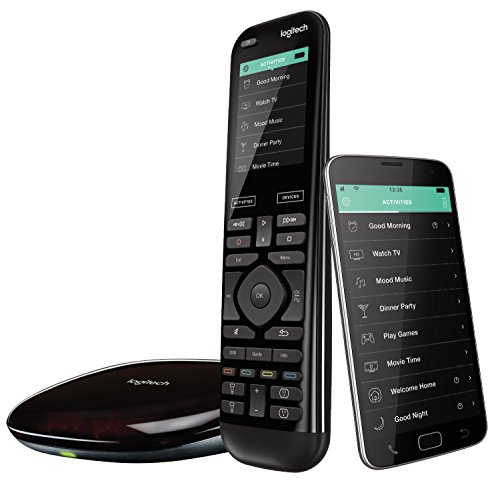
- •The most powerful and intuitive Harmony remote works with Alexa for voice control. All-in-one control of up to 15 home entertainment and connected home devices
- •Full color touchscreen: Simply swipe and tap to control channels, movies, volume, 50 favorite channels and smart home devices like Philips Hue lights
- •One-touch Activities: Touch an Activity like "Watch a Movie" to automatically power on and switch devices to the right settings; Compatible with Amazon's Alexa for easy voice integration and activation
- •Harmony app: Turns iOS or Android smartphones or tablets into personal universal remote controls for the whole house
- •Closed cabinet control: Included Harmony Hub lets you control devices in closed cabinets, or even when away from home
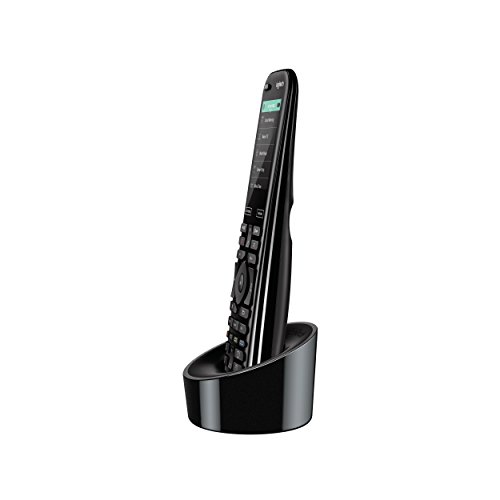
- •Convenient charging station: Keeps your remote powered and within reach
Logitech Harmony Elite Remote Control, Hub and App - Discontinued by Manufacturer
List Price: $596.54$536.89DEALYou Save: $59.65 (10%)
Free shippingFree Returns – 30 daysFree Order CancellationSecure Payment2–3 Days DeliveryGet It October 24, 2026In Stock (6)No marketing spamNo account requiredFulfilment by FedEx / Amazon / UPS / ShipwirePayPal / Card Buyer Protection
Customer Reviews
Reviews sourced from verified Amazon purchasers3.9
out of 5
Based on 10 reviews
5★
20%
4★
40%
3★
10%
2★
0%
1★
30%
Almost perfect.
Daryl✓ Verified Purchase•February 8, 2018
Almost perfect. I bought a Harmony 700 a few years ago, used it briefly, and then put it on a shelf. This remote solves all the problems I had with that one.
1) Programming is much, much easier. With the 700 I had to connect it to my computer and run a non-intuitive program to update settings. Then take it out to the living room, try it, and come back to the computer to make any changes. With the Elite, I can program it sitting on my sofa with my smart phone, wirelessly, easily and quickly.
2) Controls my RF Dish Hopper in the cabinet. Actually it won't send out RF signals, but with the Hub and blasters it will send IR signals right in the cabinet, working just as well as an RF remote.
3) "Infinite" flexibility and programability. Nothing is really infinite, of course, but this comes close. Almost all keys can be reassigned to other functions, or assigned to multi-step macros. The touchscreen display can be changed to feature the functions you want there.
4) It just feels good in my hand, and all the buttons are well marked and easy to find.
5) I'm just getting used to the "gesture" function on the touchscreen, but love that already. In the dark just by tapping or swiping on the screen I can pause, play, skip back or skip forward, and mute. Simple and functional.
Where it falls a little from perfection is in the price. That is a lot of money to pay for a remote control.
But based on the remote itself, it's 5 stars.
1) Programming is much, much easier. With the 700 I had to connect it to my computer and run a non-intuitive program to update settings. Then take it out to the living room, try it, and come back to the computer to make any changes. With the Elite, I can program it sitting on my sofa with my smart phone, wirelessly, easily and quickly.
2) Controls my RF Dish Hopper in the cabinet. Actually it won't send out RF signals, but with the Hub and blasters it will send IR signals right in the cabinet, working just as well as an RF remote.
3) "Infinite" flexibility and programability. Nothing is really infinite, of course, but this comes close. Almost all keys can be reassigned to other functions, or assigned to multi-step macros. The touchscreen display can be changed to feature the functions you want there.
4) It just feels good in my hand, and all the buttons are well marked and easy to find.
5) I'm just getting used to the "gesture" function on the touchscreen, but love that already. In the dark just by tapping or swiping on the screen I can pause, play, skip back or skip forward, and mute. Simple and functional.
Where it falls a little from perfection is in the price. That is a lot of money to pay for a remote control.
But based on the remote itself, it's 5 stars.
Still the leader, can't really go wrong -- but somewhat frustrating
Ryan✓ Verified Purchase•February 5, 2018
I haven't had a Logitech remote in quite sometime until purchasing this one. I originally had one of their older remotes years ago to consolidate the many remotes I had in my room. My biggest pet peeve with the older remote was the different "Activities" that you had to use and the like and it always was sort of clunky feeling.
I had been dealing with the multiple remotes again for the past few years and decided to look into a universal remote solution again for my home theater setup. No surprise to me that in my research it had seemed that Logitech still continues to be the leader for universal remotes. I went back and forth if I should pick one of these up and decided to a few weeks ago.
After having picked up this Logitech Harmony Elite remote, I'm pretty glad that I did. The remote itself is definitely a distinguishably nice remote that fits in the hand well and is a great weight. The backlit buttons are a really nice touch as well besides, of course, the screen.
The setup however, is quite something else. It takes sometime to get everything working well and to your liking. If you aren't super familiar with the process of Logitech's activities, or aren't super technically savvy you may run into a variety of frustrations and issues. The main thing to keep in mind is that Logitech really likes their "Activities" and what you're going to be doing on the TV and that's that. Luckily you can set this up on your Android / iPhone which can make things a bit smoother than when you used to have to connect it to your computer. However, the delay in syncing between the remote and hub can get super frustrating even for just some minor changes you want to make.
However, this is my major gripe with them as well. You have to condone to their "Activities" very strictly which is slightly unfortunate but it makes things easy for the average user. So if I'm playing Xbox and want to switch over to watching TV or something you have to ensure you enter the "Watching TV" activity to have the Logitech remote be in sync with what is going on. And when you're done, making sure that you're shutting off the devices with the Logitech remote / hub / app is really important. Else, you'll probably end up in a weird situation of things still on and Logitech won't know what's going on.
Something that's a big issue with Activities as well for me is, in my instance, I have an NVIDIA Shield which has multiple apps. It would be great if I could setup an activity for "Watch Netflix" and launch the shield and go to the Netflix app. Or "Watch Hulu" and it would go directly to that app. Unfortunately I can only have a "Watch Shield" activity for this. I've gotten one or two apps to work like that, but unfortunately the automated command max is FIVE commands. That means I need to be able to do: "Go Home", "Go Down", "Go Down", "Go Left", "Select" then I'm at my max, If I wanted to go over another left to access another app to make a new activity, I can't because that's the max amount of commands for the command sequence. Sure, there's a hacky workaround installing a secondary keyboard, blah blah blah... but of all the stuff the harmony can do including quick commands that supports way more, why is the startup command sequence max five?
Just sort of strange little things like that you'll find after using the device after a while.
Something that's absolutely great now though, is the integration with Alexa. Not having Alexa in years past was something that we have now that makes it really seem magical. After setting up Alexa properly (which also can be slightly frustrating / wonky at first), I can walk downstairs and simply call out the activity: "Alexa, Turn on Shield" and it will turn everything on properly no button pressing or anything. That right there is the best, especially when you have your hands full or are on your way to that room from the other side of the house.
Overall, I think I'm pretty content with the device, it's the best you can do at the moment for universal remotes and Logitech is definitely still the lead for that. With all the devices they support and experience they have had in this area over the years.
I had been dealing with the multiple remotes again for the past few years and decided to look into a universal remote solution again for my home theater setup. No surprise to me that in my research it had seemed that Logitech still continues to be the leader for universal remotes. I went back and forth if I should pick one of these up and decided to a few weeks ago.
After having picked up this Logitech Harmony Elite remote, I'm pretty glad that I did. The remote itself is definitely a distinguishably nice remote that fits in the hand well and is a great weight. The backlit buttons are a really nice touch as well besides, of course, the screen.
The setup however, is quite something else. It takes sometime to get everything working well and to your liking. If you aren't super familiar with the process of Logitech's activities, or aren't super technically savvy you may run into a variety of frustrations and issues. The main thing to keep in mind is that Logitech really likes their "Activities" and what you're going to be doing on the TV and that's that. Luckily you can set this up on your Android / iPhone which can make things a bit smoother than when you used to have to connect it to your computer. However, the delay in syncing between the remote and hub can get super frustrating even for just some minor changes you want to make.
However, this is my major gripe with them as well. You have to condone to their "Activities" very strictly which is slightly unfortunate but it makes things easy for the average user. So if I'm playing Xbox and want to switch over to watching TV or something you have to ensure you enter the "Watching TV" activity to have the Logitech remote be in sync with what is going on. And when you're done, making sure that you're shutting off the devices with the Logitech remote / hub / app is really important. Else, you'll probably end up in a weird situation of things still on and Logitech won't know what's going on.
Something that's a big issue with Activities as well for me is, in my instance, I have an NVIDIA Shield which has multiple apps. It would be great if I could setup an activity for "Watch Netflix" and launch the shield and go to the Netflix app. Or "Watch Hulu" and it would go directly to that app. Unfortunately I can only have a "Watch Shield" activity for this. I've gotten one or two apps to work like that, but unfortunately the automated command max is FIVE commands. That means I need to be able to do: "Go Home", "Go Down", "Go Down", "Go Left", "Select" then I'm at my max, If I wanted to go over another left to access another app to make a new activity, I can't because that's the max amount of commands for the command sequence. Sure, there's a hacky workaround installing a secondary keyboard, blah blah blah... but of all the stuff the harmony can do including quick commands that supports way more, why is the startup command sequence max five?
Just sort of strange little things like that you'll find after using the device after a while.
Something that's absolutely great now though, is the integration with Alexa. Not having Alexa in years past was something that we have now that makes it really seem magical. After setting up Alexa properly (which also can be slightly frustrating / wonky at first), I can walk downstairs and simply call out the activity: "Alexa, Turn on Shield" and it will turn everything on properly no button pressing or anything. That right there is the best, especially when you have your hands full or are on your way to that room from the other side of the house.
Overall, I think I'm pretty content with the device, it's the best you can do at the moment for universal remotes and Logitech is definitely still the lead for that. With all the devices they support and experience they have had in this area over the years.
DON'T BUY AN ELITE OR AN ULTIMATE--ESPECIALLY THE ULTIMATE, ITS A THROWAWAY REMOTE.!!!! READ ON.
Michael PMcK✓ Verified Purchase•September 25, 2017
I'm an audio video dealer... and frequently use universal remotes..: the ultimate and elite are the buggiest, hardest to program using their software i have ever encountered... Once the software fails... the remotes and/or hubs are rendered useless... the last two remotes failed while in software programming, and you MUST do a ctrl alt del, to kill the program.. once you do that the hub and remote are useless and tech support does not seem to know how to fix it. Hours and hours can be invested in programming this buggy product.. only to have it fail on you and necessitate returning it to amazon.. to start over.
I will do this one more time, then never again... as logitech support is as buggy as the product--once you get past the easy stage of support, they pass you off to 'pro-support' which is EMAIL ONLY--meaning you will have days and days trying to get the bugs out, and even then, you'll probably fail.
Also once you use the proper customer email for setting up on the pro-portal, and you have a failure, that email address will no longer be available to use.. meaning you won't be able to login remotely to the customer remote (at his home) to adjust or fix it.. It is all just a nightmare, once things go wrong..
lastly: THE ELITE IS THE ONLY HUB BASED REMOTE WITH REPLACEABLE BATTERIES.. THE ULTIMATE IS A THROW AWAY ONCE THE BATTERY EXPIRES--SOLUTION FOR THE BATTERY--BUY A NEW 200 REMOTE AND START OVER, INCREDIBLE. WHAT A NIGHTMARE.. FOR THOSE WHO INVESTED HEAVILY IN THE ULTIMATE (AS I DID)... ONCE THE BATTERY DIES, YOU HAVE TO THROW THE WHOLE THING IN THE TRASH...
I will do this one more time, then never again... as logitech support is as buggy as the product--once you get past the easy stage of support, they pass you off to 'pro-support' which is EMAIL ONLY--meaning you will have days and days trying to get the bugs out, and even then, you'll probably fail.
Also once you use the proper customer email for setting up on the pro-portal, and you have a failure, that email address will no longer be available to use.. meaning you won't be able to login remotely to the customer remote (at his home) to adjust or fix it.. It is all just a nightmare, once things go wrong..
lastly: THE ELITE IS THE ONLY HUB BASED REMOTE WITH REPLACEABLE BATTERIES.. THE ULTIMATE IS A THROW AWAY ONCE THE BATTERY EXPIRES--SOLUTION FOR THE BATTERY--BUY A NEW 200 REMOTE AND START OVER, INCREDIBLE. WHAT A NIGHTMARE.. FOR THOSE WHO INVESTED HEAVILY IN THE ULTIMATE (AS I DID)... ONCE THE BATTERY DIES, YOU HAVE TO THROW THE WHOLE THING IN THE TRASH...
Epic Fail
D. Reich✓ Verified Purchase•May 17, 2017
I had really high expectations for this remote.... I have had a Harmony 1 for many years and absolutely loved it. Unfortunately, I dropped the Harmony 1 on a tile floor this week and killed it. So, naturally I quickly ordered Logitech's latest and greatest. What an epic fail! I just spent the last 3 hours trying to get it to work with all my devices, and finally threw in the towel. Packing this thing up for return as soon as I finish this review. I'm a tech-savvy guy, so for this to be so completely unworkable was incredibly frustrating. I was able to get all my devices entered, as well as my Smart Hub. But when I tried to test the devices, there was not a single place in my room where I could get every device to work. I could get some but never all. What was surprising was it was a clear line of sight to ALL the devices, but every time I tried a new location there was one or two that refused to participate. I tried the IR Blasters, and only found it would work with everything if I stood 5 feet from my devices holding the IR Blaster as high as I could. Not going to happen. I even tested each device by its own remote in every location, and had no problems getting my devices to work at a given spot with their own remotes, but using the Harmony? Forget it. No way this thing is worth $300. I wouldn't pay $3 for it.
Amazing! Approaches perfection!!
motees✓ Verified Purchase•December 27, 2016
Update: After using this remote for about a month now I will add and repeat: This is probably the best remote available today. The speed of the commands is excellent and is very customizable.
Having said that, the remote size is a bit too small for my average size male hands. I would probably have placed some the most frequently used buttons in locations that are more comfortable to reach, but with the size limitations not much can be done. Sometimes I hold the remote with one hand and push buttons with the other.
It is true that it is too easy to hit the sensitive Devices button by mistake. Not really a problem once you learn to avoid it.
Overall I am really happy I bought this expensive remote.
//////////////////
Well, I just received this Elite remote, and I am very impressed. I am upgrading from the very nice Harmony Ultimate.
I had difficulties setting up the Ultimate with my Yamaha receiver RX-A3050 and Arris DVR, even after trying to troubleshoot it with Logitech support, so I just ended up using the Charter remote which was not satisfactory, either.
Extremely easy to set up once you have your devices brand names and model numbers. Recognized all devices immediately. I mistyped the DVR model number, and it amazingly suggested the correct DVR model number! Then created TV activity very easily.
The remote did freeze up once while trying to set up everything with the iPhone Harmony app, which is light-years easier to program the remote than the old very inconvenient wired connection to the computer. No big deal after resetting remote with power button. Stuff happens with any electronic device.
The convenience of being able to point the remote in any direction, and not being forced to point it at the device you want to control, is just about worth the high price itself.
Many of the most frequently used Utimate's control buttons have mercifully been moved down from the top of the remote to the middle of the Elite's. There are no longer any buttons above the display screen except the remote's power button. Fine.
The texture on the back of the remote is subtle and provides a good grip without being annoying. It could be a bit better gripping though.
The remote is significantly thinner than the Ultimate's and a little bit taller. Very nice.
Beautiful screen. Nice tap vibration to confirm button taps.
I will program a few buttons, but most of the buttons work fine immediately. Lots of ways to customize it, which I really like.
Will update later if needed, but initially, the is a spectacular remote system, both hardware and software: the way I would have designed it! This is what the Ultimate should have been. Logitech has really done their homework on this kitty, and they charged me a lot for it. Suits me fine, though. I like using the best, finally. :-) Again this is my initial impression, but quite amazing to set up and operate.
Everything is very fast.
Having said that, the remote size is a bit too small for my average size male hands. I would probably have placed some the most frequently used buttons in locations that are more comfortable to reach, but with the size limitations not much can be done. Sometimes I hold the remote with one hand and push buttons with the other.
It is true that it is too easy to hit the sensitive Devices button by mistake. Not really a problem once you learn to avoid it.
Overall I am really happy I bought this expensive remote.
//////////////////
Well, I just received this Elite remote, and I am very impressed. I am upgrading from the very nice Harmony Ultimate.
I had difficulties setting up the Ultimate with my Yamaha receiver RX-A3050 and Arris DVR, even after trying to troubleshoot it with Logitech support, so I just ended up using the Charter remote which was not satisfactory, either.
Extremely easy to set up once you have your devices brand names and model numbers. Recognized all devices immediately. I mistyped the DVR model number, and it amazingly suggested the correct DVR model number! Then created TV activity very easily.
The remote did freeze up once while trying to set up everything with the iPhone Harmony app, which is light-years easier to program the remote than the old very inconvenient wired connection to the computer. No big deal after resetting remote with power button. Stuff happens with any electronic device.
The convenience of being able to point the remote in any direction, and not being forced to point it at the device you want to control, is just about worth the high price itself.
Many of the most frequently used Utimate's control buttons have mercifully been moved down from the top of the remote to the middle of the Elite's. There are no longer any buttons above the display screen except the remote's power button. Fine.
The texture on the back of the remote is subtle and provides a good grip without being annoying. It could be a bit better gripping though.
The remote is significantly thinner than the Ultimate's and a little bit taller. Very nice.
Beautiful screen. Nice tap vibration to confirm button taps.
I will program a few buttons, but most of the buttons work fine immediately. Lots of ways to customize it, which I really like.
Will update later if needed, but initially, the is a spectacular remote system, both hardware and software: the way I would have designed it! This is what the Ultimate should have been. Logitech has really done their homework on this kitty, and they charged me a lot for it. Suits me fine, though. I like using the best, finally. :-) Again this is my initial impression, but quite amazing to set up and operate.
Everything is very fast.
Page 1 of 2