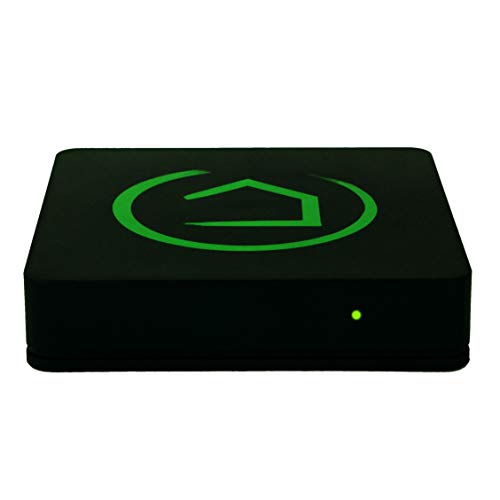
HomeSeer HomeTroller PRO Smart Home Controller Hub | Locally Managed Automation | Also Compatible with Alexa, Google Home & IFTTT


Key features
- •LOCALLY MANAGED AUTOMATION: Your automations are managed locally (NOT in the cloud) for better speed, reliability and privacy.
- •FREE INTEGRATIONS: Works with Alexa, Google Home, Z-Wave, Zigbee, MyQ, Harmony Hub, IFTTT, HUE, Ecobee, LIFX, Rachio, & More.
- •FREE REMOTE ACCESS: Includes MyHS Remote Access Service so you can monitor and control your home from anywhere.
- •FREE CAMERA SUPPORT: Supports Live Views & Automated Recordings (with compatible RTSP cameras)
- •CLOUD BACKUP AVAILABLE: Keep your system settings safe with our off-site backup service.
HomeSeer HomeTroller PRO Smart Home Controller Hub | Locally Managed Automation | Also Compatible with Alexa, Google Home & IFTTT
List Price: $1162.55$1046.30DEALYou Save: $116.25 (10%)
Free shippingFree Returns – 30 daysFree Order CancellationSecure Payment2–3 Days DeliveryGet It October 24, 2026In Stock (2)No marketing spamNo account requiredFulfilment by FedEx / Amazon / UPS / ShipwirePayPal / Card Buyer Protection
Customer Reviews
Reviews sourced from verified Amazon purchasers2.4
out of 5
Based on 3 reviews
5★
100%
4★
0%
3★
0%
2★
0%
1★
0%
Great system. Packed with features.
George S.✓ Verified Purchase•December 20, 2023
I've been a Homeseer user for 15+ years. This new Hometroller Pro and the HS 4 software are a major step up. The interface is attractive and intuitive. The programming is flexible and easy. The range of plug ins and features is vast and comes free with the system. If I sound like a marketing guy, I am... but i dont work for Homeseer. This is my hobby and passion. I have worked with many different products in the home automation field for many years. The Homeseer ecosystem is doesn't rely on just their set of products. Of course, you start there, but you can add and build and do whatever you want with so many other add ons. Further, their tech support, tutorials and most of all, their forum of passionate users is amazingly helpful. 5 stars!
Terrible customer service
YT✓ Verified Purchase•November 6, 2023
Only one guy for customer service. His name is Tyler. Terrible service. He know what he doing. He has no respect to customer. He make me feel so stupid. I know the product is good. I still couldn't use because he is not helping. He is very rude.
An excellent system if you're tech savvy
J. Dawson✓ Verified Purchase•October 20, 2023
Edit:
It's been a few weeks now and the system is still running strong and lightning quick. I'm completely done with home automation work for now. I recently added a MyQ garage door opener, and the free HomeSeer MyQ plugin works great! I paid for the LG ThinQ, Pushover, and Unifi plugins.
My wife loves it, I love it, and my son loves the speed of his custom lighting events. We have 88 Z-Wave devices (according to the HomeSeer web dashboard).
To clarify my initial review, what you're buying with this purchase is a small form factor Windows 10 machine that's been flashed with a preconfigured image. You'll have to set up HomeSeer the same way that you would if you installed it on any other machine. The software is great, so if you have some Windows admin knowledge and aren't afraid of getting (slightly) dirty, then this is a magnificent system.
If you're looking for an easier route... well... I tried Vera years ago, I tried SmartThings, and I tried Hubitat. Vera was crap. Hubitat's setup was great, but the hub needed to be rebooted on a daily basis (you have to physically unplug the cord). SmartThings is mostly fine, but does not have local processing.
We're still very, very satisfied with HomeSeer.
Original review:
After unboxing, it started up, and I had an ethernet cable plugged in. Immediately, I was unable to connect to the web interface. I hooked up a keyboard/mouse and monitor, and was greeted with a working system with the HomeSeer application running. So far so good, but it was going to take some system admin knowledge to get it rock solid.
FYI, I found out later that when I had set up the networking connections I chose "Do not make this PC discoverable on the network." When you select this option, you're telling Windows that you're on a "public" network. You have to be on a "private" network to be able to connect to the web interface without a password, so you should select "Make this PC discoverable on the network."
While directly connected with keyboard/mouse/monitor, I tried to set up the HomeSeer license. It came with an older version of HomeSeer (maybe 4.1.x.x). The license activation worked, but I couldn't connect my cloud account. I also couldn't get the setup process to restart (likely because of my own lack of familiarity). So, I googled for 5 minutes and discovered how to reset HomeSeer: Surprise, you just have to uninstall the application using Control Panel and reinstall whatever version you want. So, I downloaded the latest (4.2.19.0) and installed it. The developers had changed the sign up wizard so that the cloud linking was friendlier.
Great, I thought! Except that one of the last steps is changing the default HomeSeer account name and password. That didn't work on 4.2.19.0. OK, so uninstall, download 4.2.17.0 and try that one? Yeah, that worked. I got my license activated and my accounts linked. Good stuff.
At this point I had to plug in my Z-Wave dongle and try to pair a device. But, the dongle driver wasn't found. I went to the HomeSeer website, downloaded the driver and installed it, and Windows assigned it to COM3. Then I had to install the Z-Wave plugin from within the web GUI and add a Z-Wave interface (COM3). I paired a light switch and it worked. The speed of the local processing was blazing fast. You get what you pay for. No budget hub comes even close.
Along the way I discovered that I could use RDP and switched to that at some point. I also wanted to use WiFi (it's just windows wireless networking, no big surprise).
I spent the rest of the night pairing all of our devices throughout our house, creating Events, and installing even more plugins.
Note: If you want HomeSeer to start automatically when you don't have a keyboard/mouse/monitor connected, then you need to install it as a service. They make this very easy: Right click the HomeSeer icon in the system tray (the bottom right of the screen), and select "Install as service." Unplug the keyboard/mouse/monitor and reboot. Make sure that you can connect to the web interface from another PC.
After these initial setup woes, the software is a dream. It's very, very powerful. Events are amazing. The plugin support is great, but you do have to pay for some of the more advanced plugins. The ones I have set up (free 30 day trials) that I'm probably going to pay for are: LG ThinQ, Pushover, and Unifi (I have our Unifi Protect cameras integrated into HomeSeer).
After I set everything up, I used the web GUI to upgrade to the latest version (back to 4.2.19.0)! It's a nice system. You do have to know what you're doing in the world of Microsoft Windows. I'm a software developer. It took me about 2 hours to get past the initial set up headache, and after that I spent about 8 hours adding devices and customizing our house the way we like it. I'm 95% done at this point, and the device is humming along, plus we have lightning quick home automation due to local processing. We love it!
Great system. I highly recommend it!
It's been a few weeks now and the system is still running strong and lightning quick. I'm completely done with home automation work for now. I recently added a MyQ garage door opener, and the free HomeSeer MyQ plugin works great! I paid for the LG ThinQ, Pushover, and Unifi plugins.
My wife loves it, I love it, and my son loves the speed of his custom lighting events. We have 88 Z-Wave devices (according to the HomeSeer web dashboard).
To clarify my initial review, what you're buying with this purchase is a small form factor Windows 10 machine that's been flashed with a preconfigured image. You'll have to set up HomeSeer the same way that you would if you installed it on any other machine. The software is great, so if you have some Windows admin knowledge and aren't afraid of getting (slightly) dirty, then this is a magnificent system.
If you're looking for an easier route... well... I tried Vera years ago, I tried SmartThings, and I tried Hubitat. Vera was crap. Hubitat's setup was great, but the hub needed to be rebooted on a daily basis (you have to physically unplug the cord). SmartThings is mostly fine, but does not have local processing.
We're still very, very satisfied with HomeSeer.
Original review:
After unboxing, it started up, and I had an ethernet cable plugged in. Immediately, I was unable to connect to the web interface. I hooked up a keyboard/mouse and monitor, and was greeted with a working system with the HomeSeer application running. So far so good, but it was going to take some system admin knowledge to get it rock solid.
FYI, I found out later that when I had set up the networking connections I chose "Do not make this PC discoverable on the network." When you select this option, you're telling Windows that you're on a "public" network. You have to be on a "private" network to be able to connect to the web interface without a password, so you should select "Make this PC discoverable on the network."
While directly connected with keyboard/mouse/monitor, I tried to set up the HomeSeer license. It came with an older version of HomeSeer (maybe 4.1.x.x). The license activation worked, but I couldn't connect my cloud account. I also couldn't get the setup process to restart (likely because of my own lack of familiarity). So, I googled for 5 minutes and discovered how to reset HomeSeer: Surprise, you just have to uninstall the application using Control Panel and reinstall whatever version you want. So, I downloaded the latest (4.2.19.0) and installed it. The developers had changed the sign up wizard so that the cloud linking was friendlier.
Great, I thought! Except that one of the last steps is changing the default HomeSeer account name and password. That didn't work on 4.2.19.0. OK, so uninstall, download 4.2.17.0 and try that one? Yeah, that worked. I got my license activated and my accounts linked. Good stuff.
At this point I had to plug in my Z-Wave dongle and try to pair a device. But, the dongle driver wasn't found. I went to the HomeSeer website, downloaded the driver and installed it, and Windows assigned it to COM3. Then I had to install the Z-Wave plugin from within the web GUI and add a Z-Wave interface (COM3). I paired a light switch and it worked. The speed of the local processing was blazing fast. You get what you pay for. No budget hub comes even close.
Along the way I discovered that I could use RDP and switched to that at some point. I also wanted to use WiFi (it's just windows wireless networking, no big surprise).
I spent the rest of the night pairing all of our devices throughout our house, creating Events, and installing even more plugins.
Note: If you want HomeSeer to start automatically when you don't have a keyboard/mouse/monitor connected, then you need to install it as a service. They make this very easy: Right click the HomeSeer icon in the system tray (the bottom right of the screen), and select "Install as service." Unplug the keyboard/mouse/monitor and reboot. Make sure that you can connect to the web interface from another PC.
After these initial setup woes, the software is a dream. It's very, very powerful. Events are amazing. The plugin support is great, but you do have to pay for some of the more advanced plugins. The ones I have set up (free 30 day trials) that I'm probably going to pay for are: LG ThinQ, Pushover, and Unifi (I have our Unifi Protect cameras integrated into HomeSeer).
After I set everything up, I used the web GUI to upgrade to the latest version (back to 4.2.19.0)! It's a nice system. You do have to know what you're doing in the world of Microsoft Windows. I'm a software developer. It took me about 2 hours to get past the initial set up headache, and after that I spent about 8 hours adding devices and customizing our house the way we like it. I'm 95% done at this point, and the device is humming along, plus we have lightning quick home automation due to local processing. We love it!
Great system. I highly recommend it!