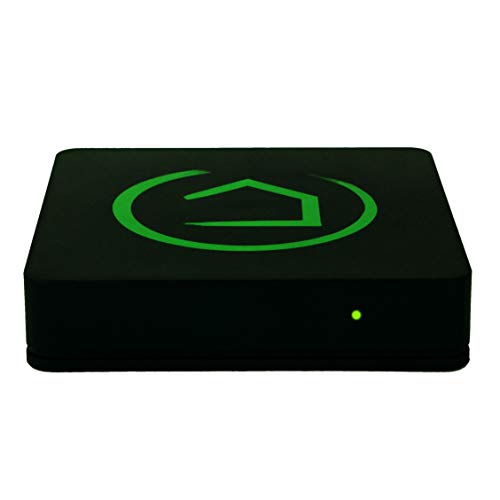
Hubitat Elevation Home Automation Hub (Model C-7) Compatible with Alexa, HomeKit, Google Home, Zigbee, Z-Wave, Lutron


Key features
- •Hubitat is changing how people live with smart devices, allowing them to "Elevate Their Home". By combining the advantages of local automation processing with cloud connectivity, Hubitat's innovative Hubitat Elevation hub ensures personal data privacy and is more reliable and responsive than competitive cloud-based solutions.
- •Connects with many popular Zigbee, Z-Wave and Lutron smart devices. Now supports Iris V1 devices. Mobile app for iOS and Android
- •After one time setup, no internet connection is required to use the Hubitat Elevation hub, so you can avoid latency and delays, and gain peace of mind by not relying on the cloud.
- •Tutorial videos, online documentation, community with online support from our team, email support. Works in USA / Canada only.
Hubitat Elevation Home Automation Hub (Model C-7) Compatible with Alexa, HomeKit, Google Home, Zigbee, Z-Wave, Lutron
List Price: $145.43$130.89DEALYou Save: $14.54 (10%)
Free shippingFree Returns – 30 daysFree Order CancellationSecure Payment2–3 Days DeliveryGet It October 24, 2026In Stock (1)No marketing spamNo account requiredFulfilment by FedEx / Amazon / UPS / ShipwirePayPal / Card Buyer Protection
Customer Reviews
Reviews sourced from verified Amazon purchasers4.0
out of 5
Based on 10 reviews
5★
70%
4★
30%
3★
0%
2★
0%
1★
0%
STOP. this is the one you want
Ben Jackson✓ Verified Purchase•January 12, 2024
I upgraded from a Wink hub after they went subscription only. I wish I'd just done the Hubitat from the start.
Now. It IS more cumbersome to set up. It's app is not full featured like Wink or Smart Things. But don't let that fool you. Unless you're a complete moron, the web interface is not only simple, but FAR perferable to getting real specific with your devices. And works MUCH better than other hubs, the Wink or anything else (apart from maybe Philips Hue, but that only runs Philips stuff, not the lights I have). It has more customization to really set things how you want them. For me, all I really wanted was a LOCALLY PROCESSED hub (very important, no cloud, unless the device requires it) that played nice with Homebridge.
What's Homebridge? it's what you need if you use an iPhone or any iOS device and want random non-Homekit devices to play nice with Homekit. I've been running Homebridge on a Raspberry Pi 4 for a while and it works great, but the Osram Lightify bulbs around the main level of my house are a real pain compared to Philips Hue, the one advantage being that they're like 10% of the price.
The Hubitat Hub made these lights work 99% as well as Hue. That's how good it is! Wink was a nightmare. The Homebridge-Wink plugin was buggy. The official Osram Hub you buy with your Osram lights is 'fine' if you use their app, but again, the Homebridge-Lightify plugin is terrible. You'd try to set color temperature and it tries to use colors instead of white/yellow lighting or it's just super buggy. The Hubitat WORKS. And the Homebridge plugin for it sends the correct commands to get the color you want. Sometimes you would ask for Blue and you'd get Red when I used Wink - no longer. Everything is FAST and all the colors and color temps work.
HOWEVER - the best part is this. With Homebridge plugin via MakerAPI, you set which 'devices' you want shown in your Home app. And instead of just the light itself, you can also tell Hubitat to make it's own SCENES available as a Homekit accessory. Why? I mean, yes it would be nice if they showed up as actual scenes in Homekit just like Hue's hub and app do. But who cares. THEY WORK. And they work well. You simply create groups and scenes in the Hubitat back end - you know, the web interface everyone kinda complains about. But you get everything perfect, set it, and then forget about it - never have to use the Web interface again unless you wanna change something or add a new scene/group. Now you use the MakerAPI Homebridge plugin to share these groups and scenes over on Homekit, and they simply show up as simple switches to trigger a group or scene. The group is sort of redundant because you can group together accessories in Homekit anyway - but I chose not to. So I have each INDIVDIUAL light as a tile, but also a tile for the group of lights. So I can set the 12 living room lights together or separately, much easier than when Homekit groups the accessories together. Then I also have about 10 scenes for all these lights, that are just switches in that Homekit room. Hit it and it's IMMEDIATE. No cloud rubbish.
Another nice feature is the fading option in Hubitat. So instead of using Homekit to create scenes (which can still be somewhat buggy/slow or not set everything correctly) just have Homekit activate the Hubitat scene which is pretty much flawless each time. In each scene there's tons of options, including the fade time. So as Siri or Home app changes a scene with a simple switch or Siri command, the lights beautifully change over 10 or 15 seconds (whatever you choose) because that's the setting you've made in HUBITAT.
I've also used the Siri Shortcuts app on iPhone to create more complicated lighting changes, covering multiple Hubitat scenes and/or combining with Hue scenes for the few Hue bulbs I have. That way you can have one Siri command or Shortcut widget activate a bunch of things, incluidng multiple Hubitat scenes. I've found putting a 'scripting wait' of about 6 seconds in between Hubitat scene commands just so it doesn't get overwhelmed.
Bottom line, Hubitat is the clear winner here on all fronts. It seems to work great with Alexa and everything non-Apple as well. But for getting non Homekit accessories to play nice with Home/Siri on iPhones and HomePods and Apple Watches etc, I've found Hubitat to be the best so far. The only thing I haven't tried and therefore can't compare to is the OpenHAB thing that is even more fiddly and hard to setup, apparently. Whilst I could have handled it, I think Hubitat is a great mix of both - customisation but also well put together and ready to go.
I was nervous about whether it was really going to work better with the Lightify lights - but they really do. And having scenes activated by a simple switch is PERFECT. For instance, with Wink to do the same thing (activate a Wink scene/shortcut from Homekit) I had to go via the cloud through IFTTT using WebHooks. Sometimes a scene could take a minute to activate that way!! Or to do the same thing with the Osram hub, I had to set up a Dummy Switch on Homebridge that had a contact sensor embedded, which then activated an Alexa routine that watched for that contact sensor to 'activate' (which was activated manually by you hitting the Dummy switch in Homekit), which then activated the Osram scene. Again, slow, cumbersome and a dumb workaround.
I haven't really bothered with the Dashboard on Hubitat. Although i can see this would be really nice on an iPad or something. Set up a nice custom dashboard with all the buttons you want, control it from the app or whatever. But the app still needs work for this to be good. I'd rather just use Home for now, as the tiles are essentially the same thing as the tiles in the Hubitat Dash.
Hope this helps!
Now. It IS more cumbersome to set up. It's app is not full featured like Wink or Smart Things. But don't let that fool you. Unless you're a complete moron, the web interface is not only simple, but FAR perferable to getting real specific with your devices. And works MUCH better than other hubs, the Wink or anything else (apart from maybe Philips Hue, but that only runs Philips stuff, not the lights I have). It has more customization to really set things how you want them. For me, all I really wanted was a LOCALLY PROCESSED hub (very important, no cloud, unless the device requires it) that played nice with Homebridge.
What's Homebridge? it's what you need if you use an iPhone or any iOS device and want random non-Homekit devices to play nice with Homekit. I've been running Homebridge on a Raspberry Pi 4 for a while and it works great, but the Osram Lightify bulbs around the main level of my house are a real pain compared to Philips Hue, the one advantage being that they're like 10% of the price.
The Hubitat Hub made these lights work 99% as well as Hue. That's how good it is! Wink was a nightmare. The Homebridge-Wink plugin was buggy. The official Osram Hub you buy with your Osram lights is 'fine' if you use their app, but again, the Homebridge-Lightify plugin is terrible. You'd try to set color temperature and it tries to use colors instead of white/yellow lighting or it's just super buggy. The Hubitat WORKS. And the Homebridge plugin for it sends the correct commands to get the color you want. Sometimes you would ask for Blue and you'd get Red when I used Wink - no longer. Everything is FAST and all the colors and color temps work.
HOWEVER - the best part is this. With Homebridge plugin via MakerAPI, you set which 'devices' you want shown in your Home app. And instead of just the light itself, you can also tell Hubitat to make it's own SCENES available as a Homekit accessory. Why? I mean, yes it would be nice if they showed up as actual scenes in Homekit just like Hue's hub and app do. But who cares. THEY WORK. And they work well. You simply create groups and scenes in the Hubitat back end - you know, the web interface everyone kinda complains about. But you get everything perfect, set it, and then forget about it - never have to use the Web interface again unless you wanna change something or add a new scene/group. Now you use the MakerAPI Homebridge plugin to share these groups and scenes over on Homekit, and they simply show up as simple switches to trigger a group or scene. The group is sort of redundant because you can group together accessories in Homekit anyway - but I chose not to. So I have each INDIVDIUAL light as a tile, but also a tile for the group of lights. So I can set the 12 living room lights together or separately, much easier than when Homekit groups the accessories together. Then I also have about 10 scenes for all these lights, that are just switches in that Homekit room. Hit it and it's IMMEDIATE. No cloud rubbish.
Another nice feature is the fading option in Hubitat. So instead of using Homekit to create scenes (which can still be somewhat buggy/slow or not set everything correctly) just have Homekit activate the Hubitat scene which is pretty much flawless each time. In each scene there's tons of options, including the fade time. So as Siri or Home app changes a scene with a simple switch or Siri command, the lights beautifully change over 10 or 15 seconds (whatever you choose) because that's the setting you've made in HUBITAT.
I've also used the Siri Shortcuts app on iPhone to create more complicated lighting changes, covering multiple Hubitat scenes and/or combining with Hue scenes for the few Hue bulbs I have. That way you can have one Siri command or Shortcut widget activate a bunch of things, incluidng multiple Hubitat scenes. I've found putting a 'scripting wait' of about 6 seconds in between Hubitat scene commands just so it doesn't get overwhelmed.
Bottom line, Hubitat is the clear winner here on all fronts. It seems to work great with Alexa and everything non-Apple as well. But for getting non Homekit accessories to play nice with Home/Siri on iPhones and HomePods and Apple Watches etc, I've found Hubitat to be the best so far. The only thing I haven't tried and therefore can't compare to is the OpenHAB thing that is even more fiddly and hard to setup, apparently. Whilst I could have handled it, I think Hubitat is a great mix of both - customisation but also well put together and ready to go.
I was nervous about whether it was really going to work better with the Lightify lights - but they really do. And having scenes activated by a simple switch is PERFECT. For instance, with Wink to do the same thing (activate a Wink scene/shortcut from Homekit) I had to go via the cloud through IFTTT using WebHooks. Sometimes a scene could take a minute to activate that way!! Or to do the same thing with the Osram hub, I had to set up a Dummy Switch on Homebridge that had a contact sensor embedded, which then activated an Alexa routine that watched for that contact sensor to 'activate' (which was activated manually by you hitting the Dummy switch in Homekit), which then activated the Osram scene. Again, slow, cumbersome and a dumb workaround.
I haven't really bothered with the Dashboard on Hubitat. Although i can see this would be really nice on an iPad or something. Set up a nice custom dashboard with all the buttons you want, control it from the app or whatever. But the app still needs work for this to be good. I'd rather just use Home for now, as the tiles are essentially the same thing as the tiles in the Hubitat Dash.
Hope this helps!
Excellent Hub. Switching from Wink? Get this one.
J. Greene✓ Verified Purchase•January 3, 2024
I had a Wink 1 and a Wink 2. Really liked them. Did not need any extra features. Wink is going out of business. I have 18 zigbee lights (Sylvania Osram and Cree), an Ecobee Thermostat, a Z-Wave switch, and some Ecolink door sensors. If you have used the Wink Hubs you can use these. Most annoying Wink feature? When the power goes out and everything comes back up, the Hub would not work without a reboot AFTER the router came up. So if I was away, and the power went out, and I looked at my IP cameras to see that 18 lights are burning at 100%, my hub would not work and I could not turn them off remotely. No good.
The Hubitat WORKS after a power outage. Power comes on, modem and router come up, and hubitat works. As it should be. I don't have to reset things. If the power comes back on while I am in bed, I can just keep my eyes closed for a few minutes, then mumble "Alexa, turn on bedtime lights" and all the lights set themselves correctly. SOOOOOO much better then getting up at 3 am and rebooting routers and hubs. Ugh. Bye Wink.
And
THE LACK OF A PHONE APP DOES NOT MATTER. Once set up, Alexa or Google Assistant (GA) are your phone apps. Everything on the Hubitat can be synced to GA and/or Alexa. I control my lights remotely using Alexa whenever necessary. No Worries! You don't need an extra phone app. It is just not a concern.
Setup? Not that bad. There is a bit of a learning curve with the browser-based interface. But for most simple smart home setups with some lights, a few plugs, and maybe a lock, it is pretty easy. Just do this:
Don't even worry about "apps" in the interface. Not yet. Just "Add devices" from the "Devices" tab. Follow manufactures instructions to put devices into pairing mode and carry your laptop around the house from device to device. (To reset Osram bulbs: On, count to three, Off, count to three, On, count to three, Off, count to three...Do this FIVE times and then leave on and wait 5 seconds and the light will flash (pairing mode). For Cree, do this, counting time: On, Off, 1, 2, On, Off, 1, 2, On, Off, 1, 2, then On. On the THIRD on, the light will flash (pairing mode)).
Once all of your devices are paired (up to an hour or two, no matter WHAT hub you get), go to the Apps tab and add the Alexa and/or Google Assistant app. You will have to tell the Alexa/GA apps WHAT devices to control (there is a "Select All" option). Then go to your phone, open the correct app (Alexa or GA) and Discover Devices. Then use Alexa or GA on your phone to set up groups (living room lights) and routines (bed time lights). It is not NEARLY as hard as reviews would lead you to believe. It is tedious to switch hubs. No getting around that. But this is a good hub. Works well. Seems bullet proof. Runs locally on your LAN. Does not go through external servers to work (Wink does/did). Note: Using Alexa or GA to control your home DOES require passing through external Internet servers as these devices only work if they pass through their respective servers. But, if the Internet is down but you have power, you can use your laptop to control your smart home. Otherwise...the hub essentially DOES require the Internet because you are using Internet devices to interact with it.
The other app you need to install is the Dashboard app. But you DON'T NEED IT. AT ALL. You can stop your Hubitat setup as soon as your devices are discovered and your smart home apps are activated. The Dashboard gives you a fancy browser-based interface with all of your devices neatly lined up, with icons, so you can click on them to turn them on/off/dim (YOU have to set it up). But you don't really need to do this. Only if you want to poke around with your smart home on your computer. For the average Alexa end-user, just add devices, add Alexa, add All Devices to Alexa, then use Alexa to discover devices. Then Group devices, then set up Routines. Begin telling Alexa to control your home. Done. When you run into a road-block, use YouTube to get help. (Like if a device shows "on" in devices tab, but Alexa has turned it off, you can click "configure" and then "save" and it will likely fix the issue. Got that from YouTube.)
It is pretty easy, but I did spend a about 4-6 hours setting everything up, including learning curve, watching a couple of youtube videos, and resetting all of my bulbs and routines. Not that bad. I am REALLY glad I switched. So much more responsive and everything works after a power outage. Just all around better than the Wink.
The Rule Machine app is useful. It is basically an ITTT interface. I set up my front porch light as follows "turn light on, 30 mins before sunset. Turn light off, 30 mins after sunrise." I had to do it twice to figure out the interface and what to click on. Took a youtube video and about 15 minutes the first time. But now I have an automated front porch light. Pretty cool. But not necessary. You don't need the Rule Machine app. Or the Dashboard app. Just extras if you want to use them.
If you have already set up your whole house using the Wink app, Alexa and you have set up routines, you can do this. If you have no idea what I am talking about....it might be a rough time for you.
HIGHLY RECOMMEND (2019...these things change).
The Hubitat WORKS after a power outage. Power comes on, modem and router come up, and hubitat works. As it should be. I don't have to reset things. If the power comes back on while I am in bed, I can just keep my eyes closed for a few minutes, then mumble "Alexa, turn on bedtime lights" and all the lights set themselves correctly. SOOOOOO much better then getting up at 3 am and rebooting routers and hubs. Ugh. Bye Wink.
And
THE LACK OF A PHONE APP DOES NOT MATTER. Once set up, Alexa or Google Assistant (GA) are your phone apps. Everything on the Hubitat can be synced to GA and/or Alexa. I control my lights remotely using Alexa whenever necessary. No Worries! You don't need an extra phone app. It is just not a concern.
Setup? Not that bad. There is a bit of a learning curve with the browser-based interface. But for most simple smart home setups with some lights, a few plugs, and maybe a lock, it is pretty easy. Just do this:
Don't even worry about "apps" in the interface. Not yet. Just "Add devices" from the "Devices" tab. Follow manufactures instructions to put devices into pairing mode and carry your laptop around the house from device to device. (To reset Osram bulbs: On, count to three, Off, count to three, On, count to three, Off, count to three...Do this FIVE times and then leave on and wait 5 seconds and the light will flash (pairing mode). For Cree, do this, counting time: On, Off, 1, 2, On, Off, 1, 2, On, Off, 1, 2, then On. On the THIRD on, the light will flash (pairing mode)).
Once all of your devices are paired (up to an hour or two, no matter WHAT hub you get), go to the Apps tab and add the Alexa and/or Google Assistant app. You will have to tell the Alexa/GA apps WHAT devices to control (there is a "Select All" option). Then go to your phone, open the correct app (Alexa or GA) and Discover Devices. Then use Alexa or GA on your phone to set up groups (living room lights) and routines (bed time lights). It is not NEARLY as hard as reviews would lead you to believe. It is tedious to switch hubs. No getting around that. But this is a good hub. Works well. Seems bullet proof. Runs locally on your LAN. Does not go through external servers to work (Wink does/did). Note: Using Alexa or GA to control your home DOES require passing through external Internet servers as these devices only work if they pass through their respective servers. But, if the Internet is down but you have power, you can use your laptop to control your smart home. Otherwise...the hub essentially DOES require the Internet because you are using Internet devices to interact with it.
The other app you need to install is the Dashboard app. But you DON'T NEED IT. AT ALL. You can stop your Hubitat setup as soon as your devices are discovered and your smart home apps are activated. The Dashboard gives you a fancy browser-based interface with all of your devices neatly lined up, with icons, so you can click on them to turn them on/off/dim (YOU have to set it up). But you don't really need to do this. Only if you want to poke around with your smart home on your computer. For the average Alexa end-user, just add devices, add Alexa, add All Devices to Alexa, then use Alexa to discover devices. Then Group devices, then set up Routines. Begin telling Alexa to control your home. Done. When you run into a road-block, use YouTube to get help. (Like if a device shows "on" in devices tab, but Alexa has turned it off, you can click "configure" and then "save" and it will likely fix the issue. Got that from YouTube.)
It is pretty easy, but I did spend a about 4-6 hours setting everything up, including learning curve, watching a couple of youtube videos, and resetting all of my bulbs and routines. Not that bad. I am REALLY glad I switched. So much more responsive and everything works after a power outage. Just all around better than the Wink.
The Rule Machine app is useful. It is basically an ITTT interface. I set up my front porch light as follows "turn light on, 30 mins before sunset. Turn light off, 30 mins after sunrise." I had to do it twice to figure out the interface and what to click on. Took a youtube video and about 15 minutes the first time. But now I have an automated front porch light. Pretty cool. But not necessary. You don't need the Rule Machine app. Or the Dashboard app. Just extras if you want to use them.
If you have already set up your whole house using the Wink app, Alexa and you have set up routines, you can do this. If you have no idea what I am talking about....it might be a rough time for you.
HIGHLY RECOMMEND (2019...these things change).
(Not So) Awful (For The Non Technical)
Rob H.✓ Verified Purchase•December 20, 2023
Beta version of a product being sold as consumer ready.
It's like the back end guys also designed the UI.
No support for a lot of popular brands.
Interesting device with potential. Like others have said, very steep learning curve and only for those who enjoy endlessly tinkering. As a matter of fact, I'd say "smart homes", where they are currently at, are STILL only for people who don't mind thinking of it as a hobby and sometimes a part time job keeping everything working.
Edit (01/14/2023)
Changed my rating from a 1 star to 3 stars. I stand by my original assessment: NOT for non technical people. That being said, it is a very interesting device to fool around with once you get going. The only compatible smart devices I currently have are Yolink motion sensors"¦and I had to download the so called driver written by a user. Anyway, I'm really amazed at the things I can do with a bunch of the motion detectors"¦gives you access to all parameters of the device. Yolink motion sensors also measure temperature which only hubitat gives you access to. Very interesting device with huge potential.
Edit 01/20/2023
So I've been fooling around with this on my free time for weeks now and it's really starting to grow on me. I contemplated increasing my rating to 4 stars only because there is currently nothing else as compelling in this space but couldn't bring myself to do it because of the awful UI. Again, if you are someone who enjoys tinkering and have already figured out the limitations of Google or Alexa routines, this hub is probably for you.
UPDATE 01/24/2023
Ok, I managed to stick with this and crest (i think) the learning curve finally. The hardest part for me was figuring out the quirky work flows. The "dashboards" are endlessly customizable, the level of attribute detail for each device is complete and so the things made possible are mind numbing. That being said, few people will want or appreciate the endless possibilities this offers. I think this is a device mainly for professionals. There is no user interface, you are creating the user interface. You can dig even deeper and get into designing your own custom "drivers and apps" , if you know a little CSS you can endlessly tweak the "dashboard" design etc.
If you are a typical consumer frustrated by another hub or your current setup for one reason or another and would like to see the Hubitat implemented, do yourself a favor and hire someone to set it up for you. You'll never figure it out and will waste a lot of money and time trying.
As I said earlier, the whole smart home space is still in its infancy despite being around for some time now. Do yourself a favor and read a LOT of reviews on all the smart devices you intend on purchasing. One thing you are going to need to set up a smart home is endless patience. Someone has to figure out a way of "saving" a complete smart home setup so that loss of power doesn't cause all the issues most people seem to have. Who the heck wants to spend several hours troubleshooting the lights every time the power goes out?
Btw: This thing works great with the Yolink line despite being a "user driver".
Update 2/12/2023
To know it is to love it. I'm a hubitat fan. I've decided to replace all non compatible devices with ones that will work with the Hubster, especially the WiFi bulbs"¦zigbee bulbs all the way. I'll never buy another device unless it can be made to work with my Hubitat!
Nice product guys. I believe that if you sent these things out a little more pre configured it would flatten the learning curve substantially. No reason not to have a bunch of typically needed "applications" already installed"¦.Hubitat Package Manager, Rule Machine etc"¦
It's like the back end guys also designed the UI.
No support for a lot of popular brands.
Interesting device with potential. Like others have said, very steep learning curve and only for those who enjoy endlessly tinkering. As a matter of fact, I'd say "smart homes", where they are currently at, are STILL only for people who don't mind thinking of it as a hobby and sometimes a part time job keeping everything working.
Edit (01/14/2023)
Changed my rating from a 1 star to 3 stars. I stand by my original assessment: NOT for non technical people. That being said, it is a very interesting device to fool around with once you get going. The only compatible smart devices I currently have are Yolink motion sensors"¦and I had to download the so called driver written by a user. Anyway, I'm really amazed at the things I can do with a bunch of the motion detectors"¦gives you access to all parameters of the device. Yolink motion sensors also measure temperature which only hubitat gives you access to. Very interesting device with huge potential.
Edit 01/20/2023
So I've been fooling around with this on my free time for weeks now and it's really starting to grow on me. I contemplated increasing my rating to 4 stars only because there is currently nothing else as compelling in this space but couldn't bring myself to do it because of the awful UI. Again, if you are someone who enjoys tinkering and have already figured out the limitations of Google or Alexa routines, this hub is probably for you.
UPDATE 01/24/2023
Ok, I managed to stick with this and crest (i think) the learning curve finally. The hardest part for me was figuring out the quirky work flows. The "dashboards" are endlessly customizable, the level of attribute detail for each device is complete and so the things made possible are mind numbing. That being said, few people will want or appreciate the endless possibilities this offers. I think this is a device mainly for professionals. There is no user interface, you are creating the user interface. You can dig even deeper and get into designing your own custom "drivers and apps" , if you know a little CSS you can endlessly tweak the "dashboard" design etc.
If you are a typical consumer frustrated by another hub or your current setup for one reason or another and would like to see the Hubitat implemented, do yourself a favor and hire someone to set it up for you. You'll never figure it out and will waste a lot of money and time trying.
As I said earlier, the whole smart home space is still in its infancy despite being around for some time now. Do yourself a favor and read a LOT of reviews on all the smart devices you intend on purchasing. One thing you are going to need to set up a smart home is endless patience. Someone has to figure out a way of "saving" a complete smart home setup so that loss of power doesn't cause all the issues most people seem to have. Who the heck wants to spend several hours troubleshooting the lights every time the power goes out?
Btw: This thing works great with the Yolink line despite being a "user driver".
Update 2/12/2023
To know it is to love it. I'm a hubitat fan. I've decided to replace all non compatible devices with ones that will work with the Hubster, especially the WiFi bulbs"¦zigbee bulbs all the way. I'll never buy another device unless it can be made to work with my Hubitat!
Nice product guys. I believe that if you sent these things out a little more pre configured it would flatten the learning curve substantially. No reason not to have a bunch of typically needed "applications" already installed"¦.Hubitat Package Manager, Rule Machine etc"¦
This is a very flexible and dependable Hub
Chris✓ Verified Purchase•November 20, 2023
I have owned a Hubitat C7 for over a year now, and I have been impressed with it.
I moved from SmartThings when they shut down the Groovy IDE and the ability to use Webcore, as I had hundreds pistons with all of my automation logic in Webcore. I was able to move all my Webcore automation pistons over when switching to the Hubitat C7, as it runs Groovy code. There is a Rule Machine app to create automations in Hubitat as well, but Webcore is powerful and easy to use and I never played around with Rule Machine.
People complain about the need for a subscription to administer the hub outside of their local network. I have never had a reason to subscribe to this, and it really is only needed if you have a hub in a remote location (like a rental property) that you need to administer remotely. In this case the administration subscription gives you access to do administration stuff, like rebooting, adding devices, adding drivers, adding apps, etc. I have never had a need to remotely administer my Hub that is in my house. I can control everything for free from Dashboards remotely as far as actually controlling my home and devices.
The Dashboards are available from the internet, and there are links provided on the dashboard setup page to use them remotely. There is a learning curve to really customize the dashboards to make them look nice. If you edit the custom CSS, you can do a lot of things with dashboards like changing text and using custom icons, layering tiles, changing colors, etc. I can run everything in my house from my dashboards, either remotely or on my home network.
Over the last six months, I have learned that the true power of this hub for me is the ability to write your own custom apps and drivers, or to find and use (and modify) apps and drivers that the community has written. This hub can become a casual programmers hobby, as if you know the basics of programming you can learn Groovy fairly quickly. I have now written custom apps and virtual drivers to reproduce all my automation logic I had in Webcore down to just a handful of custom apps and custom virtual device drivers to run everything. Most of my automations are based on motion and illuminance sensors with some schedules for changing modes.
I have over 200 devices connected and automated, and my Hubitat is never really idle, but the hub has handled all the work like a champ. I have not seen any of the issues other people have reported about devices not staying connected, lock-ups, etc. I have to assume this is user error or a defective hub, but the platform itself is rock solid for me even with taxing it with everything I can throw at it to make it do more work. It handles code exceptions well when developing apps, I've thrown code into it that was not debugged and it reports the exceptions in logging and just continues on without issues, allowing me to find and fix the issues in my code.
I highly recommend this for casual users as well, as the UI is not as bad as people make out, and most people should be able to figure it out pretty easily. There will be a learning curve like with any new product, but once you get how it works it if fairly intuitive. Dashboards have their own learning curve, but they are important as they allow you to control everything easily and remotely once they are set up.
I moved from SmartThings when they shut down the Groovy IDE and the ability to use Webcore, as I had hundreds pistons with all of my automation logic in Webcore. I was able to move all my Webcore automation pistons over when switching to the Hubitat C7, as it runs Groovy code. There is a Rule Machine app to create automations in Hubitat as well, but Webcore is powerful and easy to use and I never played around with Rule Machine.
People complain about the need for a subscription to administer the hub outside of their local network. I have never had a reason to subscribe to this, and it really is only needed if you have a hub in a remote location (like a rental property) that you need to administer remotely. In this case the administration subscription gives you access to do administration stuff, like rebooting, adding devices, adding drivers, adding apps, etc. I have never had a need to remotely administer my Hub that is in my house. I can control everything for free from Dashboards remotely as far as actually controlling my home and devices.
The Dashboards are available from the internet, and there are links provided on the dashboard setup page to use them remotely. There is a learning curve to really customize the dashboards to make them look nice. If you edit the custom CSS, you can do a lot of things with dashboards like changing text and using custom icons, layering tiles, changing colors, etc. I can run everything in my house from my dashboards, either remotely or on my home network.
Over the last six months, I have learned that the true power of this hub for me is the ability to write your own custom apps and drivers, or to find and use (and modify) apps and drivers that the community has written. This hub can become a casual programmers hobby, as if you know the basics of programming you can learn Groovy fairly quickly. I have now written custom apps and virtual drivers to reproduce all my automation logic I had in Webcore down to just a handful of custom apps and custom virtual device drivers to run everything. Most of my automations are based on motion and illuminance sensors with some schedules for changing modes.
I have over 200 devices connected and automated, and my Hubitat is never really idle, but the hub has handled all the work like a champ. I have not seen any of the issues other people have reported about devices not staying connected, lock-ups, etc. I have to assume this is user error or a defective hub, but the platform itself is rock solid for me even with taxing it with everything I can throw at it to make it do more work. It handles code exceptions well when developing apps, I've thrown code into it that was not debugged and it reports the exceptions in logging and just continues on without issues, allowing me to find and fix the issues in my code.
I highly recommend this for casual users as well, as the UI is not as bad as people make out, and most people should be able to figure it out pretty easily. There will be a learning curve like with any new product, but once you get how it works it if fairly intuitive. Dashboards have their own learning curve, but they are important as they allow you to control everything easily and remotely once they are set up.
BUYER BE HAPPY
NFAToys✓ Verified Purchase•October 31, 2023
*** Up-dated July 26, 2019 ***
See my updated Review Below
---------------------------------------
I know that's a very ominous title and rating for this little Hub, but let me explain why I gave it such a poor rating.
I started out by buying a SmartThings Hub and Zigbee Motion Sensor to add to my home automation setup based around several Echo Dot 3's. Try as I might, I could never get the SmartThings Hub configured and registered in the cloud. I tried both WiFi and Ethernet configurations multiple times, but the process always failed trying to register the Hub. The Hub would connect and I could pair my Sensor, but the Sensor wouldn't show up in my Alexa software. At this point I boxed up the Hub, obtained a return authorization from Amazon, and shipped it back. Now I was faced with finding a replacement for the Dumb-things Hub.
I looked through the entire Amazon selection of Zigbee and Z-Wave hubs until I ran across the Hubitat. The idea of a Local Hub intrigued me. The more I read the product specs and watched the product videos, the more I was becoming sold on this Hub, until I finally went ahead and made my purchase.
Hub setup went smoothly, with the possible exception that the web browser based interface seems to be agonizingly slow. Clicking on any selection that causes a new page to be launched takes up to 10 seconds (and I have a very fast PC). My next task was pairing my SmartThings Motion Sensor with the Hubitat Hub. This went totally flawless. All that was left to do was load the Hubitat Amazon Echo Skill App in the Hub, and install the Hubitat Amazon Echo Skill in my iPad's Alexa software.
I was finally ready to test my Motion Sensor in Alexa; that's when the big disappointment happened. My Motion Sensor was not showing up in the Alexa list of detected devices. Up till now, I'd been using WiFi based AC Power Outlet switches and Light-bulb sockets, mostly because Zigbee and Z-Wave devices cost from TWO to FOUR times as much. But some things just aren't available in WiFi, so I bit the bullet and bought a Hub. I emailed Hubitat support to ask them for guidance to get my Motion Sensor working, but was devastated with the reply they sent me. This is what they said:
"Thank you for reaching out. At the moment Hubitat Amazon Echo Skill app allows you to control switches, dimmers and door locks. We are planning on expanding the skill to cover other devices, but I do not have a time-frame when this enhancement may become available."
Nowhere in any of the Hubitat product literature or product videos does it mention that their Hub is crippled and does NOT support an entire full range of Zigbee and Z-Wave products like all of their competitors do. So now I have another Hub that's worthless to me unless I invest in replacing my existing WiFi based power switches with expensive Zigbee or Z-Wave alternatives. This is unacceptable.
--------------------------------------
Updated July 26, 2019
As of this morning, a software update to the Hubitat Amazon Alexa Skill has added support for Motion Sensors. This is a game changing event. The ability to control my WiFi devices like Lights and Outlets from my Motion Sensors had been severely hampered up until this software release. Now, I'll be able to use my SmartThings Motion sensors to trigger an Alexa Routine to turn on lights and outlets as I've wanted to do from the start.
This one software update changes my rating from 1 Star to 5 Stars. The flexibility that being able to write programs to control my Zigbee devices locally, without the agonizing delays that WiFi connections can sometimes impose, puts the Hubitat Hub far above its competitors. They still have a ways to go to provide specialized drivers for the vast numbers of home automation devices on the market, but at least their generic drivers have been successfully filling the void in the meantime.
--------------------------------------
Updated Aug 6, 2019
What can I say, customer service on this product is beyond phenomenal. I was experiencing two problems that popped up in one of the hubs firmware updates, so I emailed Hubitat support about the problems on a Saturday afternoon. Tuesday morning I had an email reply with the procedure to install a new firmware version that contained fixes for both the problems I was experiencing. Hubitat, I will be recommending you to every one of my friends who are looking to buy a Home Automation hub to extend their Alexa experience. Thank you for such a fine product.
See my updated Review Below
---------------------------------------
I know that's a very ominous title and rating for this little Hub, but let me explain why I gave it such a poor rating.
I started out by buying a SmartThings Hub and Zigbee Motion Sensor to add to my home automation setup based around several Echo Dot 3's. Try as I might, I could never get the SmartThings Hub configured and registered in the cloud. I tried both WiFi and Ethernet configurations multiple times, but the process always failed trying to register the Hub. The Hub would connect and I could pair my Sensor, but the Sensor wouldn't show up in my Alexa software. At this point I boxed up the Hub, obtained a return authorization from Amazon, and shipped it back. Now I was faced with finding a replacement for the Dumb-things Hub.
I looked through the entire Amazon selection of Zigbee and Z-Wave hubs until I ran across the Hubitat. The idea of a Local Hub intrigued me. The more I read the product specs and watched the product videos, the more I was becoming sold on this Hub, until I finally went ahead and made my purchase.
Hub setup went smoothly, with the possible exception that the web browser based interface seems to be agonizingly slow. Clicking on any selection that causes a new page to be launched takes up to 10 seconds (and I have a very fast PC). My next task was pairing my SmartThings Motion Sensor with the Hubitat Hub. This went totally flawless. All that was left to do was load the Hubitat Amazon Echo Skill App in the Hub, and install the Hubitat Amazon Echo Skill in my iPad's Alexa software.
I was finally ready to test my Motion Sensor in Alexa; that's when the big disappointment happened. My Motion Sensor was not showing up in the Alexa list of detected devices. Up till now, I'd been using WiFi based AC Power Outlet switches and Light-bulb sockets, mostly because Zigbee and Z-Wave devices cost from TWO to FOUR times as much. But some things just aren't available in WiFi, so I bit the bullet and bought a Hub. I emailed Hubitat support to ask them for guidance to get my Motion Sensor working, but was devastated with the reply they sent me. This is what they said:
"Thank you for reaching out. At the moment Hubitat Amazon Echo Skill app allows you to control switches, dimmers and door locks. We are planning on expanding the skill to cover other devices, but I do not have a time-frame when this enhancement may become available."
Nowhere in any of the Hubitat product literature or product videos does it mention that their Hub is crippled and does NOT support an entire full range of Zigbee and Z-Wave products like all of their competitors do. So now I have another Hub that's worthless to me unless I invest in replacing my existing WiFi based power switches with expensive Zigbee or Z-Wave alternatives. This is unacceptable.
--------------------------------------
Updated July 26, 2019
As of this morning, a software update to the Hubitat Amazon Alexa Skill has added support for Motion Sensors. This is a game changing event. The ability to control my WiFi devices like Lights and Outlets from my Motion Sensors had been severely hampered up until this software release. Now, I'll be able to use my SmartThings Motion sensors to trigger an Alexa Routine to turn on lights and outlets as I've wanted to do from the start.
This one software update changes my rating from 1 Star to 5 Stars. The flexibility that being able to write programs to control my Zigbee devices locally, without the agonizing delays that WiFi connections can sometimes impose, puts the Hubitat Hub far above its competitors. They still have a ways to go to provide specialized drivers for the vast numbers of home automation devices on the market, but at least their generic drivers have been successfully filling the void in the meantime.
--------------------------------------
Updated Aug 6, 2019
What can I say, customer service on this product is beyond phenomenal. I was experiencing two problems that popped up in one of the hubs firmware updates, so I emailed Hubitat support about the problems on a Saturday afternoon. Tuesday morning I had an email reply with the procedure to install a new firmware version that contained fixes for both the problems I was experiencing. Hubitat, I will be recommending you to every one of my friends who are looking to buy a Home Automation hub to extend their Alexa experience. Thank you for such a fine product.
Page 1 of 2