Kuman 7 Inch IPS Display 1024x600 LCD Screen Computer Monitor for PC Laptop Raspberry Pi 4 3 2B B RPI 1 B+ A+ with HDMI VGA Input, DVD VCR Car and Remote HDMI Cable SC7J


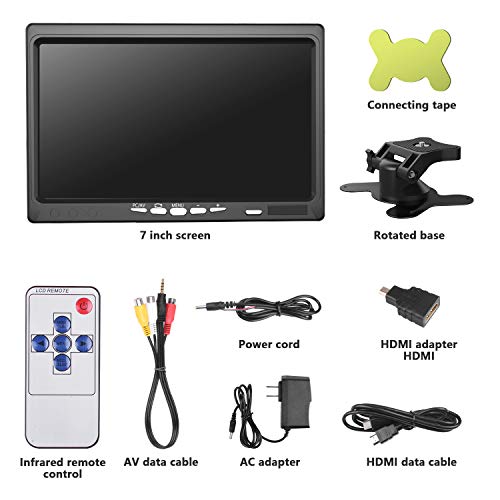
Key features
- •1024*600 TFT High-resolution monitor, working perfect with Raspberry Pi 3B+, Raspberry Pi 3, 2 and Raspberry Pi 1 B B+, support rotating the screen
- •Working perfectly with Car DVD,VCD,camera,STB,satellite receiver,and other video equipment
- •Car/PC Monitor HDMI/VGA/AV Input, Full color LED back light display. 2 ways to install: standing or mounting
- •Screen ratio 16:9/4:3 adjustable. Brightness, contrast, color adjustable Full Color Display Low Power Consumption
- •AV mode shows priority: No matter what status, as long as the AV interface has a video signal input , it will be switched to AV mode display immediately
Kuman 7 Inch IPS Display 1024x600 LCD Screen Computer Monitor for PC Laptop Raspberry Pi 4 3 2B B RPI 1 B+ A+ with HDMI VGA Input, DVD VCR Car and Remote HDMI Cable SC7J
List Price: $96.60$86.94DEALYou Save: $9.66 (10%)
Free shippingFree Returns – 30 daysFree Order CancellationSecure Payment2–3 Days DeliveryGet It October 26, 2026In Stock (1)No marketing spamNo account requiredFulfilment by FedEx / Amazon / UPS / ShipwirePayPal / Card Buyer Protection
Customer Reviews
Reviews sourced from verified Amazon purchasers4.0
out of 5
Based on 10 reviews
5★
70%
4★
30%
3★
0%
2★
0%
1★
0%
Nice screen/ great sound for what you are paying for.
Peter1985•February 14, 2018
great screen, I use it for my raspberry pi and it works perfectly. The speakers are louder than you think but don't blare them because they might pop. The stand is strudy and adjustable my only gripe is I wish you could also stop the left to right swivel. You can adjust it but not lock it in place.
Excellent little monitor for the price
Amazon Customer•November 16, 2017
I bought this to use as an in-car computer monitor. It comes with a 3 plug AV cable (2 video and one audio). This cable is nice because one of the AV cables has "priority" and displays on the monitor whenever it receives a signal. I connected this priority AV cable to a backup camera and have the source on the monitor set as HDMI for a raspberry pi 3 computer. So now when the monitor turns on it will default to the HDMI video feed from my raspberry pi, however when I shift my car into reverse it will then automatically switch to the AV priority video feed for the backup camera.
The screen resolution is very good for the price. I can watch HD 720p videos from YouTube with my raspberry pi. The viewing angle is also very good because you can view the screen from nearly any angle (except for directly below the screen) without the video image/color distorting. The screen is also a matte black rather than a glossy finish so you don't have to worry about reflections or glare.
I would definitely recommend this to anyone looking for an inexpensive 7 inch monitor. The build and construction does feel a bit cheap, but it overall I think this is an excellent little monitor for the price.
The screen resolution is very good for the price. I can watch HD 720p videos from YouTube with my raspberry pi. The viewing angle is also very good because you can view the screen from nearly any angle (except for directly below the screen) without the video image/color distorting. The screen is also a matte black rather than a glossy finish so you don't have to worry about reflections or glare.
I would definitely recommend this to anyone looking for an inexpensive 7 inch monitor. The build and construction does feel a bit cheap, but it overall I think this is an excellent little monitor for the price.
Working Great for Retropie
Freakkilroy•November 11, 2017
I bought this for my Raspberry Pi 3 running Retropie to use it in the car for trips for gaming and to play movies using KODI. I had to edit the Retropie config.txt file to adjust to the size of the screen and to be able to still use it on my Large TV as well without having to edit the file each time. I Changed the following lines to
hdmi_group=2
hdmi_mode=87
hdmi_cvt=1024 600 60 6 0 0 0
hdmi_drive=2
This little screen looks really great and it does have a built in speaker which works great with the HDMI connection on the Raspberry Pi.
I did have a problem with the menu text in Retropie when I was using the Theme "Carbon" it looked "Fuzzy" I read a couple of articles about it and they said to edit the XML file and change the font size to .05. But in the end, I just downloaded a couple of different themes that are specifically made for small screens and the fuzzy text is no longer a problem and it looks great!
All in all I would recommend this little screen for portable Retropie projects
hdmi_group=2
hdmi_mode=87
hdmi_cvt=1024 600 60 6 0 0 0
hdmi_drive=2
This little screen looks really great and it does have a built in speaker which works great with the HDMI connection on the Raspberry Pi.
I did have a problem with the menu text in Retropie when I was using the Theme "Carbon" it looked "Fuzzy" I read a couple of articles about it and they said to edit the XML file and change the font size to .05. But in the end, I just downloaded a couple of different themes that are specifically made for small screens and the fuzzy text is no longer a problem and it looks great!
All in all I would recommend this little screen for portable Retropie projects
Image is inverted/reversed.
Paul J. Shane•October 22, 2017
For the money, monitor looks OK except the setup screens are reversed/inverted. Documentation is only a very simplistic sheet. Does anyone know how to fix this problem. I'll increase the stars if the problem is fixed, otherwise the monitor goes back tomorrow.
I just fixed the reversed screen with a button on the screen, not using the remote, and moved my rating to 4 stars. Next, I'll see how it works with a Raspberry Pi.
I just fixed the reversed screen with a button on the screen, not using the remote, and moved my rating to 4 stars. Next, I'll see how it works with a Raspberry Pi.
Part of Retropie briefcase
Master Link•October 2, 2017
Got this from seeing my local GameStop using one to test systems. Works really well and looks fine using as a tv for raspberry pi 3.
Page 1 of 2