Acer R240HY Abmidx 23.8" Full HD (1920 x 1080) VA Monitor (HDMI, DVI & VGA Ports)
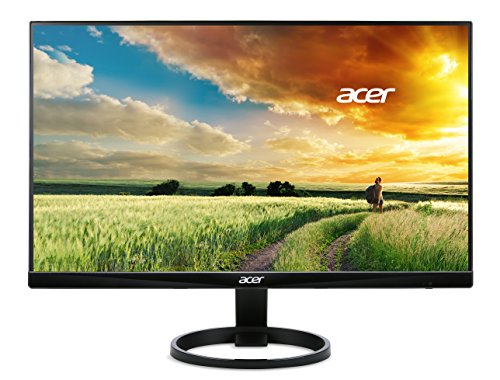


Key features
- •23.8" full HD (1920 x 1080) widescreen VA monitor
- •Response time: 4ms, Pixel Pitch: 0.275mm
- •2 x 1.5W speakers. Tiltable -5° to 15°
- •Signal inputs: 1 x HDMI, 1 x DVI & 1 x VGA
- •HDMI, DVI & VGA cable included
Acer R240HY Abmidx 23.8" Full HD (1920 x 1080) VA Monitor (HDMI, DVI & VGA Ports)
List Price: $197.52$177.77DEALYou Save: $19.75 (10%)
Free shippingFree Returns – 30 daysFree Order CancellationSecure Payment2–3 Days DeliveryGet It June 25, 2026In Stock (7)No marketing spamNo account requiredFulfilment by FedEx / Amazon / UPS / ShipwirePayPal / Card Buyer Protection
Customer Reviews
Reviews sourced from verified Amazon purchasers4.4
out of 5
Based on 10 reviews
5★
50%
4★
30%
3★
10%
2★
10%
1★
0%
How to fix ghosting!
Ray B.✓ Verified Purchase•September 1, 2017
I bought two of these and enjoy them quite a bit. A few reviews complain about ghosting, which I experienced until I realized in the default settings on the monitors had "overdrive" or "OD" on. As long as you disable this feature you will no longer have ghosting trouble! Hope this helps anyone who bought these and was disappointed, I saw nothing online about fixing this issue other than figuring it out myself by chance.
Very nice screen for the price.
Carlos D.✓ Verified Purchase•February 27, 2017
PROS
- Great value for the money
- Slim screen (6mm thick)
- Nice image quality and colors
- The screen does not get warm after a long use
- No ghosting while playing games
CONS
- Besides it's 4ms response you can see ghosting when move the mouse agaist white backgroud (web browse, read text on white background)
- Uncomfortable monitor configuration menu
- It show a little lack of homogeneity across the entire screen
- It shows light leak when the monitor is totally black
Bottom Line: My version came with minimal but perceptible light leak, cool tone on the bottom left and warm tone in the bottom right. Of course this is only seen when the screen is black but it's not a deal breaker, you will not perceive this when you normally use the monitor. In general this monitor is a good purchase.
Update 1: After a few weeks of use I like this monitor but it does not have a true 178 viewing angle. If you sit in front of the screen theres is no problem but as soon you stand up you'll notice the degradé.
- Great value for the money
- Slim screen (6mm thick)
- Nice image quality and colors
- The screen does not get warm after a long use
- No ghosting while playing games
CONS
- Besides it's 4ms response you can see ghosting when move the mouse agaist white backgroud (web browse, read text on white background)
- Uncomfortable monitor configuration menu
- It show a little lack of homogeneity across the entire screen
- It shows light leak when the monitor is totally black
Bottom Line: My version came with minimal but perceptible light leak, cool tone on the bottom left and warm tone in the bottom right. Of course this is only seen when the screen is black but it's not a deal breaker, you will not perceive this when you normally use the monitor. In general this monitor is a good purchase.
Update 1: After a few weeks of use I like this monitor but it does not have a true 178 viewing angle. If you sit in front of the screen theres is no problem but as soon you stand up you'll notice the degradé.
Great monitor but design issues for multi monitor setup
priyanka yuvaraj✓ Verified Purchase•December 27, 2016
I bought 3 of these monitors for my workstation setup and they look really great. I don't have to repeat the advantages of these monitors since there are already a lot of reviews which do that. I like these monitors and they are great for the price and so I have given it 5 stars. However, this monitor is not without its issues.
1. It has no VESA mount option. So you cannot mount it on a stand. You will need to spend on something like this VESA Mount Adapter Bracket for Acer Monitors R240HY, R221Q, G227HQL, G237HL, G257HL, G257HU, G247HYL (2-pack) - by HumanCentric to get it on a stand
2. It has a protruding bottom panel which makes it difficult to bring them close to each other in a multi monitor setup where the monitors are angled. This defeats the thin bezel advantage. When the monitors are placed in a straight line, the thin bezel looks good.Check the image to see what I mean.
Again, in spite of these issues the monitors look amazing.
1. It has no VESA mount option. So you cannot mount it on a stand. You will need to spend on something like this VESA Mount Adapter Bracket for Acer Monitors R240HY, R221Q, G227HQL, G237HL, G257HL, G257HU, G247HYL (2-pack) - by HumanCentric to get it on a stand
2. It has a protruding bottom panel which makes it difficult to bring them close to each other in a multi monitor setup where the monitors are angled. This defeats the thin bezel advantage. When the monitors are placed in a straight line, the thin bezel looks good.Check the image to see what I mean.
Again, in spite of these issues the monitors look amazing.
The essence of good, affordable monitor. A work of art, really.
maguserroris✓ Verified Purchase•December 1, 2016
Fantastic monitors! I purchased two of these when they were on sale for around 180, but even at 200 or more, these are a steal. After owning them for several months, here are my thoughts:
1. These are wonderfully stylish and clean looking. They would look nice in any office, on any desk.
2. There is very little adjustment, but I don't miss it.
3. The bezels are very thin, but not truly "Zero Frame".
4. The screens themselves are very thin! It's actually kind of impressive.
5. You will want to adjust colors on your graphics adapter, not on the monitor. The menu and controls are a pain, but that's typical for monitors.
6. These perform flawlessly with HDMI and DVI (I haven't tested VGA).
7. Thankfully, the base on these is NOT magnetic, unlike other similar-looking models.
8. I also have a 23.8" version of this monitor, the R240HY, and it seems the quality is consistent across the series.
Unless you have unreasonable expectations or very specific needs, this monitor should make you pretty happy. (Especially in a two- or three-monitor setup!) It is classy but very minimal, as it should be, and I wish more monitors were like this.
1. These are wonderfully stylish and clean looking. They would look nice in any office, on any desk.
2. There is very little adjustment, but I don't miss it.
3. The bezels are very thin, but not truly "Zero Frame".
4. The screens themselves are very thin! It's actually kind of impressive.
5. You will want to adjust colors on your graphics adapter, not on the monitor. The menu and controls are a pain, but that's typical for monitors.
6. These perform flawlessly with HDMI and DVI (I haven't tested VGA).
7. Thankfully, the base on these is NOT magnetic, unlike other similar-looking models.
8. I also have a 23.8" version of this monitor, the R240HY, and it seems the quality is consistent across the series.
Unless you have unreasonable expectations or very specific needs, this monitor should make you pretty happy. (Especially in a two- or three-monitor setup!) It is classy but very minimal, as it should be, and I wish more monitors were like this.
VERY GOOD MONITOR FOR ITS PRICE AND NO BACK LIGHT BLEEDING!!!!
Jonathan✓ Verified Purchase•November 29, 2016
This is a very good monitor for its price! I upgraded from a previous monitor that came with my Dell Inspiron that had Windows Vista LOL!. Very Old. Anyways my reason for upgrading:
1) Using it as an external monitor for my macbook pro for college work.
2) It connects to my xbox one s very nicely. Battlefield 1 and titan fall 2 looks awesome in this (in my opinion)
BEFORE YOU BUY YOU MUST KNOW:
1) the monitor does not tilt up or down.
2) monitor does not rise in height and visa versa.
3) the monitor does no rotate
To me this isn't a problem since my monitor is sitting on a monitor riser. However, if you are nit picky about this type of stuff, i recommend you look else where and compare!
OVERALL THOUGHTS:
1) set up is very easy! can be done in 5 minutes. Simply connect the circle base to the back of the monitor screen and you are done!
Its a awesome monitor for its price!!
1) Using it as an external monitor for my macbook pro for college work.
2) It connects to my xbox one s very nicely. Battlefield 1 and titan fall 2 looks awesome in this (in my opinion)
BEFORE YOU BUY YOU MUST KNOW:
1) the monitor does not tilt up or down.
2) monitor does not rise in height and visa versa.
3) the monitor does no rotate
To me this isn't a problem since my monitor is sitting on a monitor riser. However, if you are nit picky about this type of stuff, i recommend you look else where and compare!
OVERALL THOUGHTS:
1) set up is very easy! can be done in 5 minutes. Simply connect the circle base to the back of the monitor screen and you are done!
Its a awesome monitor for its price!!
Page 1 of 2