LG 27GL850-B 27 Inch Ultragear QHD Nano IPS 1ms NVIDIA G-Sync Compatible Gaming Monitor, Black
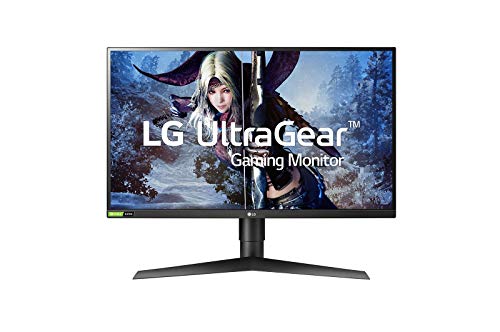


Key features
- •27 inches QHD (2560 X 1440) Nano IPS display
- •NVidia G SYNC compatible. Dimension with stand (W x H x D): (614.2 x 574.8 x 274.4) millimeter; Dimension without stand (W x H x D): (614.2x 364.8 x 56.3) millimeter
- •144 Hertz refresh rate
- •Ultra-thin bezel and tilt, height, pivot adjustable
LG 27GL850-B 27 Inch Ultragear QHD Nano IPS 1ms NVIDIA G-Sync Compatible Gaming Monitor, Black
List Price: $487.43$438.69DEALYou Save: $48.74 (10%)
Free shippingFree Returns – 30 daysFree Order CancellationSecure Payment2–3 Days DeliveryGet It October 24, 2026In Stock (1)No marketing spamNo account requiredFulfilment by FedEx / Amazon / UPS / ShipwirePayPal / Card Buyer Protection
Customer Reviews
Reviews sourced from verified Amazon purchasers4.7
out of 5
Based on 10 reviews
5★
90%
4★
10%
3★
0%
2★
0%
1★
0%
Incredible IPS!
Rhyagelle✓ Verified Purchase•December 21, 2023
I really wanted to go with IPS for my new monitor and needed it to be 1440p. I didn't want to settle for low quality or terrible brands. Thankfully LG makes some of the best panels out there, so I didn't need to compromise.
The monitor looks incredible, too. The blacks are deep and they don't "blotch", the colors pop and the brightness is much higher than I'm used to. It's not as bright as others would want it, sitting I think at like 350 nits, but it's good for me.
I completely recommend this monitor. It's perfect!
The monitor looks incredible, too. The blacks are deep and they don't "blotch", the colors pop and the brightness is much higher than I'm used to. It's not as bright as others would want it, sitting I think at like 350 nits, but it's good for me.
I completely recommend this monitor. It's perfect!
5 stars. Perfect for productivity and gaming
Andrew✓ Verified Purchase•October 18, 2023
I've had 2 of these mounted as part of a dual screen PC setup. I've run everything imaginable through them and it all works flawlessly, excellent picture, performance etc. PC productivity, PC gaming, PS5, PS4, Series X, Switch, laptop through a dock connect into display panel port. I won't go into specs since those are listed everywhere. But to clear up any confusion, this monitor DOES get 120 FPS on PS5 games (without VRR). Couldn't be happier overall. The monitors do lack audio but I circumvent this by running an AUX cable from the back of the monitor into my PC speaker system. No regrets whatsoever on my purchase. 1440p is perfect for desk use.
Stunning Display, TN Like Performance Without The Drawbacks
Adam M.✓ Verified Purchase•September 28, 2023
After playing the panel lottery on a few displays I believe I've found the holy grail. I knew this monitor would handle motion very well from reviews but what I didn't expect is how impressive the colors and image quality would be. My normal "Eww" reaction to a brand new monitor as I reach for the setting was replaced my a "holy $%*#" and it only got better once I fired up a game. I had my 14 year old daughter who's obsessed with Overwatch hop on and she had a smile from ear to ear about how smooth the experience was. To be fair I don't notice the difference from 75hz to 144hz as much with the slower paced games I normally play, like I did going from 30hz to 60hz, but the difference is still there. I think that most people could tell the difference though if you switched back and forth. Now this monitor does not really have a 1ms response time, but this marketing strategy of slapping on a bogus response time isn't unique to this monitor. Most TN panels don't really have a true 1ms response time either. The true response time on the fast overdrive setting is 4.08 with 100% of the transitions falling under the 6.94ms window to get a true 144hz. This is excellent.
Now I had originally planned on getting the cheaper 27gl83a-b, just thinking that the color gamut was the only difference. After doing some deeper digging I found the the response time on the 27gl83a-b is slightly slower as well. It was worth coughing up an extra $100 for the LG 27GL850 for me. The only thing I'm not a huge fan of is the red accents on the stand, as I prefer my setup to be blacked out. To be honest it looks a bit better in person, and if you're sitting on wall you'd only see a sliver of red on the top of the V base of the stand. It is also Vesa mountable, so I may do that at some point if my OCD acts up.
Now I have used TN, VA and IPS monitors. TN panels are just too washed out and the viewing angles are awful. VA has better viewing angles and contrast, but they still look too washed for me and the ghosting is a sin for gaming. IPS especially now that they have high refresh rate models will be the only technology that I buy and recommend. As for aspect ratios, my last monitor was an ultrawide. Now as much as I love the 21:9 aspect ratio for gaming, I feel as if the gaming industry does not, as its not as widely supported as 16:9. It drove me crazy to buy a new game and have to play with black bars on the sides effectively shrinking my display or an extended FOV where the sides would look stetched or the hud wouldn't support 21:9. The problems go on and on and the support hasn't gotten better imo
I couldn't more highly recommend this and after almost 40 years of gaming I put this monitor up there with my favorite, next level upgrades within the likes of my Super Nintendo, PS2 and my first graphics card that pushed me to 60fps.
Now I had originally planned on getting the cheaper 27gl83a-b, just thinking that the color gamut was the only difference. After doing some deeper digging I found the the response time on the 27gl83a-b is slightly slower as well. It was worth coughing up an extra $100 for the LG 27GL850 for me. The only thing I'm not a huge fan of is the red accents on the stand, as I prefer my setup to be blacked out. To be honest it looks a bit better in person, and if you're sitting on wall you'd only see a sliver of red on the top of the V base of the stand. It is also Vesa mountable, so I may do that at some point if my OCD acts up.
Now I have used TN, VA and IPS monitors. TN panels are just too washed out and the viewing angles are awful. VA has better viewing angles and contrast, but they still look too washed for me and the ghosting is a sin for gaming. IPS especially now that they have high refresh rate models will be the only technology that I buy and recommend. As for aspect ratios, my last monitor was an ultrawide. Now as much as I love the 21:9 aspect ratio for gaming, I feel as if the gaming industry does not, as its not as widely supported as 16:9. It drove me crazy to buy a new game and have to play with black bars on the sides effectively shrinking my display or an extended FOV where the sides would look stetched or the hud wouldn't support 21:9. The problems go on and on and the support hasn't gotten better imo
I couldn't more highly recommend this and after almost 40 years of gaming I put this monitor up there with my favorite, next level upgrades within the likes of my Super Nintendo, PS2 and my first graphics card that pushed me to 60fps.
Game-changer!
JD✓ Verified Purchase•September 9, 2023
The QHD resolution delivers stunning visuals, and the 144Hz refresh rate ensures buttery-smooth gameplay. The colors are vibrant thanks to Nano IPS technology, and HDR support adds another layer of brilliance.
The ergonomic design and thin bezels enhance the overall experience. With G-Sync compatibility, it's a dream for gamers seeking responsiveness. The design is sleek, and the adjustable stand adds versatility. HDR support enhances the overall experience. It's the perfect blend of performance and aesthetics.
I need 2 more in my life!
The ergonomic design and thin bezels enhance the overall experience. With G-Sync compatibility, it's a dream for gamers seeking responsiveness. The design is sleek, and the adjustable stand adds versatility. HDR support enhances the overall experience. It's the perfect blend of performance and aesthetics.
I need 2 more in my life!
LG Delivers Much Needed Quality Control to the Realm of 144 Hz, 2560x1440, IPS-type Displays
redone13✓ Verified Purchase•September 8, 2023
I write this review as the former owner of 3 Asus PG279Qs and one PG279QZ. I was drawn to this realm of the monitor market because I do not believe that 4K displays are worth it at this particular point in time. As far as I see it, the majority are a compromise as the bandwidth requirements for running 4:4:4 chroma subsampling, an extended color gamut, a refresh rate of 144 Hz and beyond, and a resolution of 3840x2160 all at the same time will be much better served by DP 1.5 or HDMI 2.1 (proper HDR wouldn't hurt either). Although it could be argued that achieving 144 frames at 1440p is more resource intensive than 60 frames at 2160p, I believe the experience to be the most immersive, at least until 144+ frames becomes viable at 4K. Unfortunately, based on the price to performance ratio trend of the current generation of graphics cards (Nvidia's in specific), it is going to be a long, long time until that is achievable at a reasonable price. All things aside, I can state with confidence that I've found my sweet spot for monitors in the form of LG's 27GL850. It has addressed all of the quality control concerns that I've experienced throughout my quest of trying to obtain a high refresh rate, 1440p IPS-type display. Seeing as this is an LG product, the monitor can rightfully be referred to as having an IPS (In-Plane Switching) panel as this is their proprietary term for the technology that produces the wider color gamut and viewing angles.
I did not buy this display because I am a hardcore gamer; I bought it because I wanted a quality monitor with good color reproduction, a uniform panel, and good response time. My purchase was based solely on the off chance of LG producing a monitor where quality control wasn't an after-thought. Now that it has finally arrived, I am proud to report that this monitor delivers. The display has zero backlight bleed and excellent uniformity, contrast, and response time. White uniformity is even across the entirety of the screen while the factory calibrated colors appear accurate even next to my calibrated Dell. Outside of sRGB mode, the colors do come off as over-saturated, although some may prefer the added vibrancy of the Nano IPS technology (I did not). Black levels are on par with most other IPS-type displays that I've used despite the specified measurement coming in at a somewhat lower figure than similar displays. As for response time, it seems universally accepted by the monitor community that the fast setting is adequate in preventing overshoot. The faster and fastest settings produce undesirable artifacts known as coronas. Despite this monitor not having variable overdrive, I have had no perceivable issues when it comes to gaming as I do tend to binge on CS:GO from time to time.
If I had to nit-pick, and I do because this is a review where transparency informs prospective buyers, I will say that the strength of the presence of IPS glow on my display falls on the moderate end of the spectrum. This could be due to the fact the panel is 27 inches, which is a decent amount of real estate for this phenomenon to occur. It is also important to keep in mind that this is something that varies on a per panel basis. Without a doubt, it is a consequence of choosing to utilize an IPS panel for one's computing purposes. Regardless, it is nothing unexpected or anything that cannot be addressed by adjusting the brightness level as well as the viewing distance, height, and angle. Besides simply turning down the brightness, placing the monitor further away is one way to remedy the matter. Another way to minimize the glow is to position the screen in such a way that one's gaze meets the center of the screen as IPS-type displays fare better when the height of the top bezel is of equal height or greater in relation to one's eyes. A final tip is to manipulate the screen's tilt angle as oftentimes angling it upwards reduces glow.
By applying these adjustments, I can easily say that this is overall the best monitor that I've used to date. I will not sit here and bash Asus' most recent iteration of their high refresh rate, 1440p IPS-type display, the PG279QZ, as one can refer to the top review of the PG279QZ to see what types of problems plague those monitors. What I will say is that it's a breath of fresh air to see that quality control still exists in consumer-grade monitors. Realistically, no manufacturing process is going to produce near perfect monitors all of the time; however, this purchase has instilled confidence in me when it comes to the LG brand. I imagine that this model will provide all disillusioned monitor buyers a glimmer of hope when it comes to having a fighting chance at obtaining a quality monitor in this realm of the market.
***As per a request in the comments, I've attached pictures of the monitor at brightness of zero, 50%, and 100%. I also managed to track down another monitor from Micro Center, so I posted the same array of shots for this sample too. The results were very similar; however, a small circular area of bleed does exist in the top left corner. It is somewhat noticeable on a black screen unless I increase the height of the stand. To identify the pictures of the second monitor, please see the pictures without the headphones in them. Despite trying several approaches and platforms, the photo uploader refuses to retain the sequence in which I had originally ordered them).***
I did not buy this display because I am a hardcore gamer; I bought it because I wanted a quality monitor with good color reproduction, a uniform panel, and good response time. My purchase was based solely on the off chance of LG producing a monitor where quality control wasn't an after-thought. Now that it has finally arrived, I am proud to report that this monitor delivers. The display has zero backlight bleed and excellent uniformity, contrast, and response time. White uniformity is even across the entirety of the screen while the factory calibrated colors appear accurate even next to my calibrated Dell. Outside of sRGB mode, the colors do come off as over-saturated, although some may prefer the added vibrancy of the Nano IPS technology (I did not). Black levels are on par with most other IPS-type displays that I've used despite the specified measurement coming in at a somewhat lower figure than similar displays. As for response time, it seems universally accepted by the monitor community that the fast setting is adequate in preventing overshoot. The faster and fastest settings produce undesirable artifacts known as coronas. Despite this monitor not having variable overdrive, I have had no perceivable issues when it comes to gaming as I do tend to binge on CS:GO from time to time.
If I had to nit-pick, and I do because this is a review where transparency informs prospective buyers, I will say that the strength of the presence of IPS glow on my display falls on the moderate end of the spectrum. This could be due to the fact the panel is 27 inches, which is a decent amount of real estate for this phenomenon to occur. It is also important to keep in mind that this is something that varies on a per panel basis. Without a doubt, it is a consequence of choosing to utilize an IPS panel for one's computing purposes. Regardless, it is nothing unexpected or anything that cannot be addressed by adjusting the brightness level as well as the viewing distance, height, and angle. Besides simply turning down the brightness, placing the monitor further away is one way to remedy the matter. Another way to minimize the glow is to position the screen in such a way that one's gaze meets the center of the screen as IPS-type displays fare better when the height of the top bezel is of equal height or greater in relation to one's eyes. A final tip is to manipulate the screen's tilt angle as oftentimes angling it upwards reduces glow.
By applying these adjustments, I can easily say that this is overall the best monitor that I've used to date. I will not sit here and bash Asus' most recent iteration of their high refresh rate, 1440p IPS-type display, the PG279QZ, as one can refer to the top review of the PG279QZ to see what types of problems plague those monitors. What I will say is that it's a breath of fresh air to see that quality control still exists in consumer-grade monitors. Realistically, no manufacturing process is going to produce near perfect monitors all of the time; however, this purchase has instilled confidence in me when it comes to the LG brand. I imagine that this model will provide all disillusioned monitor buyers a glimmer of hope when it comes to having a fighting chance at obtaining a quality monitor in this realm of the market.
***As per a request in the comments, I've attached pictures of the monitor at brightness of zero, 50%, and 100%. I also managed to track down another monitor from Micro Center, so I posted the same array of shots for this sample too. The results were very similar; however, a small circular area of bleed does exist in the top left corner. It is somewhat noticeable on a black screen unless I increase the height of the stand. To identify the pictures of the second monitor, please see the pictures without the headphones in them. Despite trying several approaches and platforms, the photo uploader refuses to retain the sequence in which I had originally ordered them).***
Page 1 of 2